Visitor journeys and the Users list
On this page
- The visitor list
- Open one visitor's path
- 1. Click a person
- 2. Read the profile
- 3. Read the path
- 4. Copy the path
- Trace visitor journeys to a goal
- 1. Open the Journey tab
- 2. Pick the goals
- 3. Read the visitor journeys
- Identity and privacy
- Common questions
- Why can't I find a visitor who came last month?
- Why does the same person appear twice?
- Does the path show how long someone stayed on a page?
- Related
The Users and Journey tabs show the people behind your numbers: who visited, what they read and which goals they completed. This page shows how to open one visitor's full path, and how to trace visitor journeys that end in a goal.
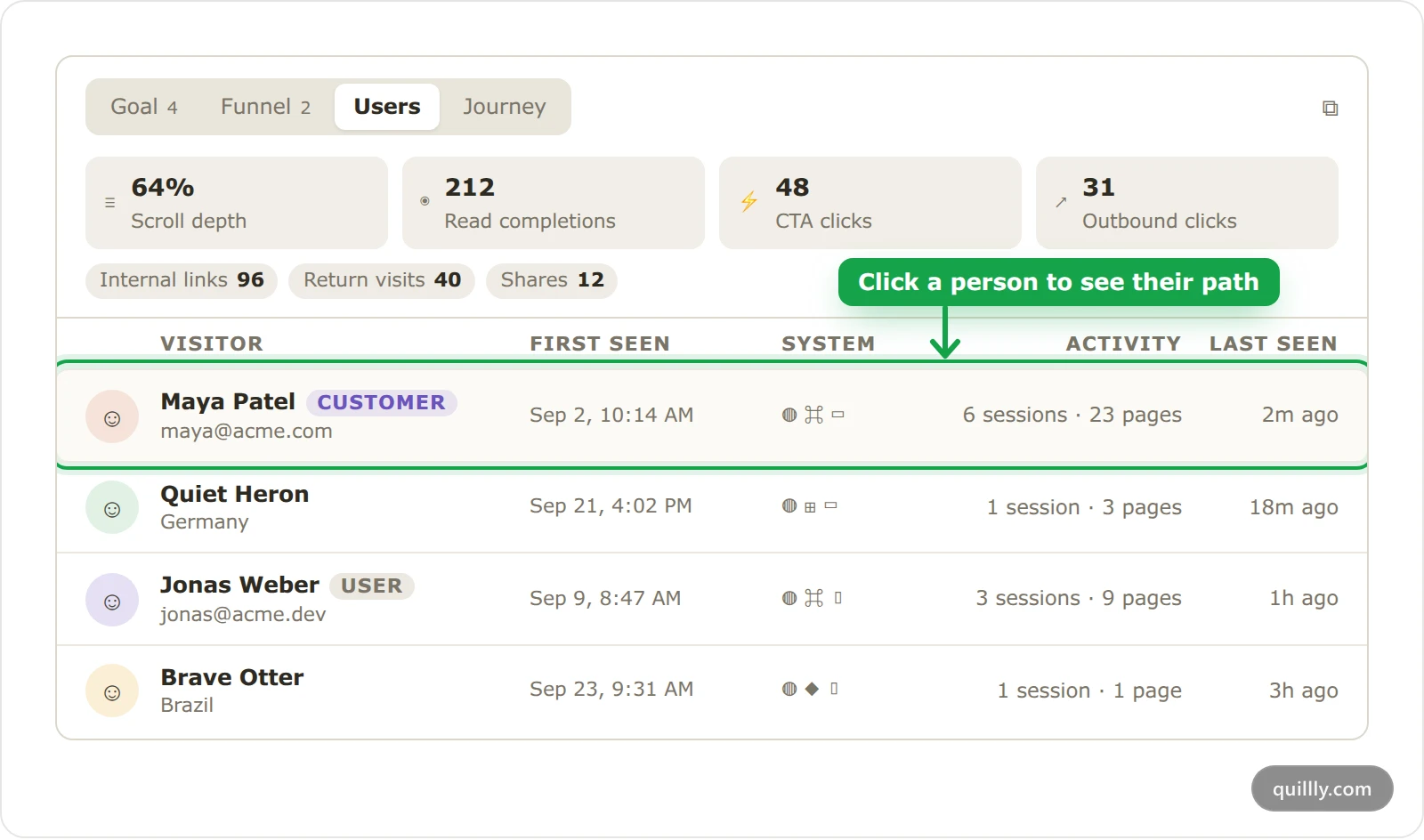
The visitor list#
Open Analytics and scroll to the visitors card. It opens on the Users tab.
The visitor list shows up to 100 visitors whose latest visit falls in the date range, most recent first. Its columns are Visitor, First seen, System for the browser, operating system and device, Activity for their sessions and pages over all time, and Last seen.
Identified users show the name and email your site sent with
qa('identify', …), with a User badge. The badge turns to Customer once they complete a conversion goal. Track goals and conversions shows how to send both.Everyone else gets a made-up name, such as "Quiet Heron", with their country under it. The same visitor keeps the same name everywhere on the page, and their real ID is never shown.
On sites where Quillly serves pages, a strip above the list shows how people read: Scroll depth, Read completions, CTA clicks and Outbound clicks, plus chips such as internal links, return visits and shares. Those come from the pages Quillly serves, because the tag on your own pages doesn't record scrolls or clicks.
Open one visitor's path#
The path works much like the user explorer in Google Analytics: one person, every page and goal, in order.
Click a person#
Click any row in the Users or Journey tab. A drawer opens with that visitor's profile on the left and their path on the right.
Read the profile#
The profile lists the visitor's device, browser, screen, location and source, then their first and last visit, sessions and pages. A Customer badge marks people who converted. Parameters lists the metadata their goals carried, such as
plan: pro.Read the path#
The path groups events under a band for each day, newest first. Click Newest first to switch to Oldest first.
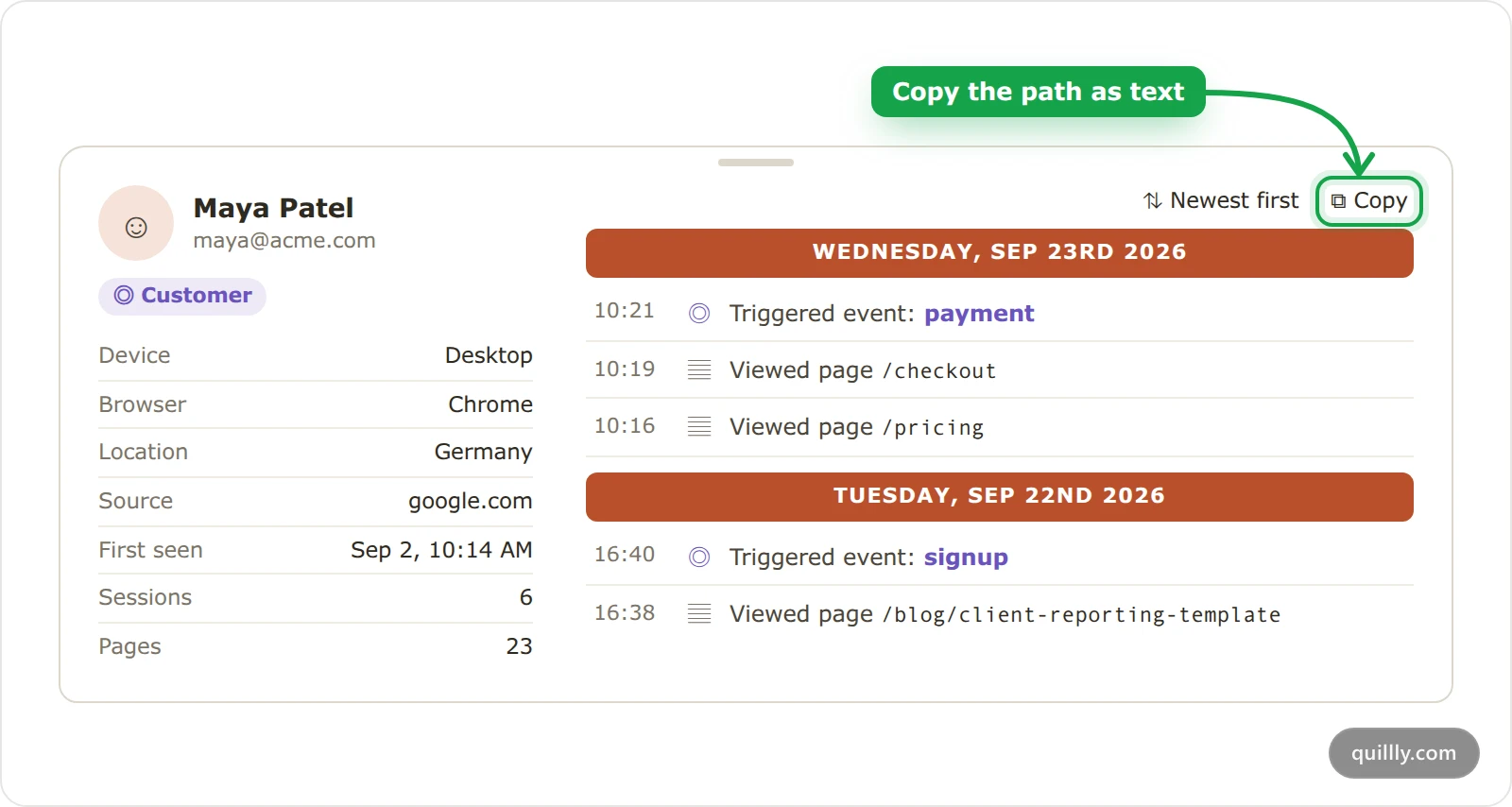
Each row has a time and what happened: Viewed page with the path, or Triggered event with the goal's name. On pages Quillly serves, you also see reading activity such as Scrolled, Finished reading, Clicked a CTA and Copied a code block. Show older events loads the next 100, as far back as Quillly keeps events: 90 days.
Copy the path#
Click Copy to copy the whole timeline as text. It pastes cleanly into a support ticket, a note or a chat with your AI assistant.
Trace visitor journeys to a goal#
The Journey tab starts from a goal and shows the people who completed it, with the path that led there.
Open the Journey tab#
In the visitors card, click Journey. It opens on your busiest goal.
Pick the goals#
Click Goal: and pick one or more goals. You can pick up to five, and a person must have completed all of them in the date range to appear. Search goals filters the picker when you have many.
Read the visitor journeys#
The table lists up to 30 people, most recent completion first. Search visitors filters it by made-up name, country or referrer.
Visitor: the person's made-up name and country.
Referrer: the site that sent their first visit, or Direct.
Time to complete: how long they took, from their first visit to the goal.
Completed at: when they completed it.
Trail: a dot for each page view, with goals in colour. Click the row to open their full path.
The trail goes back before the date range when it needs to, up to their 300 most recent steps.
Identity and privacy#
How long Quillly can follow visitor journeys depends on the visitor ID. In the default cookie mode, a returning visitor keeps the same ID for months. In cookieless mode, the ID changes every day at midnight UTC, so the same person appears as a new visitor each day. Cookies or cookieless compares the two.
Note
Names and emails you send with qa('identify', …) are personal data. When you copy a card as an image, Quillly replaces them with dots.
Common questions#
Why can't I find a visitor who came last month?#
The visitor list shows people whose latest visit falls in the selected range. If they came back since, pick a range that includes their latest visit, or widen it to the last 90 days.
Why does the same person appear twice?#
A new browser, a cleared cookie or cookieless mode gives the same person a new visitor ID. Calling qa('identify', …) shows their name on each ID, but it doesn't merge the two rows.
Does the path show how long someone stayed on a page?#
Yes. Time on page rows show how long the visitor was active on a page, both on your own pages and on pages Quillly serves. The tag sends them when the visitor moves to another page or leaves.
Related#
Track goals and conversions: send goals and identify users.
Build a conversion funnel: count how many people reach each step.
Cookies or cookieless: how the visitor ID works in each mode.
Read the Analytics dashboard: the rest of the page.