Plan limits and allowances
On this page
- Content + Analytics plan limits
- Analytics plan limits
- Directory Submission limits
- Limits that are the same on every plan
- What happens at each limit
- When monthly allowances reset
- Research credits and illustrations
- The weekly limit on new posts
- Common questions
- Does a yearly plan get its allowances once a year?
- Do pages Quillly serves use my analytics events?
- Why was my AI's post saved as a draft?
- Related
This page lists Quillly's plan limits in one place: what each plan allows, what happens when you reach a limit, and when it resets. Prices and the rest of each plan are on Plans, trial and limits.
Content + Analytics plan limits#
Pro | Autopilot Starter | Autopilot Pro | Autopilot Scale | |
|---|---|---|---|---|
Websites | 5 | 5 | 10 | 15 |
API calls a day | 1,000 | 2,000 | 4,000 | 10,000 |
API calls a minute | 60 | 60 | 100 | 200 |
API keys | 5 | 10 | 20 | 50 |
Research credits a month | 100 | 300 | 1,000 | 3,000 |
Analytics events a month | 100,000 | 250,000 | 1,000,000 | 3,000,000 |
Hosted page views a month | 50,000 | 150,000 | 500,000 | 1,500,000 |
Autopilot posts a month | None | 8 | 30 | 90 |
Scheduled posts a week, per website | None | 2 | 7 | 21 |
Scheduled posts a day, per website | None | 1 | 1 | 3 |
Seats included | 1 | 1 | 1 | 1 |
The free trial has Pro's limits, except research credits: 20 for the whole trial, with no top-ups.
Hosted page views are views of the pages Quillly serves for you, the ones listed in Served URLs and files, counted by the analytics tag on those pages. Markdown versions, feeds and sitemaps don't count.
API calls are your AI's calls to the Quillly MCP server. These API rate limits count each person separately, and only calls that succeed count. Autopilot and the in-app agent don't use them.
A plan that is no longer sold keeps the limits it had when you subscribed.
Analytics plan limits#
Analytics 10k | Analytics 100k | Analytics 500k | Analytics 2M | |
|---|---|---|---|---|
Analytics events a month | 10,000 | 100,000 | 500,000 | 2,000,000 |
Websites | Unlimited | Unlimited | Unlimited | Unlimited |
API calls a day | 500 | 1,000 | 2,000 | 4,000 |
API calls a minute | 30 | 60 | 60 | 100 |
API keys | 3 | 5 | 10 | 20 |
Analytics plans include no research credits, no hosted pages, no Autopilot and no seats for teammates.
Directory Submission limits#
What | Number |
|---|---|
Directories in one order | Up to 150: as many as are still open for your site |
Open directories needed to order | 25 |
Starting Domain Rating that gets a DR target | 20 or below |
When the Domain Rating is measured | 60 days after the order completes |
Time to choose a refund if the target is missed | 30 days after the measurement |
An account with no plan, such as one that only bought Directory Submission or whose trial ended, gets 50 API calls a day, 10 a minute and 2 API keys. The DR guarantee explains the target.
Limits that are the same on every plan#
Limit | Number | Where it applies |
|---|---|---|
Research credits one website can spend | 150 a day | Every lookup and illustration on that website |
Illustrations on one page | 6 |
|
New blog posts and news stories a week | 1, 3 or 5, or a number you set from 0 to 50 | Publishing through MCP |
Seats on one plan | Up to 50 | Organization, in the Seats card |
Credit top-up | 250 to 25,000 credits, in steps of 50 | Billing → Add credits |
Goal names | 500 per website |
|
Saved goal settings | 50 per website | The Goal tab |
Funnels | 25 per website, each with 2 to 8 steps | The Funnel tab |
Analytics data kept | 90 days | Events, visits and visitors |
What happens at each limit#
Limit | What happens | When it resets |
|---|---|---|
API calls a day | Your AI's call is refused with the time the count resets, and nothing runs. | Midnight UTC |
API calls a minute | The call is refused, and the message says how many seconds to wait. | As each call passes one minute |
API keys | Connect is hidden on Connections. OAuth connections don't use a key. | When you revoke a key |
Websites | Adding one is refused. Websites you haven't finished setting up don't count. | When you remove one |
Research credits | Past the monthly allowance, lookups spend your wallet. With the wallet empty, they are refused, and cached results stay free. | The 1st of the month, 00:00 UTC |
150 credits per website a day | That website's lookups and illustrations are refused, even with credits left. | Midnight UTC |
Analytics events | Quillly emails you at 80% and 100%. At 100%, events from your tag are no longer stored, while pages Quillly serves keep collecting. Upgrading resumes collection at once. | Your billing date |
Hosted page views | Quillly emails you at 80% and 100%. Your pages keep serving. | Your billing date |
Autopilot posts | Runs due after that are marked Skipped, with the date the count starts again. | Your billing date |
Seats | Invites are refused. A pending invite holds a seat until it is accepted, revoked or expires. | When a seat frees up |
New posts a week | The post stays a draft, and the message names the next free slot. | As each post passes 7 days |
Illustrations on a page | Blocks after the sixth are not drawn. | When you remove one |
A new plan's limits apply as soon as the change goes through. Analytics limits, retention and excluding traffic shows where to watch your events.
When monthly allowances reset#
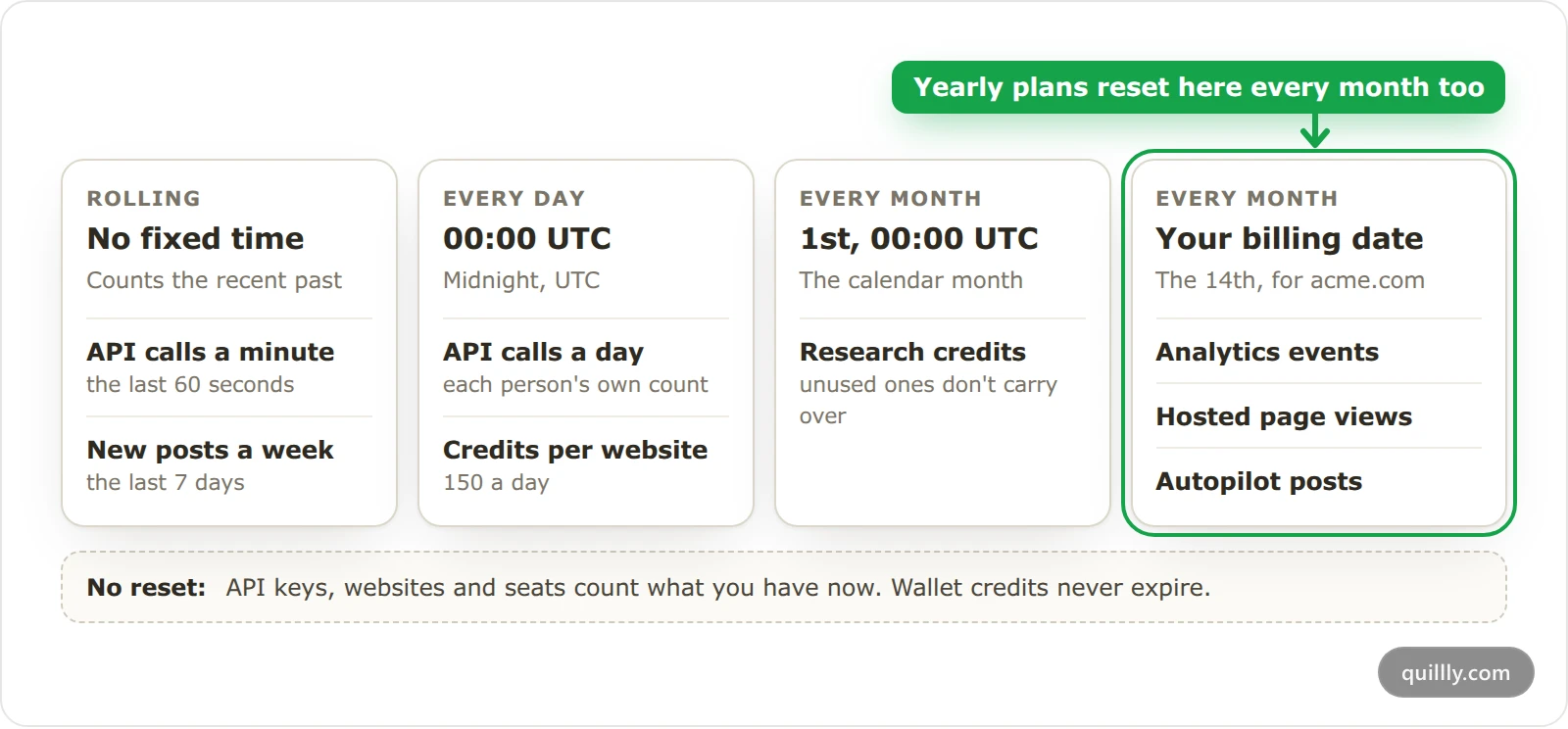
Analytics events, hosted page views and Autopilot posts count in your billing period:
Monthly plan: the count starts again on your renewal date.
Yearly plan: the count starts again every month, on the day of the month your plan started. When that day is the 29th, 30th or 31st, shorter months reset on their last day.
No subscription, as during the free trial: the count starts again on the 1st of each month, 00:00 UTC.
Research credits don't follow your billing date. Every plan's monthly allowance renews on the 1st of the month, 00:00 UTC, and unused credits don't carry over.
Research credits and illustrations#
Action | Credits |
|---|---|
Keyword ideas | 5 |
Competitor gap | 5 |
Link prospects | 15 |
SERP check | 1 |
Keyword lookup, from your AI | 1 |
Web search, by Autopilot or the in-app agent | 5 |
Section illustration | 3 |
Spend order: the monthly allowance first, then your wallet. Wallet credits never expire.
Cached results cost 0 credits, and failed lookups are refunded. Keyword research and credits lists how long each kind of result stays cached.
Who pays: research spends the credits of the person who runs it. On a website shared with your team that you don't own, it spends the team owner's credits instead. Autopilot and illustrations spend the website owner's credits.
Who may top up: only someone paying for a Content + Analytics plan. The free trial and the Analytics plans can't buy credits.
An image:illustration block is drawn when you save the page, at 3 credits. The same description is drawn once, so saving again or reusing it elsewhere on the site costs nothing. A failed drawing is refunded.
Only the first 700 characters of a description are used. In the editor, a block that wasn't drawn says why: "Not drawn: a page takes up to 6 illustrations." or "Not drawn: no credits left."
The weekly limit on new posts#
When your AI publishes through MCP, Quillly limits how many new blog posts and news stories one website gets in any 7 days. Autopilot and the in-app agent publish the same way. The limit follows how much of the site search engines have indexed, so new pages don't pile up unindexed.
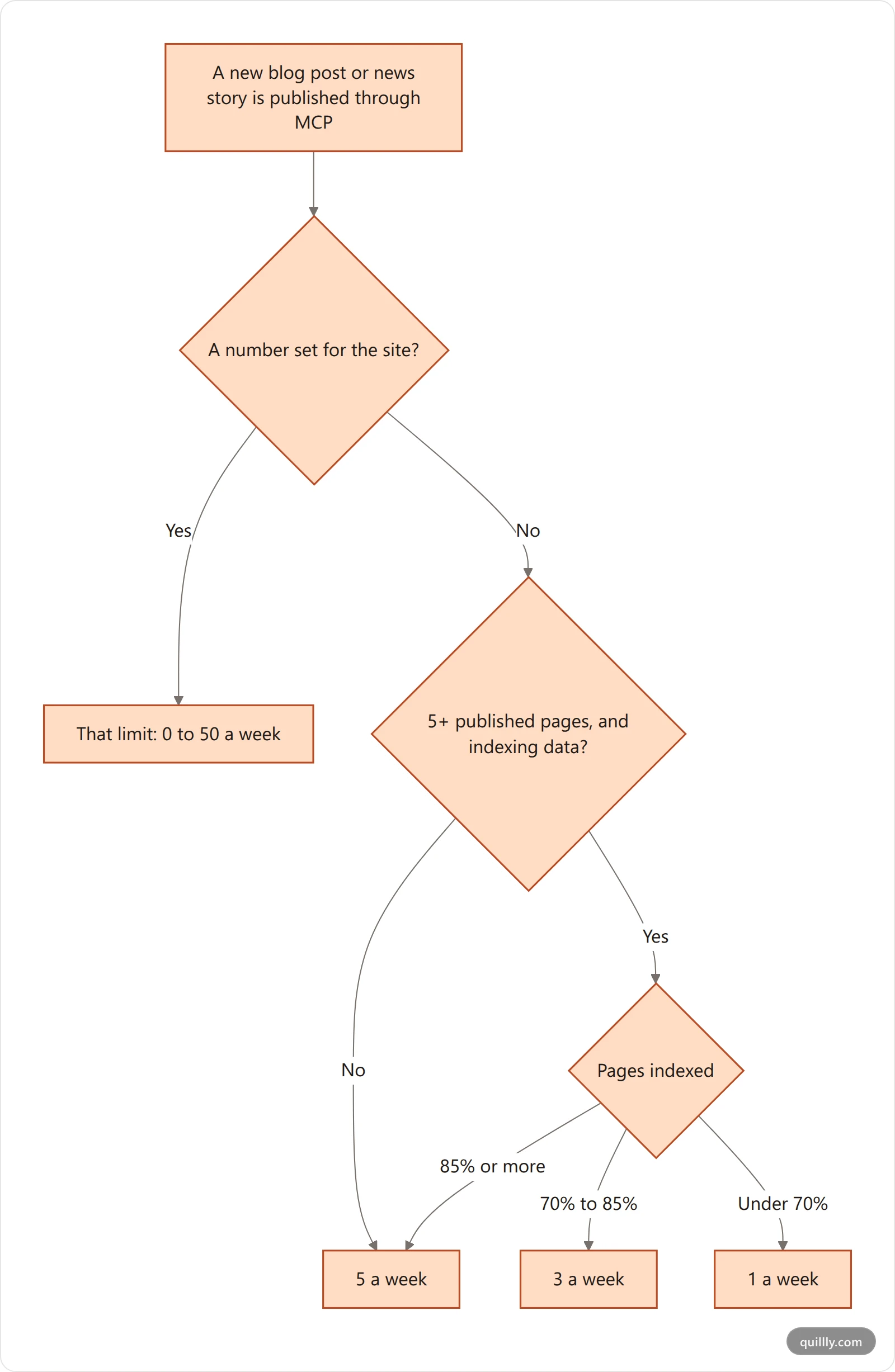
What counts: new blog posts and news stories published or scheduled within 7 days of the new one. Docs pages, changelog entries and re-publishing an existing post don't count.
Where it applies:
create_content,publish_contentandbulk_update_content. Publishing from the dashboard isn't limited.At the limit, the post stays a draft, and
forcedoesn't change that. The message starts "Not published: this site's weekly limit is 3 new posts" and names the next free slot in UTC. Autopilot parks the draft for your approval.Pages indexed is measured on your worst-indexed connected search engine. In Google, the Page indexing report shows which of your pages are indexed.
To see or change it, open your site from Websites. The New posts from AI agents card, near the bottom of the page, shows how many posts the last 7 days used, the next free slot when none is left, and why the automatic limit is what it is. Set a number from 0 to 50 with − and + and click Save, or click Use automatic to go back. Changing it takes Edit site settings on Websites. When the automatic limit is 1 a week, the card links to the pages to prune, the work that raises it.
From your AI, the same change is
content_policy.weekly_post_limitinupdate_website_settings, with the same level: a number from 0 to 50, ornullfor the automatic limit. At 0, no new blog posts or news stories go out through MCP.
Common questions#
Does a yearly plan get its allowances once a year?#
No. Analytics events, hosted page views and Autopilot posts are monthly on a yearly plan too. Each count starts again every month, on the day of the month your plan started.
Do pages Quillly serves use my analytics events?#
No. Events from the pages Quillly serves are stored in full, never counted, and keep coming in at the limit. Their page views count toward hosted page views instead.
Why was my AI's post saved as a draft?#
The message your AI gets says why. Most often the site has reached its weekly limit on new posts, and the message says when the next slot opens. The other common reason is a score below the site's minimum SEO score.
Related#
Plans, trial and limits: prices, the free trial and what each plan includes.
API keys, OAuth and tool access: creating keys and reading your usage.
Keyword research and credits: what each lookup returns, and buying credits.
Autopilot: posts written on a schedule: routines and the monthly allowance.
Organizations and seats: invites, and what happens when seats run out.