Cookies or cookieless analytics
On this page
- Cookie or cookieless analytics at a glance
- How the cookie mode works
- How cookieless analytics works
- What both modes do
- Switch between cookie and cookieless
- 1. Open Analytics settings
- 2. Choose a mode
- 3. Replace the tag on your site
- Common questions
- Which mode should I choose?
- Do I need a consent banner?
- Can the cookie follow visitors to other sites?
- What happens to my past data when I switch?
- Related
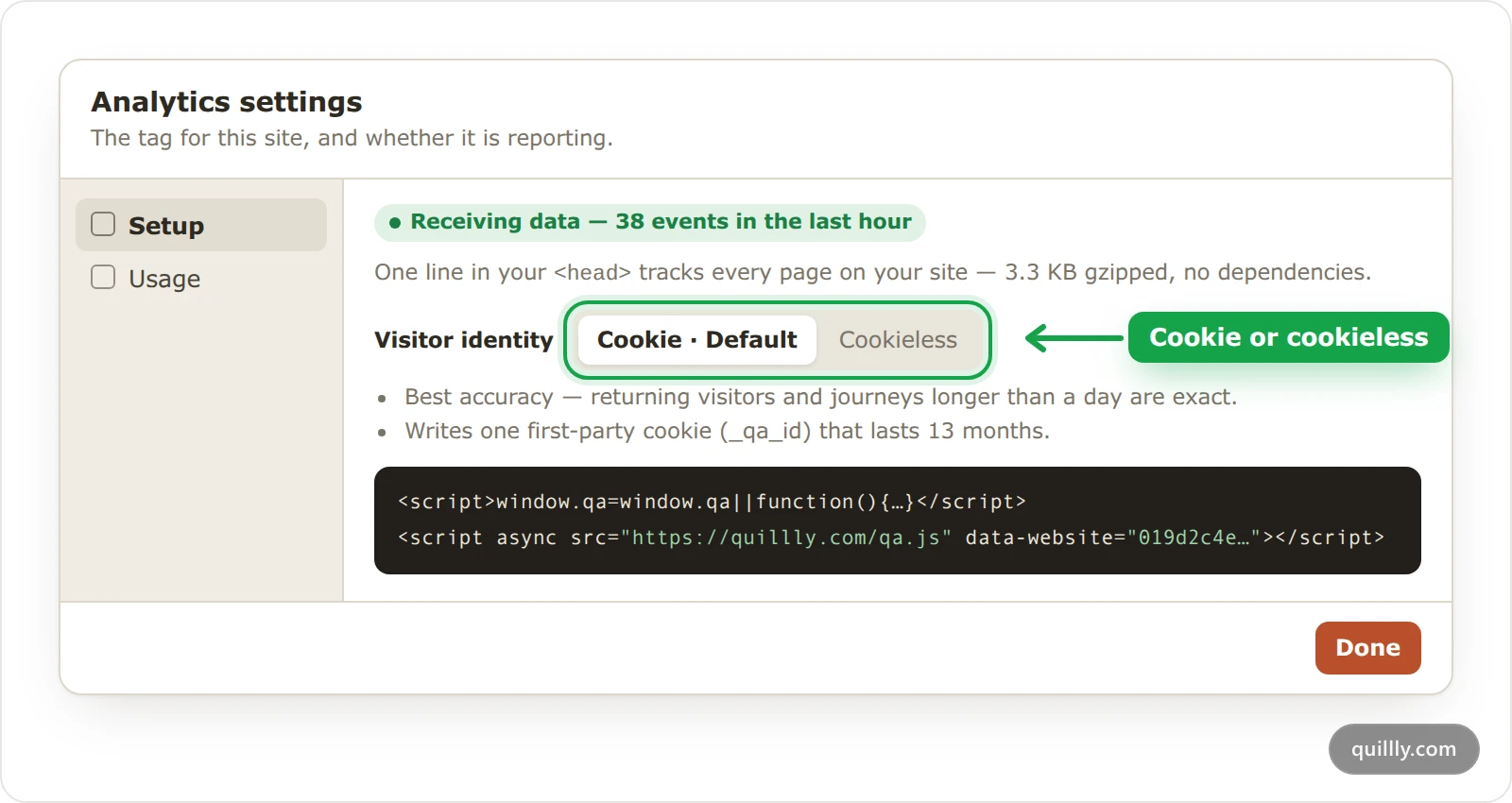
Quillly counts visitors in one of two ways: with a first-party cookie, which is the default, or with cookieless analytics, which writes no cookie. This page compares the two and shows how to switch, so you can pick one before you paste the tag on your site.
Cookie or cookieless analytics at a glance#
Cookie (default) | Cookieless | |
|---|---|---|
Script |
|
|
Stored on the visitor's device | One first-party cookie, | No cookie |
How Quillly tells visitors apart | A hash of the cookie's ID, mixed with your website ID | An ID derived each day from your website, the IP address and the browser |
The same person tomorrow | The same visitor | A new visitor |
Visits over several days | Joined into one journey | Split at midnight UTC |
How the cookie mode works#
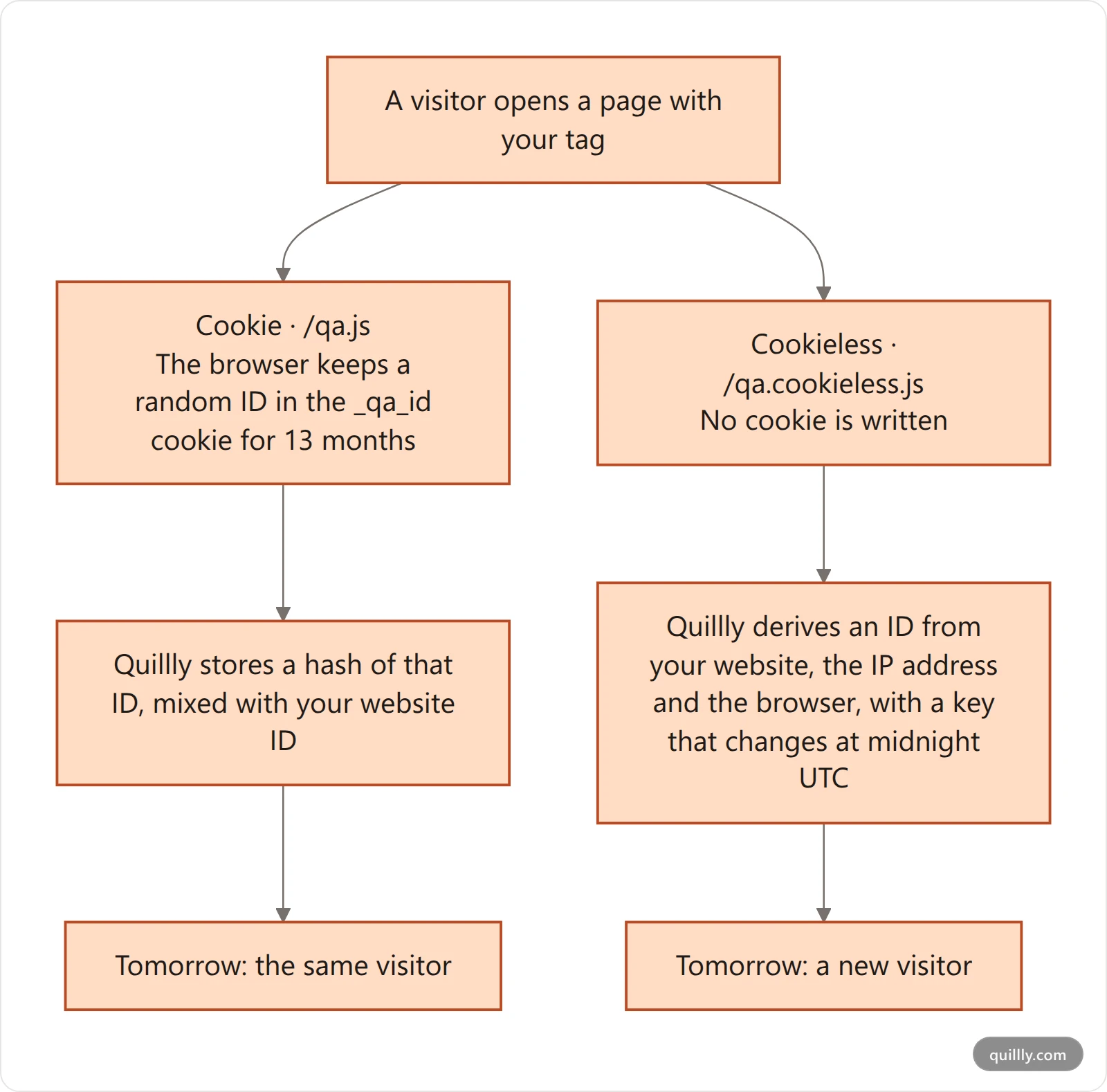
The default tag, /qa.js, writes one first-party cookie named _qa_id on your own domain. It holds a random ID and lasts 13 months. The tag writes it again on every page load, so the 13 months restart each time someone visits.
The cookie is set with
SameSite=Lax, and withSecureon HTTPS pages.Quillly never stores the cookie's value. It stores a hash of the ID mixed with your website ID, so the same browser gets unrelated IDs on different sites.
If the browser refuses the cookie, the tag counts that visitor the cookieless way instead.
Because the ID lasts, returning visitors, journeys and funnels that take several days are exact.
How cookieless analytics works#
The cookieless tag, /qa.cookieless.js, writes no cookie and sends no visitor ID. Instead, Quillly derives an ID on its server from your website ID, the visitor's IP address and their browser's user agent. A secret key that changes at midnight UTC goes into the mix, and the IP address itself is never stored.
The trade is accuracy across days:
A visitor who comes back tomorrow counts as a new visitor.
A journey that spans midnight UTC splits in two, so funnels and journeys can't follow anyone into the next day.
Someone who changes network or browser during the day also counts as a new visitor.
Two people on the same network with the same browser version can count as one visitor that day.
What both modes do#
IP addresses stay in memory. Quillly uses them to find where a visitor is and to limit request rates, then drops them. The tag on your own pages keeps only the country. Pages Quillly serves can also keep the region and city, when they're known.
One session ID per tab. The tag keeps a random session ID in the tab's sessionStorage, which the browser deletes when the tab closes.
Return visits on served articles. Articles Quillly serves keep one timestamp per article in
localStorage, to notice when someone reads it again.No third-party cookies. The tag sends its events to quillly.com without cookies, and Quillly sets no cookie in reply.
Switch between cookie and cookieless#
Before you start, you need to be the website's owner or an admin of its organization. Anyone else who tries sees a message that only the owner or an organization admin can change it.
Open Analytics settings#
Open Analytics and click the gear in the page header. The dialog opens on Setup.
Choose a mode#
Under Visitor identity, click Cookie · Default or Cookieless. The choice saves at once, and the list under it and the tag below it change to match.
Replace the tag on your site#
Copy the new tag and paste it over the old one wherever you installed it. Pages Quillly serves pick up the new mode on their own.
Warning
Changing Visitor identity doesn't change a tag that's already on your site. Your own pages keep counting the old way until you replace the tag.
After a switch, everyone gets a new ID, so expect more new visitors than usual for a while.
Common questions#
Which mode should I choose?#
Choose Cookie when you want exact returning visitors, and journeys or funnels that take several days. Choose Cookieless when writing no cookie matters more to you than knowing who comes back.
Do I need a consent banner?#
That depends on your site, your visitors' countries and your other tools, so the decision is yours. The cookie mode stores an ID on the device, while cookieless analytics stores no cookie but still keeps a session ID in the tab.
Can the cookie follow visitors to other sites?#
No. The _qa_id cookie lives on your own domain, and Quillly mixes your website ID into the hash it stores. The same browser gets unrelated IDs on different sites.
What happens to my past data when I switch?#
Your past data stays as it is. From the switch on, visitors get new IDs, so the Users list starts new rows for people it already knew.
Related#
Install analytics on your website: paste the tag and check that data arrives.
Visitor journeys and the Users list: how the visitor ID shapes the Users list.
Read the Analytics dashboard: what new and returning visitors mean on the chart.
Tracking scripts on served pages: other analytics tools, which may set cookies of their own.