News stories and sources
On this page
- Set up the news section
- 1. Open News
- 2. Add categories
- 3. Connect news sources
- 4. Save
- Write news stories
- What counts in a news story's score
- How readers see your news stories
- Google News and discovery
- Sponsored stories
- Common questions
- Why is my story missing from the news pages?
- Why did my AI's publish fail with a score of 59?
- Can I publish a story that has no picture?
- Related
A news section publishes news stories on your domain: a newsroom home page, an archive page for each category, and a page for each story with its sources listed underneath. This page shows how to set up categories and sources, how to write news stories that pass Quillly's checks, and how Google News and sponsored stories are handled.
Set up the news section#
Open News#
In the dashboard sidebar, open Content → News. If your site has no news section yet, click Set up news and choose where it is served. Content types explains the options.
Add categories#
Click the settings button at the top right of the section and choose Categories. Type a name, such as "Business", and click Add. A section can have up to 20 categories.
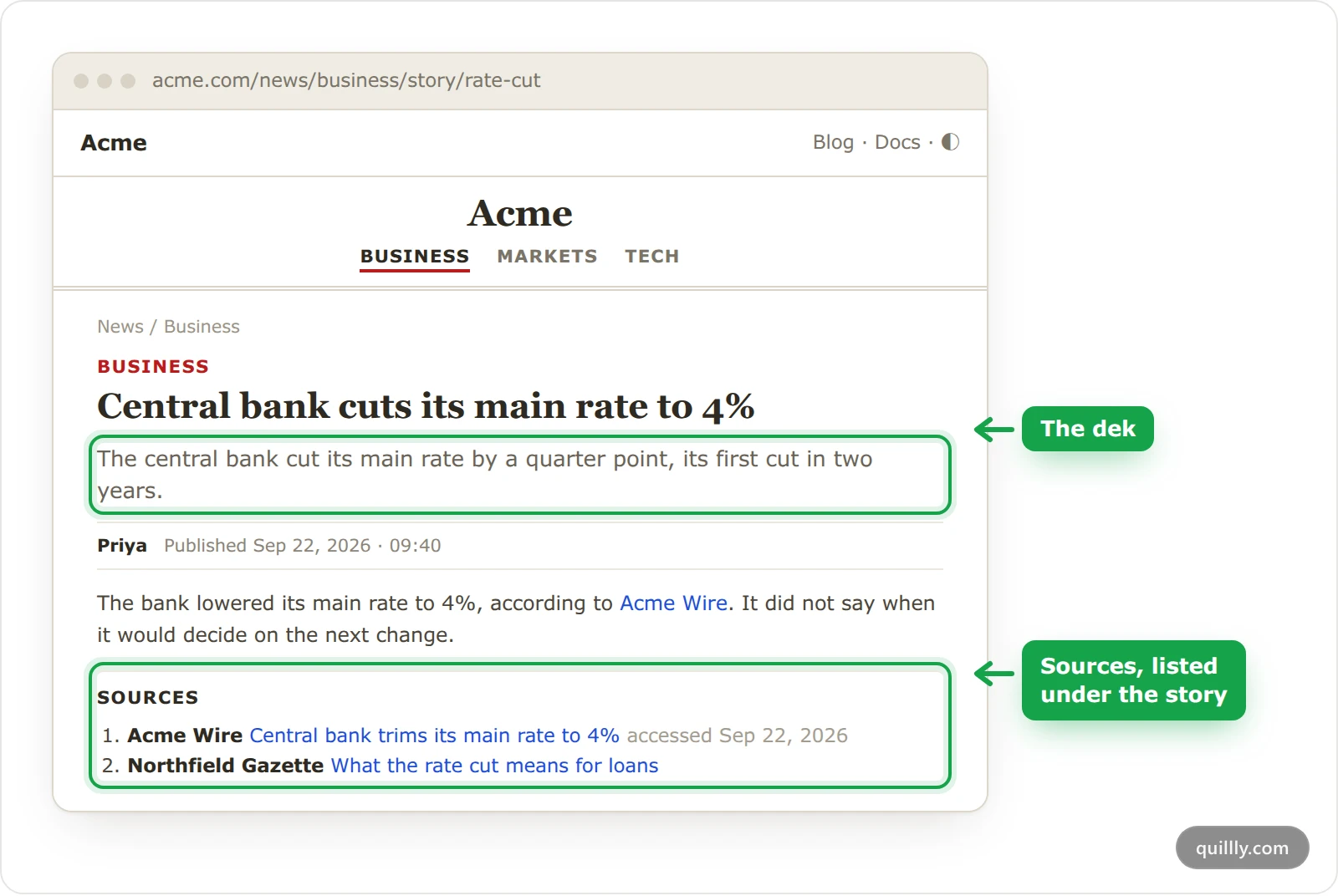
Each category is part of your stories' addresses, an entry in the news menu and an archive page. A story in Business lives at an address like acme.com/news/business/story/rate-cut. Renaming a category is free, but changing its address moves its stories and sends the old archive address to the new one. Removing a category that has stories first asks where to move them.
Connect news sources#
Choose Sources. Under Feeds, paste the address of an RSS or Atom feed, or of a Google News sitemap, add a label if you like, and click Add. Quillly checks the address before it adds it, and a section takes up to 10 feeds.
Under Integrations, NewsData.io adds a live news wire. Click Connect and paste your API key, which is stored encrypted. Refine narrows what it pulls by keywords, countries, topics and language. Each call spends your own NewsData.io credits, as its documentation explains, so your AI uses it only when you ask.
Save#
Click Save to keep your categories and feeds. A NewsData.io connection is saved as soon as it connects.
Write news stories#
Your sources are raw material: Quillly reads them for story candidates to report on and cite, and never copies their wording. Two ways turn them into news stories:
Ask your AI. For example: "Check our news sources and write a story about the most important item today." It lists candidates with
get_news_candidates, then creates the story with its category, dek and sources.Run a routine. On the Agent page, a routine of the News story type writes one story from your sources on a schedule. It always leaves the story as a draft, so a person checks it against its sources before it goes live.
Warning
Create stories with your AI or a routine. The New Story button in the News list opens an editor without the News story fields, and what it saves is not served as a story.
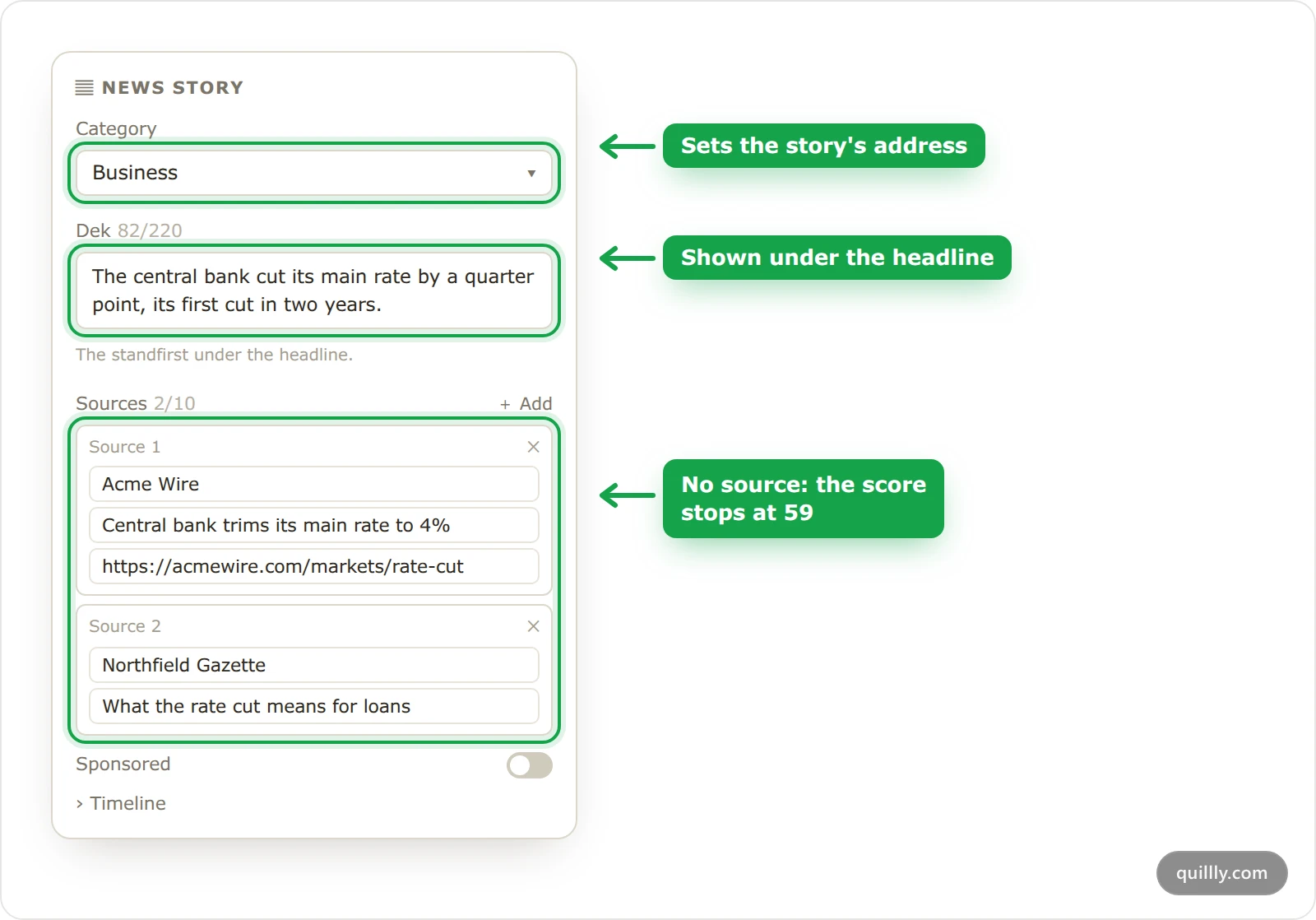
To edit a story, open it from the News list. In the editor, the side panel has a News story block:
Category: where the story is filed. A story without one has no address and is not served.
Dek: one sentence under the headline, up to 220 characters.
Sources: up to 10, each with the publisher, the headline of the cited piece and its full address.
Sponsored: marks paid placements, as described below.
Timeline: dated updates and corrections, shown on the story. Add a new entry rather than silently changing the text.
The first picture in the story's body becomes its featured image, used on story cards and when the story is shared. Diagrams and charts made with code do not count, so add a photo you have the rights to.
What counts in a news story's score#
News stories have their own scoring. There is no check for calls to action or an FAQ, keywords matter less, and length is judged against news, not long reads: 400 words or more gets full marks.
The News Integrity check looks at these things:
Check | If it fails |
|---|---|
At least one source | The whole score stops at 59. |
A second source | 10 points off this check. |
A dek | 20 points off this check. |
A category | 20 points off this check. |
A headline of 110 characters or fewer | 15 points off this check. |
A story without a featured image cannot score above 84. The Web Story check counts for news too, so a story without one can fall just short of 85, the minimum your AI's publish tool needs by default.
How readers see your news stories#
A story page shows the category, the headline, the dek, the author, when it was published and, after a later edit, when it was updated. Below the body come the Timeline, if the story has one, and Sources, each with its publisher and, when known, the date it was read. Cards for more stories from the same category close the page.
The news home page leads with the newest story beside a Latest list, then shows a row of stories for each category. Every story page carries article structured data for search engines, and the story's Markdown version and the section's llms.txt are linked at the bottom for AI agents.
Google News and discovery#
News sitemap. The section serves a Google News sitemap at its address followed by
/sitemap.xml. It lists stories published in the last 48 hours, up to 1,000, and never sponsored ones.RSS feed. Your latest news stories are also at
/rss.xml. The RSS feed switch on the Identity tab of the Brand page turns feeds off for the whole site.Preferred source on Google. In the section's settings, Discovery adds a button that asks readers to pick your publication as a preferred source in Google. Turn it on only once Google lists your publication as a news source.
Sponsored stories#
Turn on Sponsored in the News story block and write the label, such as "Sponsored by Acme". A sponsored story shows a Sponsored tag and a note saying it is a paid placement not produced by your newsroom. Its links to other sites are marked as sponsored, it is described to search engines as an article rather than a news article, and it is left out of the news sitemap.
Common questions#
Why is my story missing from the news pages?#
Check its category. A story whose category was removed, or that never had one, has no address until you file it under a live category in the News story block.
Why did my AI's publish fail with a score of 59?#
The story cites no sources. Add at least one in the editor's News story block, then publish again. Your AI sets sources when it creates a story, but it cannot change them afterwards.
Can I publish a story that has no picture?#
Yes, but its score stops at 84, so your AI cannot publish it at the default minimum. Add a photo you have the rights to, or publish it from the News list.
Related#
Publishing: statuses, scheduling and the publish checks.
Content types: where the news section is served.
MCP tools:
get_news_sources,get_news_candidatesand the rest of your AI's tools.