Served URLs and files
On this page
- How to read the served URLs tables
- Blog
- Docs
- Changelog
- News
- Files for the whole site
- What your reverse proxy forwards
- Files loaded from quillly.com
- Common questions
- Which sitemap do I submit to Google?
- Why does my post's llms.txt redirect to a .md address?
- Why is there no llms.txt at the root of my domain?
- Related
This page lists the served URLs of every section Quillly hosts for you: blog, docs, changelog and news. For each one you get the page addresses, the Markdown version of each page, the sitemap, the RSS feed, llms.txt, the IndexNow key file and the social images, on your own domain and on a Quillly subdomain.
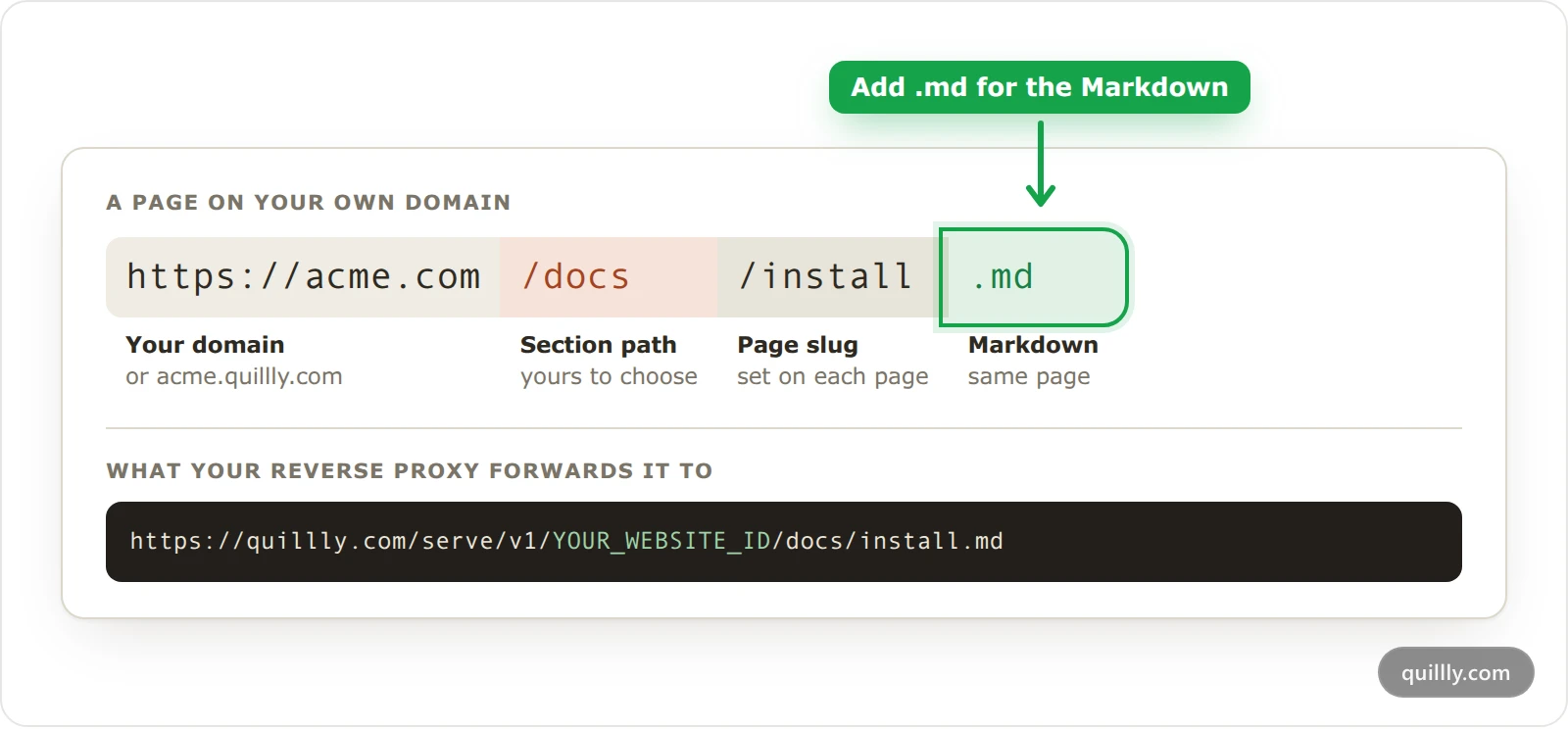
How to read the served URLs tables#
Each table lists one section's addresses, with your own domain in one column and a Quillly subdomain in the other.
Your own domain is
acme.comin the examples. Each section lives under its own path there, and your reverse proxy forwards that path to Quillly.Quillly subdomain is
acme.quillly.com. Quillly serves the whole host: blog posts sit at the root, while docs, changelog and news keep their paths.Paths are the defaults:
/blog,/docs,/changelogand/news. If you chose another path, such as/help, it replaces the default in every address.Placeholders:
{slug}is a page's slug and{category}a news category.YOUR_WEBSITE_IDis your website's ID, as in the rules the dashboard gives you. Every address useshttps://.Markdown: a page with a Markdown version also returns it at its normal address when a request's
Acceptheader namestext/markdownortext/plainand nottext/html.
A section that publishes into WordPress, Ghost, Webflow, Shopify or a webhook is served by that platform, so none of these addresses exist for it. See Publish into WordPress, Ghost, Webflow or Shopify.
Blog#
What | Your own domain | Quillly subdomain |
|---|---|---|
Blog home |
|
|
Older posts |
|
|
Post |
|
|
Post as Markdown |
|
|
Sitemap |
|
|
RSS feed |
|
|
llms.txt |
|
|
IndexNow key |
|
|
Web Story |
|
|
The sitemap lists the blog home, up to 1,000 posts and their published Web Stories. On a Quillly subdomain,
/sitemap.xmland/llms.txtcover the whole site, blog included.The RSS feed holds the 50 newest posts. The RSS feed switch under Brand → Identity turns off the blog, changelog and news feeds together.
A post's llms.txt is retired.
acme.com/blog/{slug}/llms.txtanswers with a permanent redirect (308) toacme.com/blog/{slug}.md, and the same goes foracme.quillly.com/{slug}/llms.txt. An llms.txt file is always an index of a site or a section; one page's text is its.mdversion.
Docs#
What | Your own domain | Quillly subdomain |
|---|---|---|
Docs home |
|
|
Page |
|
|
Page as Markdown |
|
|
Sitemap |
| In |
RSS feed | None | None |
llms.txt |
|
|
IndexNow key |
|
|
Web Story |
|
|
The docs home has no Markdown version of its own; its llms.txt lists every docs page. On your own domain, a docs page publishes only after the section's reverse proxy check passes, so these addresses don't lead to a missing page.
Changelog#
What | Your own domain | Quillly subdomain |
|---|---|---|
Timeline |
|
|
One entry |
|
|
Entry link |
|
|
Timeline as Markdown |
|
|
Entry as Markdown |
|
|
Sitemap |
|
|
RSS feed |
|
|
llms.txt |
|
|
IndexNow key |
|
|
Web Story |
|
|
Entries have no pages of their own: the timeline shows the 100 newest, and /changelog.md holds their full text. The feed holds the 50 newest entries, and llms.txt links the timeline and names the 15 newest. The sitemap lists the timeline, dated by its newest entry, and the entries' Web Stories.
News#
What | Your own domain | Quillly subdomain |
|---|---|---|
News home |
|
|
Category page |
|
|
Story |
|
|
Story as Markdown |
|
|
News sitemap |
|
|
RSS feed |
|
|
llms.txt |
|
|
IndexNow key |
|
|
Web Story |
|
|
The news sitemap follows Google's news sitemap rules: stories from the last 48 hours, up to 1,000, and no sponsored stories.
The RSS feed holds the 50 newest stories. Sponsored stories are in it, with "Sponsored: " before the title.
llms.txt lists the 15 newest stories, without sponsored ones.
Older stories: on a Quillly subdomain,
/sitemap.xmllists every story. On your own domain, a story older than 48 hours is in no sitemap, so search engines reach it through your news pages.
Files for the whole site#
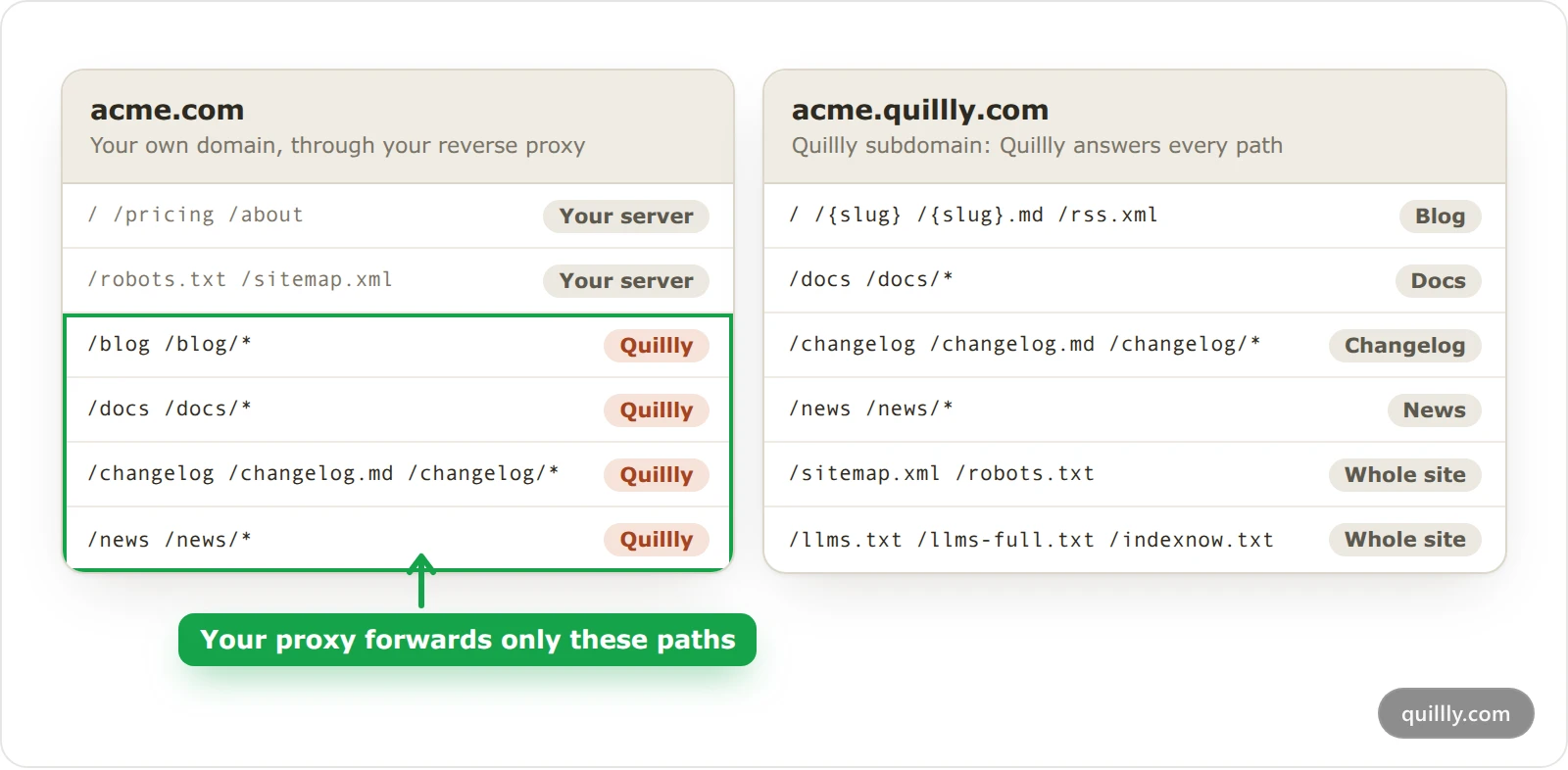
The root of your own domain belongs to your server, so Quillly answers only under your sections' paths there. On a Quillly subdomain it serves these files too:
File | Your own domain | Quillly subdomain |
|---|---|---|
robots.txt | Your own file |
|
Sitemap of every section | None |
|
llms.txt of every section | None |
|
Full text of the 50 newest items | None |
|
On a Quillly subdomain, robots.txt allows every crawler and points to /sitemap.xml and /llms.txt. The llms.txt format is an open proposal for how AI tools find a site's content.
IndexNow key: one key per website, returned as plain text at every
indexnow.txtaddress on this page. Quillly creates it the first time it notifies IndexNow, so the file answers 404 until then.Paused sites: while your pages are paused after a plan ends, these files answer 404, and a Quillly subdomain's
robots.txtblocks every crawler until you subscribe again.
What your reverse proxy forwards#
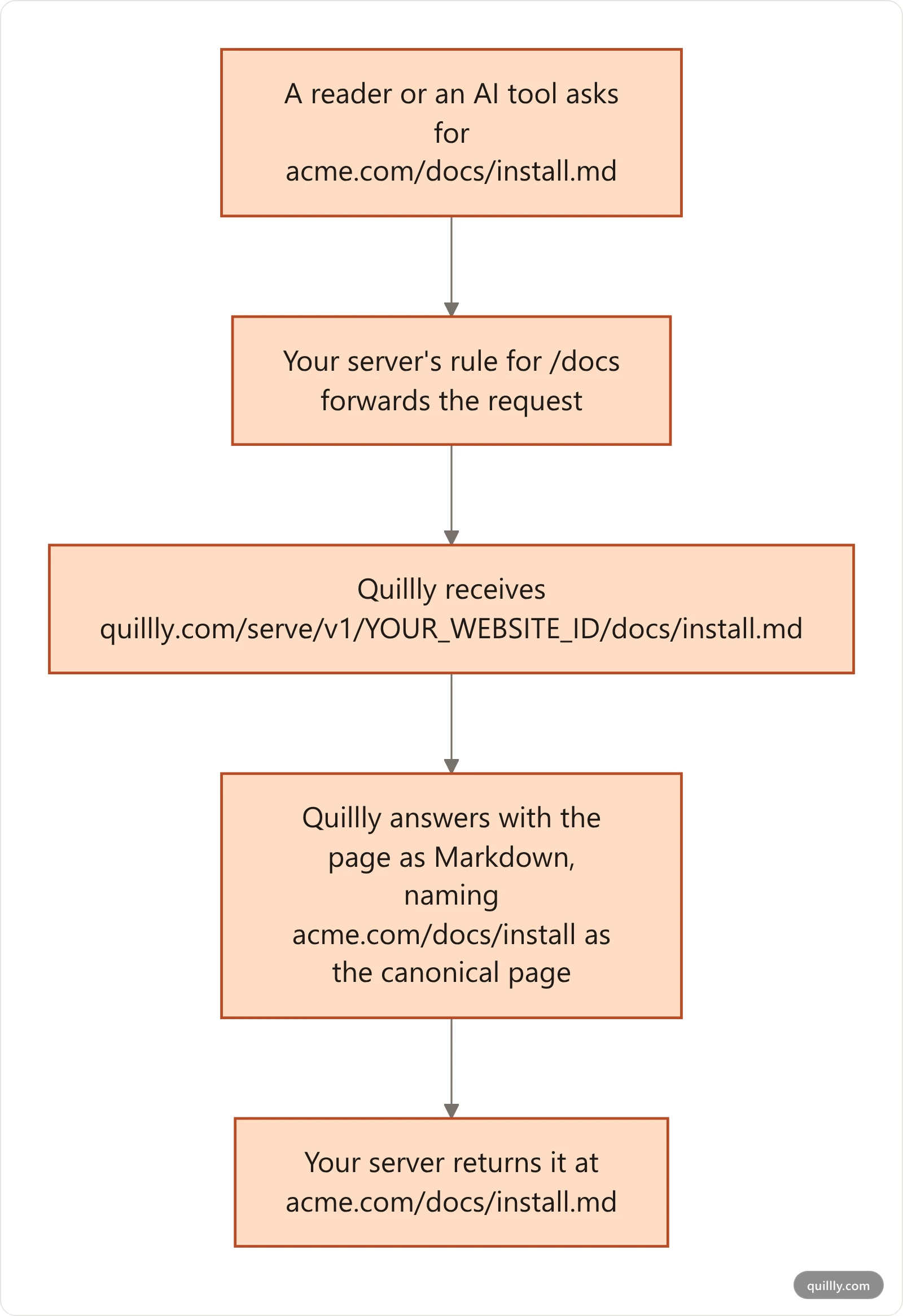
Your reverse proxy sends each section's path on your domain to the matching address on quillly.com.
Path on acme.com | Forward to |
|---|---|
|
|
|
|
|
|
|
|
The rest of the path follows unchanged, so acme.com/blog/launch.md goes to …/blogs/launch.md. The blog's target ends in blogs whatever path you chose. Copy your own rule from the section's settings: the gear icon, then Connection.
Warning
The Next.js, Vercel, Netlify and PHP rules match /changelog and /changelog/… but not /changelog.md. To serve the timeline's Markdown, add one more rule that sends /changelog.md to https://quillly.com/serve/v1/YOUR_WEBSITE_ID/changelog.md. The PHP rules also forward only one segment after the section's path, so news stories and Web Stories don't reach Quillly through them.
Tip
For an llms.txt of the whole site at acme.com/llms.txt, forward that one path to https://quillly.com/serve/v1/YOUR_WEBSITE_ID/llms.txt. It lists every section at its address on your domain.
Files loaded from quillly.com#
Some files come straight from quillly.com in every setup, so your proxy doesn't forward them. If your site sets a Content Security Policy, allow https://quillly.com.
File | Address |
|---|---|
Social image of a post |
|
Social image of the blog home |
|
Social image of a docs page |
|
Social image of the docs home |
|
Social image of the changelog |
|
Social image of a news story | The story's featured image, when it has one |
Pictures from |
|
Web Story images and video |
|
Your uploaded logo |
|
Page scripts and styles |
|
Analytics tag |
|
Reading and click tracking on served pages |
|
Analytics events from served pages |
|
Blog search |
|
Docs search index |
|
Common questions#
Which sitemap do I submit to Google?#
You don't need to. Once you connect Google Search Console or Bing, Quillly submits them for you: each connected section's sitemap and RSS feed on your own domain, or /sitemap.xml, /rss.xml and the news files on a Quillly subdomain.
Why does my post's llms.txt redirect to a .md address?#
llms.txt is an index of a site or a section, never one page. A post's own llms.txt address now sends a permanent redirect to the post's .md version, so old links keep working.
Why is there no llms.txt at the root of my domain?#
Your reverse proxy forwards only your sections' paths, so each section serves its own llms.txt. Add the one-path rule from the tip above for a whole-site file.
Related#
Content types and URLs: the sections, their paths and what each one holds.
Serve on your own domain with a reverse proxy: the rule for each stack, and how to check it.
AI crawlers, llms.txt and Markdown pages: how AI tools read these files.
Indexing: how your pages reach search engines: what Quillly submits, and where.
Web Stories: the story each post can have.
Plan limits and allowances: the hosted page views each plan includes, and what happens past them.