Indexing: how your pages reach search engines
On this page
- How Quillly notifies search engines
- What each change sends
- The Indexing column
- The page indexing report
- Validate a fix
- 1. Fix the pages
- 2. Click Mark fixed → Revalidate
- 3. Watch the result
- Common questions
- How long does indexing take?
- Why doesn't a site: search show my page?
- Does Google need Search Console to index my pages?
- Related
When you publish, Quillly tells search engines about the page, then watches whether they index it. This page covers which engines hear about each change, how to read each page's indexing status, and how to get a page that isn't indexed back into search.
How Quillly notifies search engines#
Every website notifies search engines from its first publish, with nothing to set up. Quillly uses two channels:
IndexNow reaches Bing, Yandex, Naver, Seznam.cz, Yep and Amazon. Quillly creates your site's IndexNow key, serves it on your site and sends each new or changed address. Yahoo shows Bing's results, so it follows Bing.
Sitemaps and RSS feeds reach Google. Google doesn't take IndexNow, so Quillly submits your sitemaps and feeds through Search Console, and Google crawls new pages from there.
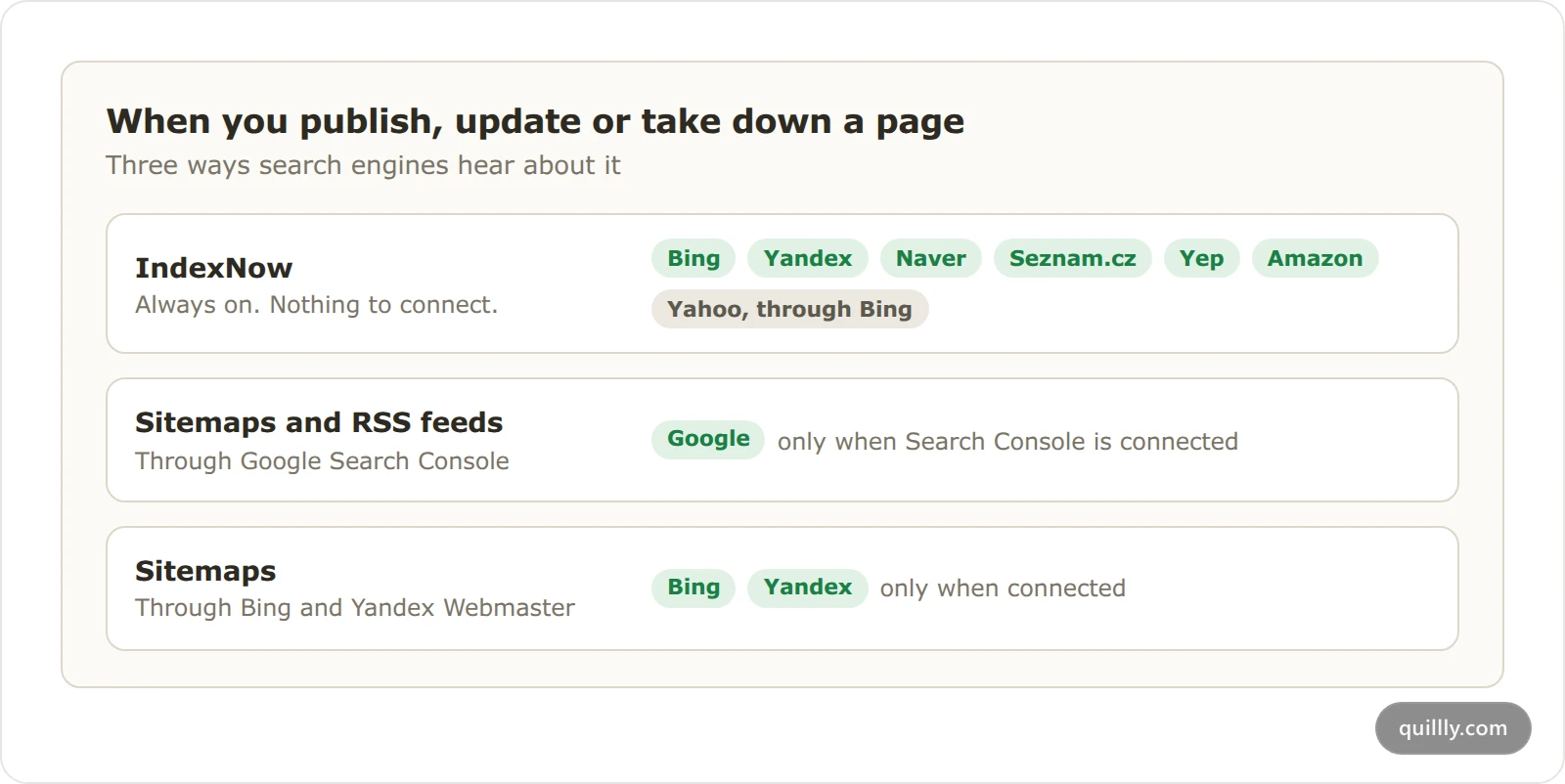
Without Search Console, Quillly sends nothing to Google, and Google finds new pages only when it crawls your site. Connect Search Console, Bing and Yandex shows how to connect it. With Bing Webmaster or Yandex Webmaster connected, those engines get your sitemaps too.
Quillly doesn't use Google's Indexing API, which Google limits to job postings and livestream videos. IndexNow is an open protocol: the engines that take part share each submission with one another.
What each change sends#
When you | IndexNow | Sitemaps |
|---|---|---|
Publish a page | Sends its address. | Submitted again. |
Edit the text of a live page | Sends its address, so engines crawl it again. | Not submitted. |
Change the slug of a live page | Sends the new address and the old one. | Submitted again. |
Unpublish or delete a page | Sends the address, so engines find it gone. | Submitted again. |
Sitemaps go only to the engines you connected. If an engine refuses a notification, Quillly tries again later, up to six times, and saving the live page in the dashboard retries at once. Pages you track in Site pages, which Quillly doesn't serve, go to IndexNow once a day when they're new or have changed.
The Indexing column#
Each content list has an Indexing column. It shows what the connected engines report about each published page:
Label | What it means |
|---|---|
Indexed | The page is in the engine's index. |
Indexed · unseen | The page has been live and indexed for 28 days or more, but has had no impressions. |
In review | The page is under 14 days old and not indexed yet, which is on schedule. |
Submitted | Google has the page from your sitemap and hasn't given a verdict yet. |
Not indexed | The engine found or crawled the page and left it out. |
Dropped | The page was indexed and has since left the index. |
Error | The engine reported a problem when it inspected the page. |
Unchecked | No engine has reported on the page yet. |
Not connected | The website has no search engine connected. |
A blog post or news story that has been live for 90 days or more, and earned no search impressions in the last 90 days, is listed in Pages to prune. That happens whether it is indexed or not. There you merge it into a stronger page, unpublish it or keep it.
With two or three engines connected, the label counts them, such as Indexed 2/3 or Dropped 1/3. Hover over it for a line per engine, the Auto-notified engines with a tick or a cross, and the time of the next check.
Quillly asks Search Console about each page on a schedule that follows its state:
Page | Checked |
|---|---|
Not indexed, under 7 days old | Every 8 hours |
Not indexed, 7 to 30 days old | Daily |
Not indexed, older than 30 days | Every 3 days |
Indexed | Weekly |
Dropped, or an inspection error | Daily |
Bing and Yandex report about twice a day.
Note
Only Google, Bing and Yandex report back. Naver, Seznam.cz, Yep and Amazon take notifications through IndexNow but never say whether they indexed a page.
The page indexing report#
The report lists why pages aren't indexed, in each engine's own words. Open a content list and click the Indexing pill at the top. It reads Indexing · 4 when four pages need attention, Revalidating · 2 while fixes are being checked, and shows a tick when nothing is open.
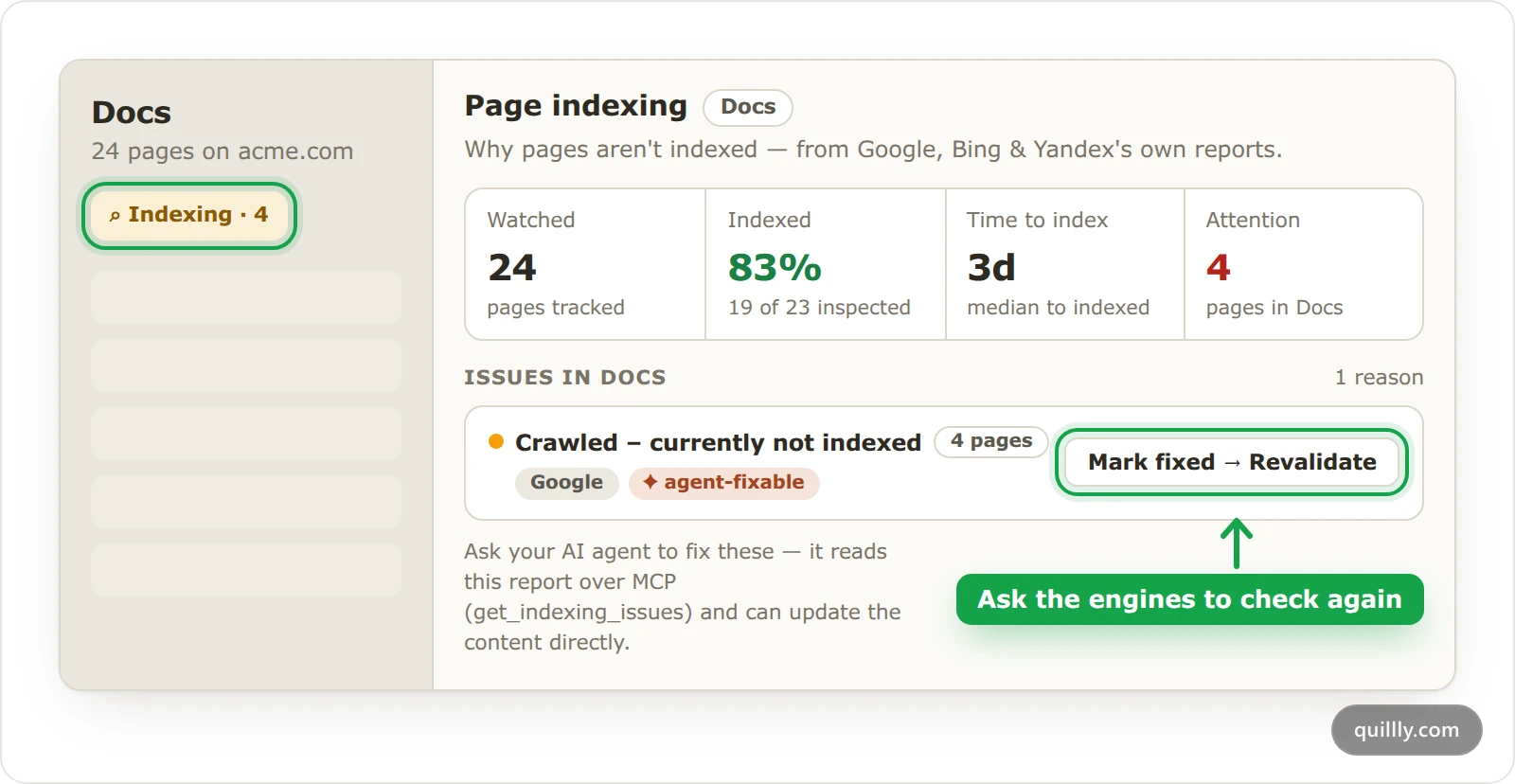
The Page indexing panel starts with four numbers for the website: Watched, Indexed, Time to index and Attention. Below them, Issues in Docs, or your section's name, lists one row per reason, such as Crawled – currently not indexed or Not found (404) — Bing.
Click a reason to see why it happens, a Fix: line and the pages it affects. Two tags help you sort the rows:
agent-fixable: the fix is in the page's text, so your AI can make it with
update_content.expected: nothing needs fixing. Changelog entries, for example, all live on one page, so engines index that page instead.
Your AI reads the same report with get_indexing_issues. Ask it, for example: "Check the indexing issues on acme.com and fix the pages you can."
Next to each page, Request indexing reads Google's current verdict on it when Search Console is connected, once every 5 minutes per page. Request indexing for all does the same for up to 15 pages. Neither makes Google crawl sooner. For that, use URL Inspection in Search Console, as Google's guide to asking for a recrawl explains. To send one page to IndexNow again, click Refresh data in its search performance panel.
Validate a fix#
After you fix the pages under a reason, ask the engines to check them again. This works with Google, Bing and Yandex when they're connected, because they can inspect a page and report back.
Fix the pages#
Edit each page the reason lists, or ask your AI to. The Fix: line under the reason says what to change.
Click Mark fixed → Revalidate#
Click Mark fixed → Revalidate on the reason's row. Quillly takes up to 500 of the affected pages, submits your sitemaps again and sends each page to IndexNow.
Watch the result#
The row shows Revalidating with how many pages are pending, passed and failed. Quillly checks each page once a day for up to 14 days. Then the row reads:
Validation passed: the engine crawled the pages again and cleared the issue.
Validation failed: some pages still have it. Fix them and click Start new validation.
Validation expired: the 14 days ended before the engine crawled every page. Click Start new validation to try again.
Your AI can start the same check with
start_indexing_revalidation.
Common questions#
How long does indexing take?#
Often a few days, sometimes a few weeks. A new page that isn't indexed yet reads In review for its first 14 days, and Time to index in the report shows your site's own median.
Why doesn't a site: search show my page?#
Google's site: search doesn't necessarily show every indexed page, as its guide to the site: operator says. Trust the Indexing column, which comes from Search Console's own inspection.
Does Google need Search Console to index my pages?#
No. Google can find pages by crawling your site and following links. Search Console helps, because Quillly then submits your sitemaps on every publish, and it's the only way to see Google's indexing status in Quillly.
Related#
Connect Search Console, Bing and Yandex: the connections that bring indexing status back.
The SEO score: what to strengthen when a page is crawled but not indexed.
Content types and URLs: the sitemaps and feeds each section serves.
Serve on your own domain with a reverse proxy: keeping your pages reachable for crawlers.
Site pages: track and score the pages you already have: indexing for the pages you didn't write in Quillly.