Analytics limits, retention and excluding traffic
On this page
- Analytics limits on each plan
- What counts toward the analytics limits
- Check your usage
- 1. Hover the gauge
- 2. Open the Usage pane
- When you reach the limit
- Data retention
- Exclude traffic from parts of your site
- Common questions
- Do pages Quillly serves count toward my analytics limits?
- How do I stop counting my own visits?
- What happens to my data when a plan ends?
- Related
Every Quillly plan includes a monthly allowance of analytics events. This page covers the analytics limits on each plan, what counts toward them, what happens when you reach one, how long data is kept, and how to exclude traffic from parts of your site.
Analytics limits on each plan#
Plan | Events a month |
|---|---|
Pro, and the free trial | 100,000 |
Autopilot Starter | 250,000 |
Autopilot Pro | 1,000,000 |
Autopilot Scale | 3,000,000 |
Analytics 10k | 10,000 |
Analytics 100k | 100,000 |
Analytics 500k | 500,000 |
Analytics 2M | 2,000,000 |
One allowance for the account. Every website on your account draws from the same pool.
It resets with your billing cycle. Without an active subscription, as during the trial, it resets on the 1st of each month, UTC.
Plans, trial and limits lists the prices and everything else each plan includes.
What counts toward the analytics limits#
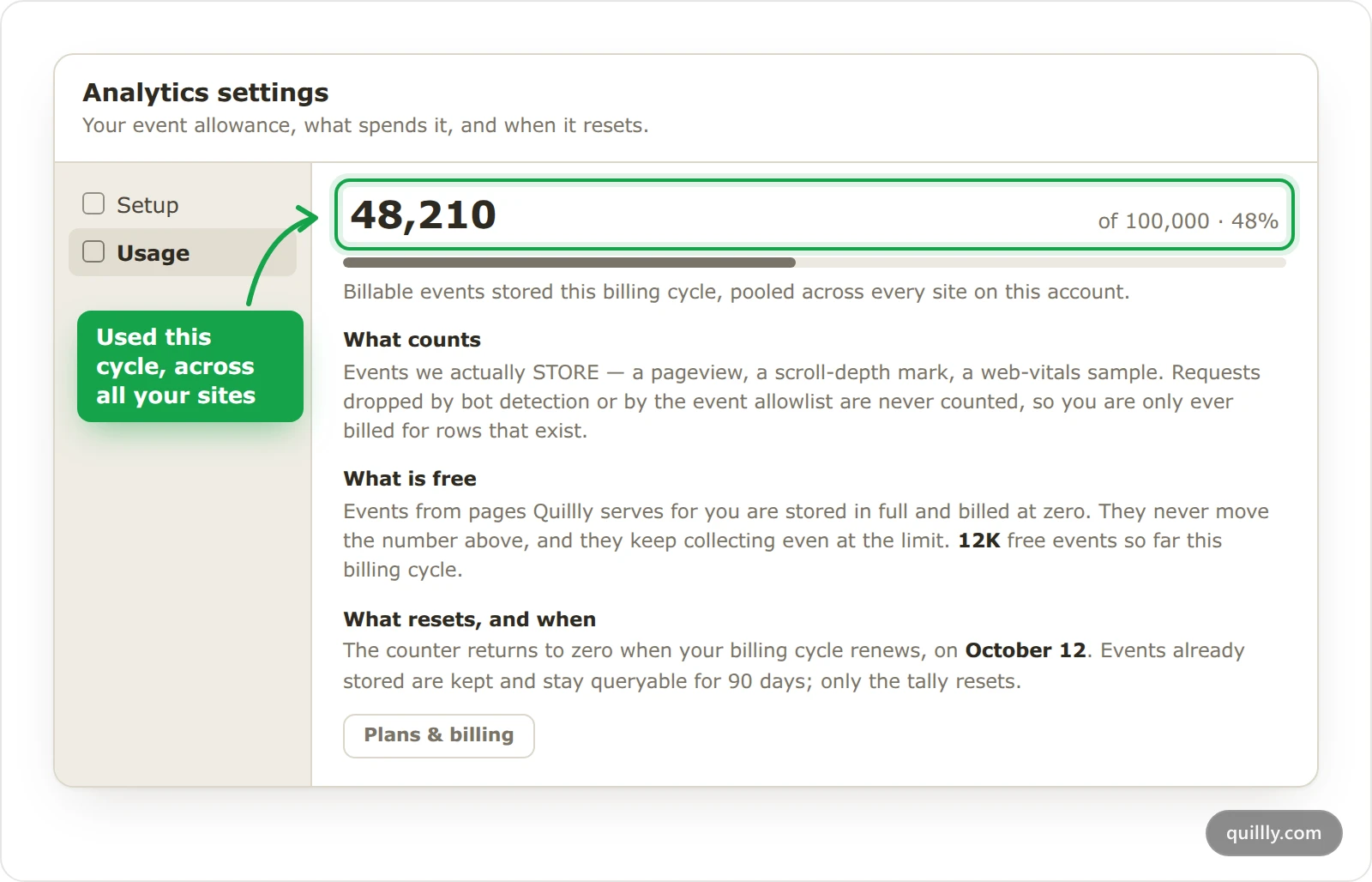
Counts: every event Quillly stores from pages with your tag. That's page views, time on page, Web Vitals samples, goals and
identifycalls.Free: everything from the pages Quillly serves for you, such as your blog and docs. Those events are stored in full, never counted, and keep coming in even at the limit. Crawls and AI assistant fetches are free too.
Never stored: visits from bots, events Quillly rejects, such as a badly formed goal name, and page views on paths you exclude.
Check your usage#
The dashboard shows how close you are to your analytics limits in two places.
Hover the gauge#
In the Analytics header, a small ring sits left of the date range. Hover it to see the share you've used, the events against your allowance and the reset date.
Open the Usage pane#
Click the gear to open Analytics settings, then click Usage. It shows the events used this cycle, what counts, what is free and when the counter resets. Plans & billing takes you to your plan.
When you reach the limit#
At 80%, Quillly emails you, and the gauge turns amber.
At 100%, Quillly emails you again, the gauge turns red, and the page shows Event collection is paused.
While paused, events from your tag aren't stored. Your pages keep working, pages Quillly serves keep collecting, and nothing extra is billed.
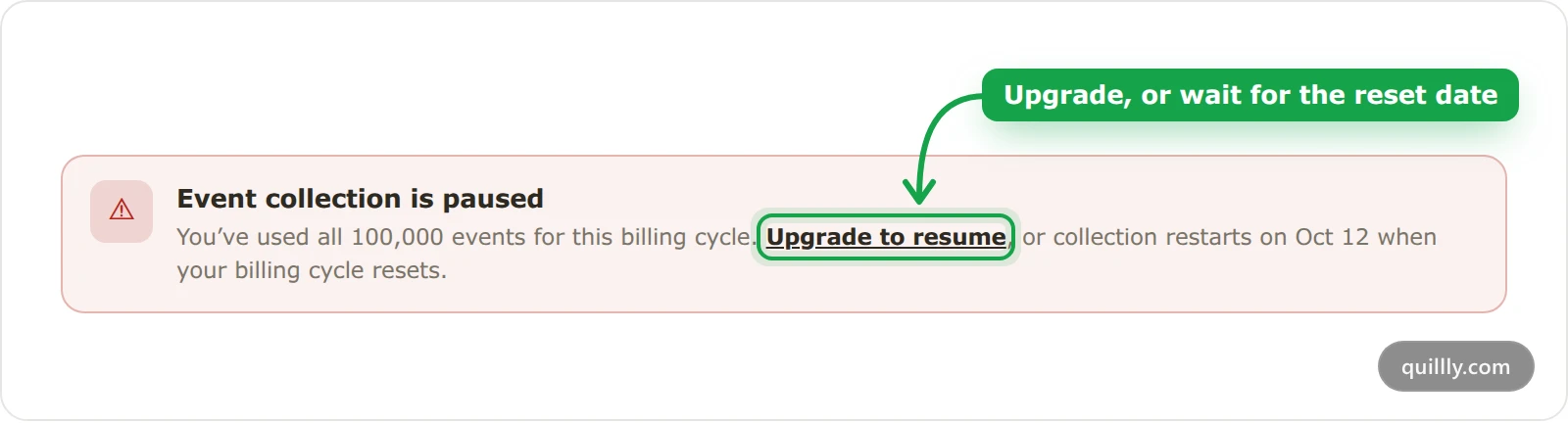
To resume, click Upgrade to resume and pick a larger plan on Billing. Collection restarts right away. Otherwise, it restarts on its own on the reset date the banner shows.
Warning
Events sent while collection is paused are lost. Quillly doesn't store them later, so upgrade before a launch if you expect a spike.
Data retention#
90 days for events, visits and crawls. Quillly deletes them after that, the same span as the longest preset range, 90 days.
Visitor profiles go 90 days after the visitor's last visit.
Kept longer: daily goal totals, and the names, emails and fields you send with
qa('identify', …).
The allowance counter resets every cycle, but stored events stay for their full 90 days, so a reset never wipes your reports.
Exclude traffic from parts of your site#
When your app and your marketing pages share a domain, you may not want your signed-in users counted as visitors. To exclude traffic from those paths, add data-qa-exclude to the tag's script, with a comma-separated list of path prefixes.
<script async src="https://quillly.com/qa.js" data-website="YOUR_WEBSITE_ID" data-qa-exclude="/dashboard,/app"></script>A prefix covers everything under it.
/dashboardexcludes/dashboardand/dashboard/billing, but not/dashboards. Matching compares the page's path, is case-sensitive, and ignores spaces around each entry.On excluded paths, the tag sends no page views, time on page or Web Vitals, so they cost no events.
Goals still count.
qa('goal', …),qa('identify', …)anddata-qa-goalclicks still send from excluded paths, so a signup or a payment inside your app is still recorded.Single-page apps work. The tag checks the path again on every navigation.
data-qa-exclude is a standard HTML data attribute on the script tag, so it goes next to data-website.
You don't need to exclude bots. Quillly drops known bots and headless browsers on its own.
Common questions#
Do pages Quillly serves count toward my analytics limits?#
No. Events from the blog, docs, changelog and news pages Quillly serves are stored in full but never counted. They keep collecting even when your own pages are paused.
How do I stop counting my own visits?#
Quillly has no switch to ignore one browser, and test visits from localhost count like any other. To keep your team's own work out of the numbers, exclude the paths only your team uses with data-qa-exclude.
What happens to my data when a plan ends?#
Collection stops when a trial or plan ends. The data you already have keeps its normal 90-day life, and new events count again once you subscribe.
Related#
Plans, trial and limits: prices, trial and every plan's limits.
Install analytics on your website: where the tag and its attributes go.
Track goals and conversions: the goals that still send from excluded paths.
Read the Analytics dashboard: the numbers your events feed.