Content types and URLs
On this page
- The five content types
- Add a section
- 1. Open the content type under Content
- 2. Pick a path
- 3. Connect the path
- Where each content type lives
- Sitemaps, RSS feeds and llms.txt
- Sitemaps
- RSS feeds
- llms.txt
- The Markdown version of each page
- Where published items go
- Common questions
- Can a website have two blogs or two docs sections?
- Why is there no RSS feed for docs?
- Do changelog entries have their own URLs?
- Can Quillly edit my site pages?
- Related
A Quillly website has five content types: Blog, Docs, Changelog, News and Site pages. This page explains what each one holds, where its pages live on your domain or Quillly subdomain, and the sitemaps, RSS feeds, llms.txt files and Markdown copies that each one serves.
Before you start, you need:
A website in Quillly, on a Quillly subdomain or on your own domain. See Add a website.
For your own domain: access to the server or host that runs it, to add a reverse proxy rule for each new section.
The five content types#
In the dashboard, each content type has its own entry under Content. A section is one content type set up on one website, at one path.
Content type | What it holds | Default path | Written in Quillly |
|---|---|---|---|
Blog | Articles, each on its own page, listed newest first. |
| Yes |
Docs | Product documentation. Folders become the sections of the docs sidebar. |
| Yes |
Changelog | Release notes on one timeline page, with an anchor for each entry. |
| Yes |
News | Stories that cite their sources, filed under categories, with a Google News sitemap. |
| Yes |
Site pages | The rest of your website, read from your sitemap. Quillly tracks and scores these pages but never edits them. | none | No |
A website has at most one section of each content type. Your AI assistant writes into the first four with the same tools, create_content, update_content and publish_content, by setting content_type to blog, docs, changelog or news. Site pages can't be written this way. The MCP tool reference lists every tool.
Add a section#
Open the content type under Content#
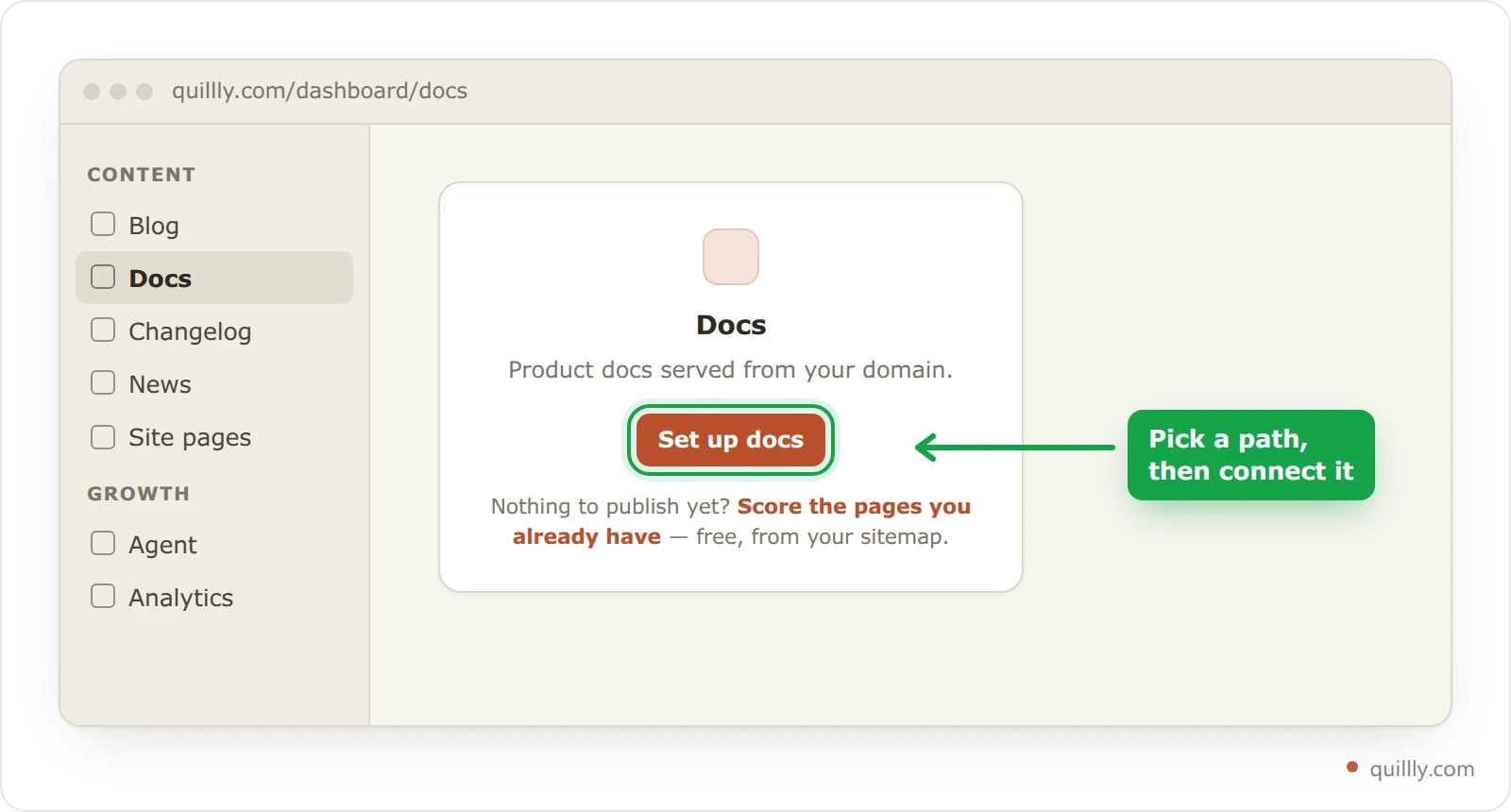
In the sidebar, under Content, click the content type you want, such as Docs. If the website doesn't have that section yet, you see a short card with a button, such as Set up docs.
Pick a path#
Click Set up docs. On Where should your docs live?, keep the suggested path or type another, such as
/help. A path is one segment, so/docs/guideis refused, and two sections can't share a path. Click Continue.Connect the path#
On a Quillly subdomain there's nothing to connect: the screen reads Docs is live, and you can start publishing.
On your own domain, the screen Connect /docs shows the reverse proxy rule for your stack. Add the rule to your server, then click Verify Connection. When the check passes, the section is live. Serve on your own domain has the rule for each stack and what each error means.
Note
Until its check passes, a section on your own domain shows Not connected next to its name. Click that badge to run the check again, or open the gear icon and then Connection to see the rule.
Site pages work differently. Click Track your pages, check the Sitemap path (usually
/sitemap.xml), and click Start tracking. Quillly reads the sitemap and lists every page in it, with no code on your site.
Where each content type lives#
On your own domain, each section sits under its own path, served through its own reverse proxy rule. On a Quillly subdomain there's no proxy: posts sit at the root, and the other sections keep their paths.
Content type | On your own domain | On a Quillly subdomain |
|---|---|---|
Blog |
|
|
Docs |
|
|
Changelog |
|
|
News |
|
|
Site pages | Your own URLs, untouched | Not used |
The paths above are the defaults. If you pick another path, such as /help, it replaces /docs in every URL.
A few content types have extra URLs:
Changelog entries don't get pages of their own. Each entry is an anchor on the timeline, such as
acme.com/changelog#entry-v2-4, and a link toacme.com/changelog/v2-4redirects to it.News has a home page at
/newsand a page for each category, such as/news/product.Docs has a home page at
/docs. It shows a card for each folder once you have two folders or six pages, and opens on your first page until then.
To change a section's path later, open the section, click the gear icon, and edit Path under General. Every item in the section moves to the new path, and internal links follow. On your own domain, update the proxy rule to match, as Serve on your own domain explains.
Warning
Quillly doesn't redirect the old path, because that path is on your server. If people link to the old URLs, add a redirect there. See Redirects and moving to a new domain.
Sitemaps, RSS feeds and llms.txt#
Every content type except Site pages serves files that help search engines and AI assistants find its pages. On your own domain, each file sits under the section's path. On a Quillly subdomain, one file at the root covers most of the site.
File | On your own domain | On a Quillly subdomain |
|---|---|---|
Sitemap |
|
|
RSS feed |
|
|
llms.txt |
|
|
Sitemaps#
A sitemap lists the pages you want search engines to crawl, in the sitemaps.org format. The blog and docs sitemaps list every published page. The changelog sitemap lists the timeline page, dated by its newest entry. The news sitemap follows Google's rules for news sitemaps, so it lists only stories from the last 48 hours.
When a blog, docs or changelog section is connected, Quillly submits its sitemap, and its feed if it has one, to the search engines you connected in website settings. On a Quillly subdomain, it submits /sitemap.xml and /rss.xml.
RSS feeds#
Blog, changelog and news sections each serve an RSS feed of their latest items, which readers can follow and search engines use to find new pages. Docs have no feed, because docs pages change in place rather than arriving in order.
llms.txt#
An llms.txt file is an index written for AI assistants. It lists a section's pages as links, most with a one-line summary. Quillly builds it from your published content, so you never edit it by hand. On a Quillly subdomain, /llms-full.txt also holds the full text of your recent items.
The Markdown version of each page#
Every published post, docs page, changelog and news story also exists as plain Markdown. Add .md to the page's URL:
https://acme.com/blog/launch-week.md
https://acme.com/docs/install.md
https://acme.com/changelog.md
/changelog.md returns the whole timeline, and an entry's own URL with .md, such as /changelog/v2-4.md, returns that entry alone. Index pages such as /blog and /docs have no Markdown version.
A tool can also ask for the normal URL with an Accept: text/markdown header and get the same Markdown back:
curl -H "Accept: text/markdown" https://acme.com/docs/install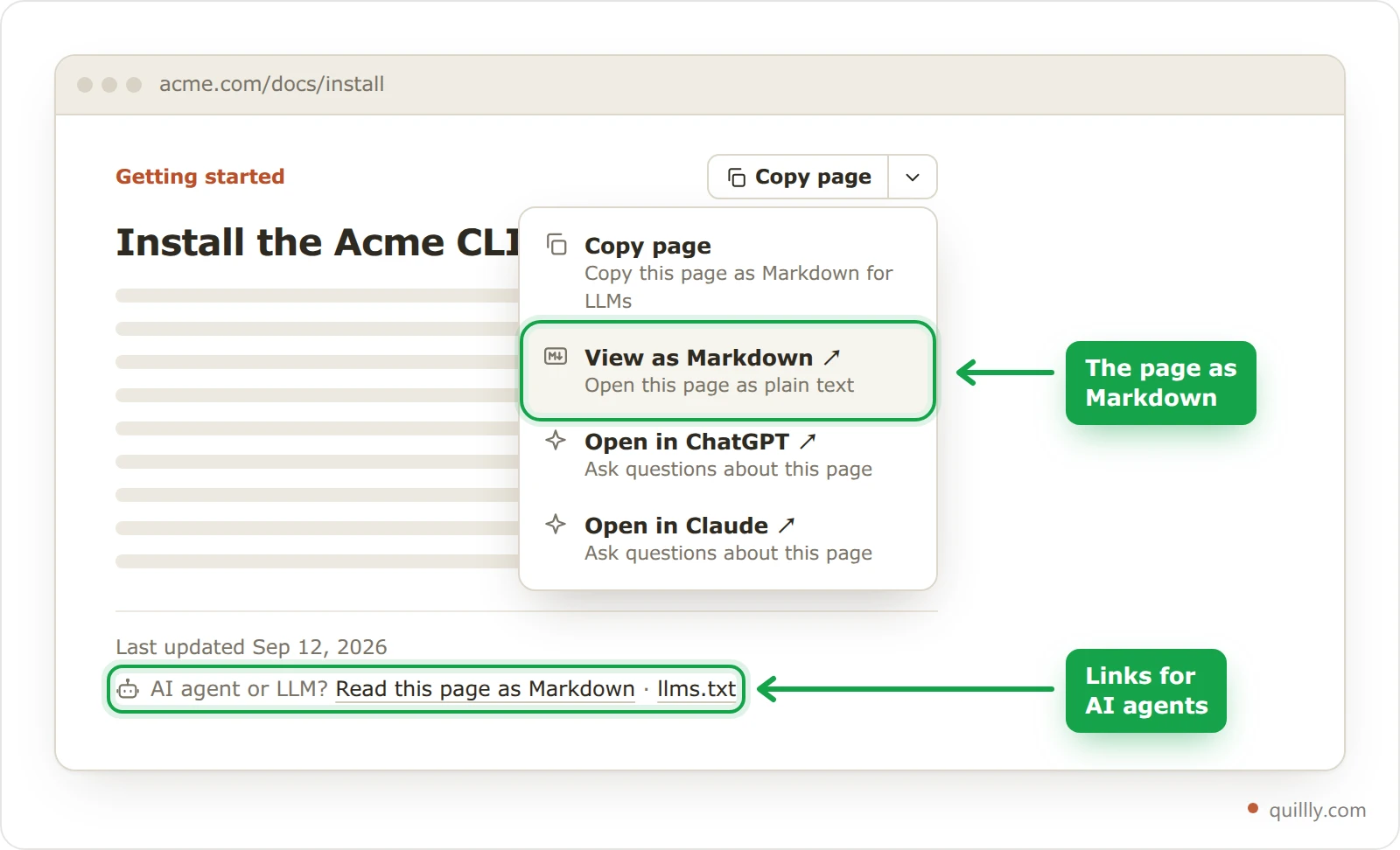
Readers see these copies too. Each docs page has a Copy page button, and its menu adds View as Markdown, Open in ChatGPT and Open in Claude. Every post, docs page and news story ends with the line AI agent or LLM? Read this page as Markdown · llms.txt, and the changelog ends with the same line for the whole timeline.
Where published items go#
By default, Quillly serves each section itself, on your domain or on your Quillly subdomain. A section can instead publish into a platform you already use: WordPress, Ghost, Webflow, Shopify, or a URL of your own through a Webhook.
You choose this for each section. Open the section, click the gear icon, then Publishing, and pick a platform under Publish to. A section that publishes elsewhere needs no reverse proxy rule. Publish into WordPress, Ghost, Webflow or Shopify and Webhook publishing cover the setup.
Common questions#
Can a website have two blogs or two docs sections?#
No. A website has one section of each content type, and each section has one path. Quillly refuses a second section of a content type the website already has.
Why is there no RSS feed for docs?#
Docs pages are reference pages that change in place, so a feed of them would have no useful order. Blog, changelog and news sections each have one.
Do changelog entries have their own URLs?#
Each entry has an anchor on the timeline, such as /changelog#entry-v2-4. A link to /changelog/v2-4 redirects there, and /changelog/v2-4.md returns that entry as Markdown.
Can Quillly edit my site pages?#
No. Quillly reads Site pages from your sitemap, then tracks and scores them. You change them on your own site.
Related#
Add a website: choose a Quillly subdomain or your own domain.
Serve on your own domain: the reverse proxy rule for each stack.
MCP tool reference: the tools your AI assistant uses to write each content type.
What is Quillly: what runs on your domain and what runs on quillly.com.
Publish into WordPress, Ghost, Webflow or Shopify: send a section's items to a platform you already use.
Import existing posts: fill your Blog from another platform.