The SEO score
On this page
- How the SEO score is calculated
- Where you see the score
- The categories and their weights
- What changes for each content type
- Score caps
- The minimum publish score
- Broken links block publishing
- Raise a score
- 1. Get the fixes
- 2. Apply them in one update
- 3. Check again
- Common questions
- Why did a score change when nobody edited the page?
- Can I publish under 85 from the dashboard?
- Why does my docs page score 0 on Featured Image?
- Does a high score mean the page will rank?
- Related
Quillly gives every blog post, docs page, changelog entry and news story an SEO score from 0 to 100. This page explains what the Quillly SEO score measures, how each content type is weighted, what caps a score, where the minimum publish score of 85 applies, and how to raise a low score.
How the SEO score is calculated#
Each category rates the page from 0 to 100 and carries a weight. The Quillly SEO score is the weighted average of those ratings, rounded. Then the score caps apply: when a foundation is missing, the score can't go above a set number, however good the rest is.
Each category also gets a status: pass, warning or fail. The grade runs from A+ at 95 and above down to F below 40, and 85 is an A-.
Where you see the score#
In each content list, the SEO column shows the score saved with each page. Sort by it to find the weakest pages.
In the editor, the SEO pill in the top bar changes as you type. Click it to open the Properties panel at its SEO section: the score, the grade, one row per category with the points it earns, and an Issues list.
Your AI gets the score back from
create_content,update_contentandcheck_blog_seo.
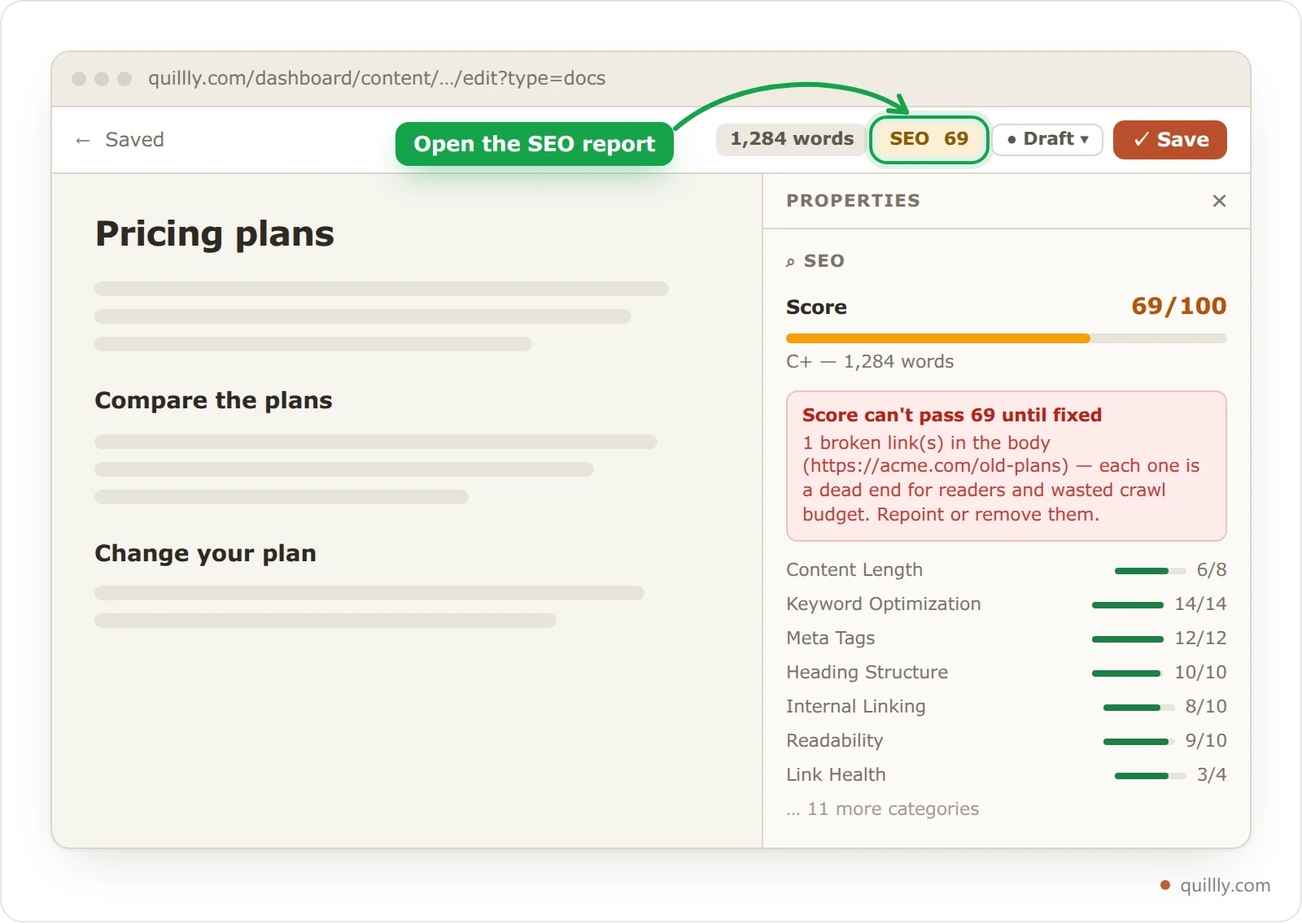
The number turns green at 70. Green doesn't mean a page can go live, though: your AI can't publish below 85 unless you changed the floor.
The categories and their weights#
Quillly has 21 categories. A blog post is scored on 20 of them, a news story on 20, a docs page on 18 and a changelog entry on 17. These 17 apply to every content type:
Category | Weight | What it checks |
|---|---|---|
Keyword Optimization | 14 | The primary keyword in the title, the first 150 words and a subheading, at 0.5% to 2.5% density. Every declared keyword used. |
Meta Tags | 12 | A meta title of 50 to 60 characters and a description of 120 to 155, both with the primary keyword. |
Heading Structure | 10 | An H2 at least every 400 words, and no skipped levels. |
Internal Linking | 10 | 2 links to your own pages, 3 from 1,200 words and 4 from 2,500, with varied link text. |
Readability | 10 | Short sentences and paragraphs, transition words, little passive voice. |
Image Optimization | 10 | Alt text on every picture, a picture at least every 500 words, and vertical diagrams. |
FAQ Structure | 10 | Each FAQ question has its own heading and answer. |
Content Length | 8 | The word count, on the content type's scale. |
External Sources | 8 | 2 links to other sites or citations, 3 from 1,500 words. |
Content Structure | 7 | An opening of 30 words or more, a summary section, lists and bold terms. |
Agent Readiness | 6 | Descriptive link text, no bare URLs, tables with a header row. |
URL / Slug | 4 | A short slug with the primary keyword. |
Featured Snippets | 4 | An FAQ, steps or question headings, structured data, answers of 40 to 60 words. |
E-E-A-T Signals | 4 | Sources, numbers, your brand name, experience and a date. |
Link Health | 4 | Broken or malformed links. |
Internal Link Validation | 4 | Links to your pages use a real slug and path. |
Redundant Metadata | 3 | No date stamp, byline, reading time or H1 at the top of the body. |
These four apply only to some content types:
Category | Weight | What it checks |
|---|---|---|
News Integrity | 12 | News only. Cited sources, a dek, a category, and a headline of 110 characters or fewer. |
CTA Presence | 8 | Blog only. 1 call to action under 800 words, up to 4 in long posts, one in the final third. |
Featured Image | 6 | Blog, docs and news. A usable featured image: the first regular image in the body. |
Web Story | 6 | Blog and news. A published Web Story that scores 70 or more. |
What changes for each content type#
Blog SEO scoring is the strictest profile. The other types drop the checks that don't fit them, and changelog and news weigh some categories less.
Blog | Docs | Changelog | News | |
|---|---|---|---|---|
Full marks for length | 2,500 words | 2,500 words | 60 words | 400 words |
FAQ needed from 800 words | Yes | No | No | No |
Keyword caps | Yes | Yes | No | No |
Featured image cap | Yes | No | No | Yes |
Lighter weights | None | None | Keyword Optimization 4, External Sources 2, Image Optimization 4, Featured Snippets 2, E-E-A-T Signals 2 | Keyword Optimization 6, Internal Linking 5, FAQ Structure 4 |
Blog posts and docs pages share one length scale: 1,800 words earns 90, 1,200 earns 75 and 800 earns 55.
Score caps#
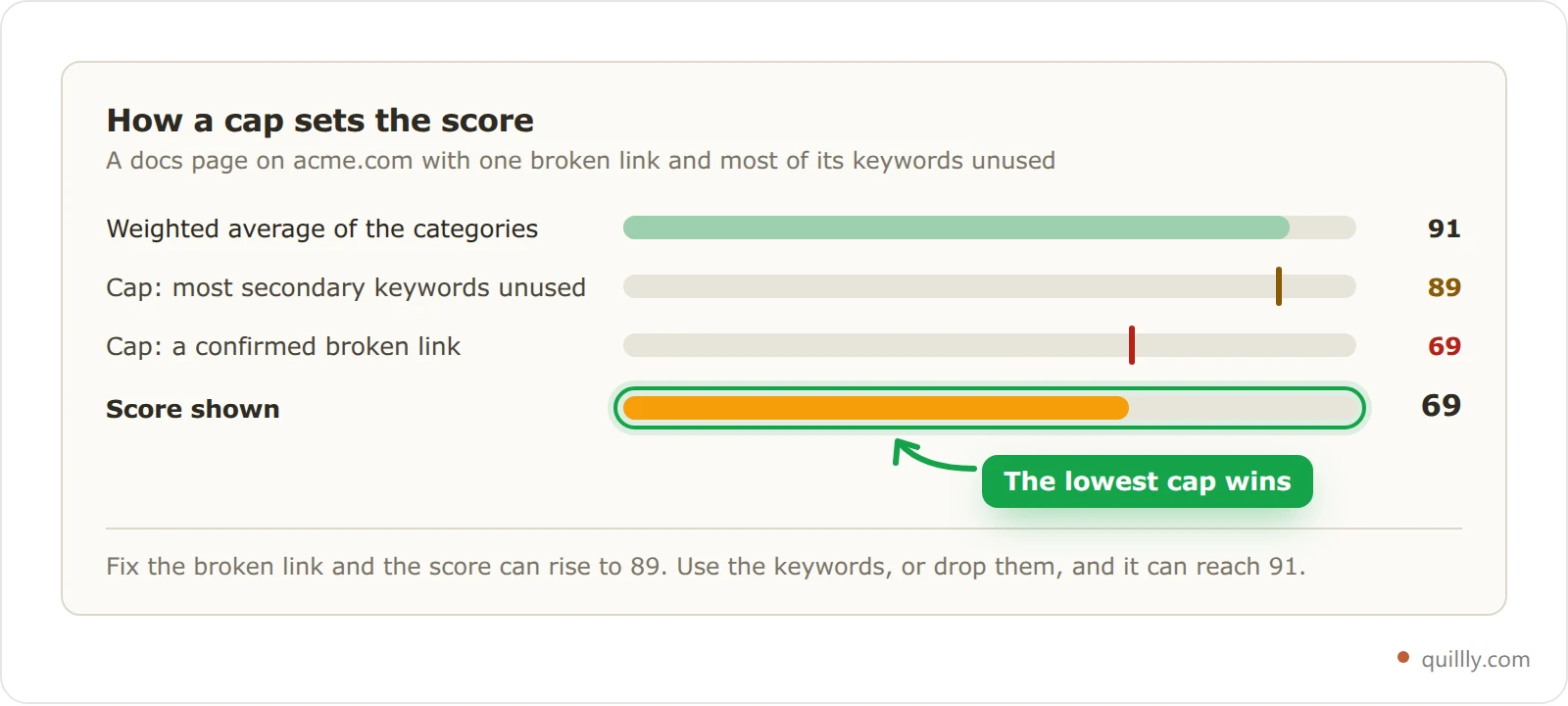
Cap | When it applies | Content types |
|---|---|---|
59 | The story cites no sources | News |
69 | The page has no target keywords | Blog, docs |
69 | The body has a confirmed broken link | All |
79 | The keywords barely appear in the title, headings and body | Blog, docs |
84 | There is no featured image | Blog, news |
84 | There is no call to action | Blog |
89 | More than half of the secondary keywords never appear | Blog, docs |
When several caps apply, the lowest one wins. The editor shows them in red, such as Score can't pass 69 until fixed, with the reason. A missing Web Story never caps a score; it costs its weight and nothing more.
The minimum publish score#
Each website has a minimum publish score, 85 unless you change it. It applies when your AI publishes:
publish_contentrefuses the page and names its weakest categories.create_contentwith the statuspublishedsaves the page as a draft instead.bulk_update_contentskips each page under the floor and says why.
Autopilot publishes through publish_content, so its drafts need the score too. Choosing Published in the dashboard doesn't check the score.
To publish under the floor anyway, tell your AI to. It passes force: true, which skips the score check and nothing else. To move the floor, ask your AI to set min_publish_score with update_website_settings, from 0 to 100, or null to go back to 85. The dashboard has no setting for it.
Note
The floor reads the score saved with the page. After you edit a page in the dashboard, ask your AI to run check_blog_seo before it publishes, so the saved score is current.
Broken links block publishing#
Before a page goes live or is scheduled, Quillly checks every link in it. A broken link stops the page, whether you publish from the dashboard or your AI calls publish_content, and force doesn't skip this check. A link counts as broken when:
another site answers 404 Not Found or 410 Gone, its domain doesn't exist, or it refuses the connection;
it points at one of your own pages that was deleted.
Slow sites, logins and bot walls count as working, and links inside code aren't checked. A broken link also caps the score at 69 until it's gone from the page. Quillly re-checks the outside links on your pages every 14 days, so a page that was fine at launch can pick up the cap later. Internal links and broken links shows how to find and fix them.
Raise a score#
Your AI does this best, because it can read the fixes and rewrite the page in one go.
Get the fixes#
Ask your AI for the SEO patches, for example: "Get the SEO patches for the pricing page and apply them." It calls
get_blog_seo_patches, which lists the failing categories, biggest gain first, with suggestions for each, then the passing categories still below 90.Apply them in one update#
The AI writes the edits itself and applies them all in one
update_contentcall. The suggestions describe what to change; they aren't ready-made text. The response carries the new score and any cap still in force.Check again#
check_blog_seoscores the page again and saves the result. If it's still under the floor, clear any cap first, because the points each fix promises ignore caps. Then take the next biggest gain.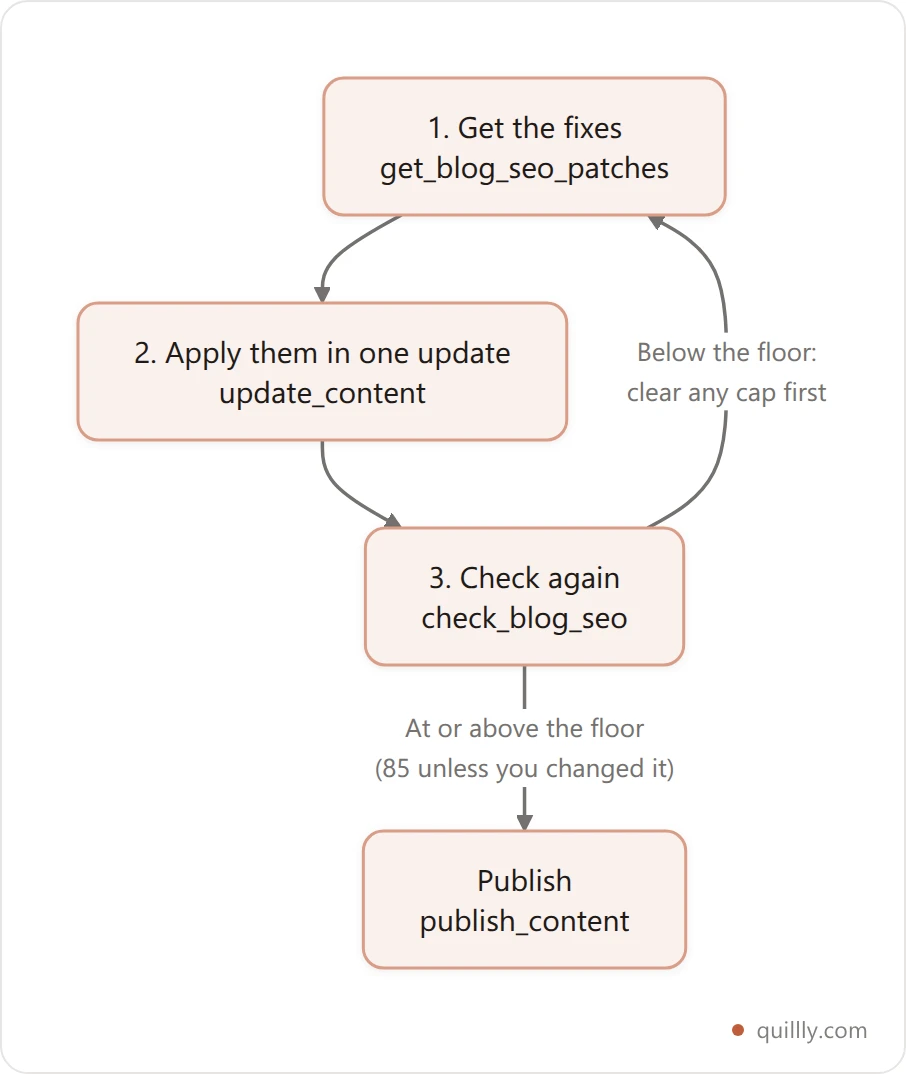
Without an AI, open the page in the editor, click the SEO pill and work through the Issues list. The score updates as you type.
Common questions#
Why did a score change when nobody edited the page?#
The score also reads things outside the text: a link that broke since the last check, a Web Story you published or took down, and changes to the scoring itself. When the scoring changes, a daily job re-scores older pages. On 24 September 2026, changelog entries moved to their own profile, so their scores rose.
Can I publish under 85 from the dashboard?#
Yes. The score floor applies only when your AI publishes, Autopilot included. The dashboard still refuses a page with a broken link. On your own domain, a docs or changelog page also waits until its section's reverse proxy passes its check.
Why does my docs page score 0 on Featured Image?#
A docs page earns that category only with a regular Markdown image in the body. Pictures drawn with an image: fence don't set a featured image. On docs pages the category costs its weight but never caps the score, so a page without a regular image can still score in the 90s.
Does a high score mean the page will rank?#
No. The score checks the page itself: structure, keywords, links and metadata. Ranking also depends on whether search engines index the page, on the competition for the query and on your site's authority. Google's guide to helpful, people-first content explains what else counts.
Related#
Publishing: statuses, scheduling and review: every check that runs before a page goes live.
Internal links and broken links: how Quillly finds dead links.
Changelog and release notes: writing entries for the changelog profile.
MCP tool reference:
check_blog_seo,get_blog_seo_patchesand the other SEO tools.Search performance and the Focus list: whether your pages rank, and for which keywords.