Deploy hook: keep tracked pages fresh
On this page
The deploy hook lets your deploy pipeline tell Quillly that your site just changed. Quillly then reads your sitemap and re-checks your Site pages at once, instead of at its daily run. At the end, every deploy triggers that re-check on its own.
Before you start, you need:
A Site pages section that tracks your sitemap. Site pages shows how to set one up.
Access to your deploy pipeline, such as GitHub Actions, and a place in it to store secrets.
Set up the deploy hook#
Copy the deploy hook URL#
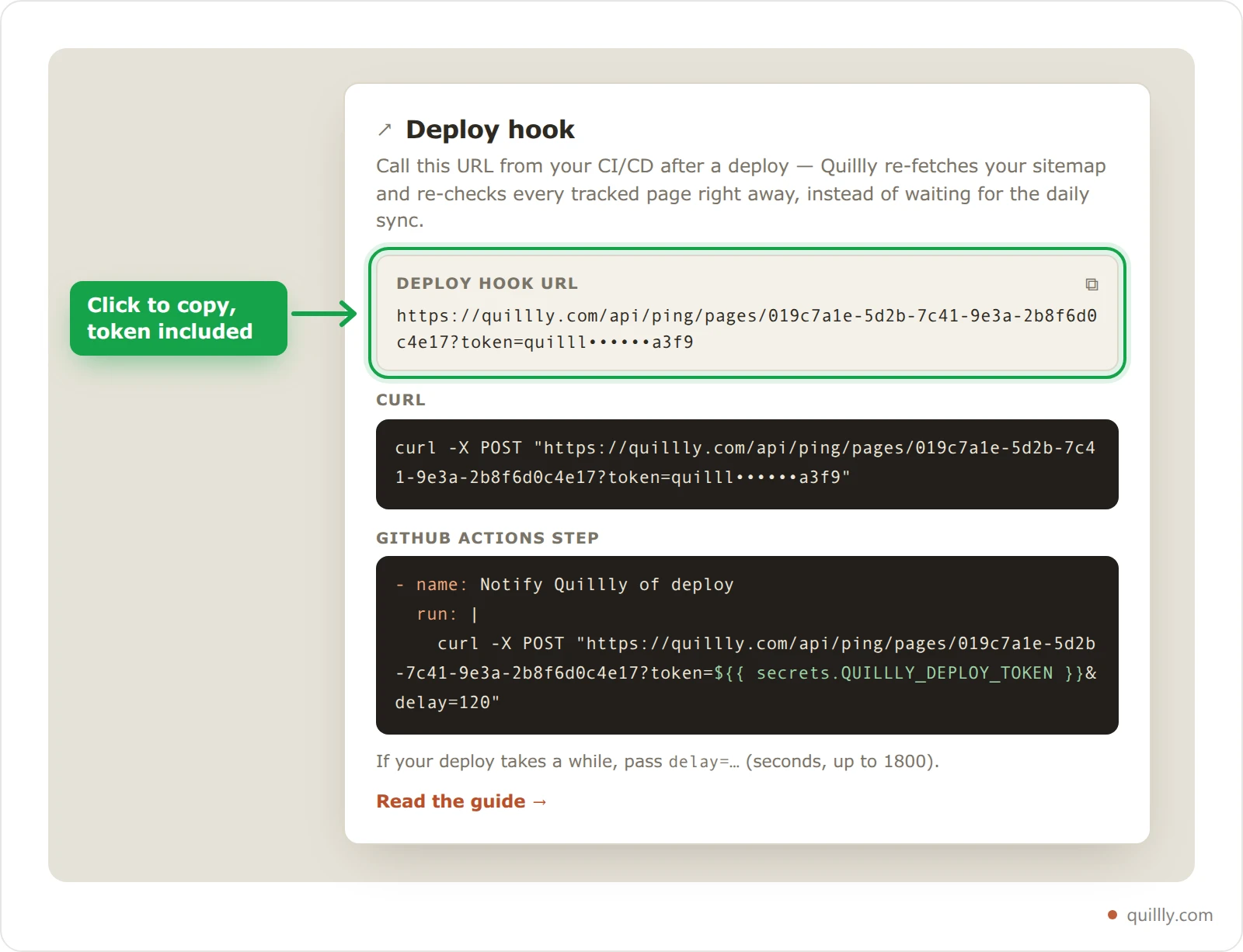
Open Site pages and click Deploy hook. The dialog shows the Deploy hook URL, a curl command and a GitHub Actions step. The token is masked on screen, but clicking the URL or the curl block copies it in full.
Store the token as a secret#
The token is the part of the URL after
token=. Save it in your pipeline's secrets, for example as a GitHub Actions secret namedQUILLLY_DEPLOY_TOKEN, rather than in your repository.Call the hook after your deploy#
Add the step from the dialog at the end of your deploy job. It looks like this, with your own website ID:
yaml- name: Notify Quillly of deploy run: | curl -X POST "https://quillly.com/api/ping/pages/<websiteId>?token=${{ secrets.QUILLLY_DEPLOY_TOKEN }}&delay=120"Any other pipeline works the same way, as long as it can send a
POST. You can pass the token in a header instead of the URL:bashcurl -X POST "https://quillly.com/api/ping/pages/<websiteId>?delay=120" \ -H "Authorization: Bearer $QUILLLY_DEPLOY_TOKEN"Check that it ran#
The call answers
202at once, and the run happens in the background. In Site pages, new pages appear and changed pages show Submitted again.
What a run does#
Each run works like the daily run:
It reads your sitemap and adds new pages, which then get a quality score.
It sends new pages, and pages whose
lastmoddate changed, to IndexNow, up to 50 per run.It compares the content of up to 25 pages, starting with those checked longest ago, and sends the changed ones to IndexNow.
It marks pages that left your sitemap as Left sitemap.
A run doesn't redo the quality check of a changed page. Click Quality check all in Site pages for that. It also sends nothing to Google, which reads your sitemap on its own schedule.
Parameters#
Send them in the query string or in a JSON body. When both have one, the query string wins.
Parameter | Values | What it does |
|---|---|---|
| Your deploy token. | Proves the call comes from you. Or send |
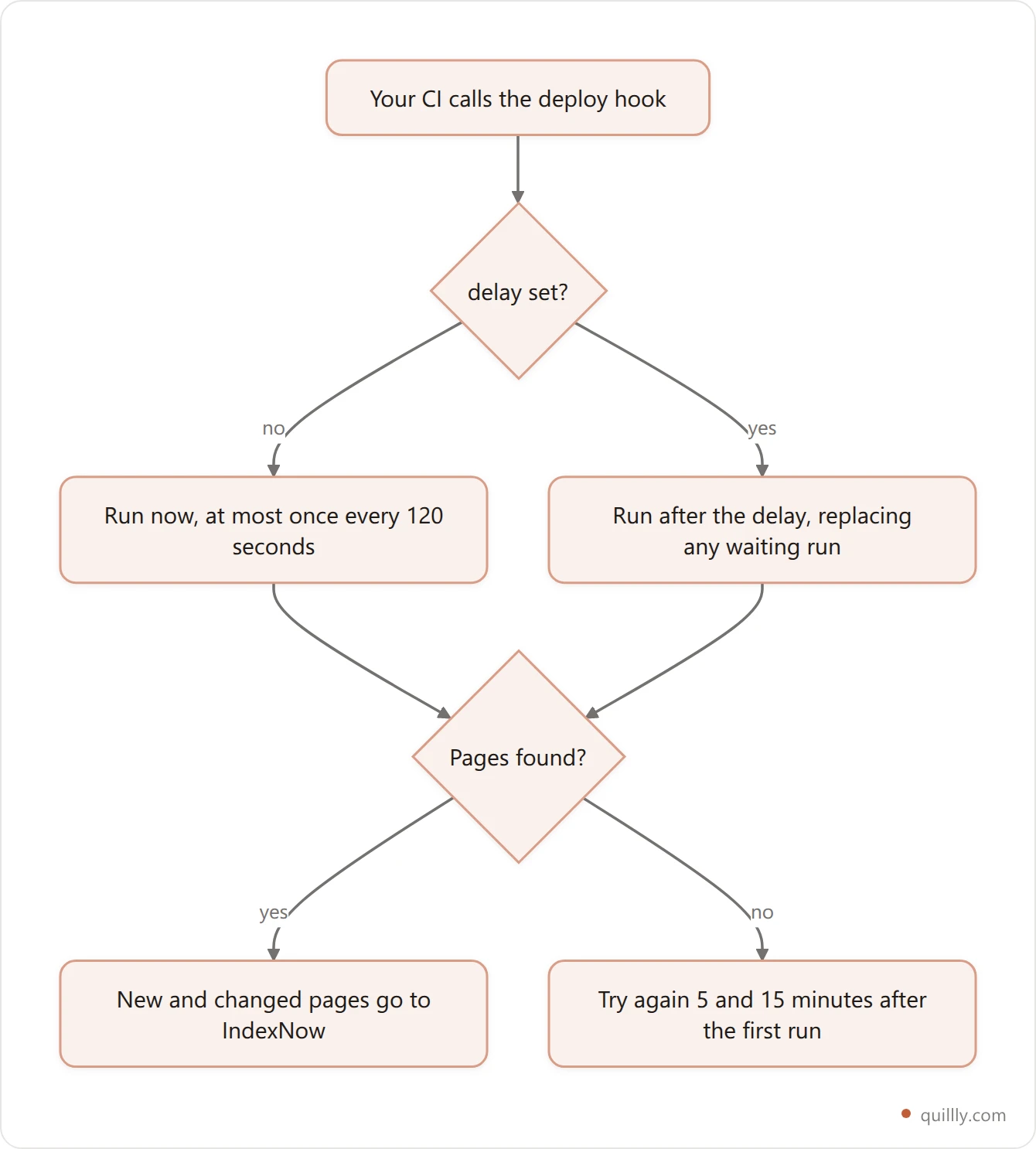
| 0 to 1800 seconds. The default is 0. | Waits this long before the run, for deploys that take a while to go live. Higher values count as 1800. |
| On by default. | When a run finds no pages in your sitemap, for example because the site is still deploying, Quillly tries again 5 minutes later. If it still finds none, it tries once more 15 minutes after the first run. |
Set delay to the time between your pipeline finishing and the new pages being live, including any CDN cache purge. If your pages go live in seconds, leave it out.
Responses and limits#
Status | When |
|---|---|
| The run is queued. The body gives |
| The website has no Site pages section with a sitemap, so |
| The token is wrong. The body says Provide the site deploy token or sign in as the owner. |
| The owner's plan has lapsed, so the website's service is paused. |
| No website has that ID. |
| An immediate run started less than 120 seconds ago. |
A call without delay starts a run at once and blocks further immediate calls for 120 seconds. A call with delay has no such limit: it replaces any run still waiting for the website, so ten quick deploys lead to one run.
Warning
Anyone with the token can start a run for your website. A run only re-reads your public sitemap and pages, but keep the token in a secret. The dashboard has no way to change it.
Common questions#
Do I need the deploy hook?#
No. Quillly re-reads your sitemap every day at 05:00 UTC. The hook makes the re-check happen right after a deploy instead.
Is there a button for this in the dashboard?#
Yes. Refresh in Site pages starts the same run without a token. Only the website's owner can use it, once every 2 minutes.
Why did my call get 429?#
Another immediate run started less than 2 minutes before. Wait, or add delay to your call.
Related#
Site pages: track and score the pages you already have: the pages the hook re-checks.
Indexing: how your pages reach search engines: what happens after a page goes to IndexNow.
Webhook publishing: the other direction, where Quillly calls your server when you publish.