MCP tool reference
On this page
- How to read this MCP tool reference
- Websites and account
- Content
- SEO and research
- Agent planning
- Analytics
- Directory Submission
- Earning
- Change what your AI can use
- Old tool names
- Common questions
- Why does my AI not see a tool from this page?
- What happens when my AI calls a tool it cannot use?
- Do the research tools use my calls a day or my credits?
- Related
This MCP tool reference covers every tool Quillly gives your AI: what each one does, whether it reads or writes, which plan includes it and the lowest team role that can use it. Your AI picks MCP tools by itself, so use this page to see what it can do and where to limit it.
How to read this MCP tool reference#
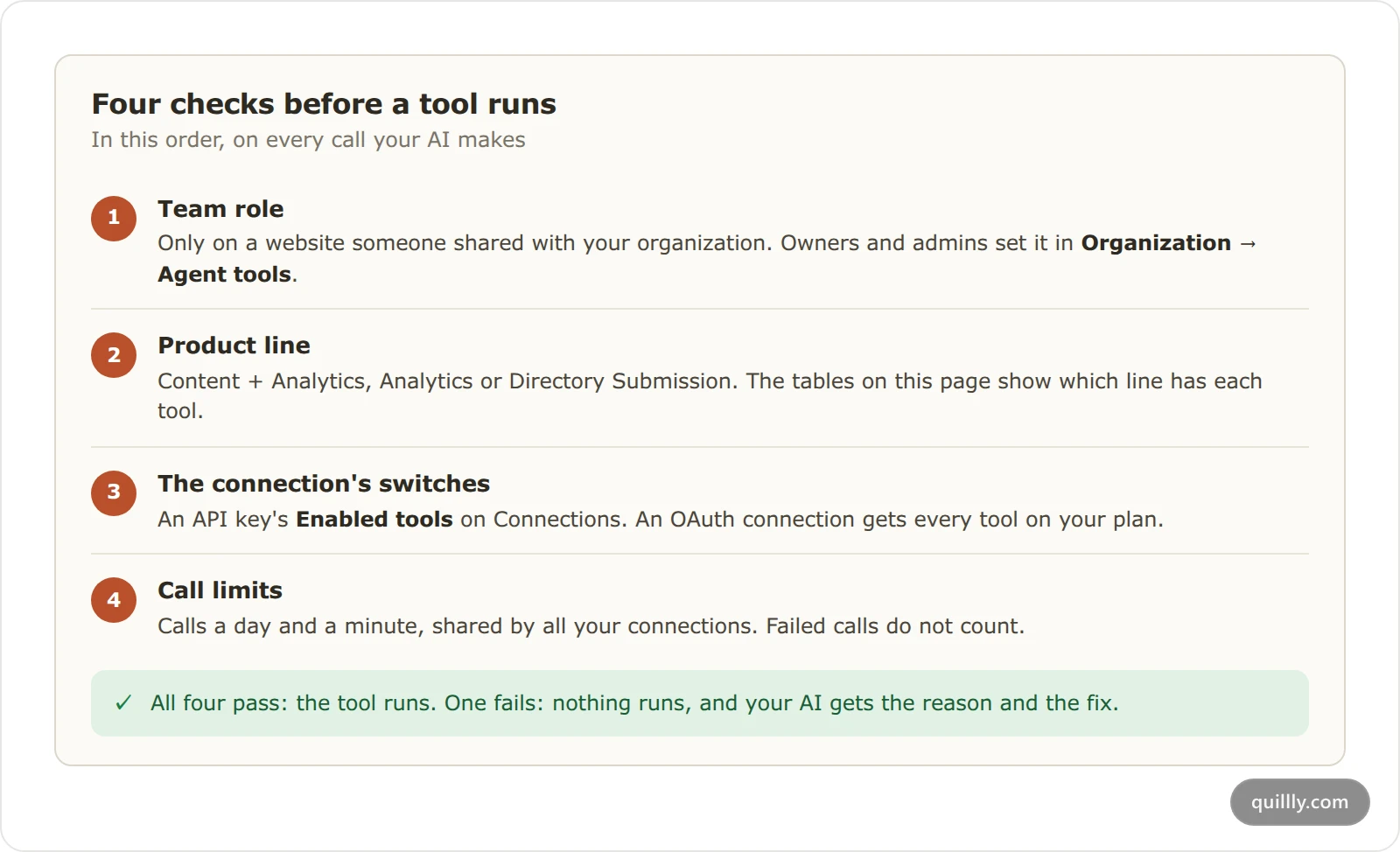
Plan. Each section names the plans that include its tools. Content + Analytics plans and the 14-day trial get up to 61 tools. Analytics plans get 15: the website, feedback, Analytics and Directory Submission tools. When a trial ends without a plan, 11 remain: the website, feedback and Directory Submission tools.
Reads or writes. The read-only label Quillly gives each tool, MCP's
readOnlyHint. Apps such as ChatGPT use it to decide which calls need your OK (OpenAI's developer mode guide). A few lookups carry the write label because they save what they find, such ascheck_page_seo.Lowest role. The lowest team role that can use the tool by default, on a website someone shared with your organization. On your own websites, your plan decides. Roles go from Viewer to Writer, Editor and Admin, and the organization's owner can use every tool.
MCP tools outside your plan, and those switched off for the connection, are left out of your AI's list. Every call that succeeds counts toward your calls a day, reads included.
Websites and account#
Plan: every account, including after a trial ends.
Tool | What it does | Reads or writes | Lowest role |
|---|---|---|---|
| Lists your websites and the content types each one has. | Reads | Viewer |
| Shows one website's settings, search engines and Domain Rating. | Reads | Viewer |
| Changes a website's theme, fonts, branding, SEO settings and the limits every session follows, such as the weekly limit on new posts. | Writes | Admin |
| Screenshots a public web page and stores the image on your website. | Writes | Viewer |
| Sends a bug report or a suggestion to the Quillly team. Not counted in your limits. | Writes | Writer |
| Records your answer to Quillly's one-time rating question. Not counted in your limits. | Writes | Writer |
On a shared website, update_website_settings needs Edit site settings on Websites, which only admins have by default. Inside one call, the theme and fonts also need Change theming and CSS on Brand, and the name, logo and menus need Edit copy and images, as Team roles and access explains.
Content#
Plan: Content + Analytics and the trial.
Tool | What it does | Reads or writes | Lowest role |
|---|---|---|---|
| Lists posts, docs pages, changelog entries or news, with scores and public URLs. | Reads | Viewer |
| Reads one item in full, with its score, keywords and indexing. | Reads | Viewer |
| Creates an item. It is saved as a draft unless your AI asks to publish. | Writes | Writer |
| Edits an item with find-and-replace patches or a rewrite, then scores it again. | Writes | Writer |
| Puts an item live, or schedules it, if it passes the publish checks. | Writes | Editor |
| Takes a live item back to draft. Its URL then returns "not found". | Writes | Editor |
| Takes an item off your site without deleting it, so you can restore it. With | Writes | Editor |
| Deletes an item for good. A writer can delete only their own unpublished drafts. | Writes | Writer |
| Copies an item as a new draft. | Writes | Writer |
| Creates up to 10 drafts in one call. | Writes | Writer |
| Moves up to 50 items between folders, or changes their status, in one call. | Writes | Editor |
| Builds, checks, publishes or removes an item's Web Story. | Writes | Writer |
| Finds Unsplash photos, with the credit line to paste under them. | Reads | Writer |
| Searches Google Fonts and suggests pairings. | Reads | Viewer |
| Shows your folders as a tree. | Reads | Viewer |
| Creates a folder, inside another one if you like. | Writes | Writer |
| Renames, recolors or moves a folder. | Writes | Writer |
| Deletes a folder. Its items move up a level, and nothing is deleted. | Writes | Editor |
| Audits your Site pages for technical SEO problems, with a fix for each. | Reads | Viewer |
| Explains why pages are not indexed on Google, Bing or Yandex, and how to fix it. | Writes | Viewer |
| Asks a search engine to check a fix again, like the Validate fix button in Search Console. | Writes | Admin |
| Lists the feeds and news APIs your news section uses, and whether each works. | Reads | Viewer |
| Lists new stories from those sources. | Reads | Viewer |
| Lists what was published on your websites since a given time. | Reads | Viewer |
SEO and research#
Plan: Content + Analytics and the trial. Research tools spend research credits, and repeating a lookup within 14 days costs nothing.
Tool | What it does | Reads or writes | Lowest role |
|---|---|---|---|
| Scores an item from 0 to 100 across 14 categories. | Reads | Viewer |
| Reads the last score without checking again. | Reads | Viewer |
| Lists the fixes for an item, with the points each one adds. | Reads | Viewer |
| Shows one item's search queries, clicks and positions, and keywords close to page 1. | Reads | Viewer |
| Sums up SEO health across a website, including broken internal links. | Reads | Viewer |
| Lists every item with its score and top fixes, worst first. | Reads | Viewer |
| Scores your Site pages. With | Writes | Viewer |
| Suggests links from an item to your other posts and docs pages. | Reads | Writer |
| Finds search volumes and related keywords. Google figures cost 1 credit and come sorted by | Reads | Writer |
| Shows Google's live top 10 for a keyword, how strong each site is, and | Reads | Writer |
| Lists keywords a competitor ranks for and you do not. 5 credits. | Reads | Admin |
| Finds pages to pitch for links, from a competitor's backlinks. 15 credits. | Reads | Admin |
| Saves keywords to Keyword targets on Focus list. Free. | Writes | Writer |
| Reads your keyword targets with their | Reads | Viewer |
| Saves link prospects to Outreach targets on Focus list. Free. | Writes | Writer |
| Reads your outreach targets and their status. Free. | Reads | Viewer |
Agent planning#
Plan: Content + Analytics and the trial.
Tool | What it does | Reads or writes | Lowest role |
|---|---|---|---|
| Returns the session brief: the plan, the limits, the writing rules and your notes. | Reads | Viewer |
| Finds posts to improve: thin, stale, low-scoring or close to page 1. Its | Reads | Viewer |
| Reads Agent Notes left by earlier sessions and by you. | Reads | Viewer |
| Adds, edits or resolves a note in Agent Notes. | Writes | Writer |
Analytics#
Plan: Analytics plans, Content + Analytics and the trial.
Tool | What it does | Reads or writes | Lowest role |
|---|---|---|---|
| Reads visitors, sources, top pages, countries, goals and conversions, and checks your tracker. | Reads | Viewer |
| Reads clicks, impressions, positions and top queries from every connected search engine, with Google's announced updates and any site-wide drop. | Reads | Viewer |
| Lists, creates, edits or deletes goals, and marks goals as conversions. | Writes | Admin |
| Builds funnels of 2 to 8 steps and works out where visitors drop off. | Writes | Admin |
Directory Submission#
Plan: every account, including after a trial ends.
Tool | What it does | Reads or writes | Lowest role |
|---|---|---|---|
| Reads your submission kit, the answers directory forms ask for, and what is missing. | Reads | Viewer |
| Writes or improves the kit's text. You add the logo and screenshots in the dashboard. | Writes | Editor |
| Lists the directories, with each one's Domain Rating and your status there. | Reads | Viewer |
| Records or schedules a submission, or marks it Needs attention. | Writes | Admin |
| Shows your scheduled launches, day by day. | Reads | Viewer |
Earning#
Plan: Content + Analytics and the trial. These tools appear only when the Earning menu is in your dashboard, and they use your own Amazon connection from Earning → Amazon.
Tool | What it does | Reads or writes | Lowest role |
|---|---|---|---|
| Searches Amazon and returns product links with your affiliate tag. | Reads | Writer |
| Looks up up to 10 Amazon products by ASIN. | Reads | Viewer |
Change what your AI can use#
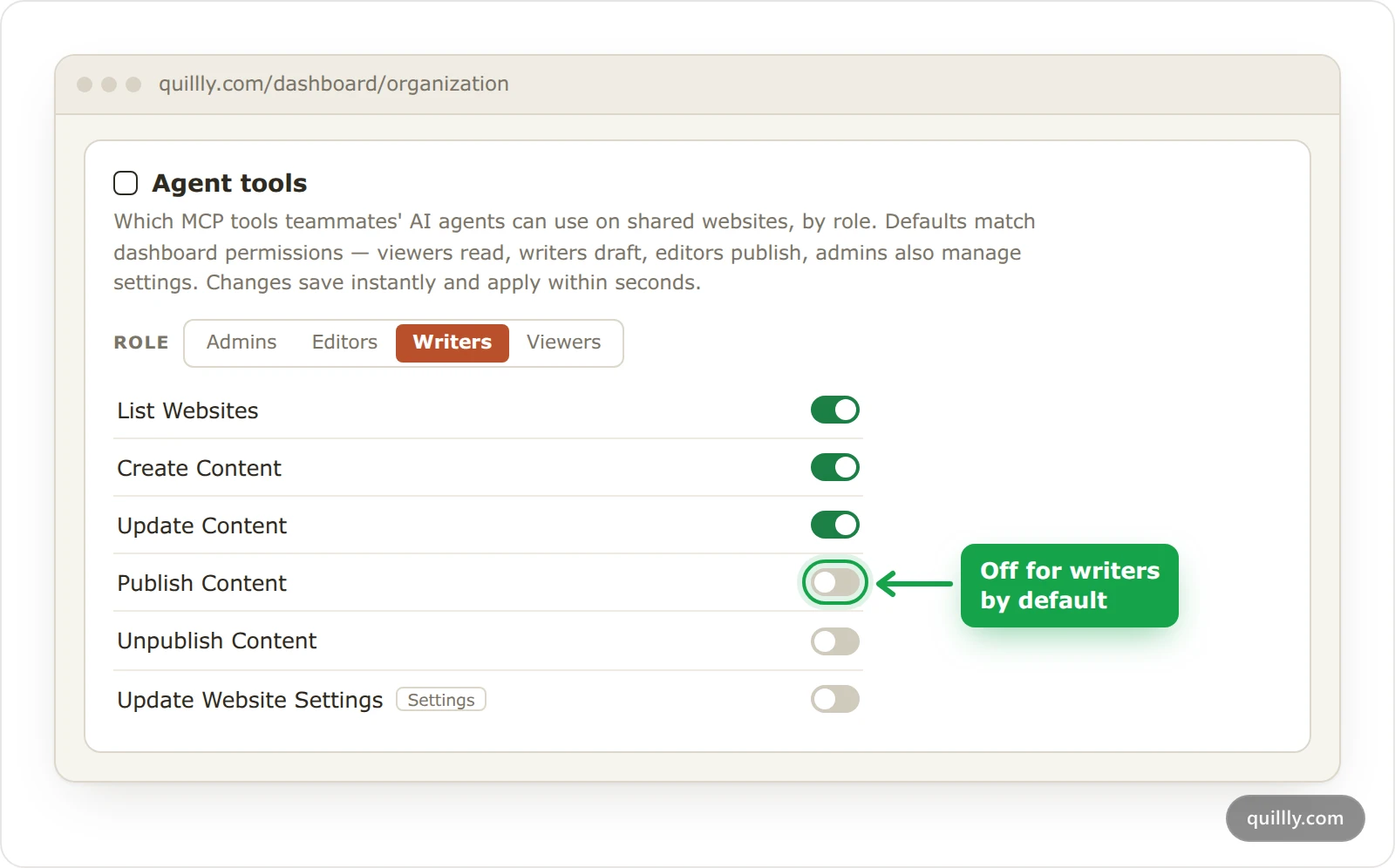
You can switch off any tool in this MCP tool reference, for one connection or for a whole team role:
For one connection: open it on Connections and switch tools off under Enabled tools. API keys, OAuth and tool access shows how.
For a team role: the owner or an admin opens Organization, then Agent tools, picks a role and switches tools on or off. A tool switched off there stays off, whatever a teammate's key allows.
Note
Switches choose tools, not rights. Even with a tool switched on, a writer can change only the content they wrote, and a viewer cannot change content at all.
Old tool names#
Some tools were renamed when docs and changelogs arrived. The old names are left out of this MCP tool reference, but they still work. list_blogs, get_blog, create_blog, update_blog, publish_blog, unpublish_blog, delete_blog, duplicate_blog and archive_blog run the matching _content tool. bulk_create_blogs and bulk_update_blogs run bulk_create_content and bulk_update_content.
Common questions#
Why does my AI not see a tool from this page?#
It is switched off for the connection, it is outside your plan, or your organization turned it off for your role. Earning tools also need the Earning menu. Open the connection on Connections to see its Enabled tools.
What happens when my AI calls a tool it cannot use?#
Nothing runs. Quillly answers with the reason and the fix, such as the plan that includes the tool or where to switch it on, and your AI passes it on to you.
Do the research tools use my calls a day or my credits?#
Both. Each call that succeeds counts toward your calls a day, and the research tools also spend the credits shown in the table.
Related#
Connect your AI: the apps you can use and how to connect them.
Your first session: example prompts and what Quillly refuses.
API keys, OAuth and tool access: switch tools off for a key and check your limits.
Plans, trial and limits: what each plan includes.