Analytics JavaScript API
On this page
- How the analytics JavaScript API loads
- qa() commands
- qa('goal')
- qa('event')
- qa('identify')
- data-qa-* attributes
- On the tag's script element
- On any element
- Events the tag sends by itself
- What the collector accepts
- Record a conversion from your server
- Common questions
- Can my server send events?
- Why doesn't my goal show up?
- Do goals on excluded paths count?
- Related
This page lists every command the Quillly analytics tag accepts through qa() and every data-qa-* attribute it reads, with the rules the collector applies to each. It is the lookup table for the analytics JavaScript API, and it ends with the one server call, recording a conversion with an API key. For the steps, see Install analytics on your website and Track goals and conversions.
How the analytics JavaScript API loads#
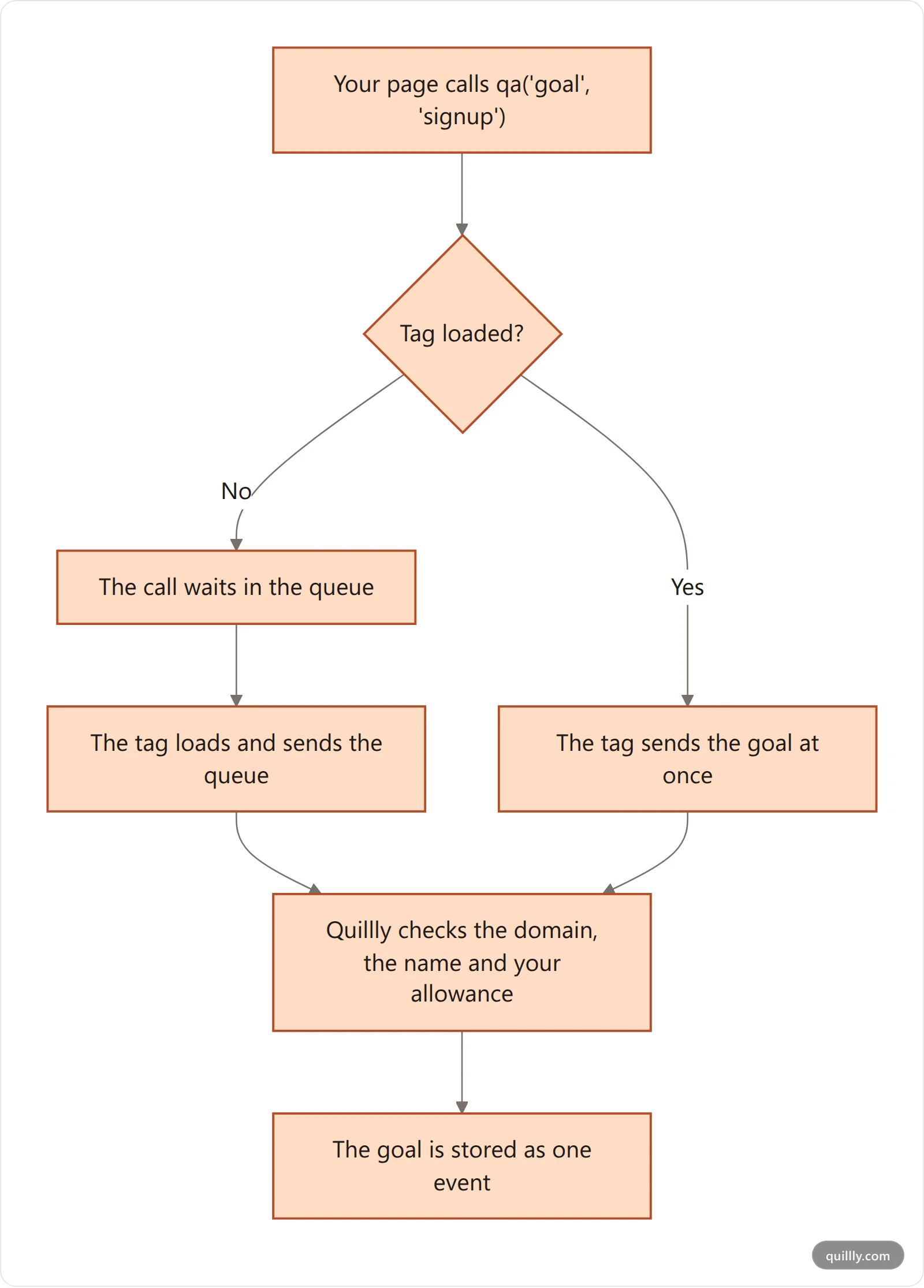
The analytics JavaScript API is the qa function and the attributes on this page. Both come with the two lines of the tag, and the Cookie tag (/qa.js) and the Cookieless tag (/qa.cookieless.js) accept exactly the same commands.
<script>window.qa=window.qa||function(){(window.qa.q=window.qa.q||[]).push(arguments)}</script>
<script async src="https://quillly.com/qa.js" data-website="YOUR_WEBSITE_ID"></script>
The first line creates
qaat once and queues every call made before the script loads. The script sends the queue when it starts.Without the first line, a call made before the script loads fails with
qa is not defined.If the script never loads, for example because an ad blocker stops it, queued calls are never sent. Your page keeps working.
qa()returns nothing and never throws. A command it doesn't know, or a call that breaks a rule below, is ignored without an error.
qa() commands#
Command | Arguments | What it records |
|---|---|---|
| A goal name, then an optional object | One completion of that goal |
| The same as | The same as |
| An object with a | Who the visitor is on your side |
There is no command to send a page view, change the page path or switch the website ID. The tag records page views by itself; see Events the tag sends by itself below.
qa('goal')#
Send a goal when the action succeeds, such as after a signup form returns.
qa('goal', 'signup', { plan: 'pro', seats: 3 });Part | Rule | When a call breaks the rule |
|---|---|---|
Name | 1 to 64 lowercase letters, digits, | The call is dropped |
Name starting with | Reserved for the goals of pages Quillly serves | The call is dropped |
Metadata | A plain object with up to 10 keys | Keys after the tenth are dropped |
Metadata keys | 1 to 32 letters, digits or | That key is dropped |
Metadata values | Text up to 255 characters, a number, | Longer text is cut; other values are dropped |
Different names per site | Up to 500 | A new name past 500 is dropped; names already sent keep counting |
A goal appears in the Goal tab the first time it arrives, so there is nothing to create first. Each call counts as one event toward your monthly allowance.
qa('event')#
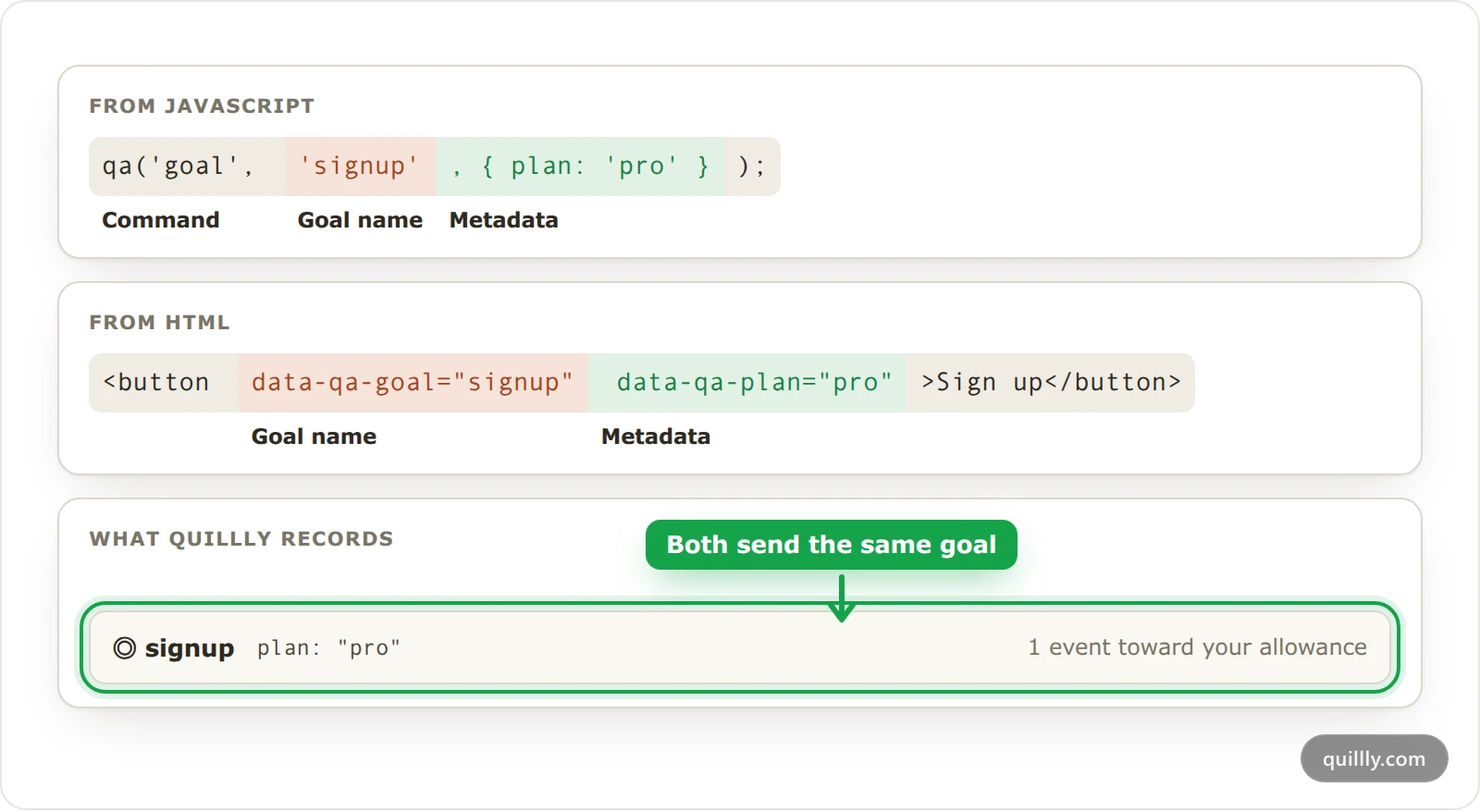
event is another word for goal: the call, the rules and the result are the same.
qa('event', 'signup', { plan: 'pro' });qa('identify')#
Call it when a person signs up or logs in, so the Users list shows who they are.
qa('identify', {
  userId: 'u_4821',
  email: '[email protected]',
  name: 'Maya',
  plan: 'pro',
});Field | Type | Limit | What it does |
|---|---|---|---|
| Text or a number | 128 characters | Your own ID for the person |
| Text | 254 characters | The person's email address |
| Text | 120 characters | The name the Users list shows |
| A number above 0 | 1,000,000,000 per call | Adds to the person's revenue total and marks them as a Customer |
|
| None | Marks the person as a Customer |
Any other key | Text, a number, | 10 keys of 1 to 32 letters, digits or | Stored with the person |
userIdoremailis required. A call with neither sends nothing, and Quillly drops a call whoseuserIdandemailhold only spaces.Later calls add to earlier ones. A new field is added, a field you send again replaces its old value, and
revenueadds up.Keys with a
-are dropped. Unlike goal metadata,identifydoesn't turn-into_.Each call is one event toward your allowance. It doesn't count as the visitor doing something, so it never changes the bounce rate.
Warning
Every revenue value adds to the person's total. Send it once for each payment, not on every page load.
data-qa-* attributes#
On the tag's script element#
Attribute | What it does |
|---|---|
| Required. Your website's ID. Without it, the tag does nothing. |
| A comma-separated list of path prefixes where the tag sends no page views, time on page or Web Vitals. Goals and |
| Where the tag sends events. Without it, events go to |
| Set by Quillly on the pages it serves, with the page's details. Don't add it to your own tag. |
data-qa-exclude matches a prefix and everything under it: /app covers /app and /app/billing, but not /apps. Matching is case-sensitive, spaces around an entry are ignored, and so is a / at its end. An entry of / on its own matches only the home page. In a single-page app, the tag checks the path again on every navigation.
<script async src="https://quillly.com/qa.js" data-website="YOUR_WEBSITE_ID" data-qa-exclude="/app,/dashboard"></script>On any element#
These are standard HTML data attributes, so they don't change how the element looks or works.
Attribute | What it does |
|---|---|
| A click on the element, or on anything inside it, sends the goal |
| The same as |
| On the same element, adds |
<a href="/pricing" data-qa-goal="pricing_click" data-qa-billing-cycle="yearly">See pricing</a>The name follows the goal rules above. An element whose name breaks them sends nothing.
Metadata comes from the same element only. Its other
data-qa-*attributes become metadata, sodata-qa-billing-cyclearrives asbilling_cycle: "yearly".The nearest element wins. When elements with
data-qa-goalsit inside each other, a click sends the goal of the one closest to it.The goal is sent at once, so a click on a link that leaves the page still records it.
Events the tag sends by itself#
Event | When the tag sends it |
|---|---|
Page view | When the page loads, and when the path changes in a single-page app. A change to only the query string or the |
Time on page | When the visitor hides the page, leaves it or moves to another path, after at least 2 seconds on it |
Web Vitals (LCP, CLS and INP) | Once per page, when the visitor hides or leaves it, or moves to another path. Pages Quillly serves don't send them. |
The tag also reads utm_source, utm_medium and utm_campaign from the address the visitor landed on. It sends events in batches of up to 20 within a second of them happening; goals and identify calls go at once.
What the collector accepts#
Quillly's collector checks every request the tag sends. These are its rules, and the answer the tag gets back when a request breaks one.
Rule | Limit | Past the limit |
|---|---|---|
Where events come from | Your website's domain and its subdomains, |
|
The website | Its owner's plan must include analytics |
|
Events in one request | 20 |
|
Size of one request | 16 KB |
|
Requests from one IP address | 240 a minute |
|
Event time | From 24 hours ago to 5 minutes ahead | Set to the time Quillly receives it |
Bots and headless browsers | Never stored |
|
Monthly allowance | Used up |
|
A 204 answer means the request arrived, whether or not its events were stored. The tag never retries, and your page's own code never sees these answers.
Record a conversion from your server#
A payment webhook on your server can mark a person as a Customer without the browser. Send a POST with an account API key, the kind you create on Connections, in the Authorization header:
curl -X POST https://quillly.com/api/websites/YOUR_WEBSITE_ID/analytics/conversions \
  -H "Authorization: Bearer qly_YOUR_KEY" \
  -H "Content-Type: application/json" \
-d '{"userId": "u_4821", "revenue": 49, "currency": "EUR"}'Field | What it is |
|---|---|
| The |
| Instead of |
| Optional. A number from 0 to 1,000,000,000, added to the person's revenue. |
| Optional. A three-letter code, such as |
| Optional. When the payment happened, as an ISO timestamp, for replaying an old webhook. It can't be in the future. |
The key decides who is calling. Its owner needs Analytics on their plan and access to the website, with Manage on Analytics when the website is shared with them, as for setting up goals.
A bad key is refused. An unknown, revoked or expired key gets
401"Invalid or revoked API key", even from a browser that is signed in.The person must be known. A
userIdthatqa('identify')never sent gets404"No visitor identified with that userId". AvisitorIdisn't checked, so a wrong one still succeeds without matching any of your visitors. A body with neither gets400.It is not an event. A server conversion doesn't count toward your monthly allowance and doesn't appear in a visitor's journey. It marks the person as a Customer and adds the revenue.
API keys, OAuth and tool access shows how to create and revoke a key.
Common questions#
Can my server send events?#
Not events: goals, identify calls and page views all come from the tag running in your visitors' browsers. Your server can record a conversion with an API key, as Record a conversion from your server shows above. To count the purchase as a goal too, call qa('goal', 'purchase') on the page the buyer sees after paying, such as your thank-you page.
Why doesn't my goal show up?#
Check the name against the rules above, and test from your own domain or localhost. New completions can take a few minutes to show in the Goal tab, and nothing is stored while your monthly allowance is used up.
Do goals on excluded paths count?#
Yes. data-qa-exclude stops page views, time on page and Web Vitals only, so a signup inside your app still sends its goal and its identify call.
Related#
Install analytics on your website: where the tag goes, and the Cookie and Cookieless tags.
Track goals and conversions: the Goal tab, conversion goals and Customers.
Analytics limits, retention and excluding traffic: the monthly allowance and what counts toward it.
Cookies or cookieless analytics: what each tag stores in the browser.
Visitor journeys and the Users list: the people
identifynames.