Site pages: track and score the pages you already have
On this page
- Track your site pages
- 1. Open Site pages
- 2. Start tracking
- 3. Open the list
- What the list shows
- The free quality check
- The SEO check
- Run the SEO check
- 1. Click the price
- 2. Check the keyword
- 3. Run the check
- How the list stays current
- Common questions
- Does Site pages cost anything?
- Why do some pages still show Discovered?
- Why is the SEO keyword wrong?
- Related
Site pages tracks the pages of your website that you didn't write in Quillly, such as your home page, pricing and product pages, from your sitemap. At the end, each of your site pages has an indexing status, a free quality score and its search numbers, with no code added to your site.
Before you start, you need:
A website in Quillly. Add a website covers a Quillly subdomain and your own domain.
A sitemap on your domain, at
/sitemap.xml, at/sitemap_index.xmlor listed in yourrobots.txt.A connected search engine for indexing status, clicks and positions. Connect Search Console, Bing and Yandex shows how.
Track your site pages#
Open Site pages#
In the sidebar, open Site pages and click Track your pages.
Start tracking#
The Rank & track existing pages dialog shows your domain and a Sitemap path field set to
/sitemap.xml. Click Start tracking.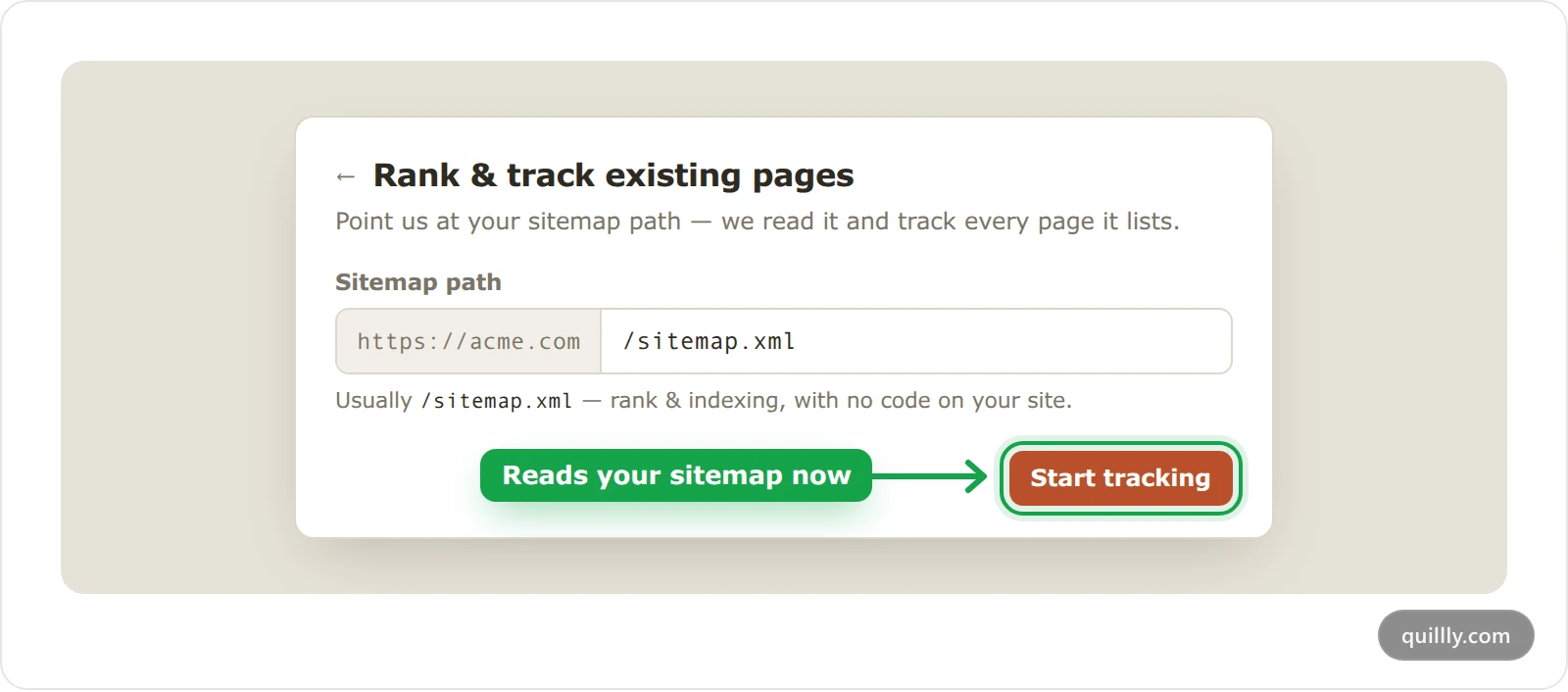
Open the list#
Click View tracked pages. Quillly reads your sitemap and lists its pages, usually within seconds. Each page shows Discovered until Quillly sends it to IndexNow, then Submitted.
Note
Quillly looks for your sitemap at
/sitemap.xml, then/sitemap_index.xml, then in yourrobots.txt, whatever path you enter. From a sitemap index it reads the first 10 sitemaps. With no sitemap at all, it follows links from your home page, up to 500 pages.
What the list shows#
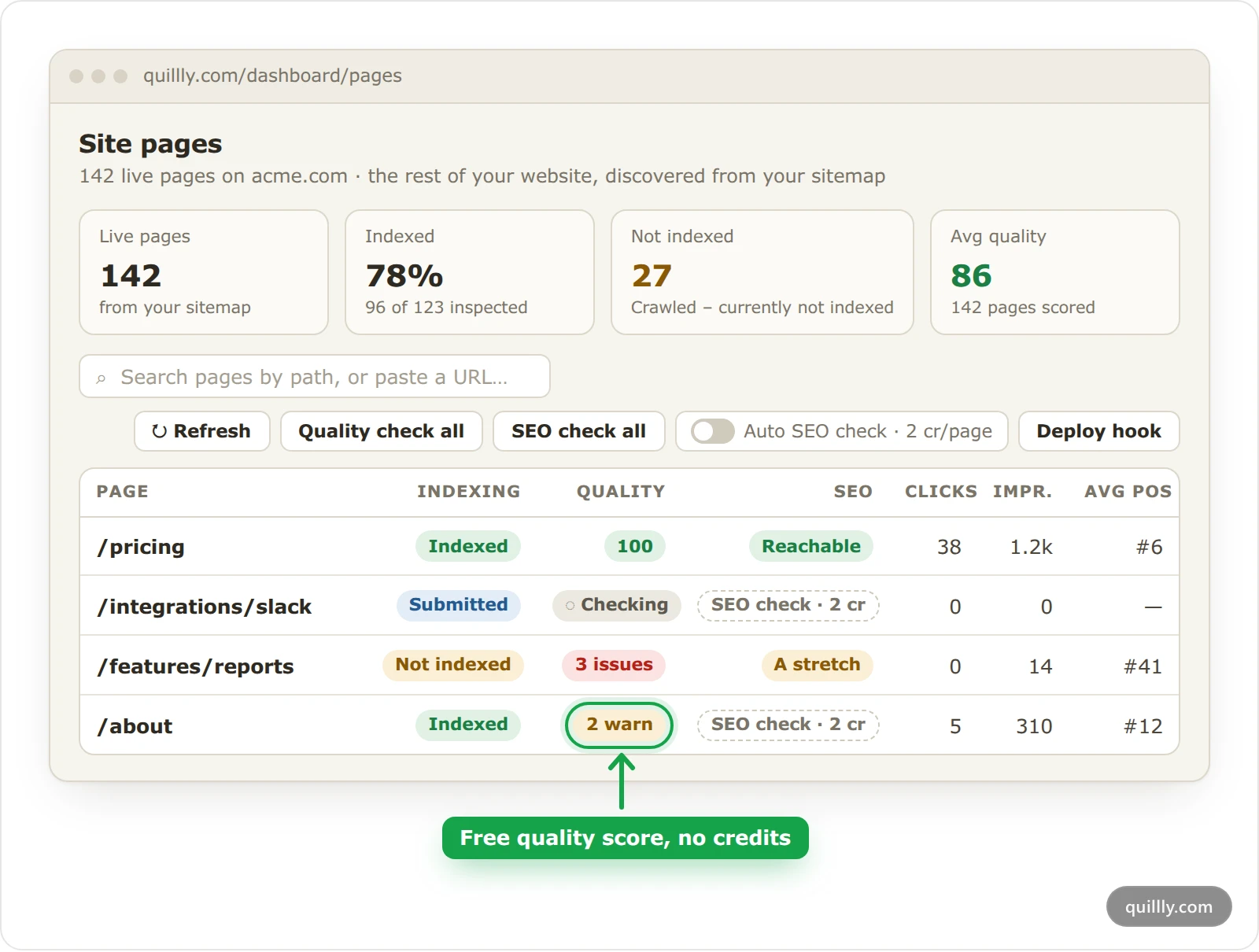
Four numbers sit above the table: Live pages, Indexed, Not indexed, with its most common reason, and Avg quality. The table has a row per page:
Column | What it shows |
|---|---|
Page | The page's path, with a link to the live page. |
Indexing | The page's status from your connected engines, as in your content lists. |
Quality | The free quality check. |
SEO | The SEO check, which costs credits. |
Clicks, Impr. and Avg pos | Search clicks, impressions and average position over the last 28 days. |
Click a row to see the page's keywords, rankings and trends. Narrow windows hide some columns, and SEO shows only on wide screens. To find a page, type part of its path in Search pages by path, or paste a URL….
The free quality check#
Quillly fetches each page and checks its HTML. It looks at the title and meta description, the canonical and robots tags, Open Graph tags, headings, image alt text, structured data, the page language, the amount of text and internal links.
The score starts at 100. Each error takes 12 points and each warning 4, while notes cost nothing. The Quality column shows 100 for a page with no errors or warnings. Otherwise it counts them: 2 warn means two warnings, and 3 issues means errors and warnings together. Hover over it for the top issues, and click it to check the page again.
New pages get their score within minutes. Quality check all checks every live page again in the background, 25 at a time. Each week, Quillly also re-checks the 25 pages it checked longest ago.
Your AI reads the same results with get_page_issues, worst page first, with a fix for each issue.
The SEO check#
The SEO check tells you whether a page can rank for the phrase it targets. Quillly reads that phrase from the page's H1, or from its title without your brand name. Then it runs two lookups.
Lookup | Credits |
|---|---|
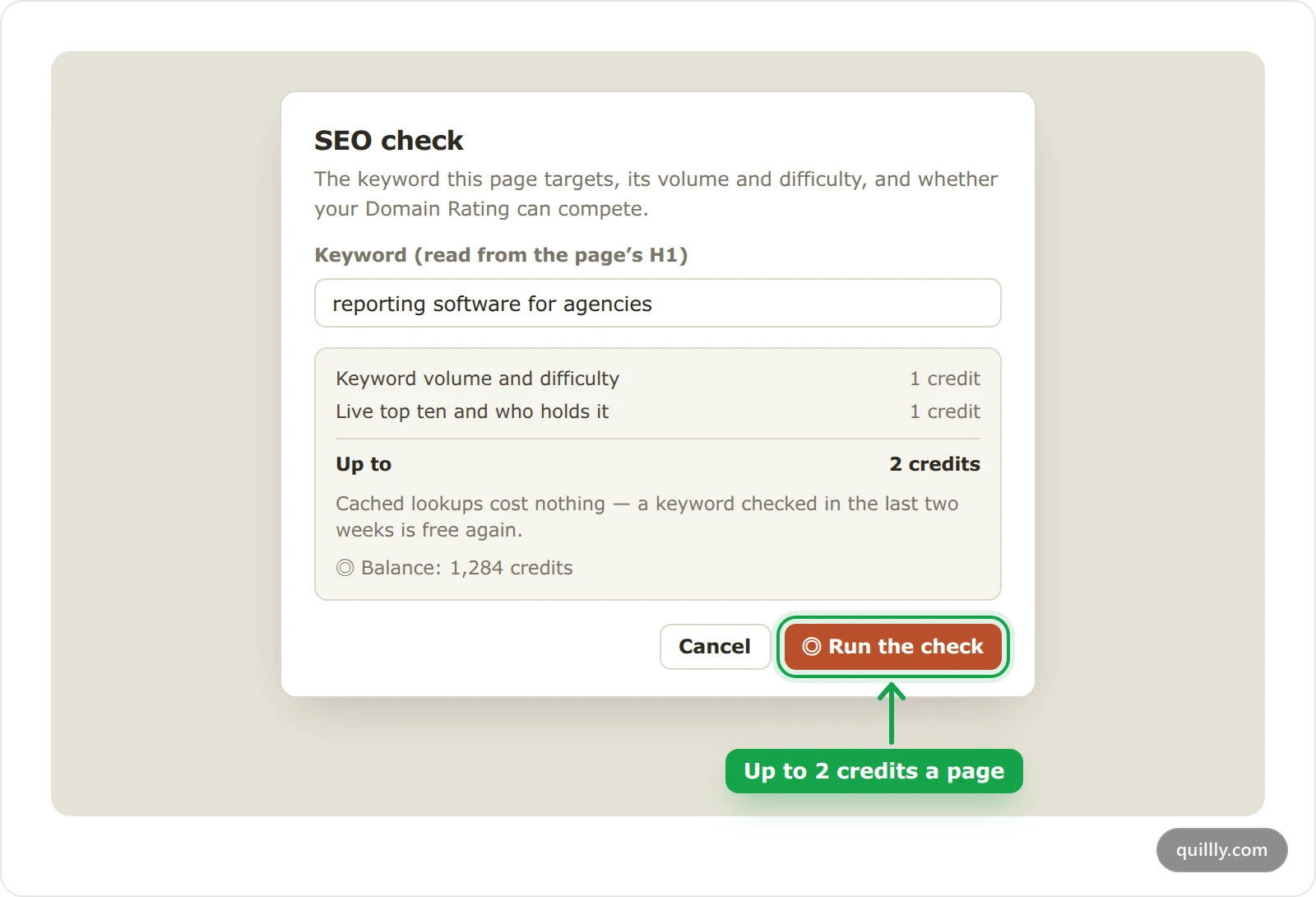
Keyword volume and difficulty | 1 |
Live top ten and who holds it | 1 |
A keyword checked in the last two weeks costs nothing again. Quillly compares the results with your website's Domain Rating and gives one of four verdicts.
Reachable: the difficulty is no more than 10 points above your Domain Rating, or a site about as strong as yours holds a top-ten spot.
A stretch: the difficulty is no more than 25 points above it, so expect months of work.
Out of reach: much stronger sites hold the top ten.
Not enough data: Quillly has no Domain Rating for your site yet, or no data for the phrase.
Run the SEO check#
Click the price#
In the page's row, click SEO check · 2 cr.
Check the keyword#
The SEO check dialog shows the keyword Quillly read from the page. Change it if the page targets another phrase.
Run the check#
Click Run the check. The SEO column shows the verdict, and hovering over it shows the monthly searches, the difficulty and the credits charged. When your balance can't cover one page, the button reads Add credits instead.
To check every page that has no result yet, click SEO check all. The dialog shows how many pages that is and the most it can cost. The check runs in the background, 25 pages at a time, and stops when your credits run out.
To check new pages as they appear, turn on Auto SEO check · 2 cr/page. Each new page found in your sitemap is then checked, and the credits come from the website owner's balance. Plans, trial and limits lists the credits each plan includes.
How the list stays current#
Every day at 05:00 UTC, Quillly reads your sitemap again:
New pages join the list and get a quality score.
Pages whose
lastmoddate changed go to IndexNow again. For pages without alastmod, Quillly compares their content instead, 25 pages a run.Up to 50 new or changed pages go to IndexNow per run, so a large sitemap takes several days. Pages that answer 404 or 410 are never sent.
Pages that left the sitemap show Left sitemap and stop being tracked. They come back if they return to the sitemap. To list them, click the link above the table, such as Show 3 archived.
Quillly doesn't send these pages to Google or submit your sitemap to Search Console. Submit it there yourself, and with Search Console connected, Quillly reads back each page's status.
Refresh reads your sitemap again now instead of waiting for the next day, and checks up to 25 pages for changed content. You can use it once every 2 minutes, and only the website's owner can use it. To run it after each deploy, use the deploy hook.
To stop tracking, click the settings icon next to Site pages, open Delete and click Delete Site pages section. It removes the list and its history from Quillly, and your pages stay as they are.
Common questions#
Does Site pages cost anything?#
Tracking, indexing status and the quality check use no credits. Only the SEO check costs credits, up to 2 per page.
Why do some pages still show Discovered?#
Quillly sends at most 50 new or changed pages to IndexNow per run. The rest of a large sitemap follows over the next days.
Why is the SEO keyword wrong?#
Quillly reads it from the page's H1, or from its title. Click the verdict in the SEO column, change the keyword and run the check again.
Related#
Indexing: how your pages reach search engines: what the indexing statuses mean.
Deploy hook: keep tracked pages fresh: re-check your pages from your deploy pipeline.
Connect Search Console, Bing and Yandex: the connections behind indexing status and search numbers.
Search performance and the Focus list: clicks, positions and keywords in more depth.