The submission kit
On this page
- Fill in the submission kit
- 1. Open the kit
- 2. Fill what the chips name
- 3. Add screenshots and videos
- 4. Save the kit
- Every field, and what directories use it for
- Keep your listings current
- Let your AI fill the kit
- Common questions
- Why does the kit say One-liner missing?
- Is my support email used to sign up for directories?
- Do I have to fill every field?
- Related
The submission kit holds the answers every directory form asks for: your tagline, descriptions, tags, links and screenshots. Quillly's agent fills every form from it, so what you write here is what directories show. This page covers each field and its limits, and how your listings stay current when you edit the kit.
Before you start:
A website in Quillly. Each website has its own kit, so select the right one first.
A logo, uploaded in the Brand menu. The kit reads it from there.
Fill in the submission kit#
Open the kit#
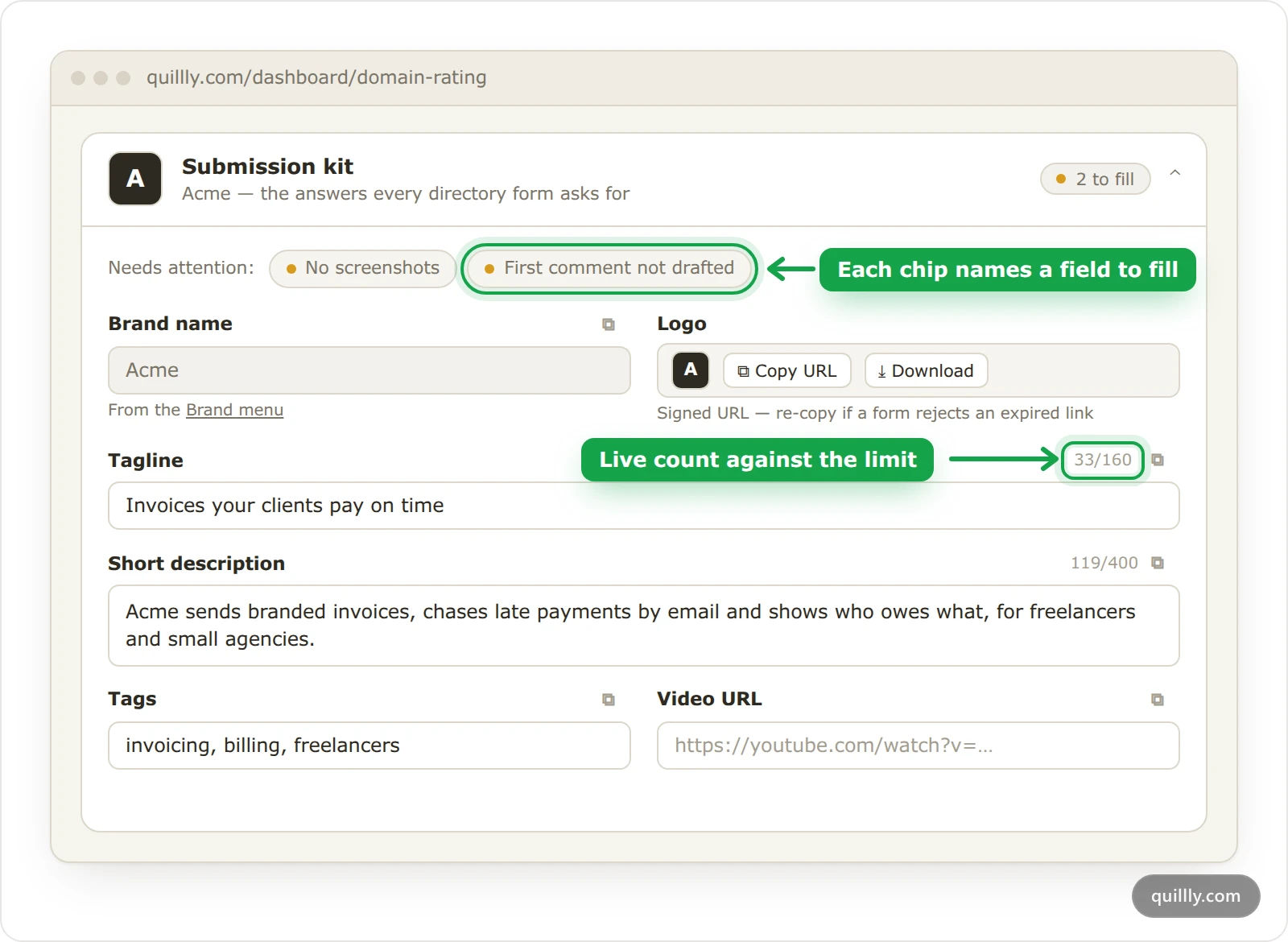
In Domain Rating, click the Submission kit card. It opens by itself while something is left to fill, and folds to one line marked Complete when nothing is.
Fill what the chips name#
The Needs attention row lists fields that are missing or weak. Hover a chip to see why it matters. A red dot marks a field every order needs, and an amber dot one that many directories ask for. Logo missing links straight to Brand.
Add screenshots and videos#
Under Assets — screenshots & videos, click Add files. Hover a tile to move it earlier or later, download it or remove it, and click it to preview. Files save as soon as they upload.
Save the kit#
Click Save kit. Text fields save only when you click it, and the kit checks first that every link is a full URL and the support email is valid. Each field's copy button copies what is on screen, so you can also paste into a form yourself.
Every field, and what directories use it for#
Only three things are required before you can order: the logo, the tagline and the short description.
Field | Required | Limit | What directories use it for |
|---|---|---|---|
Brand name | No | Set in Brand | The product name on every listing |
Logo | Yes | Set in Brand | Logo uploads |
Tagline | Yes | 160 characters | Tagline and one-line description fields |
Short description | Yes | 400 characters | One- or two-sentence summaries |
Long description | No | 2,000 characters | "Tell us about your product" boxes |
Tags | No | 10 tags, separated by commas | Category and keyword pickers |
Video URL | No | A full link, such as a YouTube share link | Demo video fields |
Founder name | No | 120 characters | Maker and submitter fields |
Pricing blurb | No | 400 characters | Pricing fields |
First comment | No | 1,500 characters | The maker's comment that launch sites expect on launch day |
Support email | No | A valid email address | Contact email fields only |
X (Twitter), GitHub, LinkedIn | No | Full links | Social profile fields |
Assets | No | 10 files: images up to 8 MB, videos up to 60 MB | Screenshot, gallery and video uploads |
One chip uses a different name. A missing tagline shows as One-liner missing, and a long one as One-liner over 120 characters.
Images can be PNG, JPEG, WebP or GIF, and videos MP4, WebM or MOV.
Without a brand name, forms get the first part of your domain, such as acme for acme.com, so set one in Brand.
Every listing links to your home page, for example
https://acme.com. When a form asks for a launch date, the agent uses the date on that directory's row in the Directory list, or today.The agent never makes up an answer. If a form insists on something the kit can't give, such as a phone number, Quillly's team handles that directory instead.
Tip
Keep the tagline under 120 characters. Many directories cut taglines around that length, which is why the counter turns amber there.
Keep your listings current#
When you save a kit that changed, listings submitted with the older version show Out of date in the Directory list. If any listing is already submitted or live, Save kit asks first, and Save anyway goes ahead.
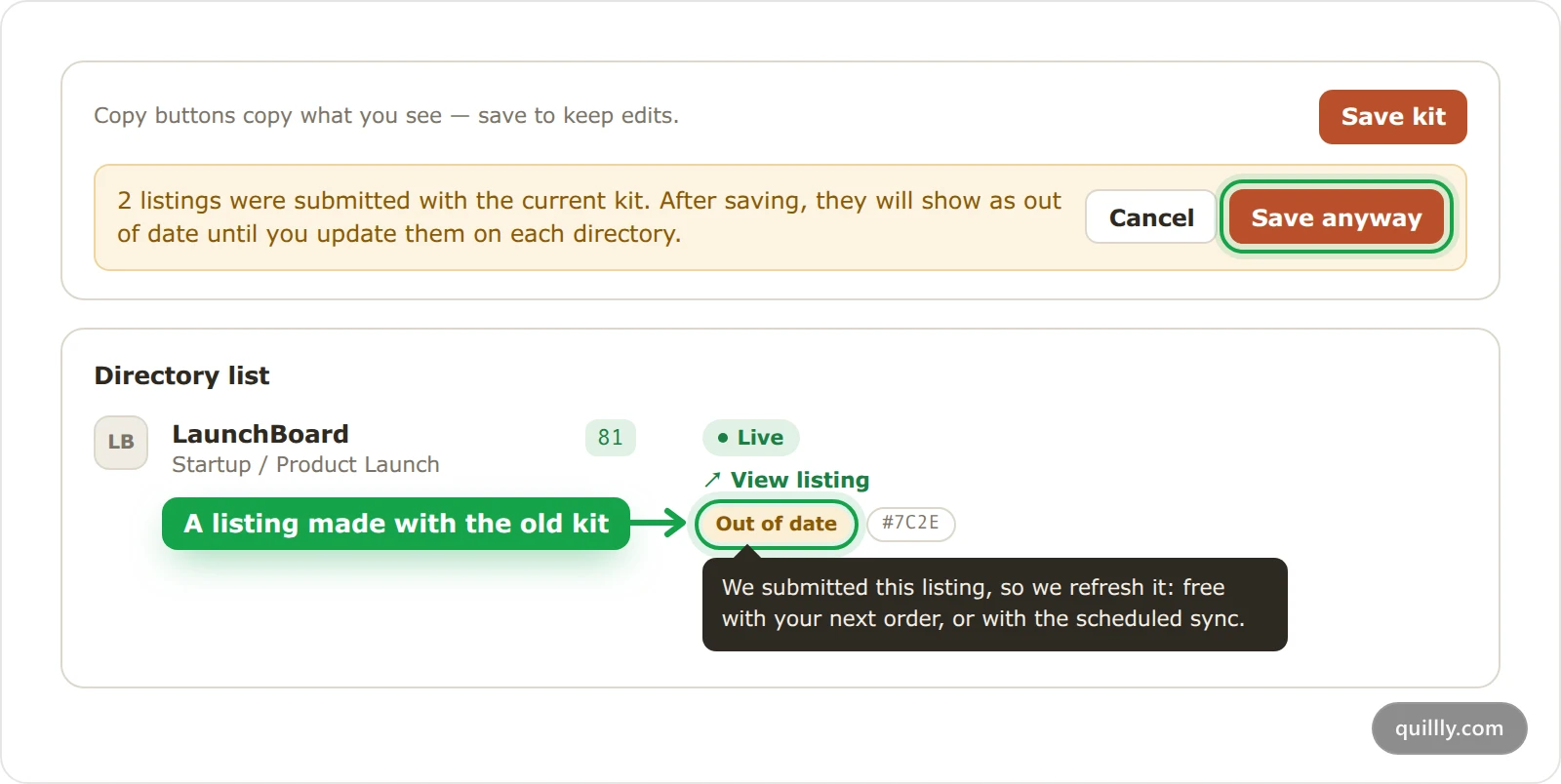
The warning tells you to update listings on each directory, but that is only needed for listings you made yourself:
Listings Quillly made are refreshed for you, free. Your next order updates them before it submits to any new directory. Without an order, the free scheduled sync does it, at most once every 45 days per site and only after your kit has been unchanged for 7 days. Instant sync refreshes them now for a one-time fee, as Orders, progress and listings shows.
Listings you made yourself stay yours, because Quillly has no account there. Update the listing on the directory, then click its Out of date chip and tick I've updated this listing with the current kit.
For listings Quillly made, the chip compares your kit with exactly what was submitted: the brand name, logo, tagline, descriptions, tags, pricing blurb, founder name, support email, video URL, social links and screenshots. Change a field back and the chip goes away. An edit to the First comment alone doesn't mark them out of date. For listings you made yourself, any saved change to the kit does.
Let your AI fill the kit#
If you've connected an AI client over MCP, it can read the kit with get_submission_kit and fill the text fields with update_submission_kit. The logo and the screenshots can only be changed in the dashboard. The MCP tool reference lists both tools.
Common questions#
Why does the kit say One-liner missing?#
That chip is the Tagline field, which the kit's checks call a one-liner. Fill in the tagline, keep it under 120 characters if you can, and click Save kit. The chip goes away, and the tagline no longer blocks your order.
Is my support email used to sign up for directories?#
No. Quillly uses the support email only where a directory's form asks for a contact email for your listing. The accounts the agent creates don't use it. Leave the field empty if you'd rather not give an address to directories.
Do I have to fill every field?#
No. Only the logo, the tagline and the short description are required to order, and the rest is optional. When a directory's form requires a field you left empty, Quillly's team handles that directory instead of the agent, so fill in what you can.
Related#
How Directory Submission works: the order, the queue and every status.
The "Featured on" badge: the other check before you order.
Orders, progress and listings: where out-of-date listings show and how they are refreshed.
Brand: site theme, logo and navigation: upload the logo and set the brand name.
MCP tool reference: every tool your AI can call.
Connect your AI: add Quillly to Claude, ChatGPT or another client.