AI crawlers, llms.txt and Markdown pages
On this page
Quillly serves every page it publishes in a form AI agents read easily, and counts the AI crawlers that fetch your pages. This page lists the llms.txt and Markdown files your site offers, shows where AI crawlers appear in Analytics and explains what the numbers mean.
What AI agents can read#
Every page Quillly serves, whether a blog post, a docs page, a news story or the changelog, comes in three forms:
The HTML page that people read.
A Markdown version. Add
.mdto the page's address, so/docs/quick-startbecomes/docs/quick-start.md. An agent that asks fortext/markdownin itsAcceptheader, withouttext/html, gets the same Markdown at the normal address.An llms.txt index for the section: a plain list of its pages, each with a link and a short description. It follows the llms.txt proposal, which puts the file at the root of the site or of a section.
Each page links to these at its end, in a line that reads AI agent or LLM? Read this page as Markdown · llms.txt. On the changelog, it reads Read the changelog as Markdown.
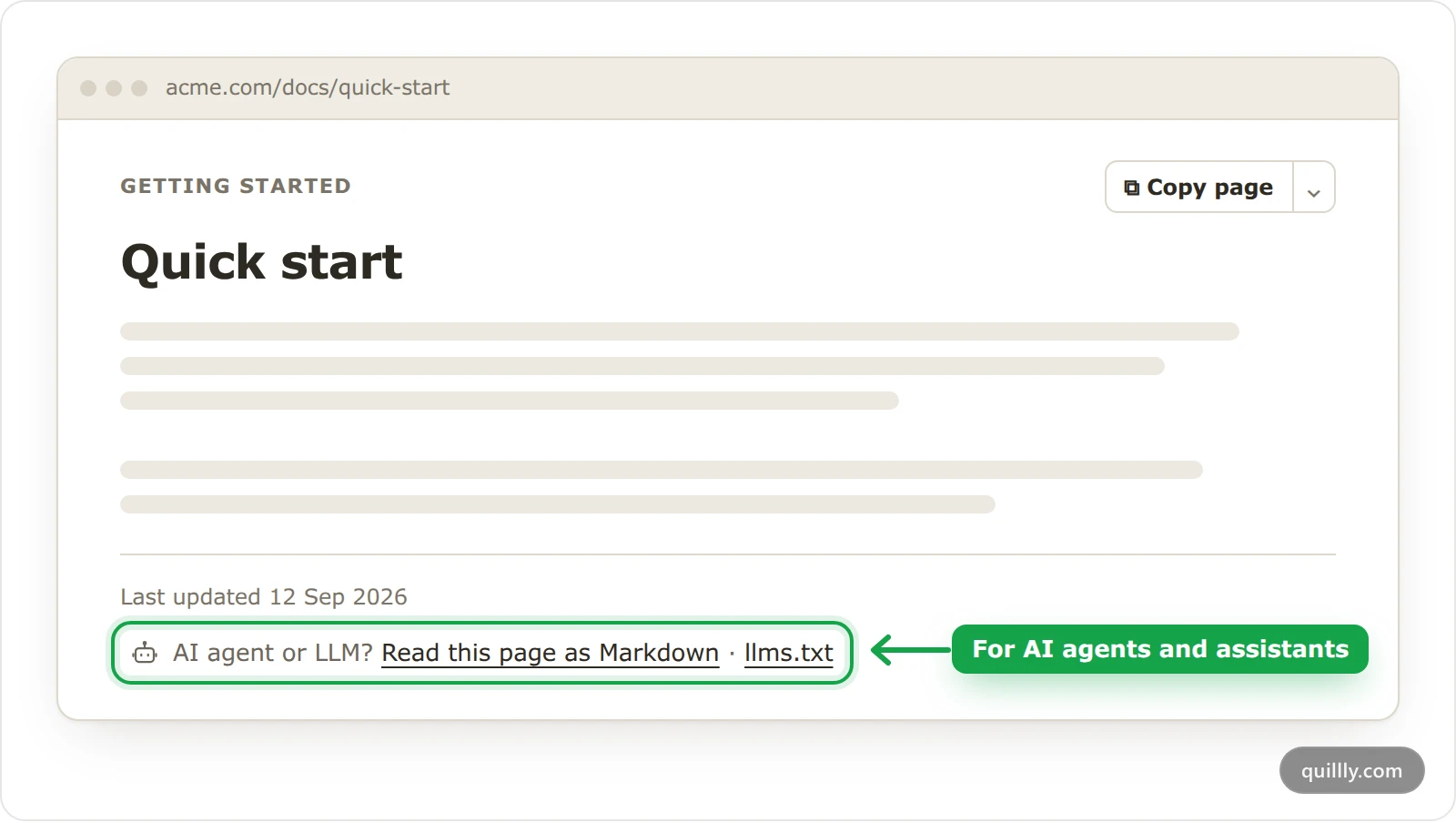
The Markdown version names the HTML page as its canonical, so search engines don't treat it as a copy. Docs pages also have a Copy page button, whose menu offers View as Markdown, Open in ChatGPT and Open in Claude to readers who want to ask an assistant about the page.
Where the files are#
Which files exist depends on how your site is served. On your own domain, Quillly answers only under your sections' paths, through the reverse proxy, so the whole-site files exist only on a Quillly subdomain.
File | On your own domain | On a Quillly subdomain |
|---|---|---|
One section's index |
|
|
The whole site's index | None. |
|
Full text of the 50 newest items | None. |
|
One blog post as Markdown |
|
|
Any page as Markdown | The page's address with | The page's address with |
The paths follow your sections. If your docs live at /help, their index is /help/llms.txt. The changelog index links the timeline and names its 15 newest entries, and the news index lists the 15 newest stories without sponsored ones.
These files need no setup and update as you publish. A section that publishes into WordPress, Ghost, Webflow or Shopify is served by that platform, so it has none of these files.
AI crawlers in Analytics#
Open Analytics and find the AI & crawlers card. It counts crawler visits to your published pages, kept apart from your human visitors.
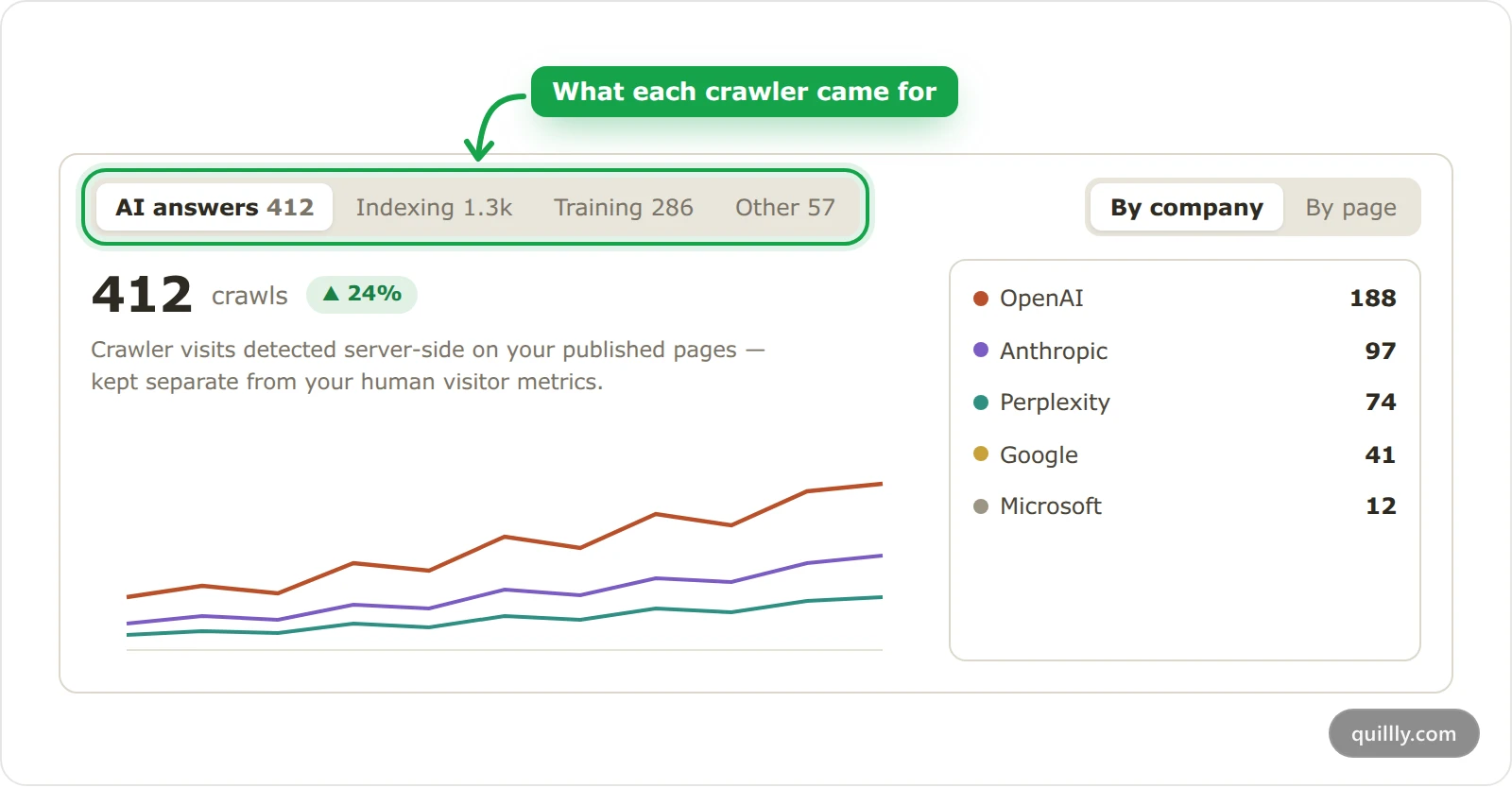
The tabs sort crawlers by what they came for:
Tab | What it counts |
|---|---|
AI answers | Assistants fetching a page because someone asked about it, such as ChatGPT-User and Claude-User. |
Indexing | Crawlers that keep search engines and AI search up to date. |
Training | Crawlers that collect pages to train AI models, such as GPTBot and ClaudeBot. |
Other | SEO tools, other bots and direct fetches of your Markdown and llms.txt files. |
By company puts all of a company's crawlers on one row. By page ranks your pages instead: click one to see which crawlers read it. The Pages card has the same view: switch it from Visitors to Crawls.
Read the numbers as a trend rather than an exact total:
Only pages Quillly serves are counted, so a site that only runs the tracking script shows no crawls.
One crawler reading one page counts at most once an hour.
Visits answered from a CDN cache never reach Quillly, so they aren't counted.
A client that fetches a
.mdor llms.txt file without being a known crawler, such as a script or a person, counts under Other as a direct fetch.
Your AI reads the AI answers side with get_website_analytics, whose ai_answers field lists which assistants fetched which pages.
The crawler directory#
The AI Crawler Directory lists the more than 60 AI crawlers and bots Quillly recognises. For each one it gives the company, what the crawler is for, the user-agent token it sends and whether it follows robots.txt. They're grouped as AI answers, Search indexes, Training crawlers, SEO tools and Other AI bots, and each has its own page.
Blocking AI crawlers#
On your own domain, your own robots.txt decides which crawlers may read the site, because it sits at your domain's root, outside Quillly's paths. To keep a training crawler out, add a group for its user-agent token, which the directory lists. OpenAI, for example, documents its crawlers and says that disallowing GPTBot keeps a site out of model training:
User-agent: GPTBot
Disallow: /
On a Quillly subdomain, Quillly serves the robots.txt. It allows every crawler, lists your sitemap and points to your /llms.txt, and there's no setting to change it.
Note
Blocking a training crawler doesn't block the assistants that fetch a page to answer a question. Those use their own tokens, such as ChatGPT-User and Claude-User.
Common questions#
Do I need to create an llms.txt file?#
No. Quillly builds the files from your published pages and serves them next to each section. They change as soon as you publish or unpublish.
Why don't I see any AI crawls?#
AI crawlers usually find a page within days of publishing, and Quillly counts them only on the pages it serves. If your site only runs the Quillly tracking script, crawls aren't visible to Quillly.
Related#
Content types and URLs: the sections, their paths and their feeds.
Serve on your own domain with a reverse proxy: the setup behind the files on your own domain.
Indexing: how your pages reach search engines: the search crawlers' side.