Build a conversion funnel
On this page
- Build a conversion funnel
- 1. Open the Funnel tab
- 2. Name the funnel
- 3. Add each step
- 4. Order the steps and save
- Funnel steps: the rules
- How Quillly counts a conversion funnel
- Read the conversion funnel
- Built-in funnels
- Edit, delete or ask your AI
- Common questions
- Do all steps have to happen in one visit?
- Why is my first step smaller than my visitor count?
- Can a step match more than one goal?
- Related
A conversion funnel shows how many visitors go through a series of steps, such as your landing page, pricing, signup and payment. At the end, you'll have a funnel in the Funnel tab with the drop-off between each step.
Before you start, you need:
The analytics tag on your site, so page visits arrive. See Install analytics on your website.
Goals for any step that isn't a page visit, such as a signup. See Track goals and conversions.
Build a conversion funnel#
Open the Funnel tab#
Open Analytics, scroll to the visitors card and click Funnel. Then click New funnel.
Name the funnel#
Type a Funnel name, such as "Signup to payment". Names can be up to 80 characters.
Add each step#
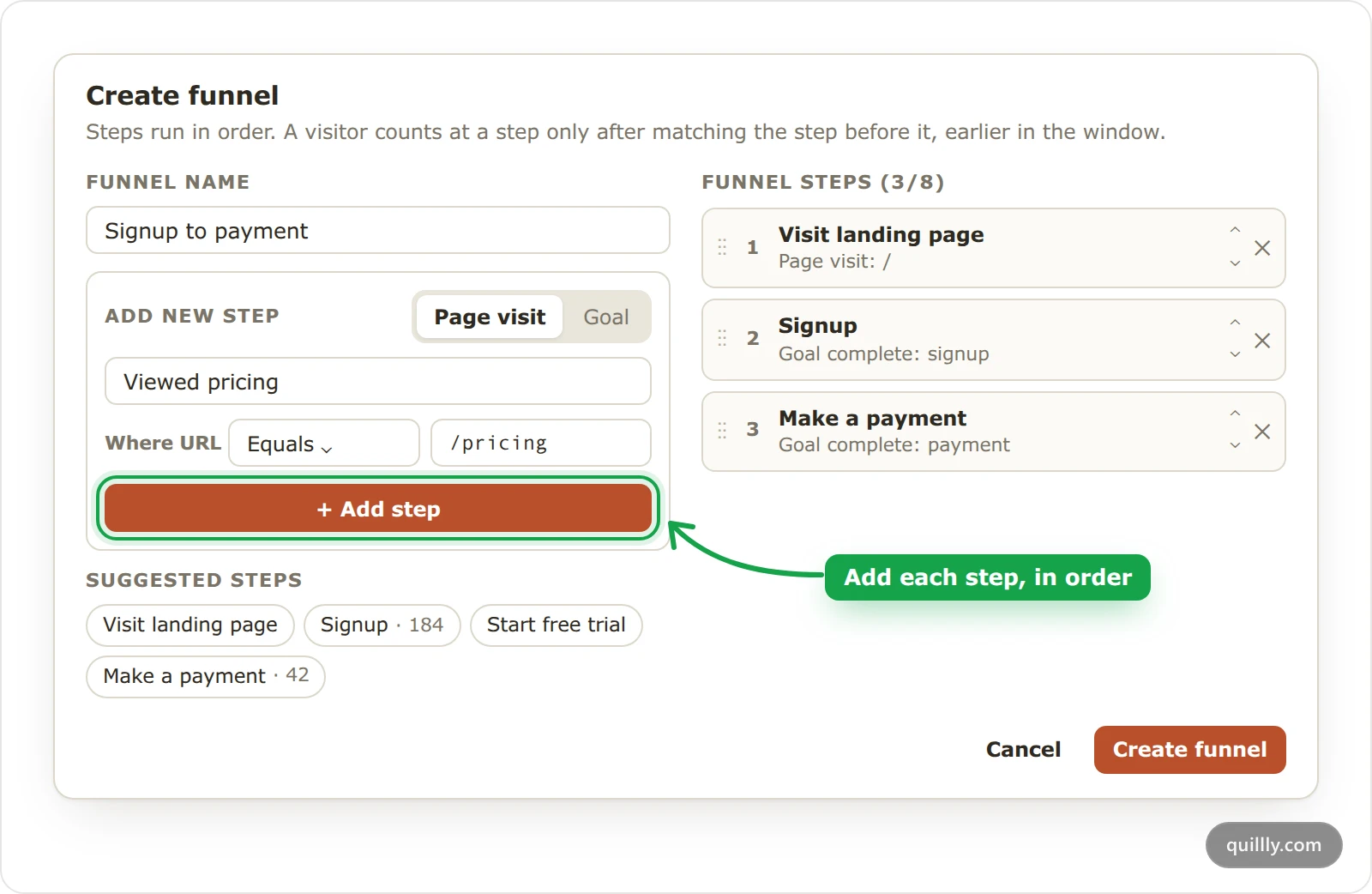
Under Add new step, choose Page visit or Goal, and type a name for the step.
Page visit: under Where URL, pick Equals, Contains, Starts with, Ends with, Does not equal or Does not contain, and type a path such as
/pricing.Goal: choose whether the Visitor Completes or Does not complete it, and type the goal's name. + Add goals adds more names, and any one of them counts.
Click Add step, and the step joins Funnel steps on the right. The chips under Suggested steps fill in common ones for you: Visit landing page, Signup, Start free trial and Make a payment.
Order the steps and save#
Drag the steps, or use their arrows, until they're in the order visitors follow. The × removes a step. Then click Create funnel.
Funnel steps: the rules#
2 to 8 steps per funnel, and up to 25 funnels per site.
Step names can be up to 60 characters, and a path up to 300.
Paths are the page's path only, such as
/pricing, without the domain or query string. Matching is case-sensitive.Equals, Starts with and Does not equal need a path that starts with
/.A goal step accepts up to 10 goal names.
The first step must be one the visitor completes, so it can't be Does not complete.
Tip
Equals needs the exact path, so /pricing doesn't match /pricing/. Use Starts with when a step covers several addresses, such as every page under /blog.
How Quillly counts a conversion funnel#
Quillly walks each visitor's events in the selected date range, much like a closed funnel exploration in Google Analytics. A visitor counts at a step only when they match it after matching the step before, so the order matters. The steps can happen in different visits, as long as they happen in order within the range.
A Does not complete step keeps the visitors who didn't complete that goal after the previous step. Use it to find, for example, people who started checkout but didn't pay.
In cookieless mode, a visitor's ID changes every day, so a funnel can't follow anyone past midnight UTC. Cookies or cookieless analytics explains why.
Read the conversion funnel#
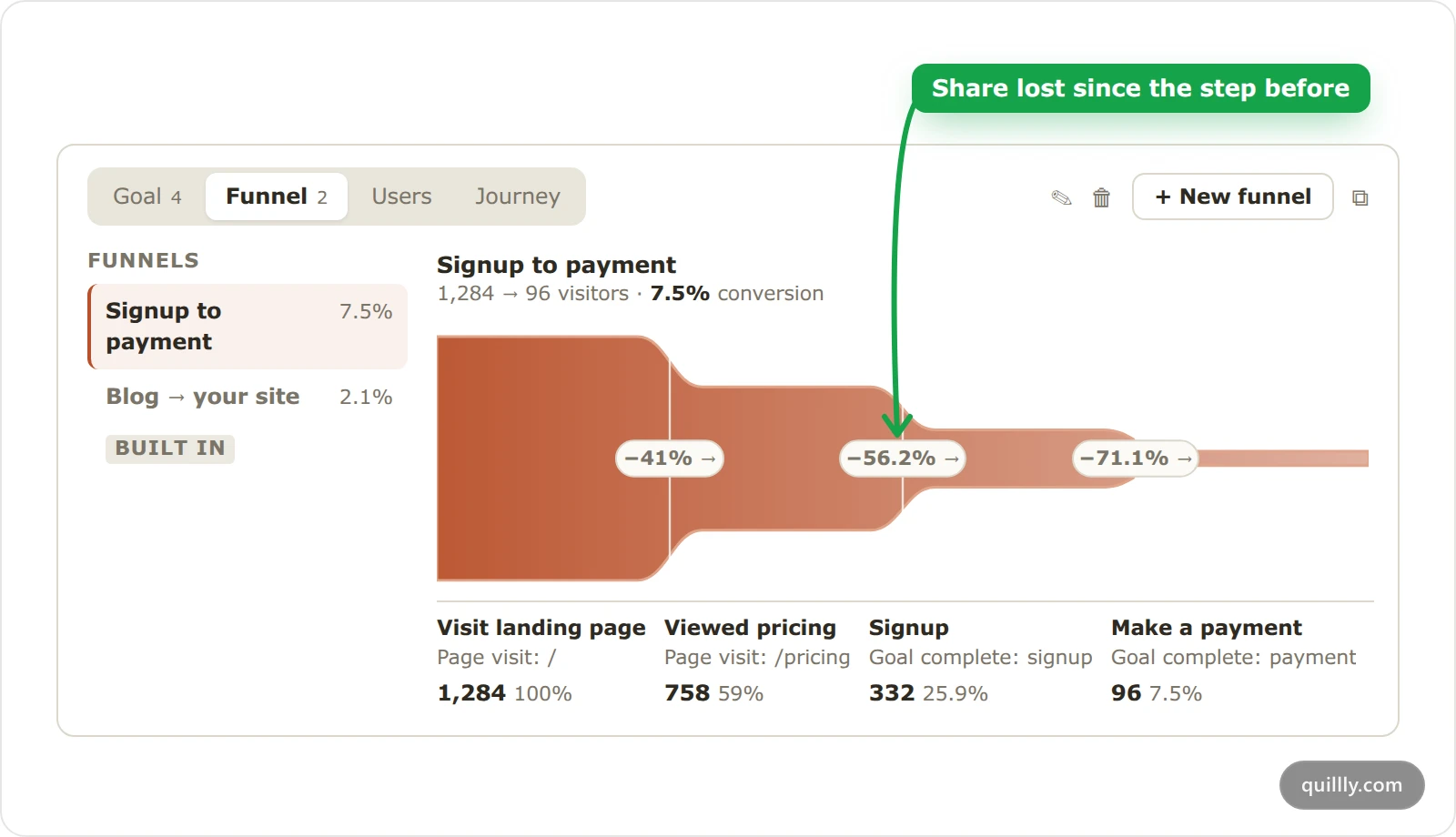
The header shows the funnel from its first step to its last, such as 1,284 → 96 visitors · 7.5% conversion. Each part of the shape is one step, and its height is the number of visitors who reached it.
The badge between two steps, such as −41%, is the share of visitors lost since the step before. That's the drop-off.
Under each step, you see its name, what it matches, such as Page visit: /pricing or Goal complete: signup, its visitors and its share of the first step.
Hover a step for the details: the visitors lost as Dropoff, the share kept as Conversion, the share from start, and the step's top sources and countries.
When your site sends revenue with qa('identify', …), the details also show Step value, the revenue per visitor at that step. The list on the left, under Funnels, shows each funnel's overall conversion, and switches between them.
Funnel results are kept for up to 10 minutes, so a visit you make now can take that long to appear.
Built-in funnels#
When Quillly serves your blog, docs, changelog or news, you also get a built-in funnel for each, such as Blog → your site. Its steps are Read the blog, Read to the end and Went to your site. Built-in funnels carry a built in chip and can't be edited or deleted.
Edit, delete or ask your AI#
Select a funnel and click the pencil to change its name or steps, or the trash icon to delete it after you confirm. Your AI assistant can list, create, change and compute funnels with the manage_analytics_funnel tool, which the MCP tool reference describes.
Common questions#
Do all steps have to happen in one visit?#
No. The steps can happen across several visits, as long as they happen in order within the date range you picked. In cookieless mode, though, a funnel can't follow a visitor into the next day.
Why is my first step smaller than my visitor count?#
The first step counts only the visitors who matched it in the range. If it's a page visit, check the path and the operator, since matching is exact and case-sensitive.
Can a step match more than one goal?#
Yes. Add several goal names to one step with + Add goals, and a visitor who completes any one of them passes the step. A step takes up to 10 names.
Related#
Track goals and conversions: send the goals your funnel steps use.
Visitor journeys and the Users list: see the path of each person who converted.
Read the Analytics dashboard: the rest of the numbers on the page.
MCP tool reference: the funnel tool your AI can use.