Connect Claude
On this page
- Connect Claude in five steps
- 1. Create a connection in Quillly
- 2. Copy the connection URL
- 3. Add the connector in Claude
- 4. Turn Quillly on in a chat
- 5. Test the connection
- Prompts to try next
- Claude Team and Enterprise
- If Claude does not connect
- Common questions
- Does the connector work in the Claude desktop and mobile apps?
- Does Quillly see my Claude account?
- Can I stop Claude from deleting posts?
- Related
Connect Claude to Quillly as a custom connector, and Claude can write, check and publish on your websites. You add it once, and it works in Claude on the web, in the desktop app and on mobile.
Before you start, you need:
A Quillly account with at least one website.
A Claude account. Every Claude plan can add custom connectors, and the Free plan allows one (Anthropic's guide to custom connectors).
On a Claude Team or Enterprise plan, follow Claude Team and Enterprise further down instead.
Connect Claude in five steps#
Create a connection in Quillly#
In Quillly, open Connections, click Connect, name the connection
Claudeand click Create. The setup dialog opens on the Claude tab.Copy the connection URL#
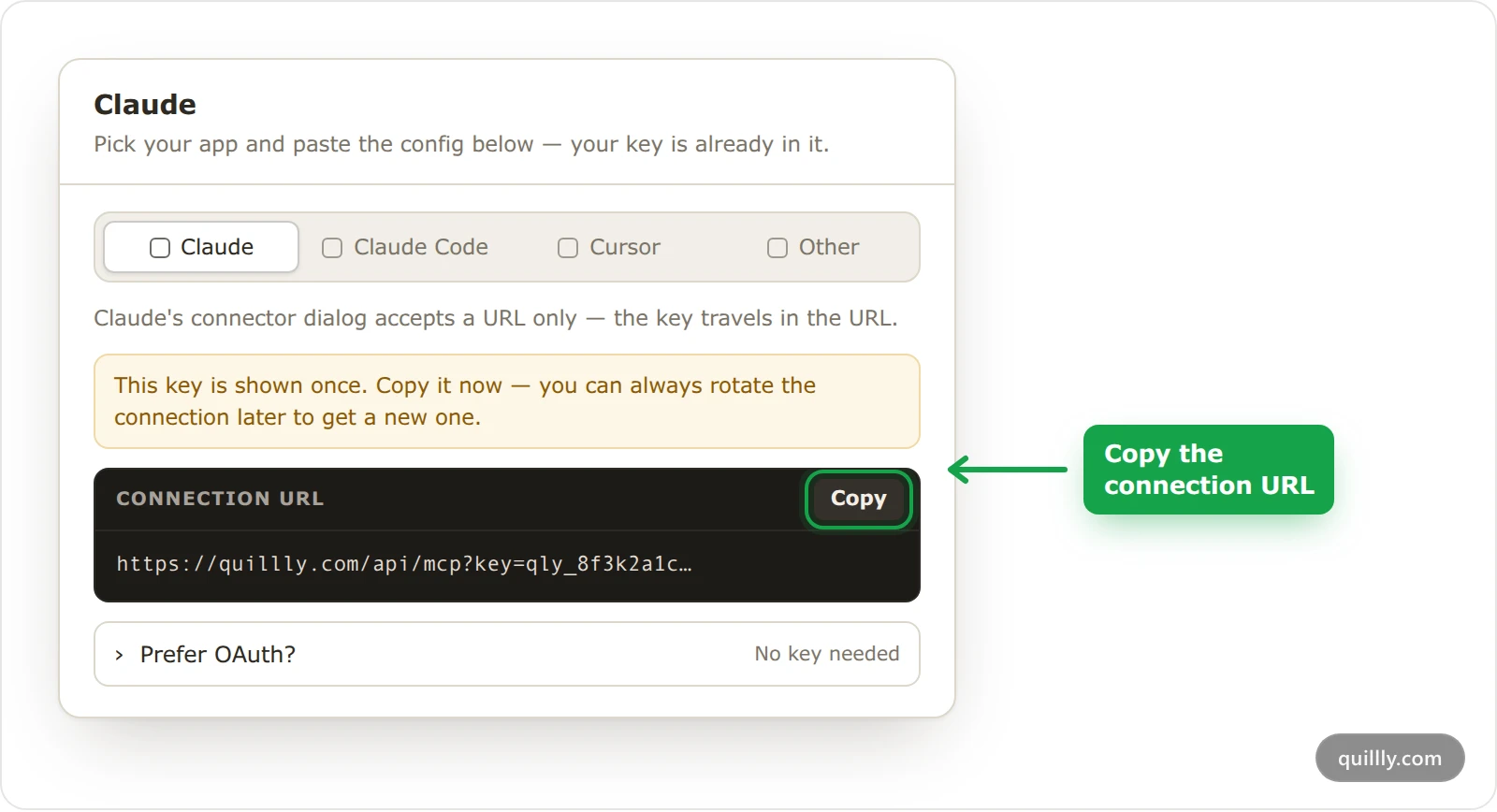
Click Copy next to Connection URL. The URL ends with your key, as in
https://quillly.com/api/mcp?key=qly_…, and Quillly shows it only this once.Claude's connector form takes a URL and nothing else, so the key travels inside the URL. Treat the whole URL as a password.
Add the connector in Claude#
In Claude, open Customize, then Connectors. Click +, choose Add custom connector, paste the URL as the server URL (name it
Quilllyif Claude asks for a name) and click Add.Leave Advanced settings empty. Those fields are for OAuth, and the key in the URL already signs Claude in.
Turn Quillly on in a chat#
In a chat, click + at the bottom left, open Connectors and switch Quillly on.
Test the connection#
Send
List my Quillly websites. Claude calls Quillly and lists your websites. On Quillly's Connections page, the connection now shows when it was last used.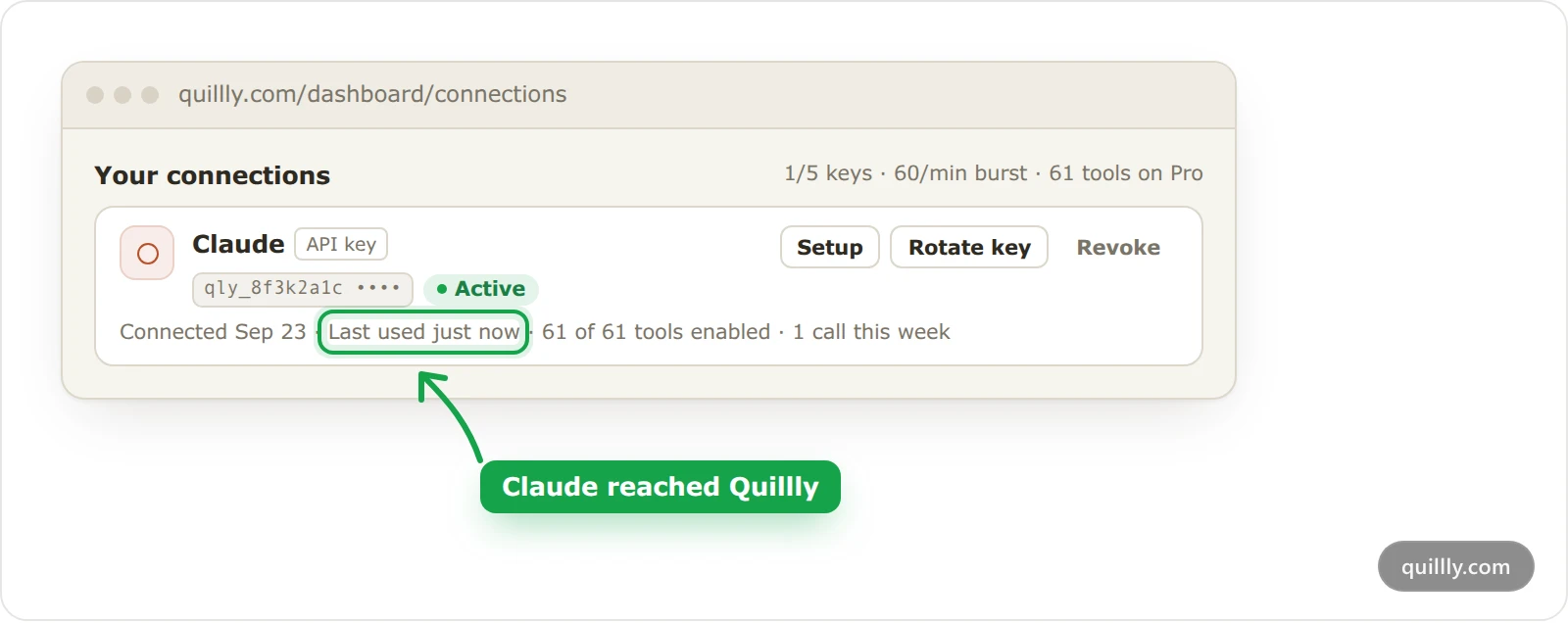
Prompts to try next#
The setup dialog suggests these three. Replace [TOPIC] with your own subject:
"Using Quillly, list my websites and show me what tools you have access to. Then suggest 3 blog ideas for my first website based on what it's about."
"Using Quillly, list my websites and pick the first one. Write a 1200-word blog post about [TOPIC] for that website, check the SEO score, apply any patches you can, and save it as a draft."
"Using Quillly, list my published blogs on my first website, check the SEO score of the top 5, and show me which ones need improvement."
When Claude publishes, Quillly checks the post first. A post below your website's minimum SEO score, 85 unless you change it, stays a draft unless you tell Claude to publish it anyway.
Claude Team and Enterprise#
On Claude Team and Enterprise plans, an owner adds custom connectors for the whole organization, under Organization settings → Connectors. Everyone in that Claude organization then uses the same connector URL.
Warning
Never put your Quillly key in a connector your Claude organization shares. Everyone in the organization would act as you, on your websites.
This is the one case where OAuth, the alternative to a key, is the right choice:
The owner adds the connector with the plain URL,
https://quillly.com/api/mcp, with no key in it.Each member opens Customize → Connectors, finds Quillly and clicks Connect.
Quillly asks them to sign in, then shows Authorize with the app's name and what it may do. They click Allow access.
Each member's connection then appears on their own Connections page with an OAuth badge. It gets every tool on their plan, and they can revoke it there.
If Claude does not connect#
Claude shows an error when it connects or calls a tool. The key in the URL no longer works, usually because it was rotated or revoked. Get a new key on Connections, then remove the connector in Claude and add it again with the new URL.
Quillly's tools are missing from a chat. Switch Quillly on for that chat in + → Connectors.
Claude says a tool is switched off for this connection. Open the connection on Connections and turn the tool back on under Enabled tools.
Claude reports a daily limit. Your plan's calls for the day are used up. The message gives the reset time, midnight UTC.
Common questions#
Does the connector work in the Claude desktop and mobile apps?#
Yes. A Claude custom connector belongs to your Claude account, so after you add it once, it is there in Claude on the web, in Claude Desktop and in the Claude mobile apps.
Does Quillly see my Claude account?#
No. Claude sends Quillly only the tool calls it makes, signed with your Quillly key. Quillly never sees your Claude login, and Claude sees only the Quillly tools your key allows.
Can I stop Claude from deleting posts?#
Yes. On Connections, open the Claude connection and switch off Delete Content under Enabled tools. Claude can still draft, edit and publish, but it can no longer delete a post for good.
Related#
Connect your AI: how the connection works and the apps you can use.
Getting started with Quillly: set up your site and publish your first post.
Plans, trial and limits: calls a day and keys for each plan.
Your first session: what to ask Claude once it is connected.