The "Featured on" badge
On this page
- Why directories want the "Featured on" badge
- What the badge strip shows
- Add the strip to your home page
- 1. Open Badges
- 2. Pick an embed
- 3. Copy the snippet
- 4. Add it to your home page
- 5. Run the check
- The four embeds
- Script
- Next.js / React
- HTML (manual)
- JSON
- The badge check before you order
- Keep the strip up
- Badges added for you
- Common questions
- My site is behind a firewall. Will the check fail?
- When does a new badge show on my site?
- Does the strip have to be on my home page?
- Related
The "Featured on" badge strip shows a badge for every directory that lists your site, each one linking back to that directory. This page shows how to add the strip to your home page, which of the four embeds to pick, and how to pass the badge check that must be green before you order.
Before you start:
A website in Quillly. Each website has its own strip, so select the right one first.
A way to edit your home page, in its code or in your site builder.
Why directories want the "Featured on" badge#
Many directories ask you to show their badge on your site. Several grant your listing a dofollow backlink only while their badge is live there, and they re-check it. Without the badge the link is no longer followed, and a link that is not followed does not count toward your Ahrefs Domain Rating.
What the badge strip shows#
The strip carries the badge for every directory at once:
One badge per listing. When a directory gives out its own badge art, the strip shows that art. Otherwise it shows a Featured on badge with the directory's name and icon.
The right link. Each badge links where that directory asks, such as its home page or your listing.
Highest Domain Rating first. Badges are sorted by each directory's Domain Rating.
Awaiting review. A badge appears when the directory marks your listing live, or earlier if the directory issues its badge first. Some directories approve a listing only once they see their badge on your site.
A credit line. The Script and Next.js / React embeds add the line Live listings, submitted by Quillly under the badges. It links to Quillly's Directory Submission page.
Add the strip to your home page#
Open Badges#
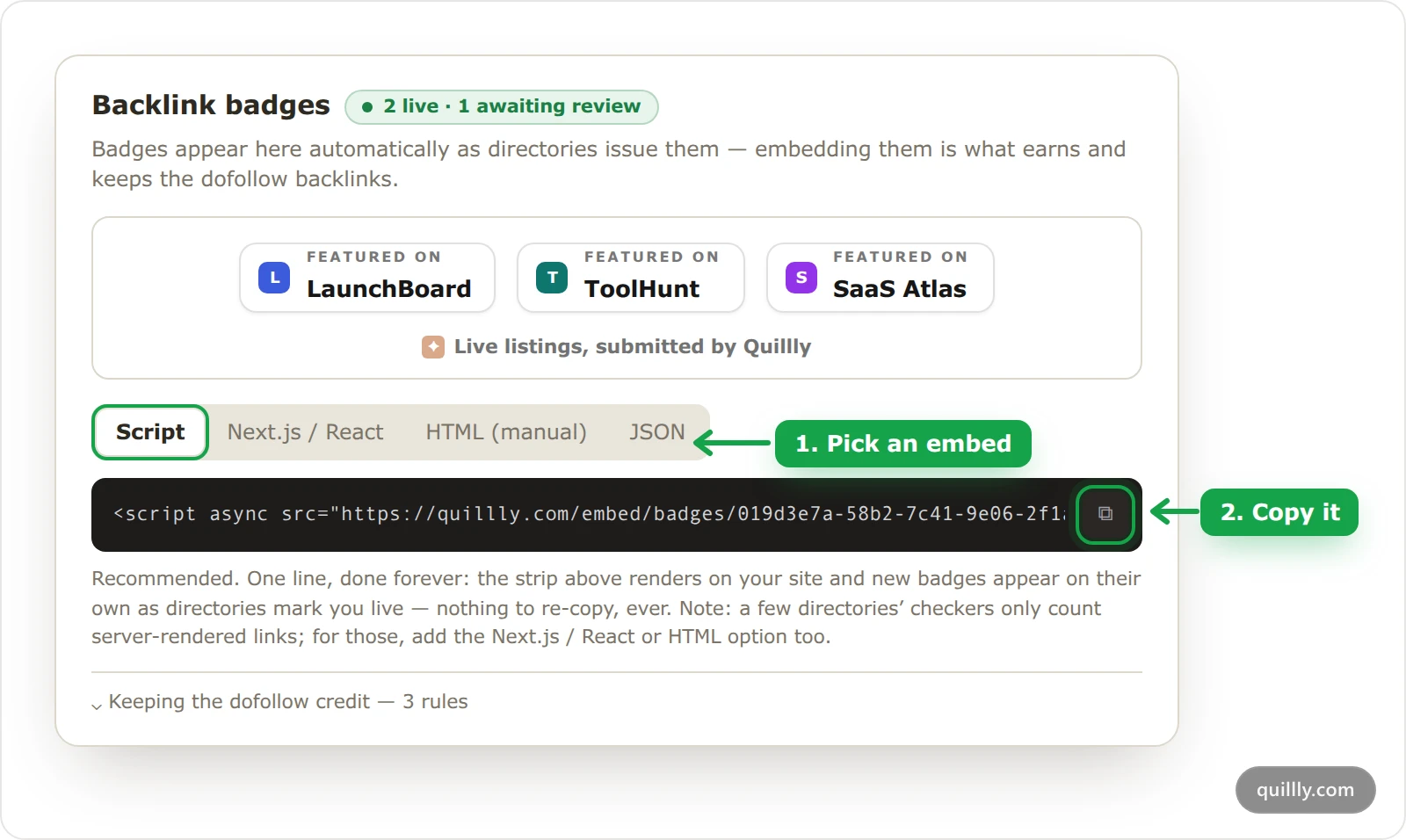
In Domain Rating, click Badges, next to Orders. The dialog previews your strip and counts your badges, for example 2 live · 1 awaiting review. Before any directory has issued a badge, it says so instead.
Pick an embed#
Choose Script unless your site needs another one. The next section compares all four.
Copy the snippet#
Click the copy button on the code box. The snippet already carries your website's ID.
Add it to your home page#
Paste it where the strip should appear, such as your home page's footer or a "Featured on" section. You add it once: the Script and Next.js / React embeds pick up new badges on their own.
Run the check#
Open the order dialog with Auto-submit to N directories, and click Check now next to Badge strip live on your landing page. The check is explained below.
The four embeds#
Embed | What you add | New badges | In your page's HTML |
|---|---|---|---|
Script | One | Appear on their own | No, the script adds them in the browser |
Next.js / React | A server component | Appear after its daily re-fetch | Yes |
HTML (manual) | Your badge links as they are today | Only when you copy them again | Yes |
JSON | The feed URL, read by your own code | Your code decides | Your code decides |
A few directories count only links that are in your page's HTML when it is served. For those, add the Next.js / React or HTML (manual) embed as well as the script.
Script#
<script async src="https://quillly.com/embed/badges/YOUR_WEBSITE_ID"></script>The script draws the strip where the tag sits. To place it elsewhere, add an element with the data-quillly-badges attribute, and the strip goes inside it. With four or more badges the strip scrolls and pauses on hover, and it stays still for visitors who turn off animations.
Next.js / React#
export async function FeaturedOn() {
  const res = await fetch('https://quillly.com/api/badges/YOUR_WEBSITE_ID?format=html', { next: { revalidate: 86400 } });
  if (!res.ok) return null;
  return <div dangerouslySetInnerHTML={{ __html: await res.text() }} />;
}
Render <FeaturedOn /> in your footer. It is an async server component, so the links are in your page's HTML, and the revalidate option of the Next.js fetch fetches the strip again once a day. On another framework, fetch the same URL on your server or at build time and insert the HTML it returns.
HTML (manual)#
This tab lists your current badges as links, one per line. Each one looks like this:
<a href="https://launchboard.example/" title="Featured on LaunchBoard" class="qb-badge qb-made"><img class="qb-fav" src="https://www.google.com/s2/favicons?domain=launchboard.example&sz=64" alt="" width="20" height="20" loading="lazy" onerror="this.remove()"/><span class="qb-text"><span class="qb-kicker">Featured on</span><span class="qb-name">LaunchBoard</span></span></a>The paste is frozen. When another directory lists you, come back and copy it again. It carries no styles, so style the qb- classes yourself, and it has no credit line.
JSON#
https://quillly.com/api/badges/YOUR_WEBSITE_IDThe raw feed for your own code. Each badge has the directory's name and domain, its link in href, its image or icon, and ready-made html. Add ?format=html to get the strip as an HTML fragment to include on your server, and &marquee=1 after that for the scrolling version.
The badge check before you order#
The order dialog lists two checks under Before we start: Submission kit complete and Badge strip live on your landing page. The order button stays off until both are green.
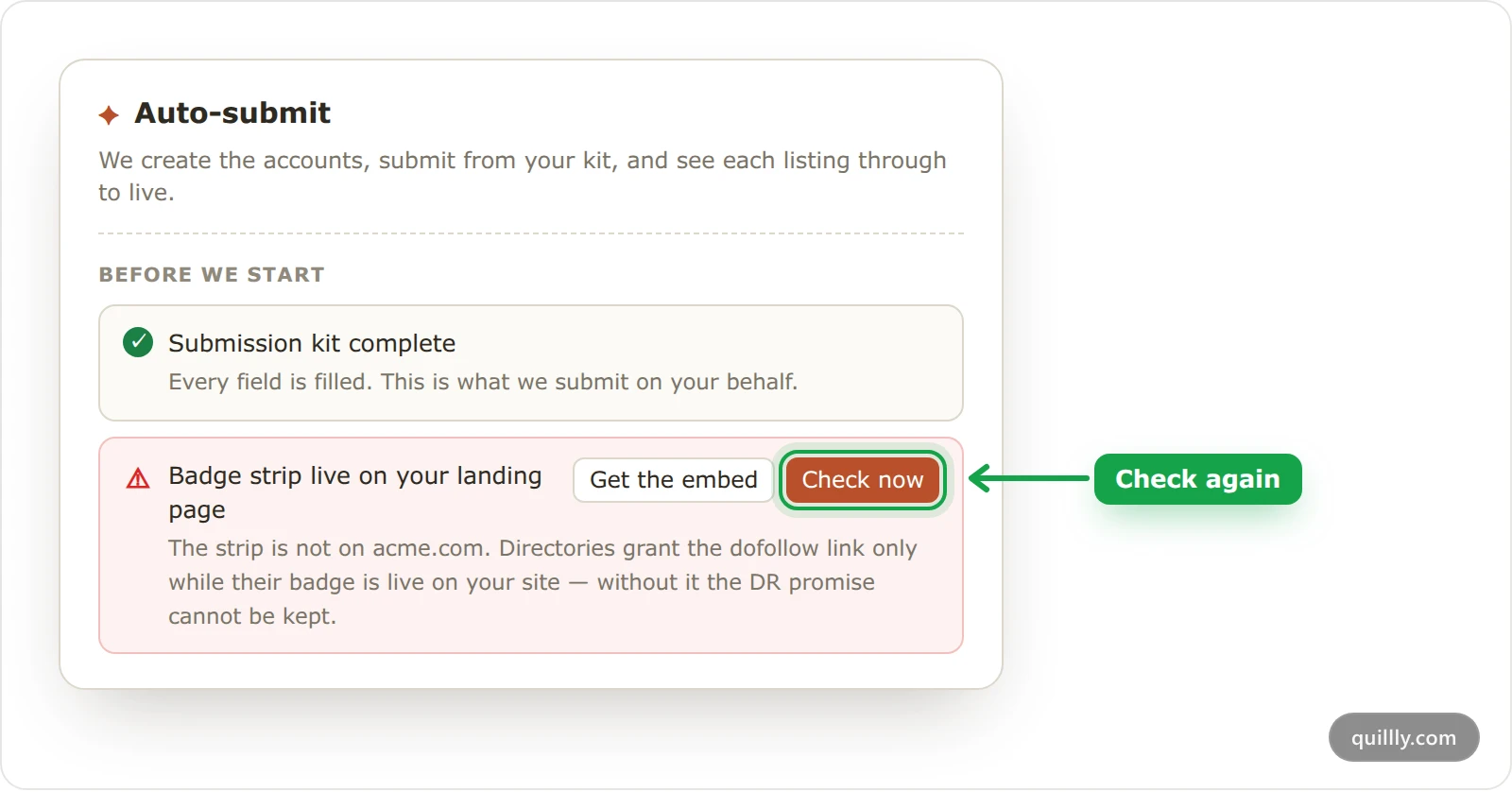
Check now loads your home page, for example https://acme.com/, and reads its HTML. It passes when it finds the Script tag, the strip the Next.js / React embed renders, or the feed URL. The row then reads, for example, Found on acme.com via the script embed · checked just now.
The check reads the HTML only and does not run scripts, which is why it looks for the tag rather than the badges.
The strip is not on acme.com. The check read your page and found no strip. Click Get the embed, add the strip, then click Check now again.
We could not read acme.com. Your server or firewall blocked the check (for example with
HTTP 403), returned a server error, showed a bot challenge, timed out or redirected to another domain. That is not proof the strip is missing. Click I've added it, and the next daily check confirms it.
Note
A paste from the HTML (manual) tab on its own does not pass the check, because the check recognizes only the script, the ?format=html fragment and the feed URL. Use the Script or Next.js / React embed, or include the fragment on your server.
Keep the strip up#
The Keeping the dofollow credit — 3 rules list in Badges says what keeps the links counting:
Keep the badge links followed: no
rel="nofollow"orrel="sponsored"on them.Leave the badges on the page. Directories re-check and demote listings whose badge disappeared.
Don't block directory checker bots in your robots.txt or your firewall or CDN rules.
Once you have a submitted or live listing, Quillly checks your home page again every day. If the strip is gone, each submitted or live listing shows Badge missing in the Directory list, and the Issues pill lists Badge strip not found on acme.com. Both open Badges.
Warning
The daily check also counts toward the DR guarantee. If the strip was found on fewer than 80% of the daily checks in the 60 days after an order completes, that order can no longer be refunded, though Quillly keeps submitting at no extra cost. Days Quillly could not read your page don't count against you.
Badges added for you#
Some directories ask for their badge on your site before they confirm a listing. For listings Quillly submits, Quillly adds that badge to your strip and confirms it with the directory. The listing's row in the Directory list then reads Quillly placed the badge on your site, and there is nothing to do. Keep an embed that updates itself, so these badges reach your site.
For a listing you made yourself, you can add the badge the directory gave you. Click the pencil button on its row in the Directory list, paste the code or the image URL into Badge embed code, and click Save. The strip shows that badge with its link once the listing is Submitted or Live.
Common questions#
My site is behind a firewall. Will the check fail?#
It can. If your firewall blocks the check, the row says We could not read your domain and shows the error, such as HTTP 403. Click I've added it to go on, and allow directory checkers through as well, since they can be blocked the same way.
When does a new badge show on my site?#
It appears in Badges as soon as the directory marks your listing live or issues its badge. The Script and Next.js / React embeds then pick it up on their own, the Next.js / React one at its daily re-fetch. A manual HTML paste shows it only once you copy it again.
Does the strip have to be on my home page?#
Yes. Quillly's check reads only your home page, so the strip must be there before you can order. You can add it to other pages as well.
Related#
How Directory Submission works: the order, the queue and every status.
The submission kit: the other check before you order.
Orders, progress and listings: where Badge missing shows in the Directory list.
The DR guarantee: why the strip matters for the refund.