How Directory Submission works
On this page
- What a Directory Submission order includes
- Before you order
- 1. Complete the submission kit
- 2. Put the badge strip on your landing page
- 3. Wait for your Domain Rating
- 4. Place the order
- After you pay
- What each status means
- Order statuses
- Directory statuses
- Common questions
- Can I order for more than one website?
- What if my site is already listed on some directories?
- Do I need a subscription?
- Related
Directory Submission is Quillly's directory submission service: a one-time order for one website, in which Quillly's agent creates the accounts and submits your site to hand-checked directories from your submission kit. This page explains what an order includes, what happens between payment and a live listing, and what each status in the Domain Rating menu means.
What a Directory Submission order includes#
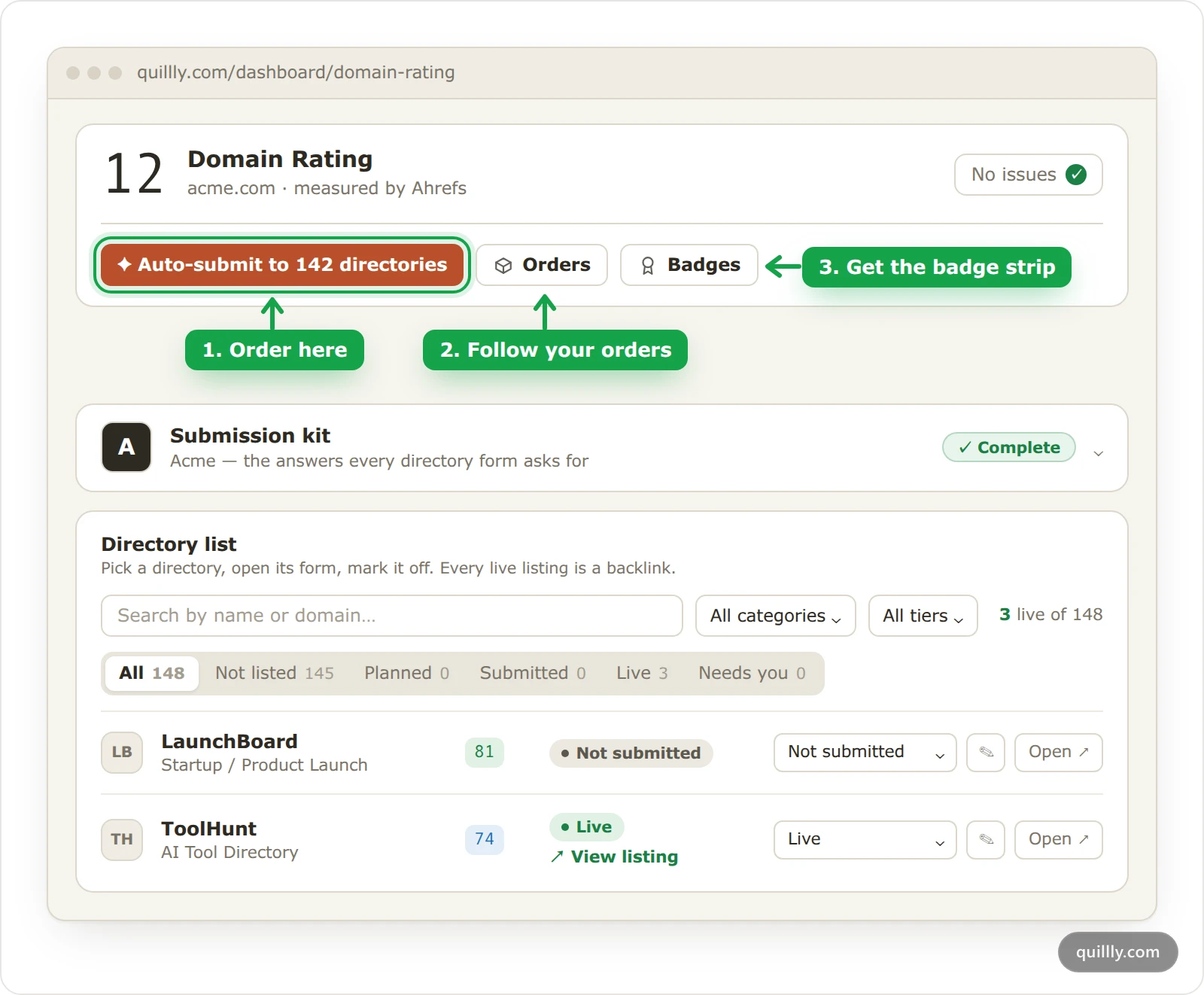
One order covers one website: up to 150 hand-checked directories, one payment, and a Domain Rating target when your site starts low. The agent does all the submitting, and every listing it makes appears in your dashboard.
Up to 150 hand-checked directories for one website. If fewer are still open for your site, the order covers every one that is left, and the order dialog shows that number before you pay. At least 25 must be open to place an order.
No duplicates. Directories your site is already listed on, and directories an open order already covers, are left out.
One payment, no subscription. The Domain Rating menu is open on every account, whatever plan you are on. Today's price is on the Directory Submission page.
A Domain Rating target for sites that start at DR 20 or below, measured in Ahrefs Domain Rating. The DR guarantee explains how it is set and measured.
Every listing recorded in your dashboard, with a View listing link once the directory publishes it.
What an order does not do: Quillly pays no listing fees and never asks you to post, verify a phone or take any other step for a directory.
A directory that turns out to charge a fee, to allow only social sign-in, to have closed its submissions or to need a step from you leaves your order, and another directory takes its place if the catalog has one left. Each directory still decides whether to accept your site.
Before you order#
The order button works once these four things are true.
Complete the submission kit#
Open the Submission kit card and fill in the Tagline and Short description. Add a logo in the Brand menu. The agent writes every listing from the kit, so an order cannot start without them. The submission kit explains every field.
Put the badge strip on your landing page#
Click Badges, copy an embed and add it to your home page, as The "Featured on" badge shows. Several directories keep your link followed only while their badge is on your site, so the order dialog checks your home page before it lets you pay.
Wait for your Domain Rating#
The number at the top of the menu is your Ahrefs Domain Rating, which Quillly reads once a day. Until Quillly has read it, the order button says Waiting on your DR, because your starting rating decides which target the order carries.
Place the order#
Click Auto-submit to N directories, where N is the number still open for your site. Check the summary, run Check now on the badge strip, and click Order Directory Submission. You pay on the checkout page, and back in the menu a notice reads Payment received — confirming your order. This page updates itself. until the order appears.
After you pay#
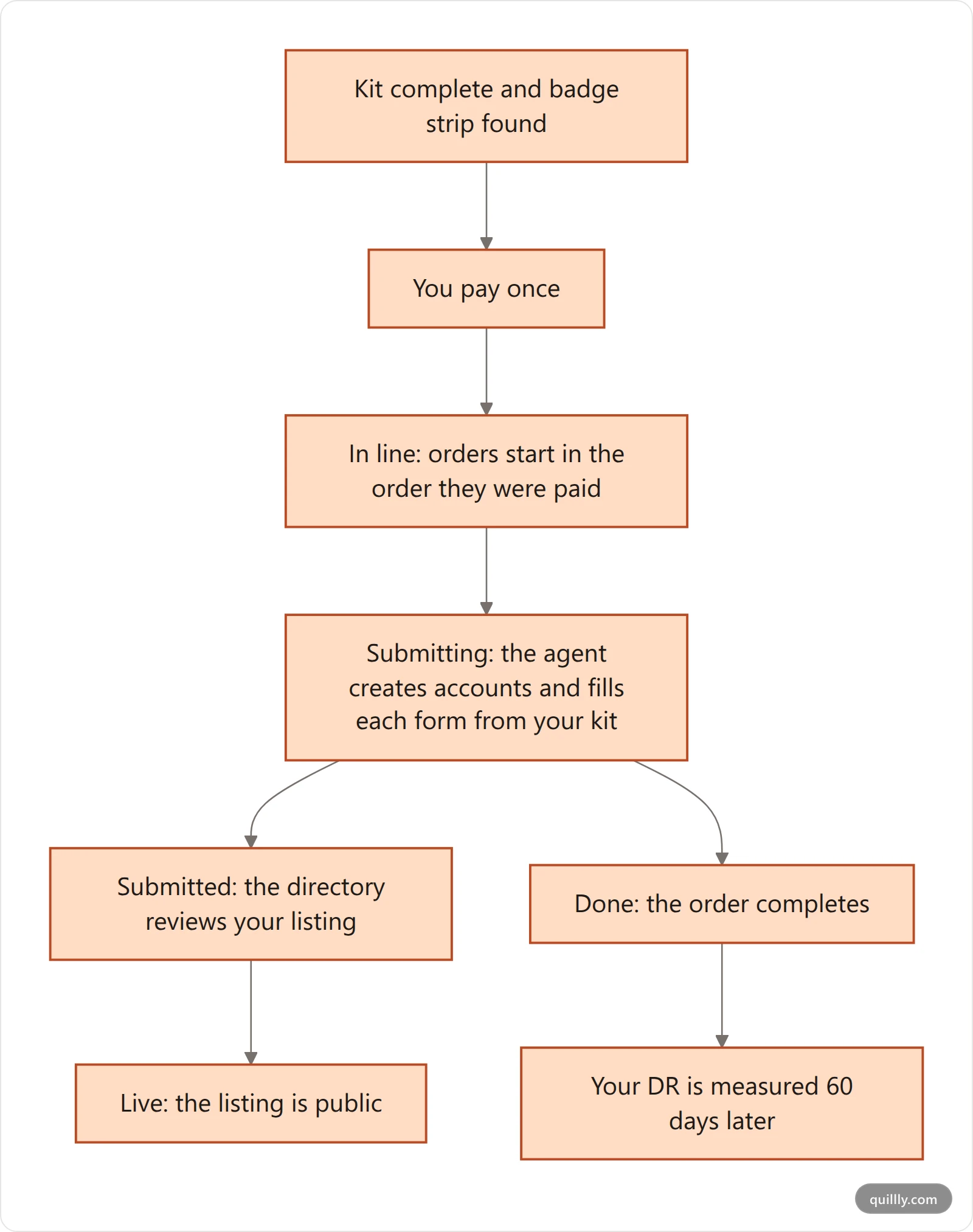
In line. Orders start in the order they were paid. While yours waits, its card shows its place and an estimate, such as Position 2 in the queue · starts in about 3 hours.
Submitting. The agent first refreshes any listings it made for you that carry an older version of your kit. Then it works through the new directories: those that usually list quickly go first, so your first listings arrive early, and the rest follow from the highest Domain Rating down.
Reviewing. Each directory reviews on its own schedule. Some publish at once, others take days or weeks. Quillly checks each listing it submitted about once a day and marks it Live once the directory has published it.
Done. When the agent has finished with every directory, the order completes. If some listings could not be placed, a note on the order says how many went through and what happens to the rest.
The order dialog says ready in 14 business days. That is the time from payment to the last submission going out, not to the last listing going live.
What each status means#
Order statuses#
These show on each order in the Orders dialog, which Orders, progress and listings walks through. The Orders button itself shows In line, a count such as 37/142 while the agent works, or Needs you.
Status | What it means |
|---|---|
In line | Your payment arrived and the order is waiting its turn. |
Submitting | The agent is working through your directories. The card shows how many are submitted and which directory it is on. |
Refreshing | The same, for an order that only updates listings you already have. |
Done | The order is complete. Directories may still be reviewing the listings it sent. |
Needs you | The order waits for something only you can fix, such as a required kit field that went missing. Its note says what. |
Refunded | The order was refunded. Your listings stay live. |
Directory statuses#
Each directory in an order has its own status. Open an order to see them.
Status | What it means |
|---|---|
Planned | Waiting for its turn in your order. |
In progress | The agent is filling in this directory's form now. |
Waiting on them | The directory has to confirm a step before the agent can go on. |
Submitted | Your listing was sent, and the directory is reviewing it. |
Live | The directory published your listing. |
Handled by Quillly's team | The directory needed a person, for example to pass a security check or a sign-in. Nothing to do on your side. |
Needs you | The directory rejected a value from your kit. The note names the field to fix. |
Skipped | The directory was taken out of this order. |
Note
Security checks, refused sign-ins and similar walls are Quillly's job. They show as Handled by Quillly's team, never as Needs you, and the listing shows as Planned in the directory list, with the note Quillly's team is handling this listing — nothing to do on your side.
The Directory list under the kit uses the same words for each listing, plus Not submitted. There, a listing that needs you reads Needs attention, and the Needs you tab collects them.
Common questions#
Can I order for more than one website?#
Yes. An order covers one website, so you place a separate order for each site. Select the website first, then order from its Domain Rating menu.
What if my site is already listed on some directories?#
Those directories are left out, and the order covers directories your site is not on yet. Mark listings you made yourself as Submitted or Live in the Directory list so Quillly skips them too.
Do I need a subscription?#
No. Directory Submission is a one-time payment for one website. The Domain Rating menu stays open on every account, with or without a plan.
Related#
The submission kit: every field the agent submits.
The "Featured on" badge: the strip and the check before you order.
Orders, progress and listings: follow an order and every listing.
The DR guarantee: the target, the measurement and the refund.
Domain Rating tracking: the daily Ahrefs reading.
Plans, trial and limits: how Directory Submission sits next to the subscriptions.
What is Quillly: the three products and the menus each one opens.
Brand: site theme, logo and navigation: where the logo your listings use comes from.