Pages to prune
On this page
- Who it is for
- Which posts are listed
- Merge, unpublish or keep
- Merge a post into a stronger page
- 1. Open Pages to prune
- 2. Pick the page to merge into
- 3. Move what is worth keeping
- 4. Click Merge
- Who can do what
- Where the list opens
- Ask your AI
- Common questions
- Why is a post with visitors on the list?
- Why is the list empty?
- Related
Pages to prune lists the live posts on your site that had 90 days to earn a search impression and earned none. This page shows which posts it lists, how to merge, unpublish or keep each one, and how your AI does the same with your approval.
Before you start, you need:
A Content + Analytics plan or the free trial. The list opens from your Blog and News lists.
At least one search engine connected: Google Search Console, Bing Webmaster Tools or Yandex Webmaster. Without their numbers, a post that earns nothing looks the same as one nobody has measured. Connect Search Console, Bing and Yandex shows how.
Who it is for#
Search engines judge a site by all of its pages. When a site loses ground after a Google quality update, the fix is fewer, better pages, and content pruning starts with the posts that never earned an impression. The drop alert sends you here when a fall sits near a Google spam, core or helpful content update.
Every post on the list has had 90 days to be found, so the list is worth a look on any site, not only after a drop.
Which posts are listed#
Each time you open it, the list checks every live post in the section, and lists a post when all of these are true:
It is a live blog post or news story. Docs pages and changelog entries are never listed: they document your product and don't need search traffic to earn their place.
It went live at least 90 days ago.
A connected engine has measured it, with search numbers or an indexing check.
No connected engine reported a single impression for it in the last 90 days.
Nobody chose Keep for it in the last 180 days.
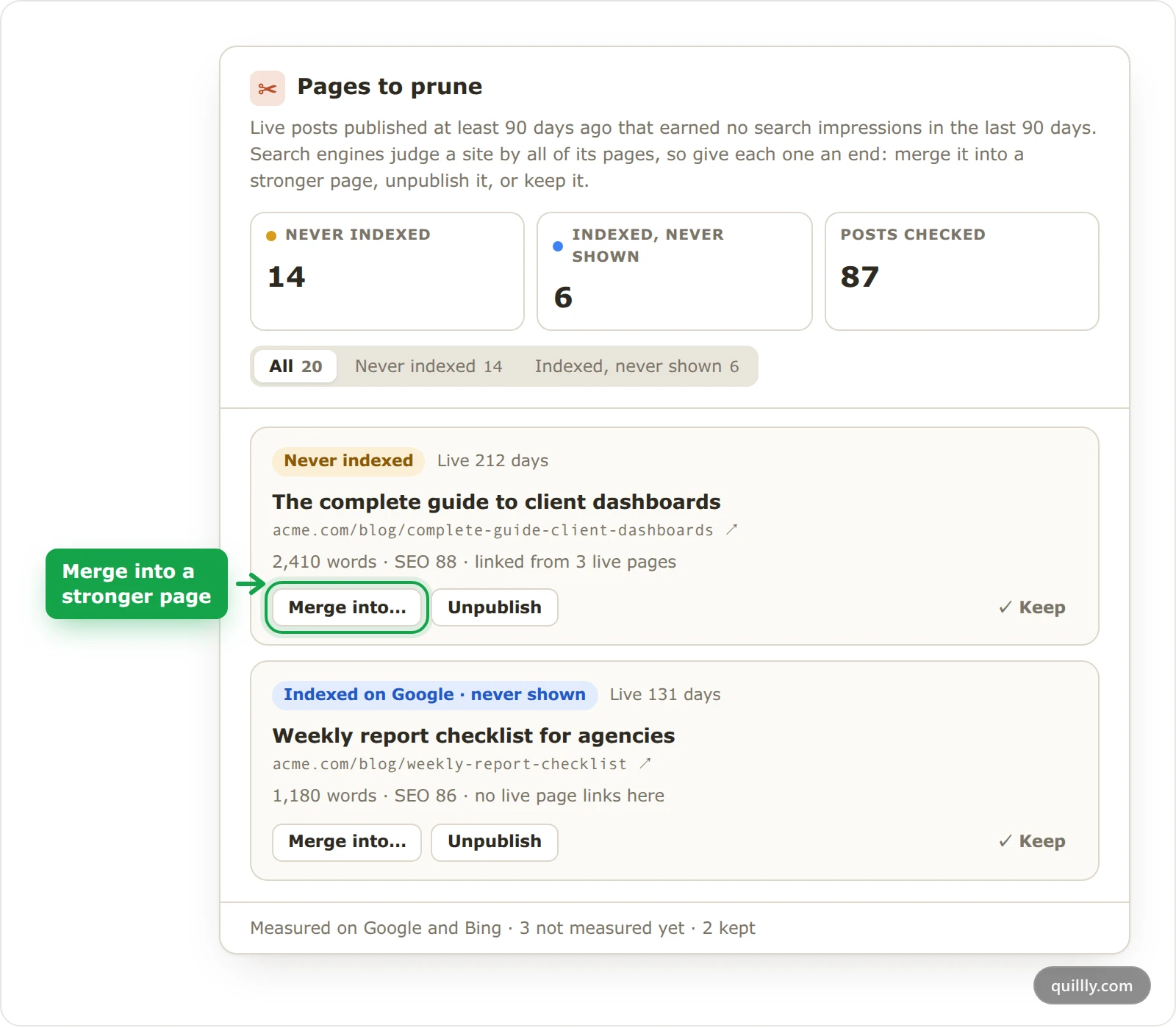
Never indexed posts come first: no connected engine has them in its index. Then come posts that are indexed but never shown, labelled with the engines, such as Indexed on Google · never shown. Each group runs oldest first.
Each row shows how many days the post has been live, its title and address, its word count and SEO score, and how many live pages link to it. The line at the bottom names the engines the list is measured on, such as Measured on Google and Bing, and counts the posts not measured yet: old enough, but no engine has reported on them. They join the list once an engine does.
Merge, unpublish or keep#
Action | What happens |
|---|---|
Merge into… | The post's address, and every older address it had, redirects with a 308 to the page you pick. Links to it from your other pages point there too. The post is archived, not deleted. |
Unpublish | The post goes back to drafts and off the site. Links to it from your live pages show as plain text, and the confirmation says how many there are. Merging keeps those links working. You can publish the post again later. |
Keep | The post stays live and leaves the list for 180 days. |
Merge posts when another page answers the same question better. Unpublish a post when nothing does. Keep it when it has another job, such as a page you send people to from emails or ads: the list counts search impressions only.
Merge into… offers only live pages in the same section, a post for a post and a story for a story, that aren't on the list themselves.
Merge a post into a stronger page#
Open Pages to prune#
Click Blog under Content, or News for stories, then click Prune in the toolbar. On a phone, the button shows only its scissors icon.
Pick the page to merge into#
On the post's row, click Merge into… and type part of a title or address. The pages are listed strongest first, with their impressions over the last 90 days.
Move what is worth keeping#
A confirmation opens under the row and names the address that will redirect, such as
/complete-guide-client-dashboardsto/client-dashboard-examples. Click Open it in the editor to add any paragraph worth keeping to the other page first.Warning
Merging copies nothing from the post. Anything you don't move into the other page before you click Merge is only in the archived post.
Click Merge#
The row leaves the list, and a message confirms the redirect. Search engines hear about the change the same way as when you unpublish a page.
Who can do what#
On a website shared with your team, each action follows the person's Content level under Menu access. The website's owner can always do all three.
Action | Content level | Who has it by default |
|---|---|---|
See the list | View: Read everything published and in draft | Every role |
Keep | Contribute: Write and edit drafts | Writers, editors and admins |
Merge into… and Unpublish | Manage: Publish, unpublish and delete anyone's work | Editors and admins |
Without Manage, the buttons are hidden, and the drawer says "Merging and unpublishing need Manage access to Content." Team roles and access shows how to change a level.
Where the list opens#
The Prune button on your Blog and News lists.
See the pages to prune under What to do in the drop banner on the Search Performance card, when the fall sits near a Google spam, core or helpful content update.
Pages to prune in the drop alert email, in the same case.
See the pages to prune on the New posts from AI agents card of your website's page, when the automatic weekly limit is down to 1 post.
Every link opens the list of that website's blog posts, even when the dashboard had another website selected.
Ask your AI#
Your AI sees the same list, and Quillly tells it to change only the posts you choose:
get_content_suggestionsreturns apruneblock when the site has posts to prune: how many there are, up to 15 of them with theirblog_id, and up to 15merge_targets.archive_contentwithredirect_toset to another live post's ID merges a post, like Merge into….unpublish_contentunpublishes it. Both need Manage on Content, which editors and admins have by default.Your AI can't mark a post as kept. Click Keep in the dashboard instead.
For example: "List the pages to prune on acme.com and suggest which to merge where. Change nothing until I say which ones."
Common questions#
Why is a post with visitors on the list?#
The list counts search impressions only. A post that gets its visitors from email, social media or ads can still appear: click Keep, and it stays off the list for 180 days.
Why is the list empty?#
It says why: No posts are 90 days old yet, Nothing to prune when every older post earned impressions or was kept, or Connect a search engine first.
Related#
Search performance and the Focus list: Google updates on the Search chart, and the drop alert.
Indexing: how your pages reach search engines: what Not indexed and Indexed · unseen mean.
Publishing: statuses, scheduling and review: drafts, archived posts and publishing again.
Internal links and broken links: what happens to links when a page leaves the site.