

You probably track 20 or 30 keywords. Your site has hundreds of URLs. See the problem?
Here's the uncomfortable part. As of June 2026, 96.55% of all pages get zero traffic from Google, based on Ahrefs' study of 14 billion pages. Most of those pages aren't bad. They're just unwatched. Nobody knows where they rank, whether Google even indexed them, or which ones sit one nudge away from page one.
Sitemap rank tracking fixes that. Instead of hand-picking a keyword list, you point a tool at your own sitemap. It pulls in every live URL and tracks each one. Position, clicks, impressions, and indexing status. Across Google, Bing, and AI search. Refreshed daily.
This guide breaks down how it works, why a manual keyword list quietly fails you, and how to set the whole thing up in about five minutes. No migration, no code.
What Is Sitemap Rank Tracking?#
Sitemap rank tracking is a method that imports every URL from your XML sitemap and monitors each page's search performance automatically. Instead of tracking a list of keywords you picked by hand, you track pages. The tool reads your sitemap, finds every live URL, then reports rank, clicks, impressions, and indexing status for each one. It refreshes daily across Google, Bing, and AI search.
The shift is small but it changes everything. A keyword tracker starts with terms you hope to win. A page tracker starts with what you've actually published. Your XML sitemap is already the master list of every page you want found. So why not track from it? That is the promise of whole site rank tracking: you track rankings for every page you have published, instead of a shortlist you maintain by hand.
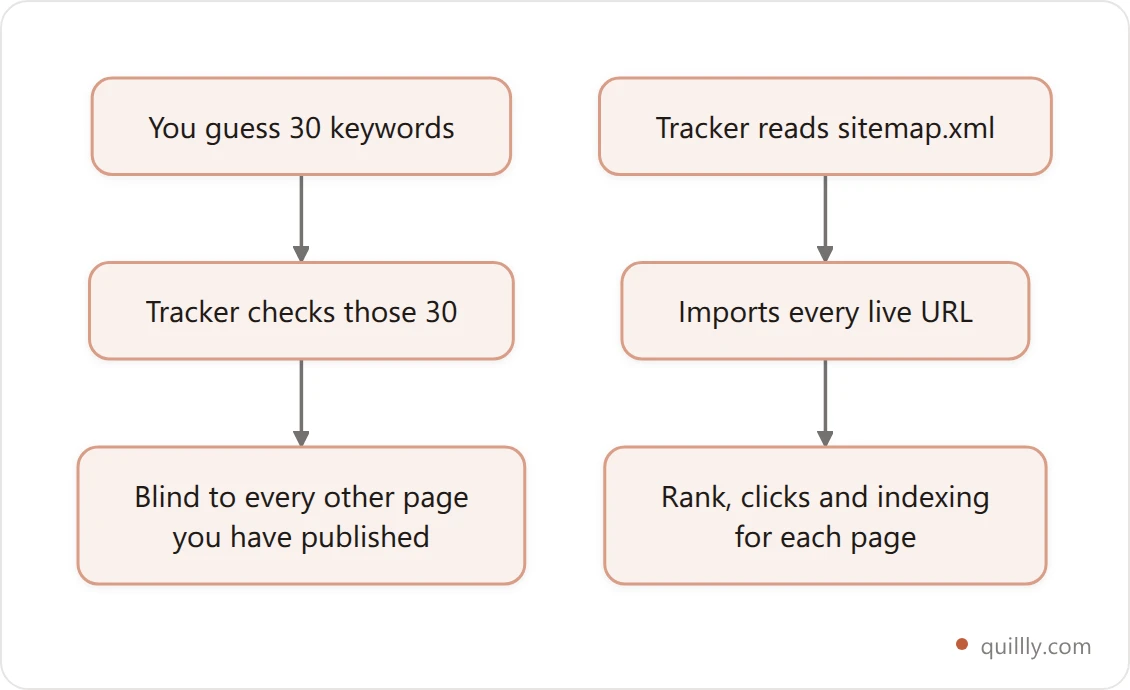
Most rank trackers ignore the sitemap entirely. You paste in keywords, they check positions. Useful, but blind to the 90% of your site you didn't think to add. Page-first tracking closes that gap by default.
Why a 30-Keyword List Misses Most of Your Site#
Start with the math. The average page that ranks #1 for one keyword also ranks in the top 10 for nearly 1,000 related keywords, per Ahrefs' analysis of 3 million queries. A hand-built list of 30 terms is a rounding error against that. A keyword-first rank tracking playbook still has its place, but it can't cover a whole site on its own.
Here's the contrarian bit: tracking a keyword list is backwards. You're measuring the terms you guessed, not the terms you earn. The page you wrote about onboarding might pull traffic for "reduce churn," "activation email," and forty phrases you never typed into a tracker. A keyword list can't see them. A page-first tracker catches all of it, because it watches the URL, not your guess.
This is also why so much content goes dark. When 96.55% of pages get zero Google traffic, the cause often isn't quality. It's that nobody's watching those URLs to catch the fixable ones. You can't improve a page you're not measuring.
Google Search Console Is a Report, Not a Rank Tracker#
Google Search Console (GSC) is free, accurate, and the source of truth for your own data. It's also not built to track rankings at scale. Three limits get in the way.
First, exports are capped. The GSC interface "truncates to 1,000 rows of representative examples of your data," per Google's own docs. A site with thousands of URLs can't see most of them in the UI.
Second, the data window rolls. GSC keeps roughly 16 months of performance data, then drops the oldest. Lose track of an export and that history is gone.
Third, queries get hidden. Google filters out "anonymized" queries that few people search. In April 2025 that meant about 46.77% of click data was missing from query reports, per Ahrefs. You're seeing half the picture.
Then there's AI. GSC added AI performance reports in 2026, but the blind spots remain. As Google's John Mueller explained, "all links within an AI Overview share a single position," and impressions only count when a link is actually shown. GSC can tell you that you appeared. It can't tell you that you won the answer.
None of this makes GSC bad. It makes it a reporting layer. Rank tracking without a rank tracker is genuinely possible on a small site — Search Console alone will do it — but it stops scaling the moment you cross that export cap. A rank tracker sits on top and turns that raw feed into per-page, multi-engine, historical tracking. For the deeper version of this, see how to track AI search traffic.
Google Search Console | Sitemap rank tracker | |
|---|---|---|
Coverage | 1,000-row export cap | Every URL in your sitemap |
History | ~16 months, rolling | Kept as long as you track |
Per-page view | Manual filtering | Automatic, all pages |
Indexing + rank together | Separate reports | One row per page |
Engines | Google only | Google, Bing, AI search |
Refresh | You check it | Daily, automatic |
The Whole-Site Rank Tracking Loop#
Page-first tracking works best as a repeatable loop. Call it the Whole-Site Rank Tracking Loop. Four phases, run on autopilot.
Import. Read the sitemap. Pull every live URL into one list. No manual entry.
Index. Check each URL's indexing status. A page Google hasn't indexed can't rank at all, so this comes first.
Rank. Track position, clicks, and impressions for every indexed page, across Google and Bing.
Act. Find the gaps. Striking-distance pages, decaying pages, un-indexed pages. Fix them, then let the loop re-measure.
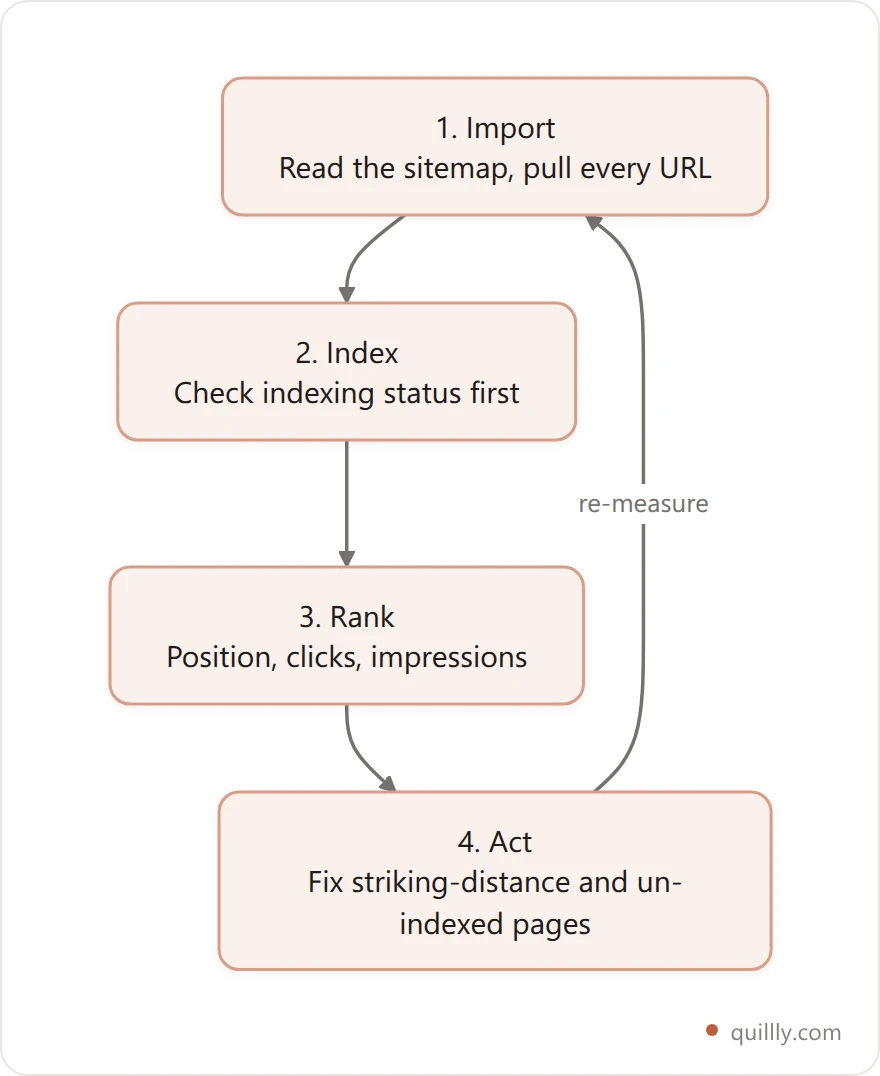
The point of naming it is the order. Most people jump straight to "Rank" and skip "Index," then wonder why a page shows no position. It shows no position because it isn't in the index. Index before rank, every time.
How to Set Up Sitemap Rank Tracking in 4 Steps#
You don't need to migrate your site or add code. The whole flow is point-and-track.
Step 1: Connect your domain. Point the tool at the site you already run. Verify ownership through Google Search Console or Bing Webmaster Tools, which also unlocks your real clicks and impressions.
Step 2: Import the sitemap. The tool reads yourdomain.com/sitemap.xml and pulls in every live URL. A 140-page site goes from zero tracked pages to 140 in one step.
Step 3: Let it run. Each page gets checked for indexing status and tracked for position, clicks, and impressions. The data refreshes daily across Google, Bing, and more.
Step 4: Read and act. Sort by clicks to find winners. Filter by "page 2" to find striking-distance pages. Spot the URLs marked "Discovered" but not indexed.
This is the part Quillly automates. Point it at a domain and it imports every URL from your sitemap, then tracks each page's rank, traffic, and indexing across Google, Bing, and more, refreshed daily. Nothing to install. If you'd rather drive it from your AI, the same data is one prompt away:
Show me every page on my site that's indexed but
ranking on page 2, sorted by impressions. Then list
any URLs Google has discovered but not indexed yet.
Your AI calls the tracking tools, reads the data, and hands you the shortlist. New to this? Start with website rank tracking without code.
Copy-paste setup checklist:
Domain verified in Google Search Console
Domain verified in Bing Webmaster Tools
Sitemap submitted and reachable at
/sitemap.xmlEvery sitemap URL imported into the tracker
Indexing status checked per page
Daily refresh on across Google and Bing
A weekly 10-minute review booked
Import your sitemap and see every page at once
Point Quillly at your domain and it pulls every URL from your sitemap, then tracks rank, clicks and indexing coverage page by page across Google, Bing and six more engines.
Start a 14-day free trialWhat to Track on Every Page#
Rank alone is a vanity number. These are the per-page metrics that actually tell you what to do next.
Metric | What it tells you | Act when |
|---|---|---|
Indexing status | Whether the page can rank at all | It reads "Discovered" or "Crawled," not "Indexed" |
Average position | Roughly where you sit in results | It's stuck at 11 to 20 (striking distance) |
Best position | Your ceiling for the page | It sits far above average position |
Clicks | Real traffic earned | Impressions are high, clicks near zero |
Impressions | How often you're shown | They rise while clicks stay flat |
CTR | Title and snippet strength | It's below the position-1 benchmark |
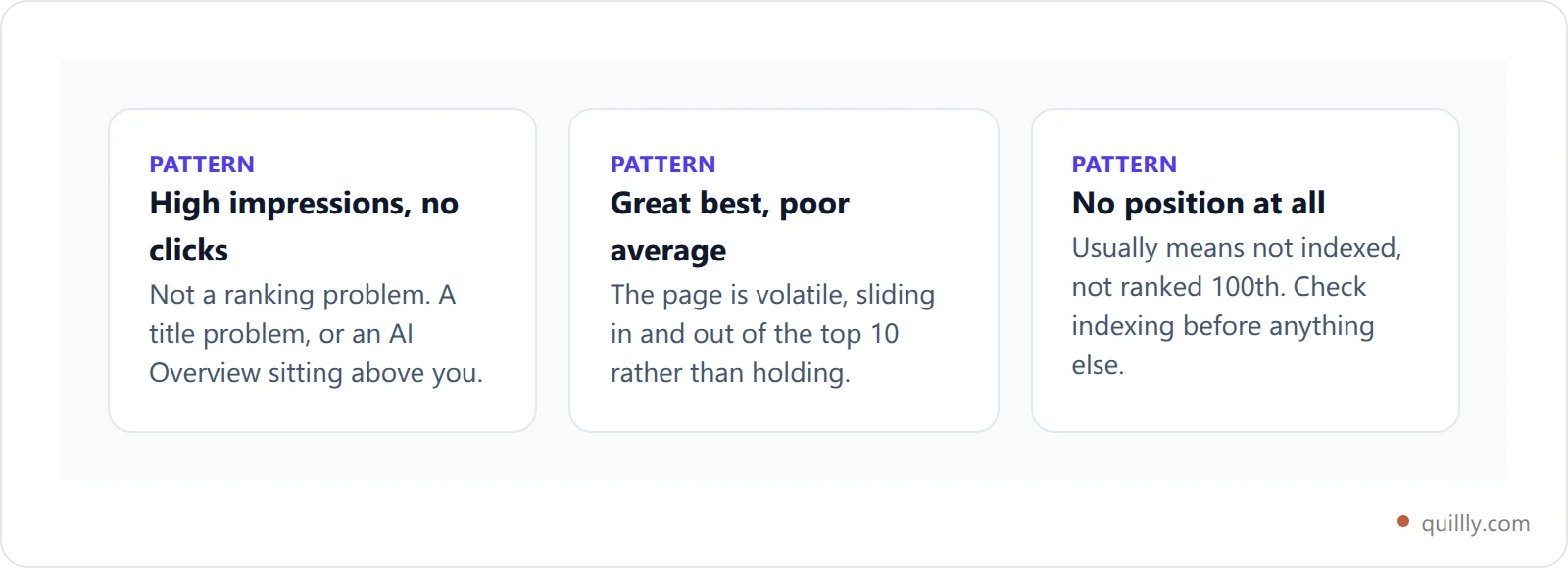
Read them together, not alone. A page with 2,000 impressions and 11 clicks isn't a ranking problem. It's a title problem, or an AI Overview is sitting above you. A page with a great best position but a poor average is volatile, sliding in and out of the top 10. Each pattern points to a different fix.
Why Bing and AI Search Now Belong in Your Tracker#
For years, tracking Bing felt pointless. That changed when ChatGPT started grounding answers in Bing's index. Seer Interactive found that 87% of SearchGPT citations match Bing's top results, versus 56% for Google. Your Bing rank now predicts whether ChatGPT cites you. That alone is a reason to care.

The traffic is real, too. AI referral visits jumped 357% year over year to 1.13 billion by mid-2025, according to Similarweb's AI traffic research. A channel that small a year ago now sends meaningful clicks, and it grounds on engines most trackers ignore.
Meanwhile Google's own results give back fewer clicks. AI Overviews cut position-1 CTR by 58% as of December 2025, Ahrefs found. As Ahrefs' Ryan Law put it, "for every 100 clicks you could historically earn for a top-ranking page, Google now keeps 58." Ranking #1 isn't the finish line it used to be.
So the new question isn't just "where do I rank on Google." It's "where do I rank on Google, where do I rank on Bing, and am I cited in the AI answer." A single-engine tracker can't answer that. Track all three. Bing rank tracking is no longer a nice-to-have, because it is the closest proxy you have for whether an AI assistant will cite you. More on the Bing-to-ChatGPT pipeline in Bing SEO for ChatGPT citations.
Turn Tracking Into Action#
Tracking is only worth it if it changes what you do. Three patterns turn data into wins.
Striking distance. Pages ranking in positions 4 to 15 are closest to real traffic. Moving from #2 to #1 alone lifts clicks by 74.5%, per Backlinko, where position 1 averages a 27.6% CTR. Page-first tracking surfaces every striking-distance URL at once. Full playbook: striking distance keywords.
Decay. Rankings rot. In Q3 2025 alone, desktop positions 2 to 4 lost a combined 4.74 percentage points of CTR, per Advanced Web Ranking. Daily tracking catches a slide while it's a dip, not after it's a cliff.
Indexing gaps. A page that isn't indexed earns nothing. When tracking flags "Discovered, not indexed," that's a fixable problem hiding from a keyword-only tracker. Here's the Google indexing fix stack. If those un-indexed URLs came from a templated set, the economics are worth reading first: what programmatic SEO tools actually automate, and which programmatic SEO examples a low-authority site can copy before you build the next batch.
Picture a 140-page site tracking 25 keywords by hand. It looks healthy. Switch to sitemap import and the real shape appears: 60 URLs indexed but stuck on page 2, and a dozen never indexed at all. None of that was visible before. That's the difference between watching a sliver and watching the whole site. See that view on your own domain.
Read Your Ranking Distribution, Not Just the Average#
A site-wide average position hides more than it shows. Two sites can both average position 14 and be in completely different shape. The fix is ranking distribution: sort every tracked page into position buckets and watch how those buckets move over time.
Positions 1 to 3. Your money pages. They earn the bulk of your clicks.
Positions 4 to 10. Page one, but below the fold. Real upside lives here.
Positions 11 to 20. Striking distance. One solid edit from page one.
Positions 21 and beyond. Indexed but invisible. Decide to fix or prune.
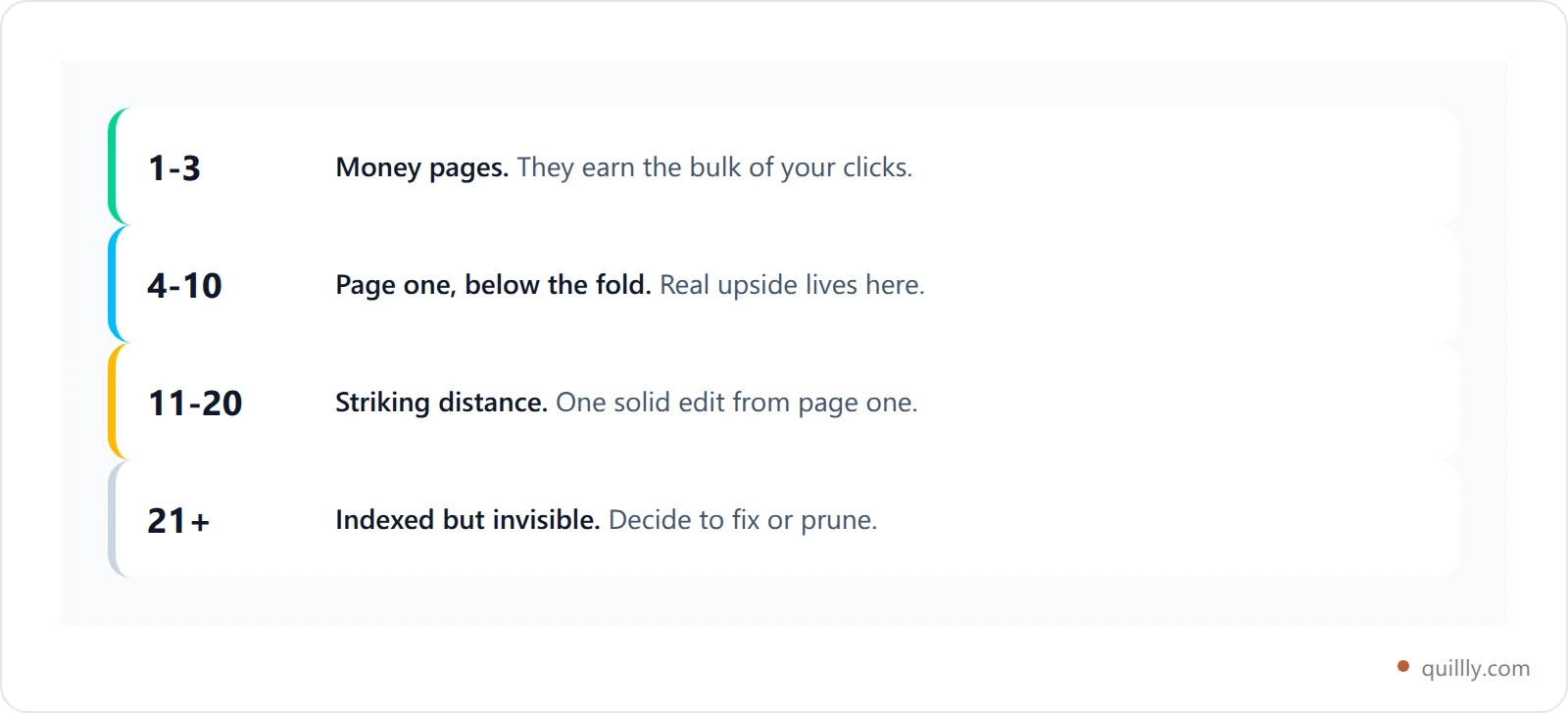
When you track from your sitemap, this distribution builds itself, because every page is already in the system. You're not guessing which URLs to bucket. You see, at a glance, how many pages sit in each band and which way they're trending.
This is also the cleanest way to read your share of voice over time. If pages are migrating from the 11-to-20 band up into 4-to-10, you're winning, even before clicks catch up. If the top bands are thinning out, something's slipping. A single average number would never surface that. Watch the shape of the distribution, not just the midpoint. Track every page you own and the buckets fill themselves. It pairs naturally with a topical authority cluster map, which groups those pages by theme.
Common Sitemap Rank Tracking Mistakes#
Even good setups trip on a few avoidable things. Watch for these.
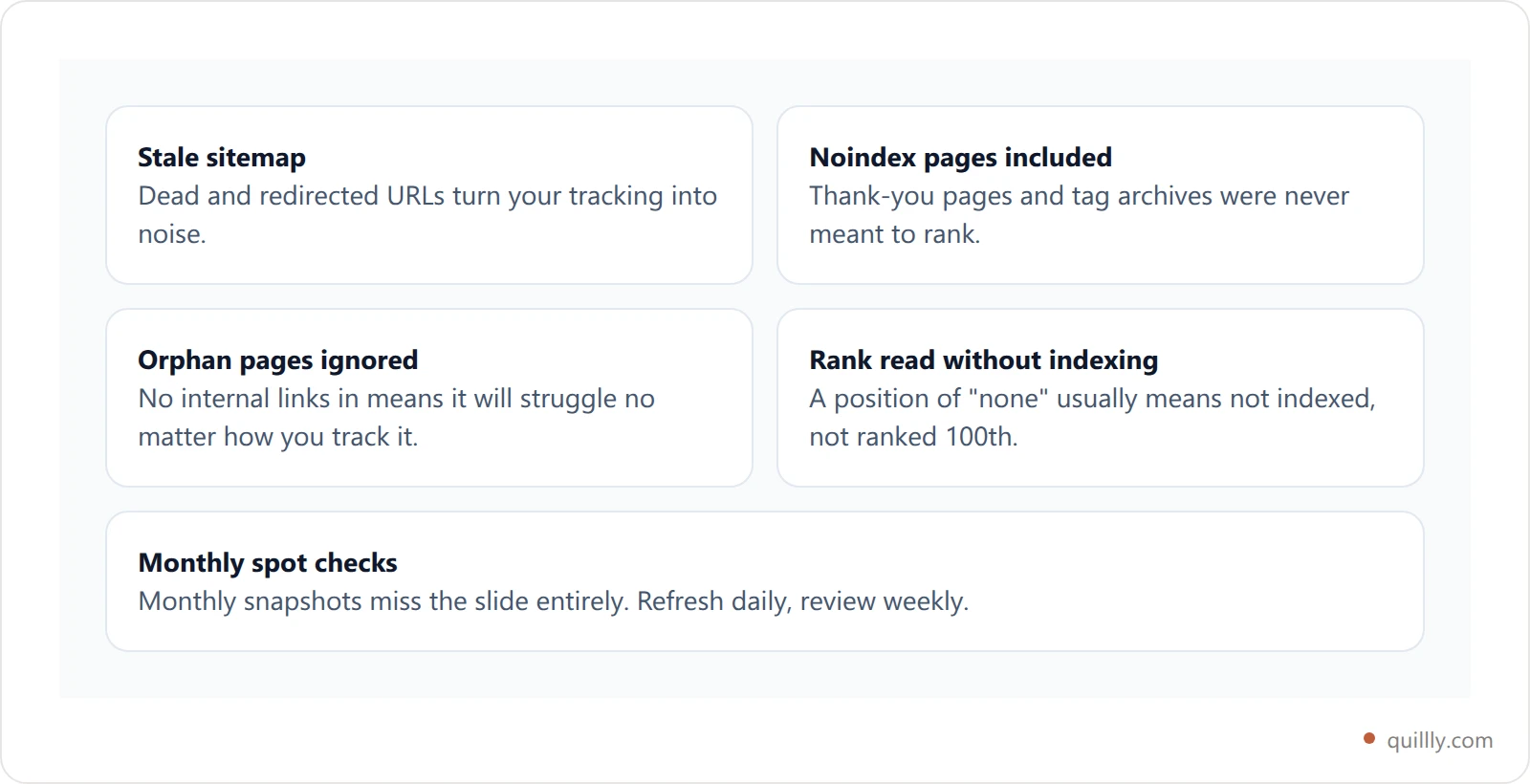
Tracking a stale sitemap. If your sitemap lists dead or redirected URLs, you'll track noise. Keep it clean and current, ideally auto-generated so it never drifts from reality.
Including noindex pages. Thank-you pages, tag archives, and filtered URLs don't belong in tracking. Exclude anything you've intentionally kept out of the index.
Ignoring orphan pages. A page in your sitemap with no internal links pointing to it will struggle to rank. Tracking surfaces them; internal linking fixes them. The same pattern hides keyword cannibalization, where two pages fight for one term.
Reading rank without indexing. A position of "none" usually means "not indexed," not "ranked 100th." Always read the two together, indexing first.
Checking once a month. Monthly snapshots miss the slide entirely. Refresh daily, review weekly.
None of these are hard. They're just easy to skip when you're moving fast. A page-first tracker catches most of them for you, because the sitemap is the input and indexing is the first thing it checks.
Frequently Asked Questions#
Can I track rankings for all my pages for free?#
Yes, partly. Google Search Console tracks every page you own at no cost, and it's the most accurate source for your own clicks and impressions. The catch is scale: its UI caps exports at 1,000 rows and keeps only about 16 months of data. For whole-site, per-page tracking with daily history, a dedicated tracker that imports your sitemap fills the gap. Most dedicated trackers are paid; Quillly covers up to five sites on Pro at $19/month after a 14-day trial.
Does Google Search Console show keyword rankings?#
It shows average position per query and per page, which is close to a ranking but not identical. GSC averages your position across every impression, so a keyword you rank #3 for in one place and #15 in another shows a blended number. It also hides anonymized queries. Use it as your data source, then layer a rank tracker on top for clean, consistent per-page positions.
How do I track rankings for my whole site from a sitemap?#
Point a tool that supports sitemap import at your domain. It reads your sitemap.xml, pulls every live URL, and tracks each one's position, clicks, impressions, and indexing status automatically. You skip manual keyword entry entirely. The tracker refreshes daily, so you see movement across your whole site instead of a hand-picked slice.
Why is my average position different from where I actually rank?#
Because average position blends a lot together. Google averages your spot across every impression, location, device, and query variation. If you rank #2 for some searches and #20 for others, GSC reports the weighted middle. What you see when you Google yourself is also personalized. A rank tracker checks from a consistent, neutral location to cut that noise.
Can you track rankings inside ChatGPT or AI Overviews?#
Not as a numbered position. In AI answers, you're either cited or you're not, and Google treats all links in an AI Overview as sharing one position. So you track presence, not rank: are you mentioned, and how often. Because ChatGPT grounds heavily on Bing, tracking your Bing rankings is the closest proxy for AI citation odds today.
How often should I check my page rankings?#
The data should refresh daily, because SERPs move constantly. Advanced Web Ranking measured positions 2 to 4 losing 4.74 points of CTR in a single quarter. You don't have to look daily, but the underlying tracking should so a slide is caught early. A 10-minute weekly review of striking-distance and decaying pages is enough for most sites.
Do I need to migrate my site to track it?#
No. Sitemap-based tracking is read-only. You verify ownership, the tool reads your existing sitemap, and tracking begins. Nothing about your hosting, CMS, or pages changes. That's the main advantage over rebuilding on a new platform just to get analytics: you keep the site you have and add visibility on top.
What's the difference between a rank tracker and Google Search Console?#
GSC reports your real, first-party data straight from Google, with the limits above. A rank tracker actively checks positions on a schedule, from a neutral location, often across multiple engines, and keeps unlimited history. They're complementary. GSC is your ground truth. The tracker is your daily, whole-site, multi-engine dashboard. Most serious sites run both.
Key Takeaways#
Three things to remember. One, you're probably watching a sliver of your site. With 96.55% of pages getting zero Google traffic, the un-tracked URLs are where your easy wins hide. Two, sitemap rank tracking flips the model: track pages, not a guessed keyword list, and you catch every term you actually rank for. Three, single-engine tracking is dated. With 87% of ChatGPT citations matching Bing and AI Overviews keeping 58% of clicks, you need Google, Bing, and AI search in one view.
The setup costs about five minutes and zero code. Import your sitemap, check indexing, track rank, act on the gaps. Then let it run.
Want your AI to track every page you own, straight from your sitemap? Connect Quillly to Claude or ChatGPT in 30 seconds.
Related reading#
Tracking a page's rank only matters once the page is actually in the index. If your Search Console report is full of pages stuck at "crawled – currently not indexed," see crawled currently not indexed — a test across 284 tracked URLs that measures which recovery tactics moved the needle and which produced nothing at all.
Tracking also assumes the crawler hitting your pages is who it claims to be. When your logs show heavy Googlebot activity that never turns into indexed pages, some of that traffic may not be Google at all — how to verify a fake Googlebot walks through the two-step DNS check that tells the real crawler from the impostors.


