
You published a post six weeks ago. Your AI wrote it, it scored 92 on SEO, you hit publish. Then nothing happened. Or so you assumed.
Open Google Search Console and you'll often find that same post parked at position 12 for a query pulling 1,400 impressions a month. It isn't failing. It's one paragraph away from page one. You just never looked.
That blind spot is what keyword rank tracking fixes. And here's the part nobody selling you a $99/month tool wants to admit: as of mid-2026, most of the data you need is already free and already yours. The missing piece isn't data. It's a system to act on it. This guide gives you that system, a named loop you can run yourself, and the math on why the wins are bigger than they look.
What keyword rank tracking actually is#
Keyword rank tracking is defined as the practice of monitoring the exact positions your pages hold in search results for specific queries, measured over time. It tells you which posts sit close to page one, which ones are slipping, and which query to target next. In 2026, most of that data is free.
The discipline used to mean one thing: pay a SaaS tool to ping the SERP for your keywords every day and log the position. That still exists. But for a blog you own, three cheaper and more honest sources now cover 90% of the job: Google Search Console, Bing Webmaster Tools, and your publishing layer if it surfaces the data.
The goal is not vanity. You're not tracking rankings to feel good about a line going up. You're tracking them to find the one edit that moves a single page from invisible to clicked. Rankings are the input. Edits are the output.
Why average position lies to you#
Here's the contrarian part. The single number most people stare at, average position in Google Search Console, is close to useless on its own. It blends every query, country, device, and personalization signal your site appeared for into one smoothed-out figure. The highs and lows that tell the real story get averaged away.
Three distortions make it worse:
Branded queries inflate it. Your brand name ranks #1 or #2. If a chunk of your impressions are branded, your non-branded performance looks far better than it is.
Low-impression queries swing it. On a young blog, ten impressions and one ranking jump can yank the average several positions.
It hides the wins. A page averaging position 18 might actually rank #4 for your money keyword and #40 for noise. The average buries the #4.
As the team at Practical Ecommerce puts it, the aggregate "masks important variations" and should never be read as a standalone health metric. The fix is simple: stop reading the top-line number. Read positions per query, per page. That's where the action is.
What this looks like on a real site#
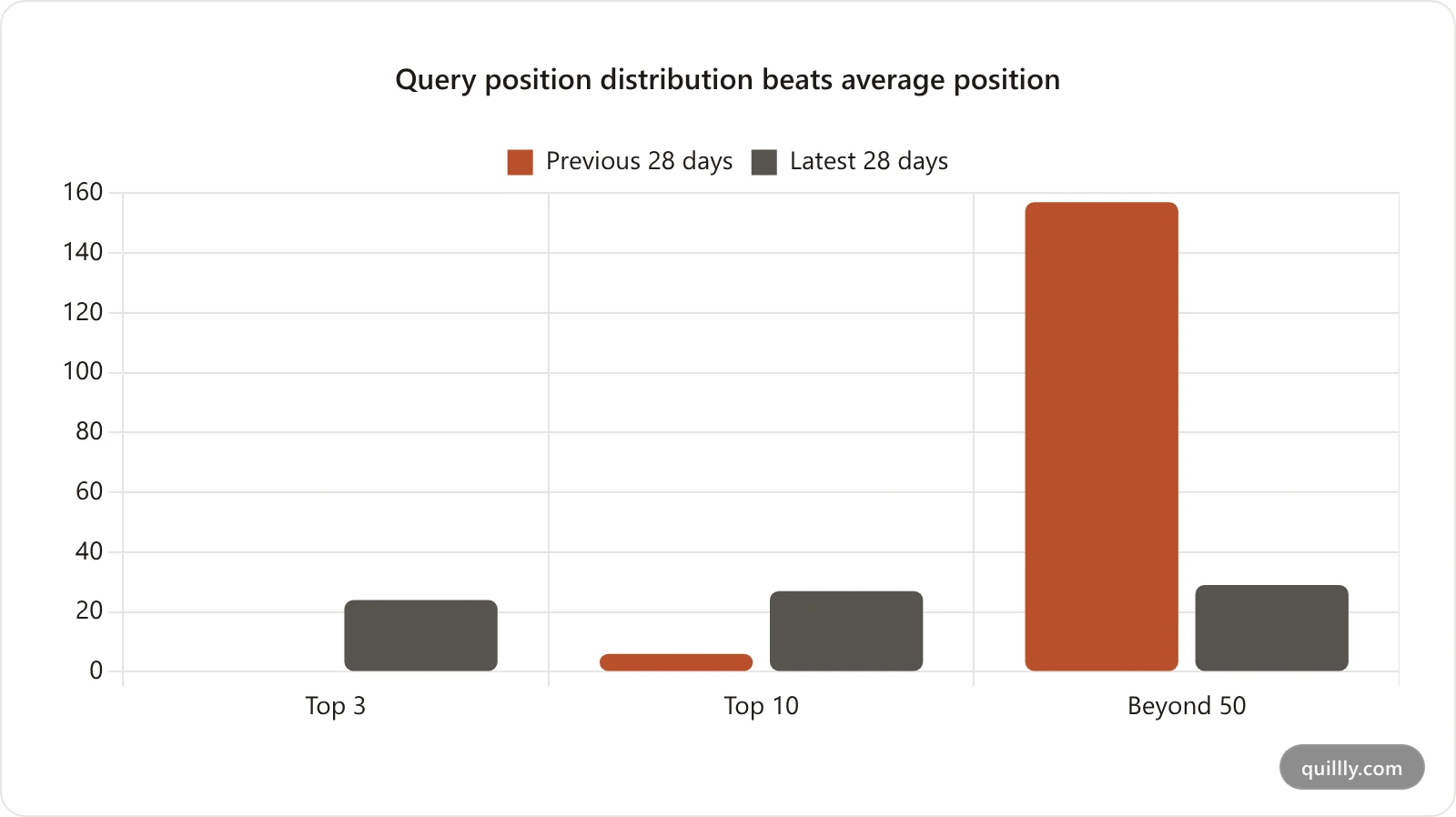
We pulled two consecutive 28-day windows from this blog's own Search Console property (DR 12, 114 live posts) and compared the average against the distribution. The average said the site got worse. The distribution said it got dramatically better.
Metric | Previous 28 days | Latest 28 days | Read |
|---|---|---|---|
Average position | 35.4 | 39.5 | Looks like a decline |
Queries in top 3 | 0 | 24 | Massive gain |
Queries in top 10 | 6 | 27 | 4.5x |
Queries beyond position 50 | 157 | 29 | 82% fewer |
Clicks | 4 | 7 | +75% |
Impressions | 2,057 | 2,627 | +28% |
Read the top row alone and you'd conclude the site slid four positions and start diagnosing a problem that doesn't exist. What actually happened: a long tail of junk queries ranking at position 60-90 dropped out of the sample, and a cluster of real queries climbed into the top 3 for the first time. Average position rose because the composition changed, not because any page fell.
The rule this gives you: average position is a mix, not a measurement. When it moves, always check whether the queries underneath it are the same queries. A rising average with a shrinking tail is a healthy site. A falling average with a growing tail is a site accumulating impressions it will never convert.
The data you already own#
Before you buy anything, look at what's sitting in your account for free.
Google Search Console's Search Analytics report gives you, for every page, the exact queries it ranks for, plus clicks, impressions, CTR, and average position for each one. Filter by a single page and add the query dimension and you get the per-keyword table that paid tools charge for. The catch: GSC only shows queries you already get impressions on, and it reports averages, not live local rank.
Bing Webmaster Tools mirrors this for the Bing index, which matters more than its market share suggests (more on that below). Between the two, you have a self-updating map of every keyword your blog is in the running for.
What you don't get out of the box is a system. GSC shows you 9,000 rows and walks away. You need a way to turn those rows into a short, ranked to-do list. If you already run an MCP-driven GSC workflow, you're halfway there. The next section is the system.
The Rank-to-Rewrite Loop#
Most rank tracking advice stops at "look at your rankings." That's the trap. Looking isn't optimizing. Here's a four-phase loop you can run on every post, every month. Call it the Rank-to-Rewrite Loop.
Phase 1: Track#
Pull the per-query position table for one page. Not the site average. One page, every query it ranks for, sorted by impressions. This is your raw material.
Phase 2: Triage#
Bucket every query into one of three lists. This is the step that turns noise into priorities:
Bucket | Definition | What it means | Action |
|---|---|---|---|
Striking distance | Positions 8 to 20 with real impressions | One tweak from page one | Rewrite to win |
Low CTR | Top 10 but barely clicked | Title/meta isn't pulling | Rewrite the title and meta |
Top 3 | Already winning | Your moat | Protect and refresh |
Phase 3: Tweak#
Take the top striking-distance query and make the page deserve a better rank. Add the section the top-ranking pages have and you don't. Match the search intent more tightly. Tighten the title to the exact phrase. You're not rewriting the whole post. You're closing one specific gap.
Phase 4: Resubmit#
Save the change, regenerate the sitemap, and request reindexing so the engines see the new version fast. Then wait one sync cycle and check the position delta. Did it move 12 to 6? Good. Did it stall? Re-triage. The loop closes and starts again.
The reason this works: the loop is anchored to data you act on, not data you admire. Kevin Indig, former growth lead at Shopify, makes the same point in his Growth Memo writing, that the value of rank tracking is continuous monitoring that feeds data-driven decisions, not a dashboard you check once a quarter.
Striking-distance keywords are your highest-leverage list#
If you only ever run one phase of the loop, run this one. Striking-distance keywords are queries where your page already ranks just off page one, roughly positions 8 to 20, with enough impressions to matter. Google already trusts your page for these terms. You don't need a new post. You need a nudge.
The reason this is the best use of your time is the click math. CTR collapses a cliff at the page-one boundary. Pull the numbers from any recent study and the shape is the same.
Position band | Approx. average organic CTR | What that means |
|---|---|---|
1 to 3 | 30% to 40%+ at #1 | The clicks live here |
4 to 6 | 6% to 9% | Solid page-one traffic |
7 to 10 | 2% to 4% | Page one, thin clicks |
11 to 20 | Under 1% | Effectively invisible |
CTR figures blended from First Page Sage and Advanced Web Ranking 2025 to 2026 data. The top three organic results now capture 68.7% of all clicks, and the #1 result earns more clicks than positions #3 through #10 combined.
So run the worked example. A post ranks position 12 for a query with 1,400 monthly impressions. At sub-1% CTR, that's roughly 14 clicks a month. Move it to position 4, where average CTR sits near 7%, and the same 1,400 impressions throw off about 98 clicks. Same page. Same query. One focused rewrite. A 7x traffic gain that a brand-new post would take months to match.
That's the whole argument for striking-distance keywords: the work is small, the upside is compounding, and Google has already told you which pages qualify. Moving from position 8 to position 3 also sharply raises your odds of being pulled into an AI Overview, so the same edit pays off in both classic search and answer engines.
Low-CTR keywords: ranking without the clicks#
The second bucket is sneakier. A low-CTR keyword is one where your page ranks well, top 10, but gets almost no clicks for the traffic it's shown to. The ranking is fine. The packaging is broken.
This almost always means the title tag and meta description don't match what the searcher wants. They scroll past you to a result that reads like the answer. The fix isn't more content. It's a sharper title and a meta description that promises the exact thing the query asks for.
A useful threshold: a query in the top 10 with 50+ impressions and a CTR under 1% is underclicked. Rewrite its title to lead with the searcher's phrase and a concrete hook, a number, a year, a benefit. Then watch the CTR column, not the position column. You're optimizing clicks, not rank, and a title rewrite can lift CTR within days because no reindex of body content is even required.
This is also where keyword cannibalization hides. If two of your posts both rank on page one for the same query, neither earns the clicks it should. Per-page rank data is how you spot it: same query, two URLs, split impressions. Consolidate or differentiate.
Track rankings without leaving your AI#
Here's where the AI-native workflow changes the game. The reason rank tracking gets neglected isn't that the data is hard to get. It's that the data lives in one tab, your content lives in another, and copy-pasting between them is friction nobody sustains.
If you publish through an MCP-connected layer, the rank data and the editor are the same surface, and your AI can read both. Quillly's get_blog_seo_panel tool returns, for any post, the exact buckets from the loop above: striking-distance queries, low-CTR queries, top-3 keywords, the full ranked keyword list, and a position delta for each one (the move since the last sync, shown as a simple up or down). It pulls from your connected Search Console data on the indexing sync cadence, so it stays current without you opening GSC at all.
That means you can run the entire Rank-to-Rewrite Loop in one conversation. Ask your AI to read the panel, pick the highest-impression striking-distance query, rewrite the relevant section to target it, and resubmit. Here's the prompt to paste into Claude, Cursor, or ChatGPT once Quillly is connected:
Using Quillly, call get_blog_seo_panel for my post "[title]".
Find the striking-distance keyword with the most impressions.
Rewrite the section that targets it so the page deserves a top-5 rank,
update the post, then resubmit it for indexing.
Tell me the query you targeted and the change you made.
Wiring it up is a one-time config. Drop Quillly's MCP server into your client's config file:
{
  "mcpServers": {
    "quillly": {
      "command": "npx",
      "args": ["-y", "quillly-mcp"],
      "env": { "QUILLLY_API_KEY": "your_key_here" }
    }
  }
}
Now your AI writes, scores, publishes, and reads back the rankings to decide what to fix next. The loop runs where you already work.
What about Bing and ChatGPT rankings?#
Tracking only Google is a 2026 mistake, and our own numbers make the case better than the theory does. Over one 28-day window, quillly.com averaged position 39.4 on Google and 4.3 on Bing — the same pages, the same content, the same domain, a 35-position gap. Bing sent 2 clicks from 266 impressions (0.75% CTR); Google sent 5 from 2,295 (0.22%). On a DR-12 domain, Bing was not a rounding error, it was the only index where the content was actually visible. If we had tracked Google alone we would have concluded the library was failing, when half of it was ranking on page one somewhere else.
The reason to care is not Bing's direct market share, but what runs on top of it. ChatGPT search and Copilot lean heavily on Bing's index. DuckDuckGo, Yahoo in the US, and Ecosia all pull from Bing too. Rank well in Bing and you're feeding several answer engines at once.
The plumbing here got cheaper. IndexNow, the keyless protocol Bing, Yandex, Seznam, and Naver all accept, lets one submission fan a new or updated URL out to every participating engine instantly. Connect Bing Webmaster Tools on top and you get the same per-query position data you get from GSC, so your rank tracking covers both indexes. If you want the deeper version, see how IndexNow gets your blog into Bing and ChatGPT fast.
One honest caveat: rank tracking for AI answer engines is still immature. There's no clean "position 4 in ChatGPT" API. The best proxy in 2026 remains your Bing rank plus your share of AI Overview citations, which you can monitor by tracking AI search traffic in your analytics. Track the inputs you can measure and the citations tend to follow.
Do you actually need a paid rank tracker?#
For most indie blogs in 2026, no. The paid tools earn their price for agencies tracking hundreds of client domains and competitor SERPs at city-level precision. For a founder running one blog, that's a lot of money to re-display data Google already gives you.
Here's the honest comparison.
Tool | Starting price | Keywords tracked | Best for |
|---|---|---|---|
Ahrefs Lite | $99/mo | 500 | Agencies, deep competitor data |
Semrush Pro | $139.95/mo | 500 (5 projects) | Full marketing suites |
SE Ranking | ~$52/mo | 250+ | Budget agencies |
Google Search Console | Free | Unlimited (impressed queries) | Owned-property rank data |
Quillly | Pro $9/mo, 14-day trial | Your published posts | AI-native publish + track loop |
The split is clear. If you need live, location-specific rank for keywords you don't yet rank for, or you're benchmarking ten competitors, pay for Ahrefs or Semrush. If you're optimizing your own posts based on queries you already appear for, GSC plus a layer that surfaces it to your AI does the job for a fraction of the cost.
This matches where the smartest SEO voices are pointing. Aleyda Solis, in her SEO in 2025 outlook, tells builders to "focus on the long tail," the exact specific, lower-competition queries that GSC surfaces for free and that paid trackers often deprioritize. The expensive tool isn't where the indie-hacker edge is. The edge is acting on the cheap data faster than anyone else.
Rank tracking mistakes that waste your time#
A few traps that make rank tracking feel like work without results:
Chasing average position. Covered above. Track per-query, per-page, or don't bother.
Tracking too often. Daily rank checks on a small blog are noise. Positions wobble naturally. Monthly cycles with the loop beat daily anxiety.
Tracking without a next action. A dashboard you don't act on is a screensaver. Every check should produce one edit.
Ignoring content decay. Posts slip over time as competitors update theirs. Falling positions are your early warning to refresh; see how to fix content decay before traffic drops.
Forgetting low-CTR wins. People obsess over moving up and ignore the top-10 pages bleeding clicks to a weak title. Those are the fastest wins of all.
Frequently asked questions#
What is keyword rank tracking?#
Keyword rank tracking is monitoring the exact positions your web pages hold in search results for specific queries, measured over time. It shows which pages are close to page one, which are slipping, and which keyword to target next. For a blog you own, most of this data comes free from Google Search Console and Bing Webmaster Tools rather than a paid tool.
How do I track keyword rankings for free?#
Use Google Search Console's Search Analytics report. Filter by a single page, add the "query" dimension, and you get every keyword that page ranks for with clicks, impressions, CTR, and average position. Bing Webmaster Tools gives the same for the Bing index. Together they cover most of what a paid rank tracker shows, at no cost.
Why is average position in Google Search Console misleading?#
Average position blends every query, device, country, and personalization signal into one number, which masks the variations that matter. Branded queries inflate it, low-impression queries swing it, and strong individual rankings get buried in the average. Read positions per query and per page instead of the top-line figure.
What are striking-distance keywords?#
Striking-distance keywords are queries where your page already ranks just off page one, roughly positions 8 to 20, with real impressions. Google already trusts your page for them, so a small, focused edit can push them onto page one. Because CTR jumps sharply between page two and the top of page one, these are usually the highest-leverage edits you can make.
How often should I check my rankings?#
For most blogs, monthly is plenty. Positions fluctuate day to day for reasons outside your control, so daily checking adds anxiety, not insight. Run a monthly cycle: pull per-query positions, triage into buckets, make one edit per priority page, then resubmit and measure the delta next cycle.
Can I track rankings inside ChatGPT or Claude?#
Yes, if your blog connects to those tools through an MCP server. Quillly's get_blog_seo_panel tool returns striking-distance and low-CTR keywords plus position deltas straight into your AI chat, so your assistant can read the rankings and rewrite the post in the same conversation. There's no separate rank-tracking app to open.
Does Bing ranking matter for AI search?#
Yes. ChatGPT search, Copilot, DuckDuckGo, and US Yahoo all draw on Bing's index, so a strong Bing rank feeds multiple answer engines. Connect Bing Webmaster Tools for per-query Bing positions, and use IndexNow to push new and updated URLs to Bing, Yandex, and others instantly.
The takeaway#
Keyword rank tracking in 2026 isn't about buying a tool. It's about building a habit on data you already own. Three things to remember:
Average position lies. Track per query, per page. The top three results take 68.7% of clicks, so a single jump from page two to position four can lift a post's traffic roughly 7x.
Run the loop. Track, triage, tweak, resubmit. Striking-distance keywords, positions 8 to 20, are your highest-leverage list because Google already trusts those pages.
Skip the $99 tool if you can. GSC and Bing give you the data free. The edge is acting on it faster, ideally without leaving the AI you already write in.
Stop admiring dashboards. Start closing the gap between position 12 and position 4, one post at a time.
Want your AI to read your rankings and rewrite the post in the same chat? Connect Quillly to Claude, Cursor, or ChatGPT in 30 seconds.