
Your best blog post is dying right now. Not all at once. A few clicks this month, a few more the next, until the page that once pulled 2,000 visitors a month quietly settles at 400.
This is content decay, and it touches almost everything you publish. Most founders never see it coming because it doesn't crash. It erodes. And in 2026, with AI search pulling answers from the freshest sources it can find, that erosion is faster than ever.
Content decay is defined as the gradual loss of organic traffic and rankings a page suffers as its information ages, search intent shifts, and fresher competitors move in. The fix is a content refresh: updating a post's data, structure, and coverage so it matches what searchers and AI answer engines reward today.
This guide gives you the data on why refreshing beats writing new, a repeatable framework called the REVIVE Loop, and the exact checklist to run it. Solo, or with an AI agent doing the heavy lifting.
What Is Content Decay?#
Content decay is the slow, ongoing loss of organic traffic and rankings a published page suffers over time. It rarely shows up as a cliff. It looks like a gentle downward slope on a 12-month traffic chart.
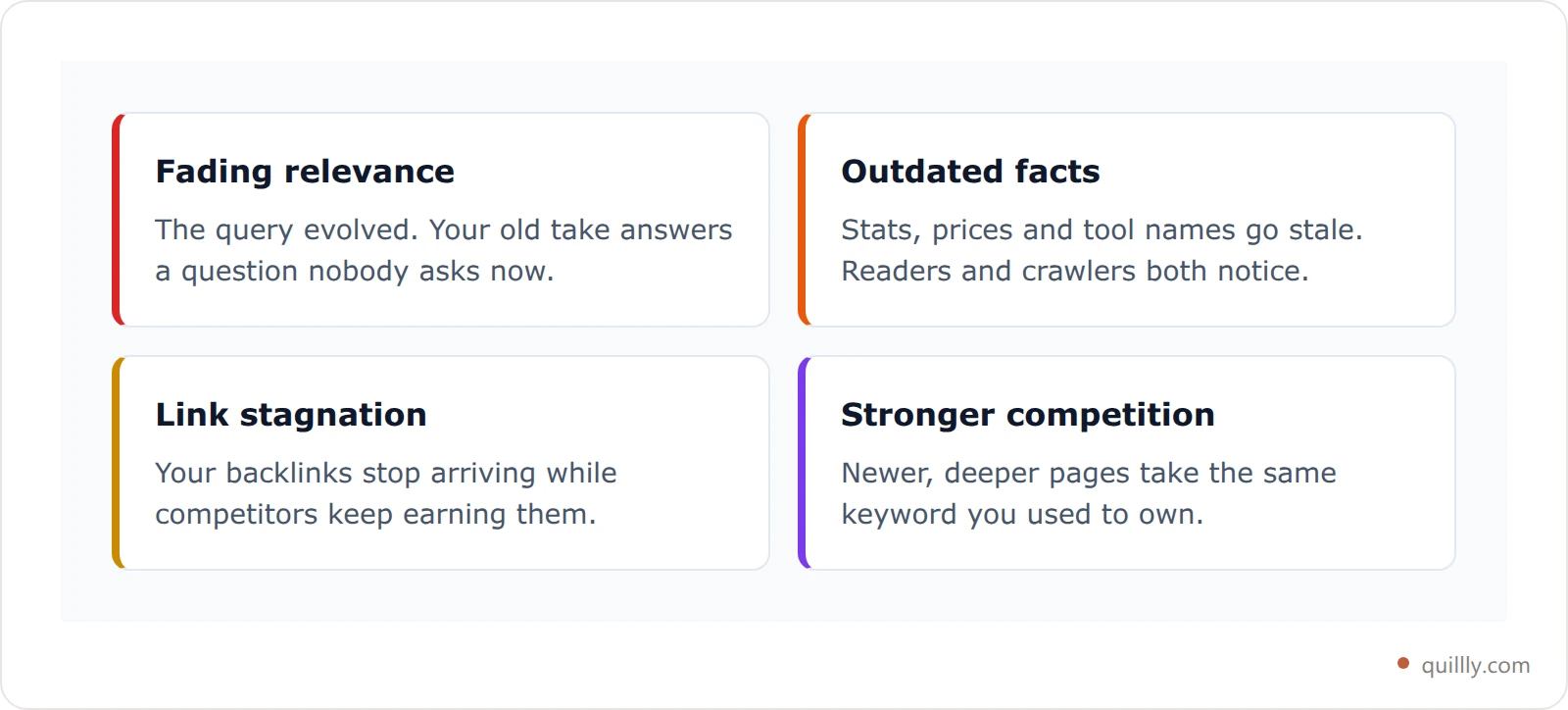
SEO strategist Kevin Indig defines it cleanly: "Content decay describes the slow loss of organic traffic for a piece of content caused by fading relevance, outdated facts, link stagnation, or stronger competition."
Four forces drive it:
Fading relevance. The query evolves. Your 2024 take no longer answers a 2026 question.
Outdated facts. Stats, prices, screenshots, and tool names go stale. Readers and crawlers both notice.
Link stagnation. Backlinks stop arriving while competitors keep earning them.
Stronger competition. Newer, deeper pages outrank you on the same keyword.
Decay is normal. Every evergreen post you own sits somewhere on this curve. The only question is whether you catch it in time.
Why Content Decays Faster in the AI Search Era#
Here's the part most older guides miss: decay sped up when AI search arrived.
Google AI Overviews, ChatGPT, and Perplexity all use retrieval-augmented generation. They retrieve source pages first, then synthesize an answer. The retrieval step treats freshness as a filter. When two pages cover the same topic, the newer one usually wins the citation.
The numbers are stark. Roughly 76.4% of ChatGPT's most-cited pages were updated within the last 30 days. Content under 30 days old earns about 3.2x more ChatGPT citations than older pages. And around 50% of Perplexity citations point to content less than 13 weeks old.
So a post can hold its Google ranking and still vanish from the AI answer that now sits above it. That's a new kind of decay, and traditional rank tracking won't even show it.
The decay nobody measures: silent reference rot#
There's a second kind of decay that no traffic graph will ever show you, and we only found ours by auditing for it directly.
We fetched all 114 live posts on this blog as plain markdown and grepped them for references to our own product's API surface — tool names that had been renamed months earlier. The result:
Finding | Count |
|---|---|
Live posts audited | 114 |
Posts containing at least one stale reference | 48 (42.1%) |
Total stale references | 246 |
Worst single post | 22 in one article |
Time to detect the whole library | ~20 seconds |
Every one of those 246 references told a reader to call something that no longer exists. Not one had generated a support ticket. Not one showed up as a traffic drop. Rankings were unchanged. The posts were quietly, invisibly wrong — and the highest-scoring post in the set had an SEO grade of A.
Why this matters more in 2026: an AI answer engine reading your page has no way to know a name is outdated. It ingests the stale name and repeats it confidently to the next person who asks. Traditional decay costs you a ranking; reference rot costs you correctness in every AI answer that cites you, and it compounds silently for as long as the page stays up.
Call it the Silent Rot Rate: the share of your library that has become factually wrong without losing a single position. Ours was 42%. Most sites have never measured theirs, because no analytics product reports it — traffic tools watch rankings, not truth.

How to measure yours in one pass. If your posts are reachable as plain text (many platforms serve a .md twin of every page), you can audit the entire library locally without touching an API:
# fetch every post as markdown, then grep for terms that went stale
curl -s https://yourdomain.com/blogs/sitemap.xml \
  | grep -o '<loc>[^<]*</loc>' | sed 's|</\?loc>||g' > urls.txt

while read u; do curl -s "$u.md" -o "md/$(basename $u).md"; done < urls.txt

# your own rot list: renamed features, old prices, dead integrations
grep -rnE 'old_tool_name|\$19/mo|free tier' md/
Run it quarterly against a short list of things you know changed: renamed features, old pricing, sunset integrations, former positioning. Fixing 48 posts took one batched find-and-replace per post — the detection was the hard part, and it cost nothing.
The Data: What Refreshing Old Posts Actually Does#
Refreshing old content is the highest-ROI move in content marketing, and the data is not subtle.
HubSpot ran the now-famous experiment: it stopped treating old posts as finished. After updating and republishing existing articles, those posts saw an average 106% increase in organic search views and tripled their monthly lead generation. HubSpot also found that 76% of its monthly blog views and 92% of its blog leads came from posts published more than a month earlier.
Individual refreshes can be dramatic:
Page refreshed | Before | After | Lift |
|---|---|---|---|
HubSpot article overhaul | 2,731 visits/mo | 12,573 visits/mo | +360% |
Ahrefs link-reclamation post | ~350 visits/mo | ~1,050 visits/mo | +302% |
Ahrefs on-page SEO guide update | baseline | focused refresh | +36% |
HubSpot republished posts (avg) | baseline | updated + republished | +106% |
The pattern is consistent. A focused refresh of a page that already has authority beats publishing a brand-new page from zero. You compound earned equity instead of starting over. Ahrefs documented the same effect across its own library, and content teams like Animalz built a whole discipline around it called historical optimization.
That's the contrarian point. Most content calendars are 90% "new post" and 10% "update." The data says move closer to 50/50.
How to Spot Decaying Posts Before They Tank#
You can't refresh what you can't see, and decay is invisible until you go looking. Start in Google Search Console.
The core signal: pages where impressions hold steady but clicks and CTR slide. That means you still rank, but you're losing the click. Usually to a fresher result or an AI answer sitting above you.
Run this check monthly:
Compare the last 3 months to the previous 3 months in GSC.
Sort your pages by clicks lost.
Flag any page down 20% or more that isn't just seasonal.
Note pages with high impressions but falling average position. They're slipping next.
For AI search, rank tracking alone isn't enough. A page can rank #3 and still be missing from the AI Overview entirely. You need to track which posts get cited in AI search, not just where they rank in blue links.
One more diagnosis: if two of your own posts target the same query, the "decay" might actually be keyword cannibalization — your own pages splitting authority and competing with each other.
The REVIVE Loop: A 6-Step Content Refresh Framework#
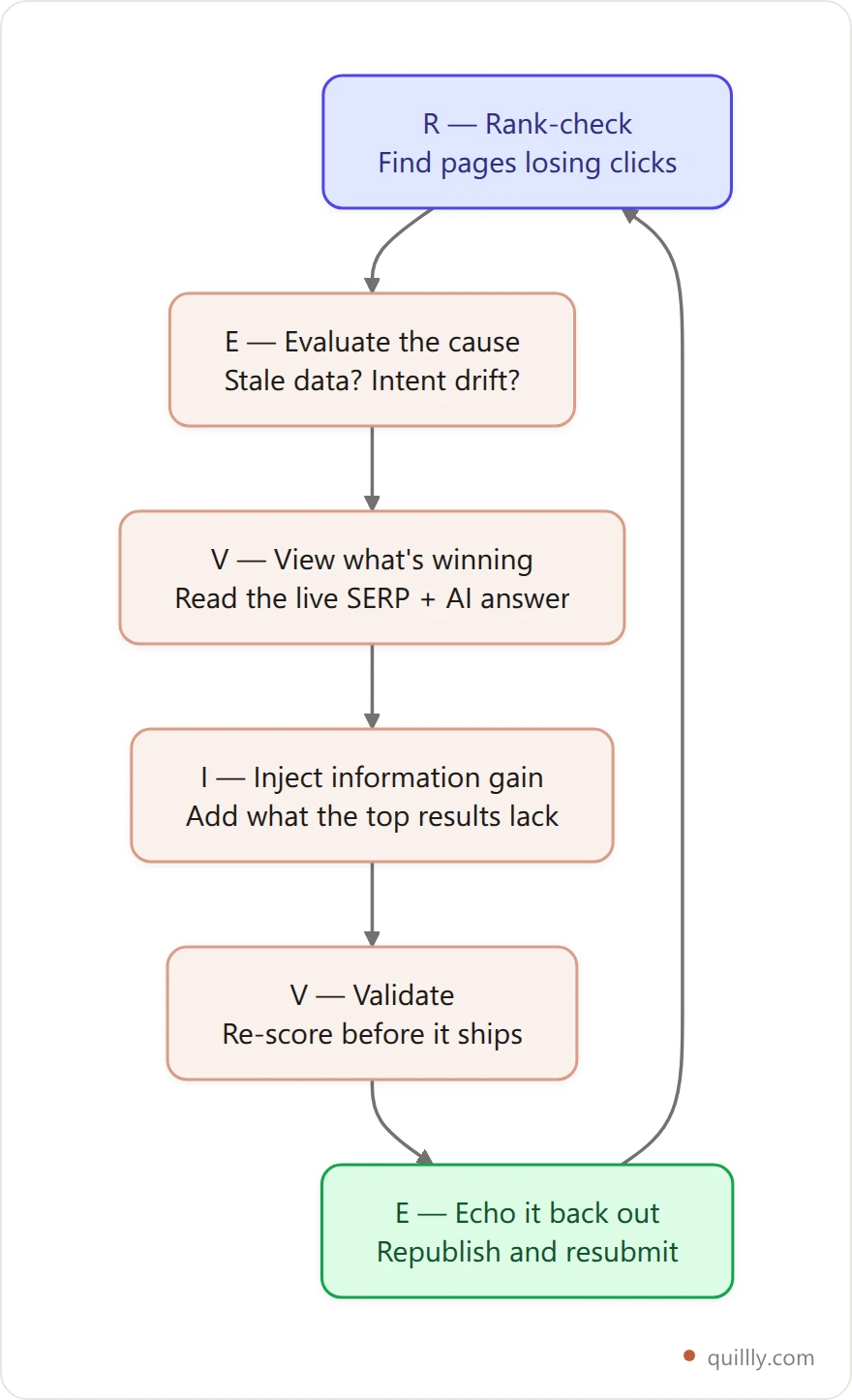
Most refreshes fail because they're random. You open an old post, tweak a sentence, change the date, and hope. HubSpot named the disciplined version of this historical optimization — systematically updating posts you already own instead of only publishing new ones. The REVIVE Loop is a repeatable framework that turns refreshing into a system you can run every month, or hand to an AI agent.
R — Rank-check#
Pull Google Search Console. Find the pages losing clicks, impressions, or position. Prioritize posts that still rank on page one but are sliding. Those recover the fastest because the authority is already there.
E — Evaluate the cause#
Diagnose why each page is decaying. Stale stats? Intent drift? Lost backlinks? A stronger new competitor? The fix depends on the cause, so name it before you touch a word.
V — View what's winning now#
Open the live SERP and the AI answers for your target query. Read the top three results and the AI Overview. Note every subtopic they cover that you don't. That gap list is your refresh brief.
I — Inject information gain#
Add what's missing. Current 2026 stats. A new section answering a question the SERP now expects. An original data point, a comparison table, a real example. Google rewards information gain, meaning content that adds something the other results lack.
V — Validate#
Re-score the post before it ships. Check the meta title and description, heading structure, internal links, and readability. While you're in there, audit and fix any broken links so you're not refreshing a page that points at dead ends.
E — Echo it back out#
Republish. Update the genuine "last updated" date so the freshness signal is real, not cosmetic. Resubmit the URL to Google for re-crawling. Refresh the internal links pointing to and from the post so equity flows where you want it.
Run the loop top to bottom, then start again next month. That's why it's a loop, not a checklist.
Run the whole loop from your AI assistant
What to Actually Change (and What to Leave Alone)#
Here's the contrarian truth: changing the publish date does nothing on its own.
Google's John Mueller has said repeatedly that faking freshness, bumping the date without changing the content, offers no ranking benefit and can erode trust. The freshness signal only works when the page genuinely changed.
So make real changes. In priority order:
Replace stale data. Any stat older than about two years is suspect. Swap in current numbers, with sources.
Match current intent. If the SERP shifted from "what is X" to "best X tools," restructure the post to match what people now want.
Add information gain. A new section, an original table, or an angle the competition lacks.
Refresh visuals. New screenshots and charts let you update alt text and image freshness at the same time.
Fix link rot. Replace dead outbound links and add internal links to your newer posts.
Leave two things alone. Never change the URL of a ranking post. And don't refresh pages that are already healthy. Editing a page that's winning can backfire. Triage by need, not by age.
How to Run the REVIVE Loop With AI#
This is where the loop gets fast. The slow part of refreshing, auditing dozens of posts, finding gaps, and re-scoring, is exactly what AI is good at.
Indig makes the point in his refresh work with AirOps: marketers and SEOs "can use AI to speed up our refresh velocity and make our process much more effective."
If your AI talks to your blog through an MCP server, the whole loop runs in one conversation. With Quillly connected to Claude or ChatGPT, it looks like this:
1. get_gsc_performance  -> find pages losing clicks
2. get_content             -> pull the decaying post
3. check_blog_seo       -> see exactly what's weak
4. (your AI rewrites the stale sections)
5. update_content          -> apply the refresh + real "last updated"
6. publish_content         -> republish and resubmit to Google
Your AI writes the new sections. The platform handles the SEO score, the freshness stamp, the sitemap update, and re-indexing. No copy-paste into WordPress, no manual re-submission. If you want the full mechanics, the Search Console MCP workflow shows how the GSC data feeds straight into the refresh.
That turns a multi-hour chore into a repeatable agent task you can run every week.
What a Real Refresh Looks Like#
Walk the loop through a real example. One HubSpot guide had slid to 2,731 monthly visits. The team rank-checked it in Search Console, evaluated the cause (outdated framing and missing subtopics), and viewed the current SERP. Then they injected information gain: new sections, current data, a clearer structure. After validating and republishing, the page climbed to 12,573 monthly visits, a 360% recovery. Same URL, same domain. The only thing that changed was that the page finally matched what searchers wanted in the present tense.
Refresh, Rewrite, or Prune? How to Decide#
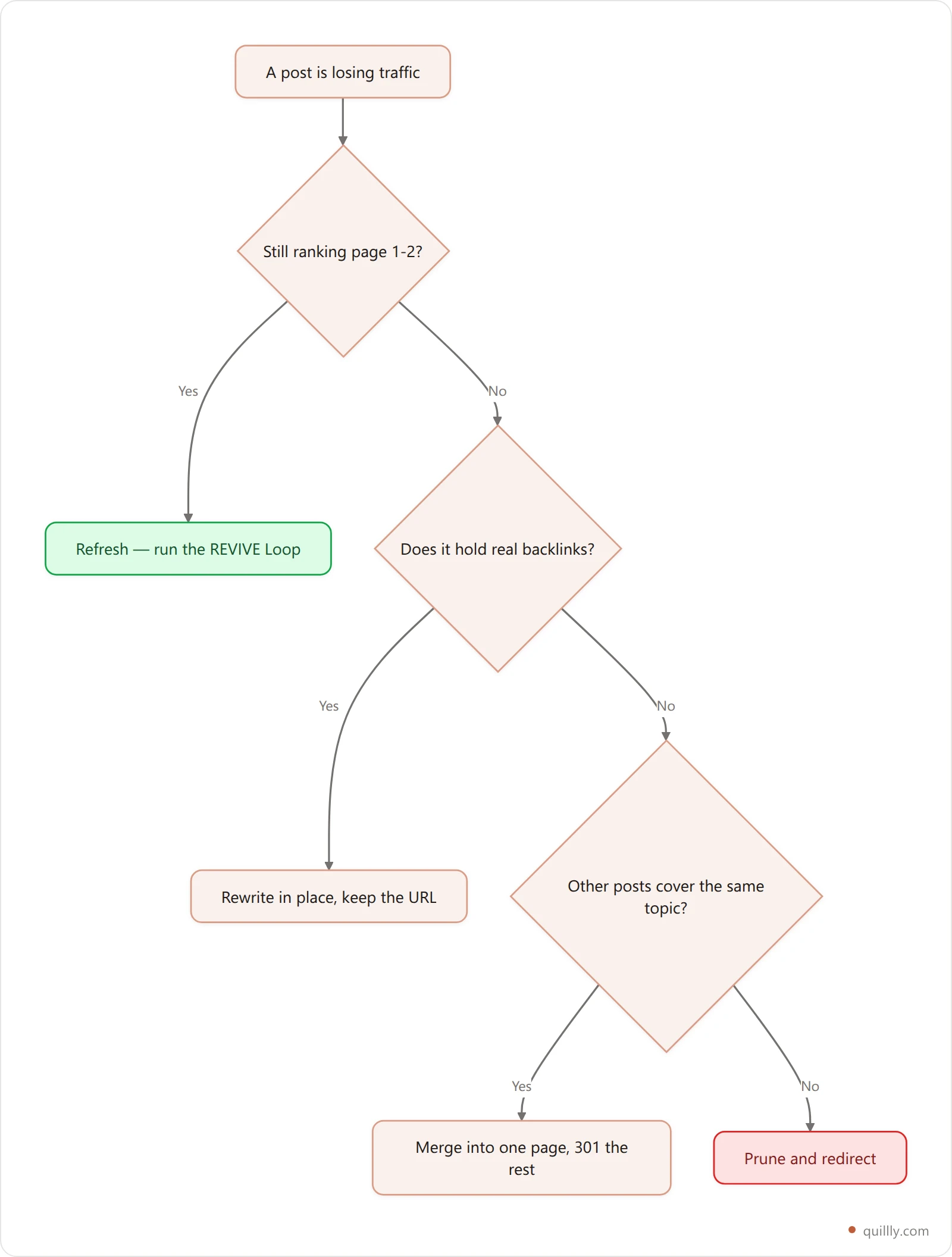
Not every decaying post gets the same treatment. Pick the right play before you open the editor. The wrong one wastes hours or buries a page that could have recovered.
Signal | Best move |
|---|---|
Ranks page 1-2, slipping, real traffic | Refresh (run the REVIVE Loop) |
Outdated but strong backlinks | Rewrite in place, keep the URL |
Several thin posts on one topic | Merge into one page, 301 the rest |
No traffic, no links, no intent | Prune and redirect |
Healthy and stable | Leave it alone |
The rule of thumb: refresh what's slipping, merge what's fragmented, prune what's dead. Spend your hours where authority already exists.
Refresh Velocity: How Often Should You Update?#
Refresh velocity is how frequently you update existing content, and it's the practical lever behind content freshness. It compounds: the more consistently you refresh, the more content freshness signals you send, and the more your library stays inside the window AI engines favor.
HubSpot treats it as a standing process, updating two to three posts per week rather than an occasional cleanup. You don't need that volume. A solo founder can win with a simple cadence:
Content type | Refresh cadence |
|---|---|
Stat-heavy or "2026" posts | Every 3 months |
High-traffic money pages | Every 3 to 6 months |
Evergreen guides | Every 6 months |
Low-traffic, low-intent posts | Prune or merge |
Notice the last row. Not every decaying post deserves a refresh. Some should be merged into a stronger page, and some should be pruned entirely. Thin, low-intent posts that will never rank dilute your topical authority, so consolidating them often lifts the survivors.
The 13-week pattern in AI citations is your north star here. If your most important posts are older than a quarter, they're aging out of the window answer engines reward. A quarterly refresh keeps them in it.
The Content Refresh Checklist#
Copy this. Run it on every post you refresh:
Pulled GSC and confirmed clicks/CTR are actually dropping
Named the decay cause: stale data, intent drift, lost links, or competition
Read the live top 3 results and the AI Overview for the target query
Replaced every stat older than ~2 years, with sources
Added one new section or original data point for information gain
Updated screenshots and their alt text
Fixed broken outbound links
Added internal links to newer, related posts
Re-scored the post: meta title under 60 chars, description under 160, clean headings
Updated the genuine "last updated" date
Republished and resubmitted the URL to Google
Refresh posts without the copy-paste
Connect Quillly to Claude, ChatGPT or Cursor and your AI can pull a decaying post, score it against 14 SEO criteria, apply the refresh and republish it to your own domain in one conversation.
Start the 14-day free trialFrequently Asked Questions#
What is content decay?#
Content decay is the gradual loss of organic traffic and rankings a page experiences as its information ages, search intent shifts, backlinks stagnate, and fresher competitors appear. It usually shows up as a slow downward slope over 6 to 12 months, not a sudden drop, which is exactly why it's easy to miss until a page has already lost most of its visitors.
How do I know if my content is decaying?#
Check Google Search Console. Compare the last 3 months to the previous 3 and look for pages where impressions hold steady but clicks and CTR fall. That means you still rank but lose the click, often to a fresher result or an AI answer. A falling average position on a money page is another early warning sign worth flagging.
How often should I update old blog posts?#
The short answer on how to update old blog posts is cadence plus cause: refresh stat-heavy and current-year posts every 3 months, high-traffic pages every 3 to 6 months, and evergreen guides every 6 months. Because AI citations favor content under 13 weeks old, a quarterly cadence on your most important posts keeps them inside the freshness window that answer engines reward most.
Does changing the publish date improve SEO?#
No. Updating only the date without changing the content does not help and can hurt trust. Google's John Mueller has said faking freshness offers no benefit. The freshness signal works only when the page genuinely changed, with new data, new sections, or better answers. Make real edits first, then update the date to reflect them.
Is it better to update old content or write new content?#
For pages that already rank or hold authority, updating usually wins. HubSpot saw a 106% average traffic lift from refreshing existing posts, because you compound earned equity instead of starting from zero. Write new content to fill genuine topic gaps, and refresh to defend and grow what you already own. A healthy mix is closer to 50/50 than most calendars assume.
Does refreshing content help with AI search and ChatGPT citations?#
Yes, strongly. About 76.4% of ChatGPT's most-cited pages were updated within the last 30 days, and fresh content earns roughly 3.2x more citations. AI engines retrieve sources before answering and prefer recent ones. A genuine refresh can move a page from invisible to cited inside a single index cycle, especially on Perplexity, which retrieves live.
How long until a refresh shows results?#
It varies, but refreshes often work faster than new content because the page already has authority and history. Many pages show movement within 2 to 6 weeks once Google re-crawls. Resubmitting the URL in Search Console speeds re-indexing, and AI engines that retrieve live can pick up your changes even faster than Google does.
Should I delete or redirect decayed content?#
Not always. Refresh pages with real intent and recoverable traffic. Merge several thin posts on the same topic into one strong page and 301-redirect the rest. Prune only true dead weight: low-intent posts with no traffic and no link equity that only dilute your topical authority.
Key Takeaways#
Content decay is not a bug. It's the default. Every post you publish starts aging the day it goes live, and AI search made the clock tick faster. Fresh pages earn up to 3.2x more citations, and half of all AI references point to content under 13 weeks old.
The fix is systematic, not heroic. Spot decay early in Search Console. Run the REVIVE Loop: rank-check, evaluate, view the SERP, inject information gain, validate, then echo it back out. Refresh on a quarterly cadence for the posts that matter, and prune the dead weight. HubSpot turned that discipline into a 106% average traffic lift.
The teams winning in 2026 don't just publish. They tend what they've published. As Kevin Indig puts it, a content hub "should be treated more like a garden."
Want your AI to actually refresh the posts it wrote, scoring, updating, and republishing in one conversation? Connect Quillly to Claude or ChatGPT in 30 seconds.