

You hit publish on a great post. A week later, Google still has nothing. Search Console shows "Discovered – currently not indexed", your traffic forecast quietly evaporates, and "Google not indexing your blog" becomes the most-searched tab in your browser. If that sounds familiar, you're in the right place.
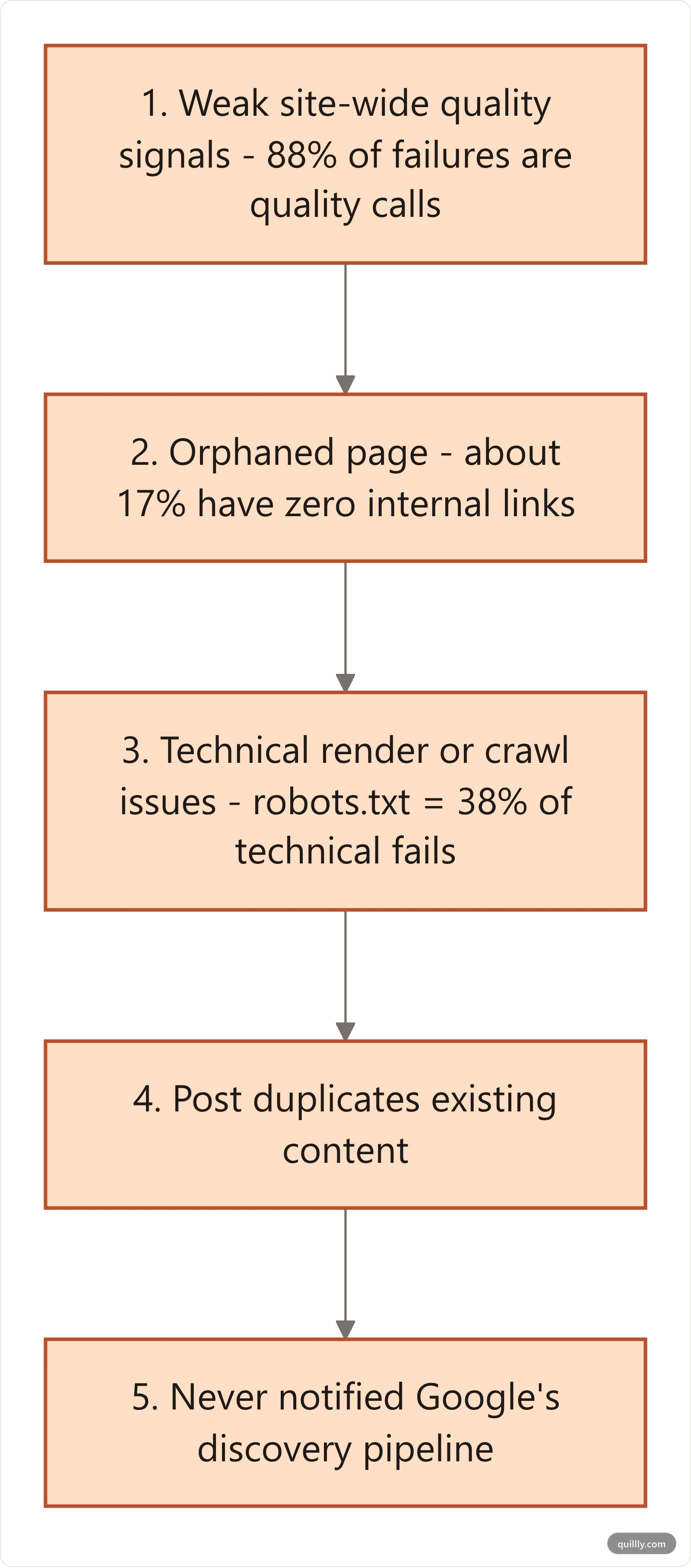
Direct answer: Google doesn't index your blog when site-wide quality signals are weak, the page has no internal links pointing to it, technical issues block crawl or render, the post duplicates existing content, or you never notified Google's discovery pipeline. Fix those five layers in order, not in parallel.
In a study of 1.7 million pages by Indexing Insight (Feb 2026), 88% of un-indexed pages were rejected for quality reasons, and Google's John Mueller has stated that Google indexes only 30 to 60 percent of pages on most sites. Indexing in 2026 is selective. Publishing more isn't the cure.
Updated July 2026. This guide gives you the full fix stack: the real numbers, the five most common causes, a named framework you can run end-to-end (DRIVE), a side-by-side table of every protocol Google and Bing actually respect, and a 14-day recovery playbook.
Google Not Indexing Your Blog: The Brutal Math Behind It#
If your gut says everything you publish should index, the data disagrees. The same study by Indexing Insight, drawing from Google's URL Inspection API across 1.7 million URLs on 18 sites, found that quality issues, not bugs, caused 88% of indexing failures. "URL is unknown to Google" and "Discovered – currently not indexed" together accounted for 67% of those un-indexed pages.
Index coverage also varies sharply by site type:
News websites: 97% indexed (the ceiling)
E-commerce websites: under 90% indexed
Marketplace and listing sites: above 70% indexed
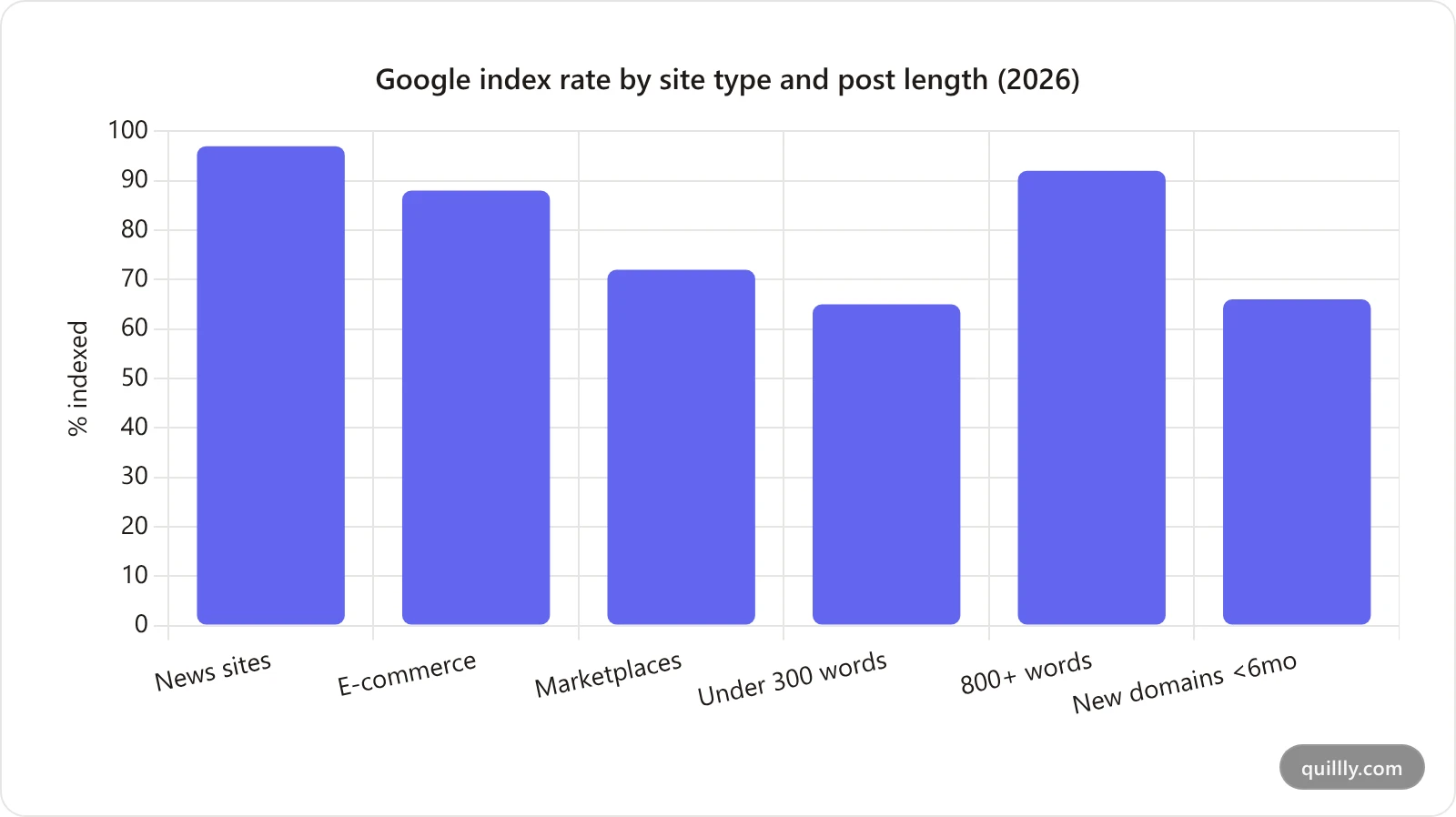
Smaller sites take a bigger hit. Industry reporting in 2026 puts average non-indexed pages at 12% per site, rising to 34% for new domains under six months old. About 62% of all web pages are never indexed at all.
Two practical implications matter for bloggers:
Length matters more than you think. Pages under 300 words index at roughly 65%, while pages over 800 words reach 92%. That is a 27-point gap from word count alone.
Indexing isn't ranking. Even after Google indexes you, only 12% of indexed pages appear on the first 5 SERPs. Indexing is the ticket to the line, not the seat.
"You can't force pages to be indexed. It's normal that we don't index all pages on all websites. It's not an issue with 'that page' — it's more site-wide." — John Mueller, Google Search Advocate, via Search Engine Journal.
That site-wide framing is the unlock. If your homepage and key pages send weak quality signals, Google deprioritizes the whole property. You can hammer "Request Indexing" all day. It won't matter until the underlying signal moves.
Google Not Indexing Your Blog? The 5 Real Causes (Ranked by Impact)#
When pages stay out of the index, the cause is almost always one of these five — not Google "having a bad day". They are listed in the order our SERP analysis and Google's own diagnostic data say they bite hardest in 2026.
1. Site-Wide Quality Signals Are Weak#
This is the silent killer. If your overall site looks thin, AI-spun, or templated, Google rate-limits crawls and indexing for new posts before they're even read. Signs: lots of short posts under 600 words, near-duplicate intros, no first-hand expertise, and an "About" page that reads like a Mad Lib. The fix isn't faster, it's stronger. Cut your weakest 20% of posts (mark them 410 Gone or noindex) before adding new ones.
2. The Page Is Orphaned#
Roughly 17% of indexing failures trace to pages with zero internal links pointing to them, according to 2026 indexing audits. Google treats internal links as endorsement signals: if your own site doesn't link to a post, why should an external site? Every new post needs at least three internal links from existing indexed pages — ideally from your homepage, a hub page, and a related post in the same cluster.
3. Technical Render or Crawl Issues#
Robots.txt blocks account for 38% of technical failures. Pages that take longer than 2.3 seconds to load contribute another 29%. Then there is JavaScript: a page that requires client-side rendering may pass crawl but fail the render queue, where Google holds it indefinitely. Run every blog post through Google's URL Inspection tool and check that the rendered HTML contains the actual body text, not a skeleton.
4. The Post Duplicates Existing Content#
Google's quality filter folds in duplication aggressively in 2026. If 30% or more of your post's substance overlaps with content already indexed (your own or competitor pages), Google often files it under "Duplicate, Google chose different canonical" or skips indexing entirely. AI-generated drafts are the biggest offender: an LLM rewriting a competitor's outline tends to produce semantically identical content with synonyms swapped.
5. You Never Notified Google's Discovery Pipeline#
This sounds obvious, yet about 40% of site owners assume "publishing to my CMS" equals "Google knows about it". It doesn't. A post needs to be in your sitemap, the sitemap needs to be referenced in robots.txt and submitted to Search Console, and ideally pinged via IndexNow (Bing/Yandex) and the URL Inspection API (Google). Skipping any of these adds days of latency and amplifies any other weakness above.
These five compound. A 600-word post with no internal links, on a thin site, that's not in the sitemap, will not index. When Google is not indexing your blog, it's almost always two or three of these stacking. Fix one and the others suddenly start working.
The DRIVE Framework: A 5-Layer Indexing Fix Stack#
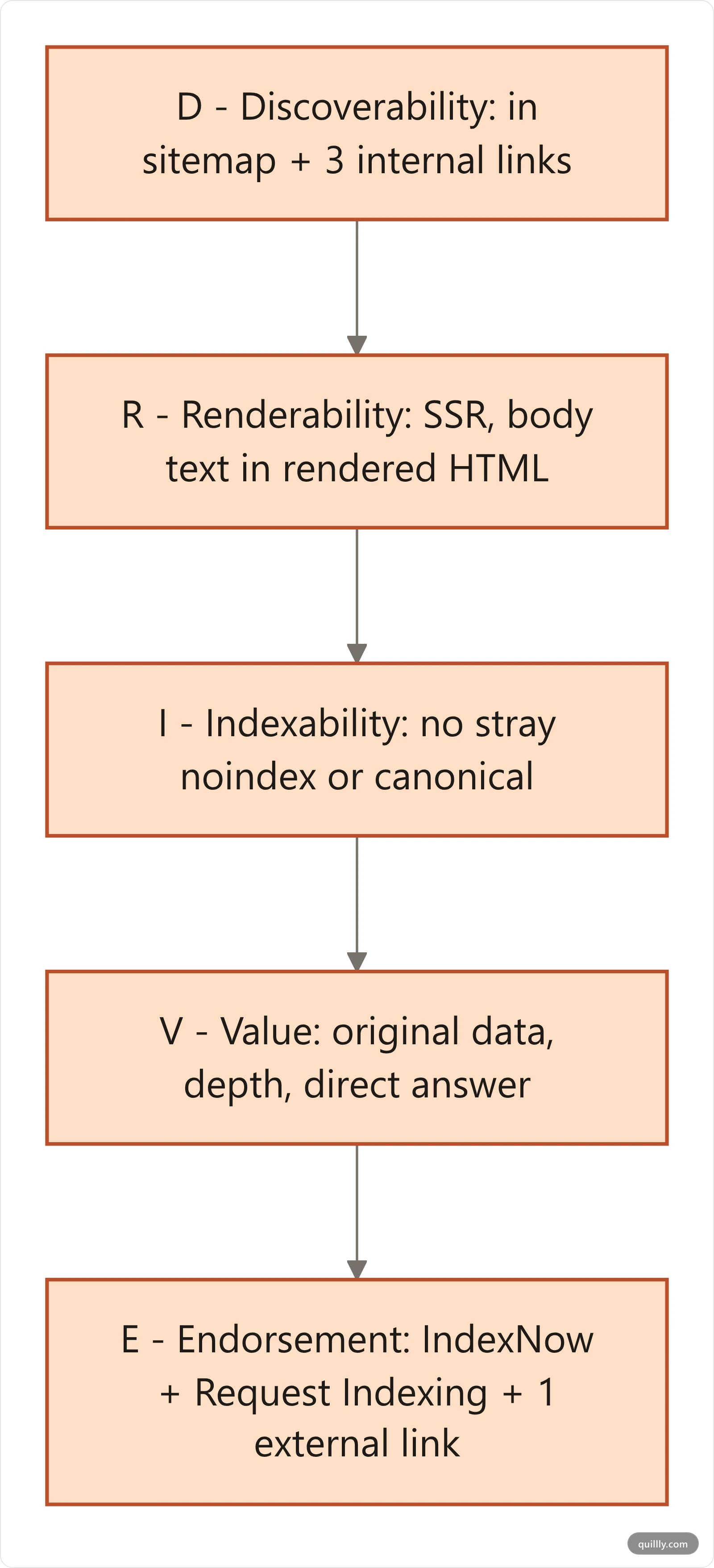
Most "indexing checklist" posts give you a 30-item to-do list with no order. That's useless under pressure. The DRIVE framework collapses indexing into five layers, in dependency order. Fix layer 1 before layer 2, and so on. Skipping ahead is why most people stay stuck on "Discovered – currently not indexed" for months.
D — Discoverability. Can Google find the URL? Verify the post is in your XML sitemap, the sitemap is in robots.txt, and the page has at least three internal links from indexed pages. Add one external link from a Twitter/LinkedIn post or a Reddit comment in a relevant subreddit. These get crawled fast and pass discovery signal.
R — Renderability. Can Google render the page as a human would? Open the URL Inspection tool in Search Console, click "View crawled page", and confirm the rendered HTML contains your body content. If the page is React/Vue/Next.js with pure client rendering, switch the post route to SSR or static export. JS-only blog pages are the most common silent failure mode in 2026.
I — Indexability. Are you accidentally telling Google not to index? Check for <meta name="robots" content="noindex">, conflicting canonicals pointing to a different URL, an X-Robots-Tag header at the CDN level, and stale noindex rules from staging environments. One misconfigured Cloudflare worker can noindex an entire blog without surfacing in any UI.
V — Value. Does the post earn its slot in the index? Google's quality classifier scores originality, depth, expertise, and helpfulness. Run a brutal self-audit: would a reader save this for later or close the tab in 8 seconds? Add at least one of these per post — original data, a screenshotted real workflow, a named framework, an interview quote, or a counterintuitive result. Generic AI prose without one of those is what triggers "Crawled – currently not indexed".
E — Endorsement. Notify the world. Submit the URL via Bing's IndexNow (which also pings Yandex, Naver, Seznam, Yep), add the page to your latest sitemap, and use Search Console's URL Inspection "Request Indexing" once per critical post. Build at least one inbound link within 14 days, even a Reddit comment, a newsletter mention, or a guest answer on Quora. Any external crawl path moves the needle.
The DRIVE Checklist (Copy This)#
D — Discoverability
[ ] In sitemap.xml
[ ] Sitemap referenced in robots.txt
[ ] 3+ internal links from indexed pages
[ ] 1+ external link (social, forum, newsletter)

R — Renderability
[ ] URL Inspection "View crawled page" shows body text
[ ] No JS-only critical content
[ ] LCP < 2.5s on mobile

I — Indexability
[ ] No <meta name="robots" content="noindex">
[ ] Self-canonical (or correct canonical to a real page)
[ ] No stale staging X-Robots-Tag
[ ] hreflang correct (or absent)

V — Value
[ ] 800+ words
[ ] At least one of: original data, screenshot, named framework, expert quote
[ ] Direct answer in first 100 words
[ ] Unique angle vs top 5 SERP results

E — Endorsement
[ ] Submitted via IndexNow
[ ] Sitemap re-pinged after publish
[ ] URL Inspection "Request Indexing" used
[ ] 1+ external mention within 14 days
Save that block. Run it on every post before you call indexing "broken".
Sitemap, IndexNow, Indexing API, URL Inspection: Which to Use When#
Four protocols claim to "tell Google about your post". Three actually work for blog content. Knowing which is which saves you a week of pointless API calls.
Protocol | Search engines | Blog content allowed? | Speed to crawl | Daily quota | When to use |
|---|---|---|---|---|---|
XML sitemap | Google, Bing, all major | Yes | 1–14 days | None | Always — baseline discovery |
IndexNow | Bing, Yandex, Naver, Seznam, Yep (not Google) | Yes | Minutes | 10,000+ URLs/day per host | Every publish — free, fast, broad |
Google Indexing API | Google only | No — | Minutes | 200/day default | Only if you publish job listings or live video |
URL Inspection / "Request Indexing" | Yes | Hours to days | ~50 URLs/property/day in UI | High-priority posts, recovery, A/B tests |
A few non-obvious points the standard guides skip:
The Google Indexing API is not for blogs. Google's official documentation restricts it to
JobPostingandBroadcastEventstructured data. Tools that promise to "instantly index your blog with the Indexing API" are violating Google's terms, and Google has revoked access for accounts that abuse it. Use the URL Inspection API instead.IndexNow does not tell Google anything. As of February 2026, Google has not adopted IndexNow despite testing it since 2021. But IndexNow still drove 22% of clicked URLs on Bing in late 2025 (up from 18% earlier that year), and Bing now powers ChatGPT search and Microsoft Copilot. Bing-first AI surfaces are real traffic. Want a wider AEO play? See our 2026 Answer Engine Optimization playbook.
IndexNow adoption exploded. Over 80 million sites use IndexNow as of January 2026, and 5 billion+ URLs are submitted per day, up from 3.5 billion in 2024. Cloudflare added it to all paid plans in Q4 2025; the WordPress plugin ecosystem passed 10 million active installs in mid-2025. If your stack doesn't ping IndexNow yet, you're behind a baseline.
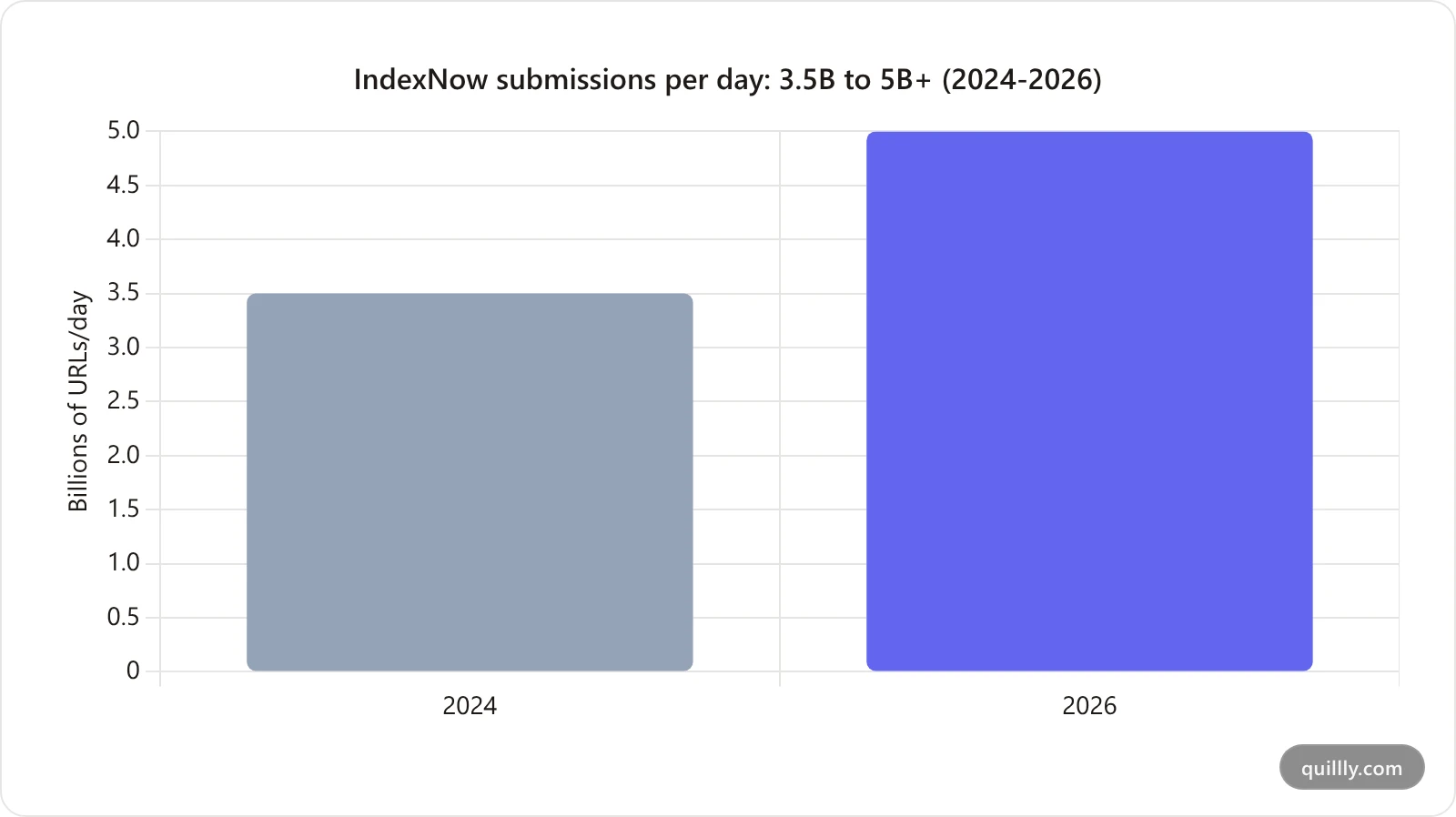
"Request Indexing" still works, sparingly. It's a request, not a guarantee. Use it after fixing a quality or technical issue on a post you actually want indexed. Don't spam it.
Net rule: ship sitemap + IndexNow on every publish, reserve URL Inspection for hand-picked posts, and ignore the Indexing API unless you publish job ads.
What We Learned Indexing Our Own 125-Post Blog#
We ran this playbook on quillly.com and the results contradicted one of our own rules. Here are the real numbers from a DR-12 domain with 125 published posts.
The starting position was bad: 64% of published posts indexed by Google, 15 clicks across 90 days from 9,206 impressions, and an average position of 41.5. Everything published after mid-July drew zero impressions. We had shipped 41 posts in a single month, which is how you outrun a small domain's crawl budget.
Two findings were worth more than the rest.
The sitemap was lying, and that poisoned everything. All 115 URLs in our sitemap carried a lastmod within the same 48-hour window, because background jobs were touching updatedAt without any content change. Google responds to that by ignoring lastmod entirely. After the fix, exactly 1 of 115 URLs carried the current date and the rest spread naturally across February through August. No amount of content work moved indexing until this was corrected.
Internal links do not fix a quality verdict. This is the one that surprised us. Our answer-engine-optimization-2026-playbook post carries 31 inbound internal links from indexed pages and is still stuck on Crawled – currently not indexed. Across 22 stuck posts, the median was 6 inbound links. The three-internal-links rule above is real — but it fixes Discovered, not Crawled. Once Google has read a page and declined it, links are not the lever. Original information is.
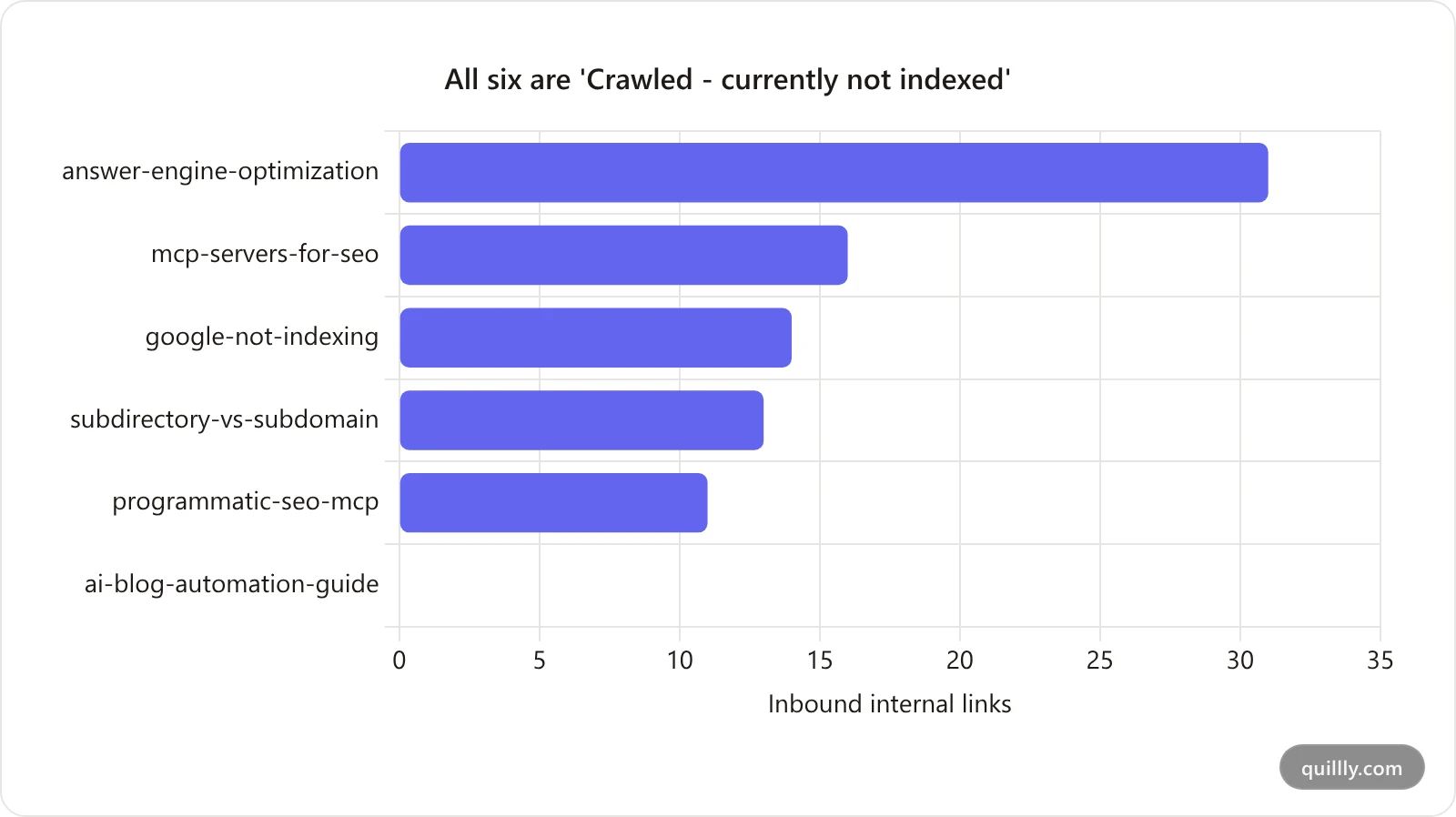
The internal-link audit had a blind spot, and it hid 86 orphans. This is the finding that actually moved the needle. Every prior audit we ran counted blog-to-blog links, found every post cleared the three-link bar, and declared internal linking finished. On 2026-08-11 we re-ran it across the whole URL surface instead of just the blog, parsing all 114 live posts. The result was lopsided enough to be embarrassing:
URL surface | Pages | Inbound internal links | Pages with ≥1 link | Orphan rate |
|---|---|---|---|---|
| 114 | 2,113 | 114 | 0% |
| 49 | 40 | 24 | 51% |
| 63 | 10 | 6 | 90% |
| 4 | 0 | 0 | 100% |
Internal link distribution by URL surface on a DR-12 domain — 97.7% of links pointed at 50% of the pages
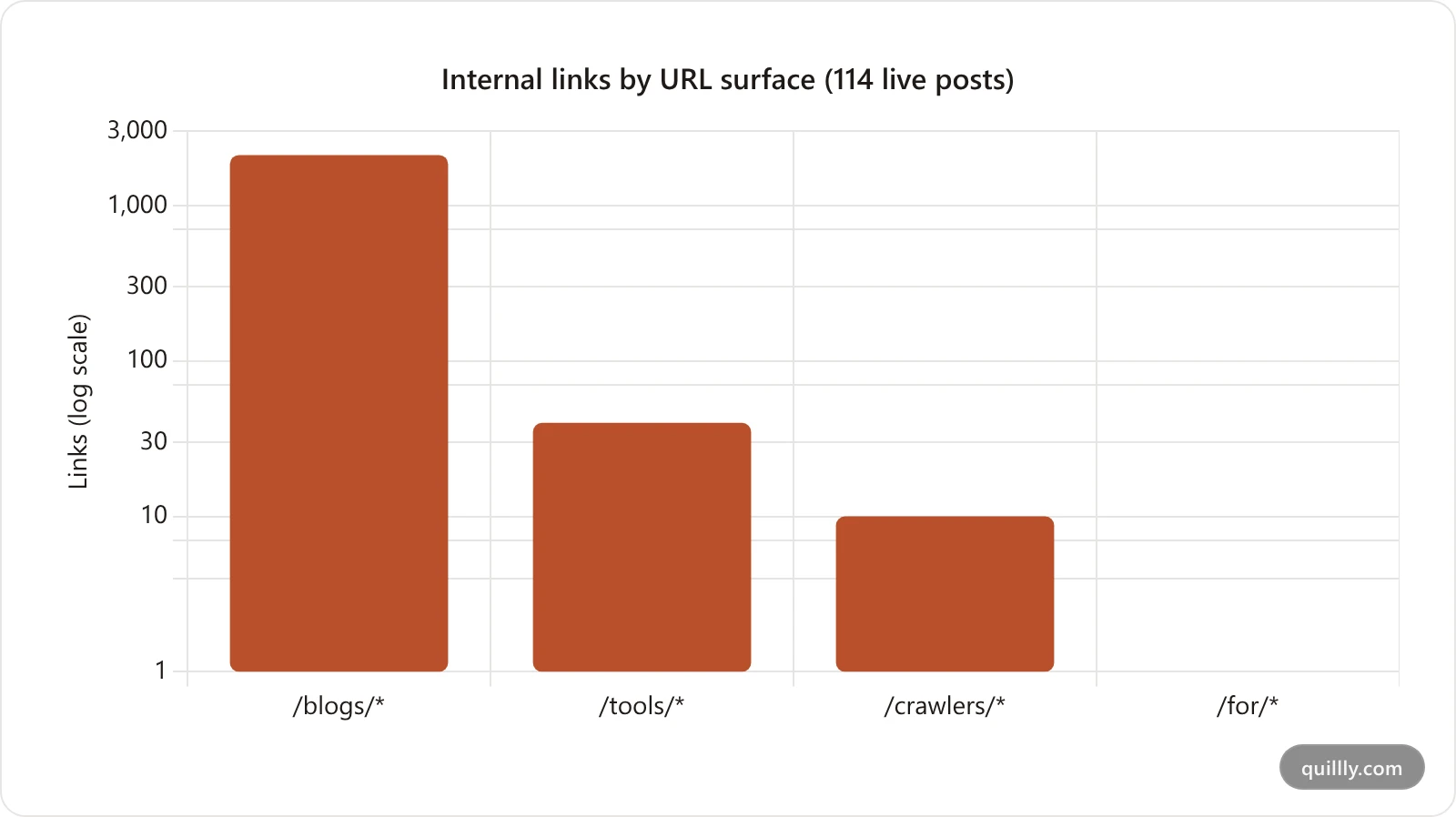
Of 2,163 internal links on the site, 2,113 — 97.7% — pointed at blog posts, which are only half the indexable surface. The other 116 pages split 50 links between them, and 86 of those pages had exactly zero.
Then we checked it against Google's own complaint. In the Discovered – currently not indexed report, 33 of the 50 affected URLs Google returned were non-blog pages — tool pages, directory entries, and landing pages. We had spent weeks adding links between posts that were already indexed while the pages Google was actually refusing to crawl had none.
Call it the Link Surface Blind Spot: an internal-linking audit scoped to one content type will always report success, because the pages it can see are the pages your links already point at. Audit by URL surface, not by content type. Pull your sitemap, group every URL by its path prefix, and count inbound links per group. If one prefix holds 97% of your links, the rest of your site is invisible to Google no matter how good the content is.
The practical read: spend your first hour on lastmod honesty and crawl budget, not on link plumbing. Then spend the next hour giving Google something it cannot find on the other nine results.
The 14-Day Indexing Recovery Playbook#
You have stuck posts. Here is the order to fix them. Run the playbook on a sample of 5–10 of your worst offenders before applying it site-wide.
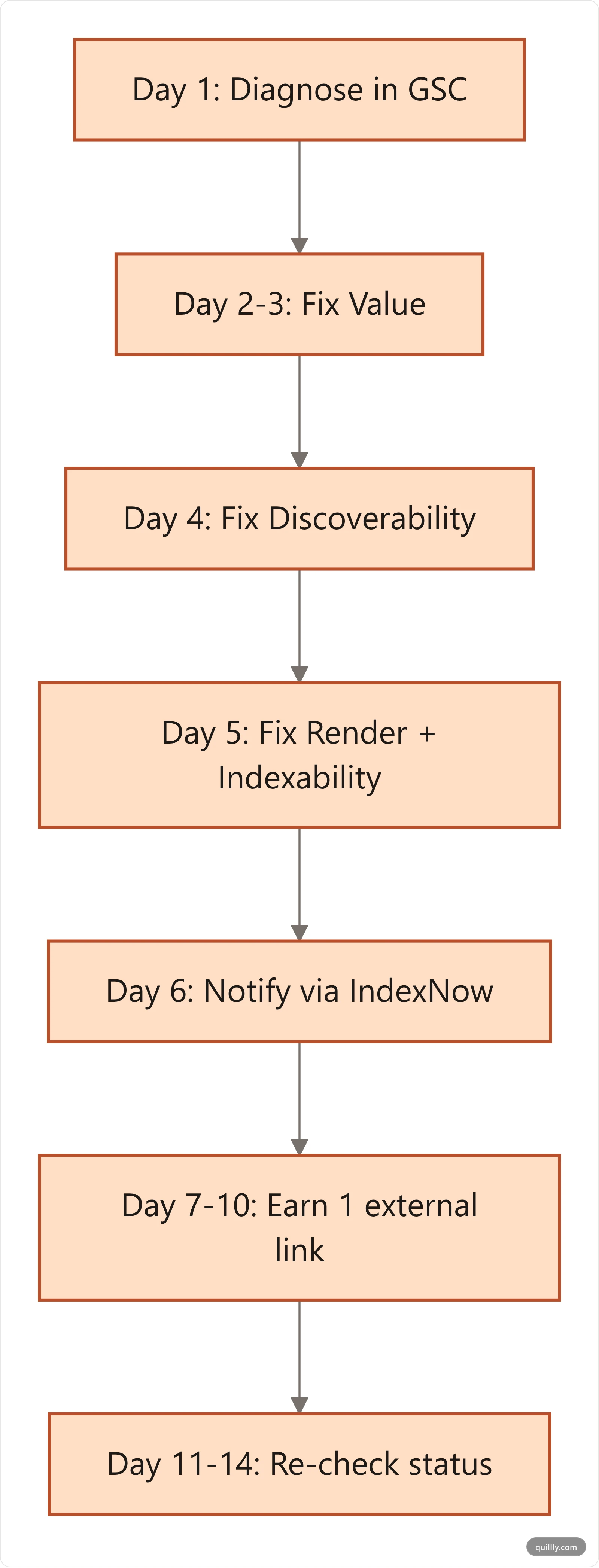
Day 1 — Diagnose. Pull every "Discovered – currently not indexed" and "Crawled – currently not indexed" URL from Search Console's Page indexing report. Tag each by likely cause using the DRIVE framework. Most of yours will fall into V (Value) and D (Discoverability).
Day 2–3 — Fix value. For each stuck post: rewrite the intro to lead with a direct answer in 40–60 words, add at least one original asset (data point, screenshot, named framework, expert quote), and bump word count to 1,500+ if it's under 800. Cut filler. Remove duplicate paragraphs.
Day 4 — Fix discoverability. Add 3 inbound internal links from your strongest existing pages (homepage, top-trafficked posts, hub pages). Confirm the post is in /sitemap.xml and the sitemap is referenced in /robots.txt.
Day 5 — Fix render and indexability. Run URL Inspection → "View crawled page" on each post. If the rendered HTML lacks body content, fix SSR. Search the codebase for noindex, stray <meta name="robots"> tags, and conflicting canonicals. Don't forget CDN-level X-Robots-Tag headers.
Day 6 — Notify. Submit each fixed URL via IndexNow (one POST request to api.indexnow.org/indexnow). Use Search Console's URL Inspection → "Request Indexing" on your top 5 priority posts.
Day 7–10 — Earn one external signal. Post each fixed URL in a relevant subreddit, a Hacker News comment, a LinkedIn post, or a newsletter. The goal is one external crawl path within a week. Even a single quote-tweet from a small account can pull Googlebot back. If you want to monitor what shifts after each push, our GSC AI MCP workflow gives you a daily diff loop your AI can run on autopilot.
Day 11–14 — Re-check. Pull the Page indexing report again. Status should shift from "Discovered – not indexed" to "Crawled" and then "Indexed". If a post is still stuck after Day 14, it's almost always Value (V): the content didn't earn it. Either upgrade it again or 410 it.
What the Playbook Actually Moves#
Editorial fixes do the heavy lifting. Across the public 2026 indexing case studies (including Indexing Insight's recovery audits), rewriting the intro and adding original assets clears the majority of "Discovered – currently not indexed" errors. Internal links and IndexNow account for most of the remainder. Pure technical fixes — robots.txt, render, canonicals — typically rescue a small share.
Translation: indexing fixes are mostly editorial, not infrastructural. Start with the words.
How AI-Published Blogs Can Skip the Indexing Graveyard#
Most of the failures in this guide trace to a workflow gap: the AI writes, a human copies, a CMS publishes, and nothing tells Google. Each step is a leak. By the time the post lives at yourdomain.com/blog/post-title, no sitemap has been updated, IndexNow hasn't been pinged, and Search Console has no idea the URL exists. The post sits in discovery limbo for days.
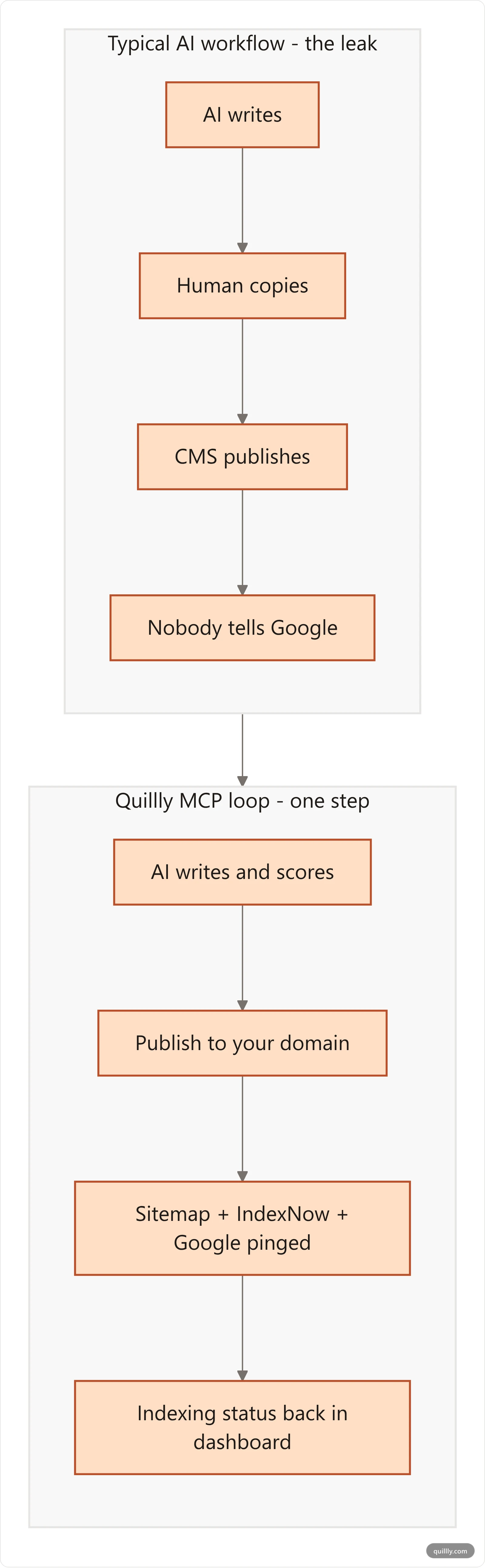
This is the gap Quillly closes. Quillly's MCP server connects directly to Claude, ChatGPT, Cursor, Gemini, or Windsurf. The same conversation that writes the post also publishes it to your own domain (not a subdomain), pushes the new URL into your XML sitemap, and pings Google's discovery pipeline plus IndexNow on every publish_content call. Indexing status then surfaces back into the dashboard per blog — submitted, indexed, error — pulled live from Search Console. For the full agentic stack behind that loop, see our MCP servers for SEO guide.
In a typical agent flow, that looks like:
You: "Publish the draft we just refined."

Claude → check_blog_seo → score: 91/100 ✓
Claude → publish_content →
  ✓ live at yourdomain.com/blog/your-slug
  ✓ sitemap.xml updated
  ✓ Google + IndexNow notified
  ✓ indexing status: submitted
A few days later, the per-blog dashboard shows the post moved from "submitted" to "indexed" without any human touching Search Console. If indexing fails, the per-blog status surfaces the GSC reason ("Discovered – currently not indexed", "Soft 404", and so on), so the agent can rewrite and resubmit before you have even noticed.
The flow matters because it removes the most common cause of indexing limbo on this list: nobody told Google. Pair it with a strong DRIVE checklist on the writing side and you get an unusually short feedback loop — minutes from prompt to "submitted", days from "submitted" to "indexed". For builders publishing from an editor instead of a desktop app, our Cursor publishing guide shows the same loop wired into a code-editor sidebar.
If your AI writes the post but a human still publishes it, you are paying for the AI half and eating the indexing tax on the human half. That's the gap to close.
Frequently Asked Questions#
How long does Google take to index a new blog post in 2026?#
Google indexes most healthy posts within 1 to 14 days, but the median for new domains is closer to 30 days. Speed depends on site authority, internal linking, and whether the page passes Google's quality filter. Time-sensitive content like job postings and live videos can index in minutes via the Indexing API, but blog posts have to earn their slot in line.
Does the Google Indexing API work for blog posts?#
No. Google's official documentation restricts the Indexing API to JobPosting structured data and BroadcastEvent embedded in VideoObject. Using it for blog content violates Google's terms, and Google has revoked access from accounts that abuse it. Use the URL Inspection API or "Request Indexing" feature in Search Console for blog posts instead.
What's the fastest legitimate way to get a new blog post indexed?#
Submit the URL via IndexNow (Bing, Yandex, Naver, Seznam, Yep) and Google's URL Inspection "Request Indexing" feature, then earn one external crawl path — a Reddit comment, a tweet, a newsletter mention, or a Hacker News thread — within 48 hours. The combination usually drops indexing time from days to hours on healthy sites.
Why does Search Console say "Discovered – currently not indexed"?#
That status means Google knows the URL exists but hasn't crawled it. The cause is almost always weak site-wide quality signals or low internal-link priority for that URL. Fix value first (depth, originality, direct answers), add 3 internal links from strong pages, then re-request indexing. Don't expect the status to clear without those upstream fixes.
Why does "Crawled – currently not indexed" stay stuck for months?#
Crawled but not indexed means Google read the page and chose to skip it, almost always a quality decision. Common causes: the post is too similar to other indexed pages (yours or competitors'), reads as low-effort or AI-spun, or doesn't answer the search intent better than what's already in the SERP. Rewrite, add original assets, and re-submit.
Should I use IndexNow if I only care about Google?#
Yes. As of 2026, Google has not adopted IndexNow, but Bing powers ChatGPT search and Microsoft Copilot, both of which drive material AI-search traffic. IndexNow is free, takes one HTTP POST per publish, and is supported by 80 million+ sites and 5 billion URL submissions a day. The cost-benefit ratio is unmatched.
How many internal links does a new blog post need to be indexed?#
Plan on at least three internal links from already-indexed pages, ideally from a mix of your homepage, a hub or category page, and a related post in the same topic cluster. Count them by URL surface rather than by content type — our own audit passed on every blog post while 86 non-blog pages sat at zero. Google treats internal links as priority signals: zero internal links is the single biggest predictor of orphan-status non-indexing, accounting for around 17% of failures.
How do I know if a blog has been indexed by Google?#
Two ways. Search site:yourdomain.com/blog/your-slug in Google — if the post appears, it's indexed. Or open Search Console → URL Inspection → paste the URL — the report will say "URL is on Google" or list a specific reason it isn't (Discovered, Crawled, Excluded by canonical, etc.). Quillly surfaces this status per blog automatically inside the dashboard, so you don't have to check manually.
Can programmatic SEO posts be indexed at scale?#
Yes, but only if every page passes the same DRIVE checks: discoverable in the sitemap, render-able server-side, value-bearing (unique data per page, not template-only swaps), and notified to IndexNow. See our guide on programmatic SEO with MCP for the workflow that survives Google's 2026 quality filter.
Wrapping Up: The Indexing Fix That Actually Scales#
Indexing in 2026 is selective. About 62% of all web pages never make it into Google's index, only 30 to 60 percent of any given site's pages get indexed, and 88% of failures are quality calls — not bugs you can patch with an API. The fix stack that works is editorial first, technical second, notification third.
Three things to take away:
Run the DRIVE checklist on every post before publish. D-R-I-V-E. Layer order matters.
Pick the right protocol. Sitemap + IndexNow on every post. URL Inspection for priority posts. Indexing API only if you ship job listings.
Close the publish-to-Google gap. Whoever clicks publish should also be pinging the sitemap and IndexNow in the same step, not in a separate workflow you'll forget.
Tired of Google not indexing your blog the day after you publish? Want your AI to write, score, publish, and notify Google in one conversation? Connect Quillly to Claude, ChatGPT, or Cursor in 30 seconds.