


You picked a hosted blog platform to skip the WordPress headache. Smart. Then you hit the catch: it serves your posts from blog.yourdomain.com, a subdomain. And every SEO study from the last decade says that's the slow lane.
A reverse proxy fixes this. It lets a blog hosted somewhere else show up at yourdomain.com/blog, a real subdirectory on your root domain, so the ranking authority your homepage earns flows straight into your posts. As of June 2026, this is no longer a niche trick. It's the difference between content that compounds and content that sits on an island.
Here's the uncomfortable part. Google's own John Mueller has said subdomains and subdirectories are treated "the same." Yet a Backlinko analysis of 11.8 million search results found subdirectories consistently outrank subdomains, and real migrations show 40% swings in organic traffic. The official line and the field data disagree, and your traffic follows the field data.
This guide shows you exactly how to set up a reverse proxy blog subdirectory: what it does, why it wins, and copy-paste configs for Nginx, Apache, Next.js, Vercel, Netlify, Cloudflare Workers, and shared PHP hosting.
What a Reverse Proxy Blog Subdirectory Actually Does#
A reverse proxy blog subdirectory is a server rule that takes requests for yourdomain.com/blog and quietly fetches the content from a blog hosted elsewhere, then returns it as if it lived on your domain all along. The visitor and Google both see one site. No subdomain, no redirect, no separate URL.
Think of it like a receptionist. Someone asks for "the blog." Instead of pointing them down the street to blog.yourdomain.com, your server walks to the back room, grabs the page, and hands it over at the front desk. The address bar never changes. It still reads yourdomain.com/blog/your-post.
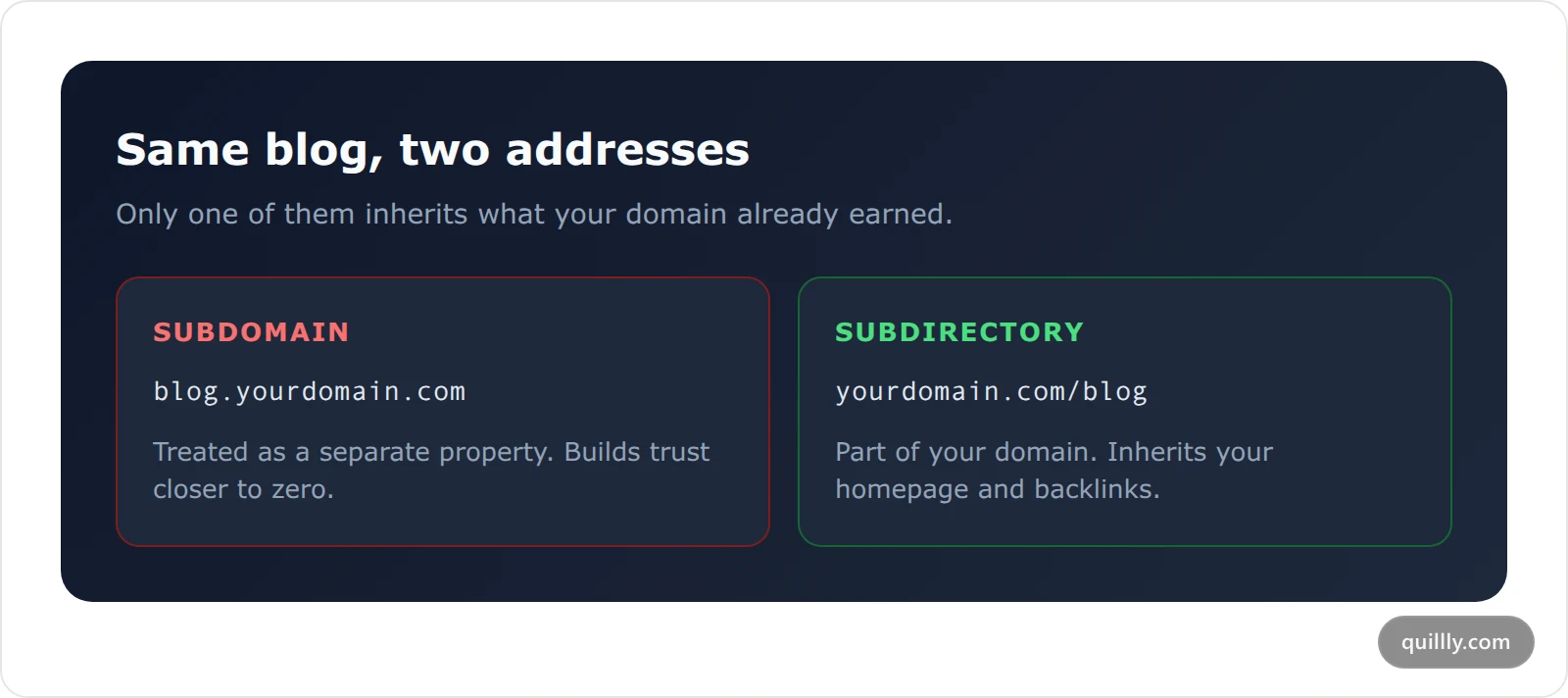
That last detail is the whole game. Search engines assign ranking authority at the domain level. A subdirectory is part of your domain, so it inherits everything your homepage, your backlinks, and your brand have earned. A subdomain is treated as a related-but-separate property that has to build trust from closer to zero.
The reverse proxy is how you run a hosted blog on your own domain without giving up that authority. You write and publish on the platform. Your readers and crawlers see your root domain.
Subdirectory vs Subdomain: What the Data Actually Says#
Default to a subdirectory. The subdomain vs subdirectory SEO debate has an official answer and a field answer, and they don't match — the evidence is one-sided once you look past Google's "it doesn't matter" line.
Google's John Mueller has said plainly: "we see these the same... I would personally try to keep things together as much as possible." That sounds like a wash. The field results say otherwise.
Source | Finding |
|---|---|
Backlinko (11.8M search results) | Subdirectories consistently outrank subdomains for competitive keywords |
PinkCakeBox (via ButterCMS) | +40% organic traffic moving subdomain to subdirectory |
IWantMyName | -47% organic traffic moving subdirectory to subdomain |
HotPads | Hockey-stick organic growth after the subdirectory switch |
SEO Engico (2026) | Subdirectory content pulled 2-5x more ChatGPT citations over 90 days |
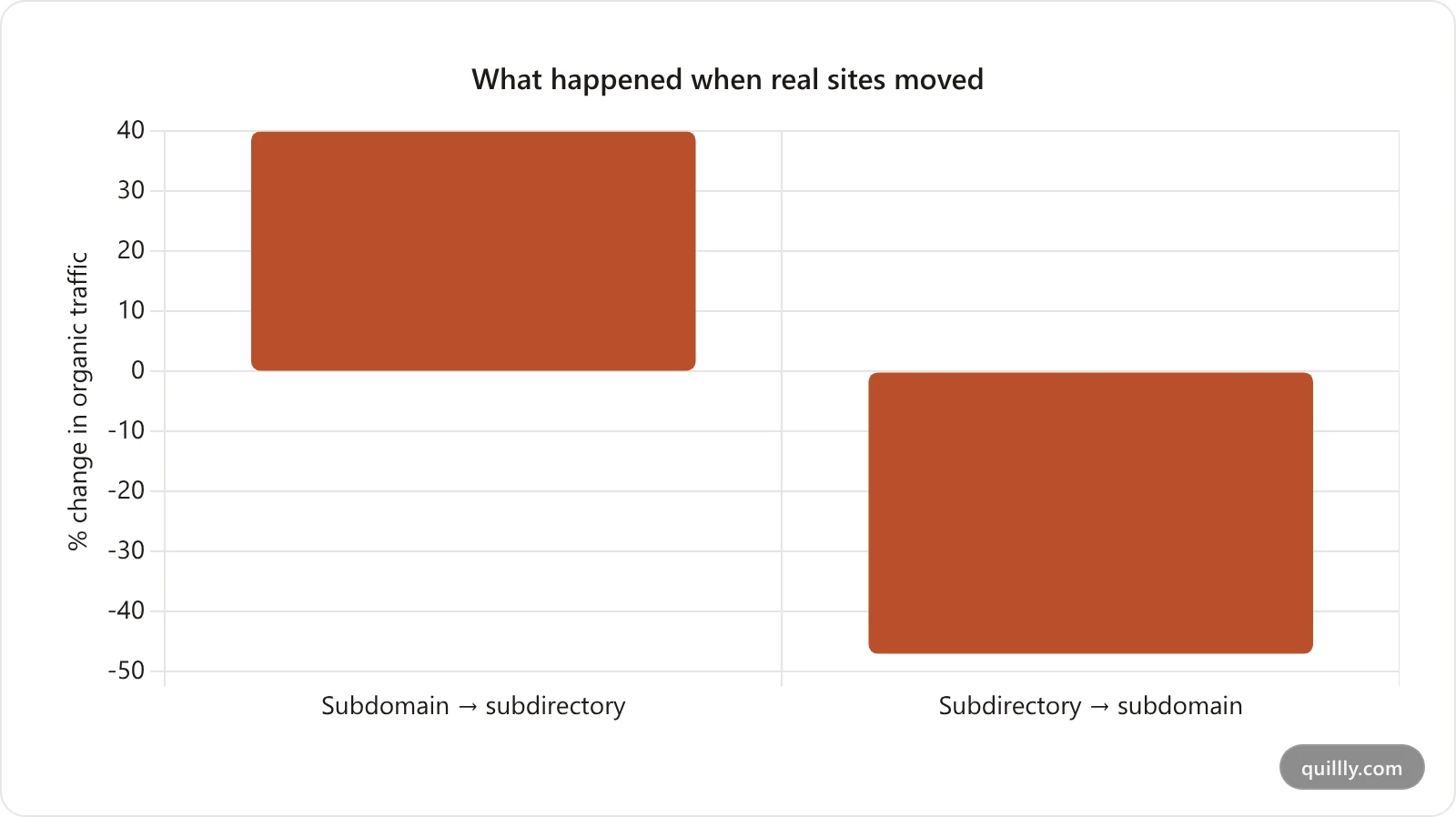
Here's the contrarian take worth sitting with. The "subdomains and subdirectories are equal" claim is technically true and practically misleading. Google's crawler can pass authority across a subdomain. Whether it does, and how fully, depends on signals it never fully documents. Every time a real business has run the experiment, the subdirectory won. When the official guidance and a decade of A/B migrations disagree, bet on the migrations.
The AI-search angle makes this sharper in 2026. Answer engines like ChatGPT and Perplexity lean on domain-level trust to decide who to cite. Splitting your best content onto a subdomain dilutes exactly the signal that earns citations. For the deeper breakdown of the tradeoff, see our guide on subdirectory vs subdomain SEO.
Why Hosted Blog Platforms Push You Onto a Subdomain#
Subdomains are easier for the platform, not better for you. When a blog tool hands you blog.yourdomain.com, it's solving its own problem: a subdomain points at the platform's servers with a single DNS record, no integration with your real site required.
A true subdirectory is harder on their end. Your root domain is served by your infrastructure. To inject /blog into it, something has to route those requests over to the blog platform. That "something" is a reverse proxy, and most platforms won't build it for every customer's stack.
So they default to the subdomain and call it "on your domain." It isn't, not in the way that counts for SEO. It's a separate house with your last name on the mailbox.
This is the exact trap indie founders fall into. You wanted to add a blog without WordPress, you got a clean editor and managed hosting, and you quietly traded away your domain authority to get there. The reverse proxy is how you take it back.
The Single-Domain Blog Pattern: 4 Steps#
Call this the Single-Domain Blog Pattern. It's a repeatable setup that gets a hosted blog ranking under your root domain. Four steps, in order.
Map. Decide the public path.
/blogis the SEO default and the one most readers expect. Pick it once and don't change it later, because the path becomes part of every URL you publish.Proxy. Add a reverse-proxy rule to your existing site so requests to
yourdomain.com/blogforward to the blog platform's serve endpoint. This is the only step that touches your server config.Verify. Confirm the proxy is live and returning server-rendered HTML, not a client-side shell. A page that only renders in JavaScript can get crawled poorly. Server-rendered pages get indexed cleanly.
Index. Submit the subdirectory URLs to Google Search Console and Bing, generate a sitemap at the proxied path, and let the crawlers find the new home.
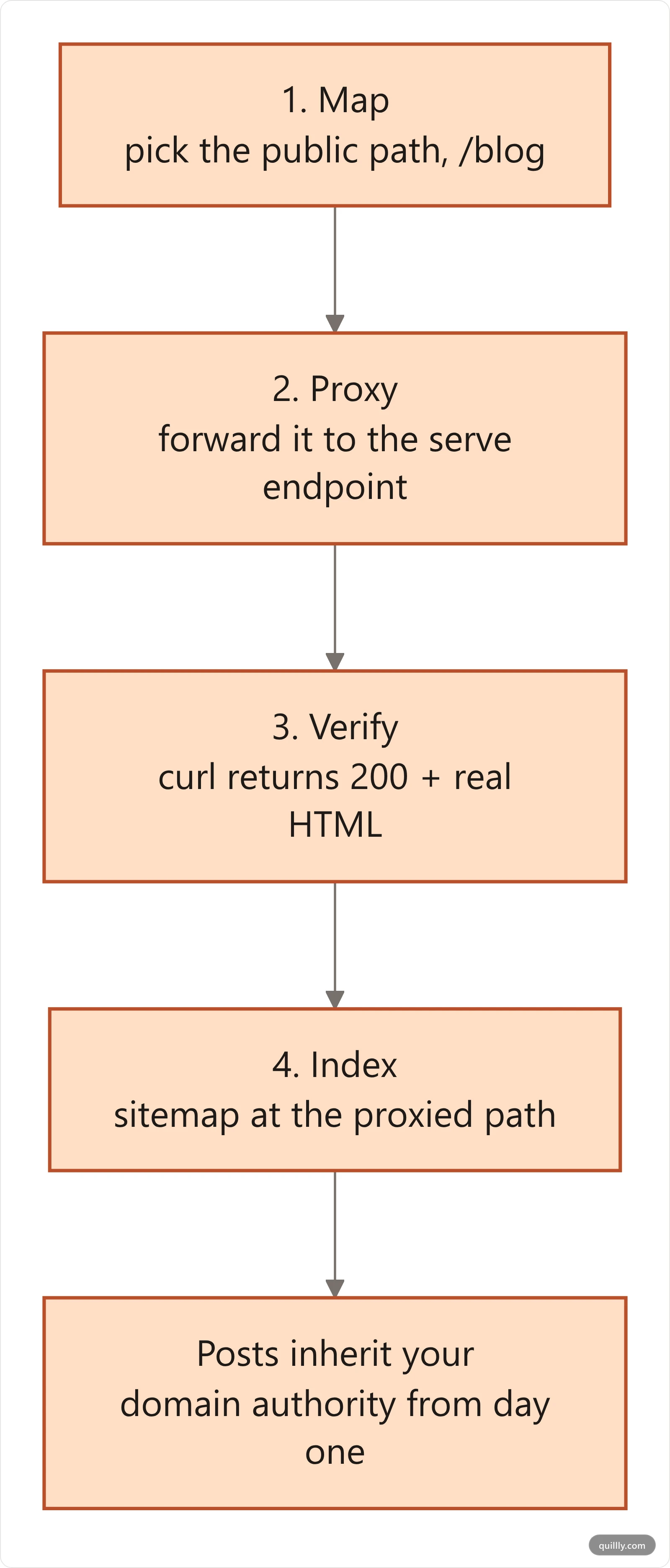
The pattern matters because skipping a step quietly breaks SEO. Map the wrong path and you'll be issuing redirects forever. Proxy without verifying and you may be serving a blank shell to Googlebot. Forget to index and your beautiful subdirectory sits undiscovered. Run all four and your posts inherit your domain's authority from day one.
With Quillly, steps 2 through 4 are guided. The dashboard generates the exact proxy snippet for your platform, runs a one-click connection check, and serves a sitemap at your subdirectory path automatically. You bring the AI to write. The infrastructure is handled.
Get the proxy snippet for your stack — it's about five minutes of copy and paste.
The Reverse Proxy Configs for 6 Platforms#
Every config below does the same thing: forward /blog to a hosted serve endpoint and return the response under your domain. Swap in your own platform host and your site ID. The examples use a Quillly serve URL of the shape https://quillly.com/serve/v1/{WEBSITE_ID}/blogs, where {WEBSITE_ID} is the id your dashboard shows for the site — replace the whole token, braces included, before you deploy. The same shape works for any platform that exposes a server-rendered endpoint.
One rule saves you a headache: don't proxy static assets. Scripts, fonts, and styles load directly from the platform's CDN. You only proxy the HTML pages. That keeps the config short and the pages fast.
Nginx#
The Nginx reverse proxy blog setup is the one you'll meet most often. Add two location blocks to your server block, one for /blog and one for /blog/.
location /blog {
    proxy_pass https://quillly.com/serve/v1/{WEBSITE_ID}/blogs;
    proxy_set_header Host quillly.com;
    proxy_ssl_server_name on;
}

location /blog/ {
    proxy_pass https://quillly.com/serve/v1/{WEBSITE_ID}/blogs/;
    proxy_set_header Host quillly.com;
    proxy_ssl_server_name on;
}
The proxy_ssl_server_name on line matters. Without it, the TLS handshake to the upstream fails and you get a 502.
Apache#
Apache needs mod_proxy, mod_proxy_http, and mod_ssl enabled. Then it's four lines in your VirtualHost.
SSLProxyEngine On
ProxyPreserveHost Off

ProxyPass        "/blog"  "https://quillly.com/serve/v1/{WEBSITE_ID}/blogs"
ProxyPassReverse "/blog"  "https://quillly.com/serve/v1/{WEBSITE_ID}/blogs"
ProxyPreserveHost Off is deliberate. You want the upstream host header to point at the blog platform, not your domain, so it serves the right content.
Next.js#
If your main site runs on Next.js, you don't touch a web server at all. Use the built-in rewrites in next.config.ts. A rewrite proxies on the server; the URL the user sees never changes.
async rewrites() {
  return [
    {
      source: '/blog',
      destination: 'https://quillly.com/serve/v1/{WEBSITE_ID}/blogs',
    },
    {
      source: '/blog/:path*',
      destination: 'https://quillly.com/serve/v1/{WEBSITE_ID}/blogs/:path*',
    },
  ];
}
Vercel and Netlify#
On Vercel, rewrites live in vercel.json. The :path* wildcard catches every post under /blog.
{
  "rewrites": [
    { "source": "/blog", "destination": "https://quillly.com/serve/v1/{WEBSITE_ID}/blogs" },
    { "source": "/blog/:path*", "destination": "https://quillly.com/serve/v1/{WEBSITE_ID}/blogs/:path*" }
  ]
}
Netlify uses the same idea in netlify.toml, with status = 200 to make it a proxy rather than a redirect:
[[redirects]]
  from = "/blog/*"
  to = "https://quillly.com/serve/v1/{WEBSITE_ID}/blogs/:splat"
  status = 200
The status = 200 is non-negotiable. A 301 would change the URL and hand the authority straight back to the platform domain.
Cloudflare Workers#
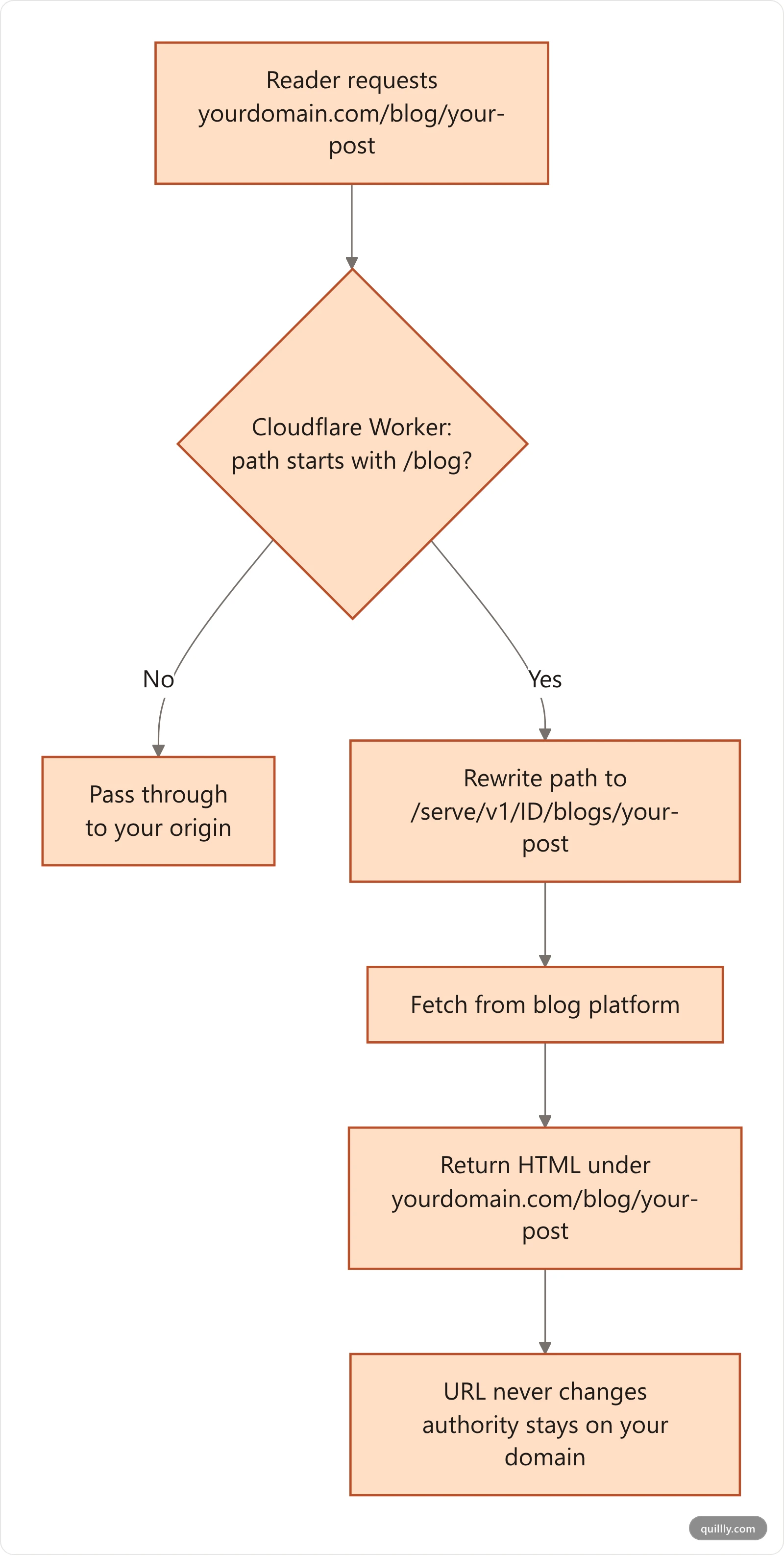
A Cloudflare reverse proxy subdirectory is the least invasive option on this list. If your domain already sits behind Cloudflare, you can proxy at the edge and never touch your origin server. A Worker intercepts requests to /blog, rewrites the path onto the platform's serve endpoint, and returns the response unchanged. This is the option to reach for when your main site runs on a host that gives you no server config at all.
export default {
  async fetch(request) {
    const url = new URL(request.url);
    if (!url.pathname.startsWith('/blog')) return fetch(request);

    const upstreamPath = url.pathname.replace(
      /^\/blog/,
      '/serve/v1/{WEBSITE_ID}/blogs'
    );
    const upstream = new URL(upstreamPath + url.search, 'https://quillly.com');

    return fetch(upstream, { headers: request.headers });
  },
};
Route the Worker at yourdomain.com/blog* so it only fires on blog paths, and note that the startsWith('/blog') check covers both /blog and /blog/ in one line — no separate trailing-slash rule needed. Everything else on your site falls through to fetch(request) untouched.
The edge hop is usually the fastest option in this list, because Cloudflare is already terminating the TLS connection for your domain. There's no second handshake to your origin and no proxy_ssl_server_name class of bug to hit.
PHP / Shared Hosting#
No Nginx access? On cPanel-style shared hosting you can proxy in PHP. A small script fetches the upstream page and echoes it, with .htaccess routing /blog requests to that script. It's the slowest option, so cache aggressively, but it works where nothing else does.
How to Verify the Proxy Is Actually Working#
A proxy that loads in your browser can still be invisible to Google. Verify two things before you celebrate.
First, confirm the page is server-rendered. Run curl https://yourdomain.com/blog from a terminal and read the raw HTML. You should see your post's actual text and headings in the response, not an empty <div id="root">. If the body is empty, the page renders only in JavaScript, and you've lost the SEO point of the whole exercise. Quillly's serve endpoint returns fully rendered HTML, so the curl test passes by default.
Second, check the status code. A correct proxy returns 200. A 301 or 302 means you built a redirect, not a proxy, and the URL is bouncing to the platform domain. A 502 usually means the upstream TLS handshake failed (the missing proxy_ssl_server_name line on Nginx). On Cloudflare Workers, a 1101 or a blank response almost always means the Worker threw — check the route pattern first, since a Worker mounted at /* instead of /blog* will try to proxy your entire site.
Platforms that take this seriously give you a one-click check. Quillly's dashboard has a "Verify Connection" button that probes your subdirectory, confirms it's serving real content, and reports the detected method. Green dot, you're done. Red, it tells you what's wrong.
Run the connection check on your own domain free for 14 days.
Reverse Proxy Mistakes That Quietly Tank SEO#
Most proxy failures aren't loud. The page loads fine for humans and silently leaks ranking signal. Watch for these five.
Proxying static assets. You only need to proxy HTML pages. Let scripts, fonts, and CSS load from the platform CDN. Proxying them adds latency and breaks caching for zero benefit.
Using a 301 instead of a proxy. A redirect changes the URL in the address bar back to the subdomain. That undoes everything. Proxies return
200and keep the URL on your domain.Wrong canonical tags. The canonical URL on each post must point at
yourdomain.com/blog/slug, not the platform's URL. A canonical aimed at the wrong domain tells Google to credit the other site.Forgetting the sitemap. Your sitemap must list the subdirectory URLs and live at the proxied path, like
yourdomain.com/blog/sitemap.xml. A sitemap pointing at subdomain URLs sends crawlers to the version you don't want indexed.Skipping the trailing-slash rule. Both
/blogand/blog/need to route. Miss one and half your internal links 404. Notice every config above handles both.
Get the canonical and sitemap right and you avoid the duplicate-content problem entirely. Once the plumbing is correct, the next lever is what you put at that path — blog titles that rank and the complete guide to AI blog publishing cover the content side of the same setup. If your posts are already live on a subdomain, plan the switch carefully so you don't lose rankings mid-move. Our walkthrough on how to move your blog to your own domain without losing SEO covers the redirect map step by step.
Serving Docs and Changelog From the Same Proxy#
The subdirectory trick isn't just for blogs. The same reverse-proxy pattern serves docs at /docs and a changelog at /changelog, each from its own path, all under your root domain. One domain, multiple content types, one pool of authority.
The setup is identical. Each content endpoint gets its own proxy rule pointing its path at the platform's serve URL, and each gets its own connection check. In Quillly, you add the endpoint, copy the per-platform snippet for that path, and verify it the same way you verified /blog. A docs site and a blog feeding the same domain's authority is a real topical-authority advantage, the kind that compounds across your whole site.
When a Subdomain Actually Makes Sense#
Subdirectories are the default, not a law. A subdomain is the right call when the content is genuinely a separate property: a standalone app at app.yourdomain.com, a help desk run by a third-party tool, a status page, or a regional site in another language with its own team.
The test is simple. Ask whether the content should share your main domain's authority and brand, or stand apart. A blog that exists to rank for your topics and pull in buyers should share. A login portal shouldn't. If you're publishing content to grow search traffic, that's the share case, and the reverse proxy subdirectory is how you do it without migrating off your hosted platform.
Frequently Asked Questions#
Does a reverse proxy blog subdirectory really help SEO?#
Yes. A subdirectory keeps your blog on your root domain, so it inherits the domain authority your homepage and backlinks have built. Documented migrations show 40% organic traffic gains moving from subdomain to subdirectory, and a 47% loss going the other way. Google says the two are equal, but every real-world experiment favors the subdirectory.
Is a reverse proxy the same as a redirect?#
No, and the difference is everything. A redirect (301 or 302) sends the browser to a new URL, so the address bar changes to the subdomain. A reverse proxy fetches the content behind the scenes and returns it under the original URL, so yourdomain.com/blog stays in the address bar. Only the proxy keeps the SEO authority on your domain.
Will a reverse proxy slow down my blog?#
Barely, if you set it up right. The proxy adds one server-to-server hop, measured in milliseconds. Static assets like scripts and fonts load directly from the platform's CDN, not through the proxy, so page weight is unaffected. On shared PHP hosting the overhead is higher, which is why caching matters there.
Do I need a developer to set up the reverse proxy?#
For Nginx or Apache, some server access helps. For Next.js, Vercel, and Netlify, it's a few lines in a config file you already manage. Platforms like Quillly generate the exact snippet for your stack and give you a one-click verify button, so the technical lift is mostly copy, paste, and confirm.
Can I serve my blog at a path other than /blog?#
Yes. /blog is the convention readers expect, but the proxy works for any path: /articles, /resources, /learn. Pick the path before you publish, because it becomes part of every post URL. Changing it later means setting up redirects for every existing post, so decide once.
How do I know Google is indexing the subdirectory version?#
Submit your subdirectory sitemap in Google Search Console and watch the Pages report. Run a site:yourdomain.com/blog search to see what's indexed. If the subdomain URLs still show up, add canonical tags pointing at the subdirectory and 301 the old subdomain URLs. For a full troubleshooting path, see our Google indexing fix stack.
Does the reverse proxy work with AI search and ChatGPT citations?#
It helps. Answer engines weigh domain-level trust when choosing sources to cite. Consolidating your content onto one root domain instead of splitting it across a subdomain strengthens that signal. One 2026 analysis found subdirectory content earned 2 to 5 times more ChatGPT citations than the same content on a subdomain over 90 days.
Keep the hosted blog, keep the authority
Quillly serves your posts at yourdomain.com/blogs behind a reverse proxy, generates the config for your stack, and ships the sitemap at the proxied path. Your AI writes; the plumbing is handled.
Start the free trialThe Bottom Line#
A reverse proxy blog subdirectory is the cleanest way to keep a hosted blog and still rank on your own domain. Three things to remember: subdirectories beat subdomains by up to 40% in documented organic traffic swings, a proxy returns a 200 while a redirect returns a 301 (only the proxy keeps authority on your domain), and the Single-Domain Blog Pattern (Map, Proxy, Verify, Index) is the four-step path to get there without breaking anything.
The conventional wisdom says you have to choose between an easy hosted blog and good SEO. You don't. The proxy gives you both: write and publish on a managed platform, serve it at yourdomain.com/blog, and let your domain's authority do the heavy lifting.
Want your AI to write the post and have it land on your own domain at the right subdirectory, sitemap and all? Connect Quillly to Claude, ChatGPT, or Cursor in 30 seconds.
Related: A reverse proxy means your blog inherits whatever infrastructure your main site already runs on — which makes the quality of that infrastructure worth checking. Web hosting for SEO covers what search engines actually measure, and what hosting plans only claim.


