

Your best blog post might be making someone else rich. If you publish on Medium, Substack, or a hosted CMS subdomain, every link you earn and every AI citation you collect builds their domain authority, not yours. You're a tenant renovating a landlord's house.
Heading into the second half of 2026, that's a worse deal than it has ever been. When you move your blog to your own domain, you transfer your traffic, rankings, and hard-won backlinks to a property you actually own. Done wrong, the same move can wipe out months of SEO in a weekend.
This is the clean version. You'll get the real reason owning your domain matters more now than it did in 2021, where your blog should actually live (the subdomain-vs-subdirectory data is brutal), and a repeatable 4-step framework that preserves your SEO instead of torching it.
The short answer: To move your blog to your own domain without losing SEO, export your content, republish it to a subdirectory (yourdomain.com/blog, not a subdomain), set 301 redirects from every old URL to its new match, then resubmit your sitemap in Google Search Console. Rankings usually stabilize in 8 to 12 weeks.
What it means to move your blog to your own domain#
Moving your blog to your own domain means relocating your published posts from a platform you rent (Medium, Substack, a username.platform.com subdomain) to URLs on a domain you control, like yourdomain.com/blog.
The destination matters as much as the move. A real domain migration changes three things at once:
The host of the content moves from the platform's servers to yours.
The URL changes from rented to owned, which is what passes authority to you.
The control layer changes. You now own the sitemap, the robots rules, the schema, the analytics, and the Google Search Console property.
Renting your blog's home is fine for distribution. It's terrible for compounding. Newsletters and social platforms can send you readers today. But the SEO equity, the backlinks, and the AI citations that pay off for years should land on an asset you keep. If the platform changes its rules, prices, or algorithm, your owned domain doesn't blink.
Why renting your blog's home costs more in 2026#
Here's the contrarian part: ranking #1 on rented land is a liability, not an asset. The better your borrowed-domain post performs, the more authority you hand to a platform that can deprioritize you whenever it wants.
The math got worse because search itself changed. AI answer engines now sit between your content and your reader, and they cite domains.
ChatGPT crossed 800 million weekly active users by early 2026, per Reuters reporting, making AI answers a primary discovery channel, not a novelty.
Zero-click searches on Google climbed from 56% to 69% in the year after AI Overviews launched, according to GEO research compiled by Digital Agency Network.
AI referral traffic converts far better than classic search. ChatGPT visitors convert at 14.2–15.9% and Claude at up to 16.8%, versus Google organic's 1.76%.
When ChatGPT or Google's AI Overview cites a Substack post, the credit accrues to substack.com, not to you. Build a year of citations on rented land and you've built someone else's moat.
"The alpha is in the content and the infrastructure behind it." — Kevin Indig, Growth Memo
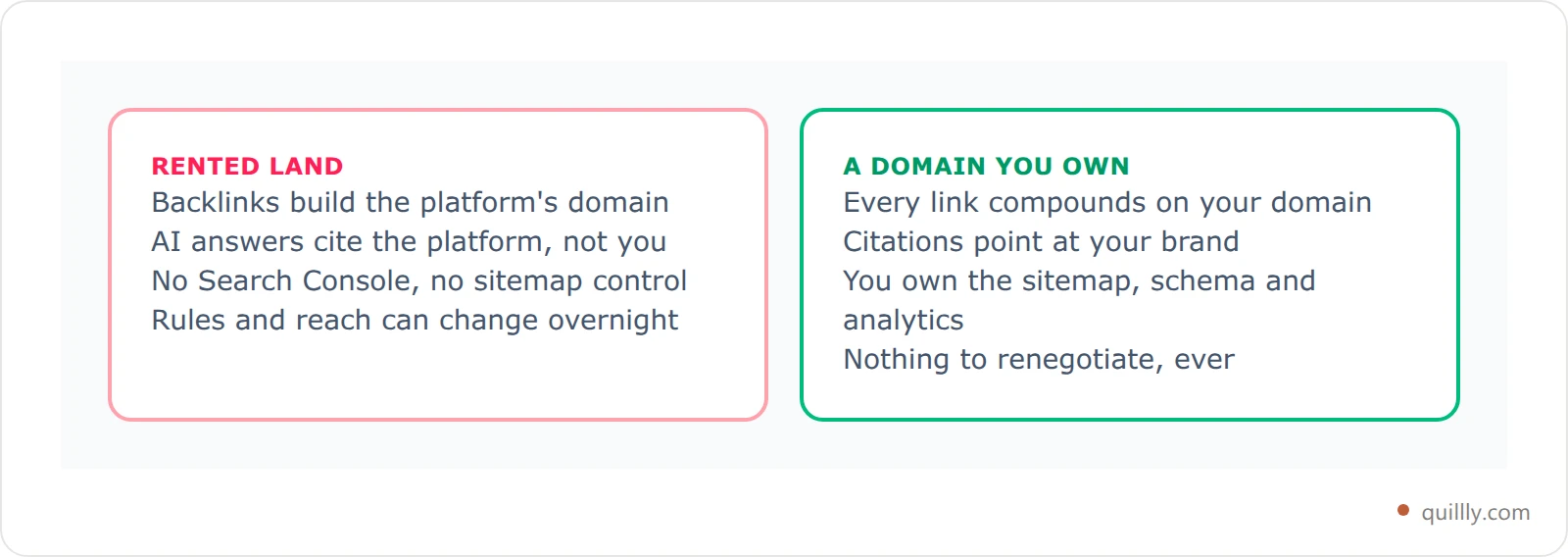
That's the whole thesis. The content is yours. The infrastructure shouldn't belong to a landlord. If you're optimizing for AI answers at all, read our 2026 answer engine optimization playbook next, because none of those tactics compound on a domain you don't own.
Moving to a domain you own only pays off if the pages there are indexable to begin with — if your site is one URL or a JavaScript app, start with SEO for single page website setups.
Subdomain vs subdirectory: where your blog should live#
If you only remember one rule from this guide, make it this: put your blog on a subdirectory (yourdomain.com/blog), not a subdomain (blog.yourdomain.com).
Google treats a subdirectory as part of your main site, so every post strengthens your whole domain's topical authority. A subdomain often behaves like a separate site that has to earn trust from scratch.
The case studies are not subtle:
Migration | Result |
|---|---|
Salesforce: subdomain → subdirectory | Organic traffic roughly doubled |
Monster.co.uk: subdomain → subdirectory | +116% search visibility |
Commonly cited blog migration | +40% organic traffic |
Wrong direction (subdirectory → subdomain) | −47% organic traffic |

It now shows up in AI citations too. In 13 client audits run between January and March 2026, the same content on a subdirectory pulled 2 to 5 times more ChatGPT citations than on a subdomain over a 90-day window, per a 2026 subdomain analysis. We break down the full trade-off in subdirectory vs subdomain SEO. For 95% of blogs, the answer is a subdirectory.
Where your blog lives now (and what you're giving up)#
Before you move, know exactly what each platform keeps from you. The pattern is consistent: rented platforms lend you their authority while you publish, then keep it when you leave.
Where your blog lives | Who owns the domain | Backlinks build your authority? | Google Search Console access | Built-in lock-in |
|---|---|---|---|---|
Medium | Medium | No | No | High |
Substack (default URL) | Substack | No | No | Medium |
Hosted CMS subdomain | The platform | Partly | Limited | Medium |
Notion / Webflow site | You (if custom domain) | Yes | Yes | Low |
Your own domain + subdirectory | You | Yes | Yes | None |
Substack itself carries a domain authority near 78, so a post there can rank fast, notes Sprout Social's Substack SEO guide. That's the trap. The ranking is real, but it's borrowed. The moment you connect a custom domain, you start building your own authority instead of renting theirs.
A Medium to own domain move is the most common version of this, and the fix isn't complicated — you don't need WordPress to do it. See how to add a blog without WordPress if you're picking a destination.
Blog Migration SEO: The 4-R Framework#
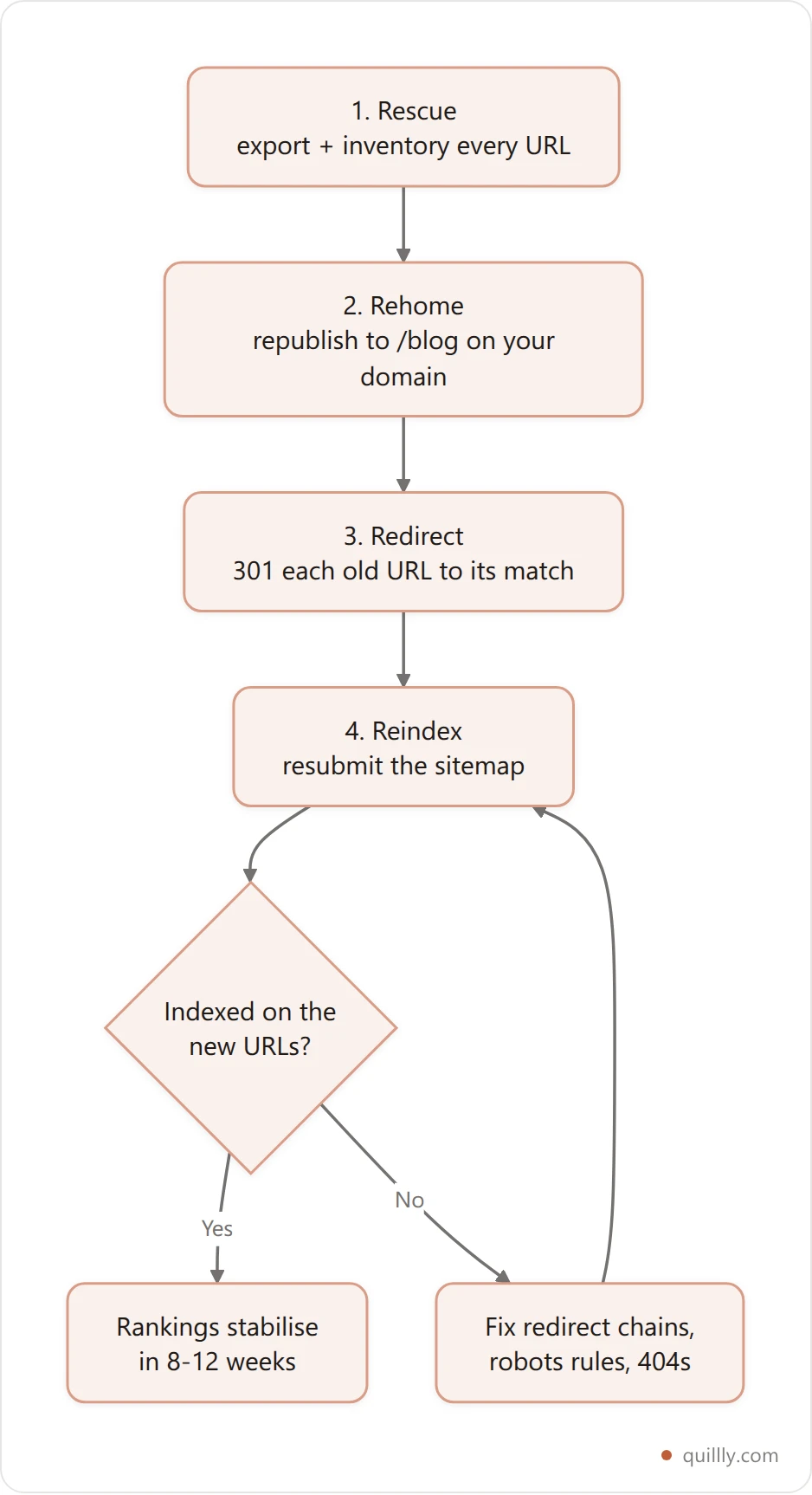
Blog migration SEO comes down to four phases. I call it the 4-R Migration: Rescue, Rehome, Redirect, Reindex. Do them in order. Skip one and you leak rankings.
Phase | What you do | Why it matters |
|---|---|---|
1. Rescue | Export content and inventory every URL + backlink | You can't preserve what you didn't measure |
2. Rehome | Republish each post to a subdirectory on your domain | This is where authority starts compounding for you |
3. Redirect | 301 every old URL to its new match | Passes link equity and tells search engines it moved |
4. Reindex | Resubmit sitemaps to Google and open the door to AI crawlers | Speeds re-crawl so the new URLs rank, not the old ones |
The order is the point. Most botched migrations fail because someone redirected before the new pages existed, or republished without redirects. Treat these as a sequence, not a checklist you can shuffle.
Rehome your posts without the copy-paste
Quillly connects Claude, ChatGPT or Cursor to your site through MCP. Your AI recreates each post on your own domain, scores it against 14+ SEO criteria before it ships, and the sitemap goes to eight search engines on publish.
See how publishing worksStep 1 — Rescue: export and inventory everything#
You can't preserve rankings you never mapped. Start by pulling a complete record of what you have today.
Do these three things first:
Export your content. Medium offers a settings export, Substack exports posts as files, and most CMS platforms have a built-in export. Save the raw text or HTML so you can reformat cleanly later.
Inventory every URL. Build a simple spreadsheet with one row per post: old URL, title, primary keyword, and the new URL it will map to. This sheet becomes your redirect map in Step 3.
Find your backlinks. Use a free backlink checker or Google Search Console on the old property to list which posts have earned links. Those are your priority pages. Protect them first.
Sort the sheet by traffic and backlinks. Your top 20% of posts likely drive most of your organic value, so migrate those with the most care. A messy export is the single most common reason migrations leak equity, so spend real time here before you touch anything live.
Step 2 — Rehome: republish to a subdirectory you own#
Now recreate each post at its new home: yourdomain.com/blog/post-slug. This is the phase where authority finally starts compounding for you instead of the platform.
Keep slugs clean and consistent#
Map old to new with readable, keyword-bearing slugs. If your Medium URL was a slug with a random hash on the end, drop the hash. Shorter, descriptive slugs rank and get cited better.
Don't just paste, re-optimize#
A migration is a free chance to upgrade thin posts. As you rehome each one, fix headings, add a direct-answer paragraph near the top, and re-check on-page SEO. This is where an MCP-connected workflow earns its keep. You can ask your AI to recreate a post on your domain and score it in one move:
Create a blog on my website from this exported Medium post.
Keep the H1, add a 50-word answer summary under the first H2,
then run check_blog_seo and fix anything below 85.
Behind that prompt, tools like create_content, check_blog_seo, and publish_content handle the rehoming, scoring against 14+ ranking criteria, and going live on your domain, no copy-paste into WordPress required. Whatever tool you use, don't publish a post that scores below an 85. The migration is your one cheap upgrade window.
Match the metadata#
Carry over (or improve) the title tag, meta description, and featured image for each post. Keep canonical tags pointing at the new URL. Mismatched canonicals are a quiet killer that tells Google to keep ranking the old page.
Leaving a site builder is the hardest version of this move, because there's no portable export. We walk through what that means in Wix vs WordPress.
Step 3 — Redirect: 301s that carry your equity#
A 301 redirect is a permanent "this page moved here" instruction. It forwards visitors to the new URL and passes the large majority of the old page's ranking signals along with them. Without 301s, your migration looks like deletion plus a brand-new site. That's how people lose 60% of their traffic overnight.
How you set redirects depends on the old platform:
Own server (Nginx/Apache): add redirect rules in your config.
Cloudflare: use Bulk Redirects with your URL map from Step 1.
Medium: map old post URLs to your new domain in publication settings, or use a custom-domain redirect.
Substack: point the custom domain and set redirects from the old URLs where supported.
Here's a clean Nginx pattern you can adapt per post:
# Redirect old blog URLs to the new subdirectory (301 = permanent)
location = /old-post-slug {
    return 301 https://yourdomain.com/blog/new-post-slug;
}
The 301 redirect blog checklist#
Two rules that save migrations:
Map one-to-one. Each old URL points to its closest new match, not a blanket redirect to your homepage. Bulk-redirecting everything to
/throws away the page-level equity you're trying to keep. Google calls these "soft 404s" and treats them as lost pages.Update internal links. Repoint links between your own posts to the new URLs so you're not chaining redirects. Clean internal links also help AI crawlers map your topical clusters.
Keep the old redirects live for at least a year. Search engines and the sites linking to you need time to catch up.
Step 4 — Reindex: get the new URLs crawled fast#
Redirects tell engines a page moved. Reindexing tells them to come look now, so the new URL ranks instead of the stale one.
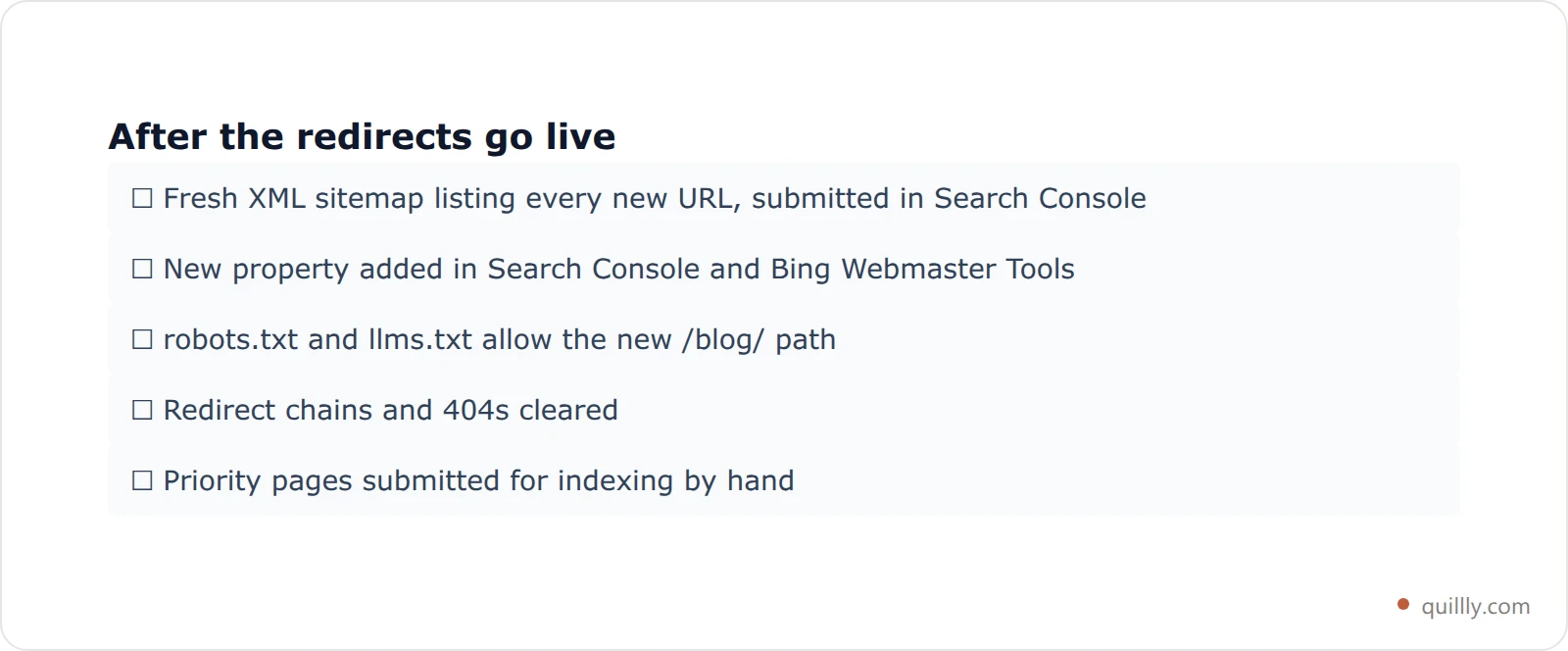
Run this sequence after the redirects are live:
Generate and submit a fresh XML sitemap listing every new URL. Submit it in Google Search Console.
Add the new property in Search Console (and Bing Webmaster Tools) and request indexing on your highest-value pages.
Confirm robots and llms rules let crawlers in. Don't accidentally
Disallowyour new/blog/path.Watch for crawl errors and fix any redirect chains or 404s that surface.
A platform that auto-generates the sitemap and pings Google for you removes the most error-prone part. When you publish through an MCP-connected setup with Search Console linked, the new post is added to your sitemap and submitted for indexing automatically — and the same publish notifies Bing, Yahoo, Yandex, Naver, Seznam, Yep and Amazon through IndexNow. If posts still aren't showing up after a couple of weeks, work through our Google not indexing fix stack.
The payoff arrives in a specific order in 2026: AI Overview and ChatGPT citations on the new domain often recover within 8 to 12 weeks, sometimes before classic organic rankings fully settle.
Migration mistakes that tank traffic (and how to dodge them)#
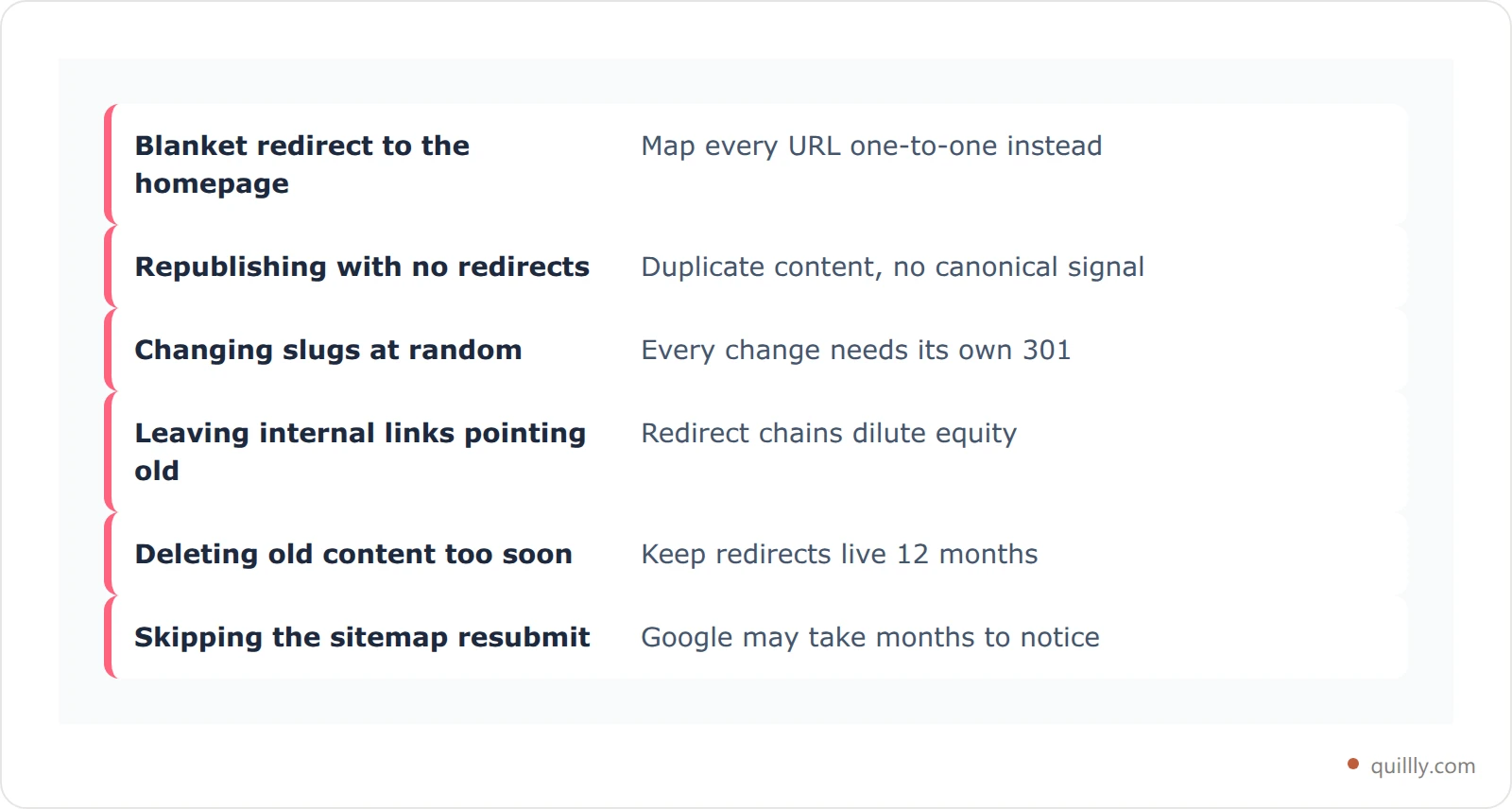
Most horror stories trace back to the same handful of errors. Avoid these and you keep your rankings.
Redirecting everything to the homepage. This destroys page-level equity. Map each URL one-to-one instead.
Republishing without redirects. Now you have duplicate content and no signal about which version is canonical. Engines may keep ranking the old rented URL.
Changing slugs randomly. Every changed slug needs its own redirect. Keep them stable unless you have a reason.
Forgetting internal links. Old internal links create redirect chains that slow crawling and dilute equity.
Removing the old content too soon. Leave redirects in place for at least 12 months so external links and AI crawlers catch up.
Skipping the sitemap resubmit. Without it, Google may take months to notice the move on its own.
One more, specific to 2026: don't assume your AI citations transfer automatically. They follow the new domain only once it's crawled, redirected, and earning fresh signals. The migration enables the transfer. It doesn't teleport it.
How to measure whether the move worked#
Pick your baseline before you migrate, not after. Record current organic clicks, top keywords, and citation counts so you have something to compare against.
Track these in the 90 days after migration:
Indexation: are the new URLs indexed and the old ones showing as redirected in Search Console?
Rankings: are your priority keywords holding position on the new URLs?
AI citations: are ChatGPT, Perplexity, and AI Overviews now pointing at your domain instead of the platform?
Referral mix: how much traffic is arriving from AI answer engines versus classic search?
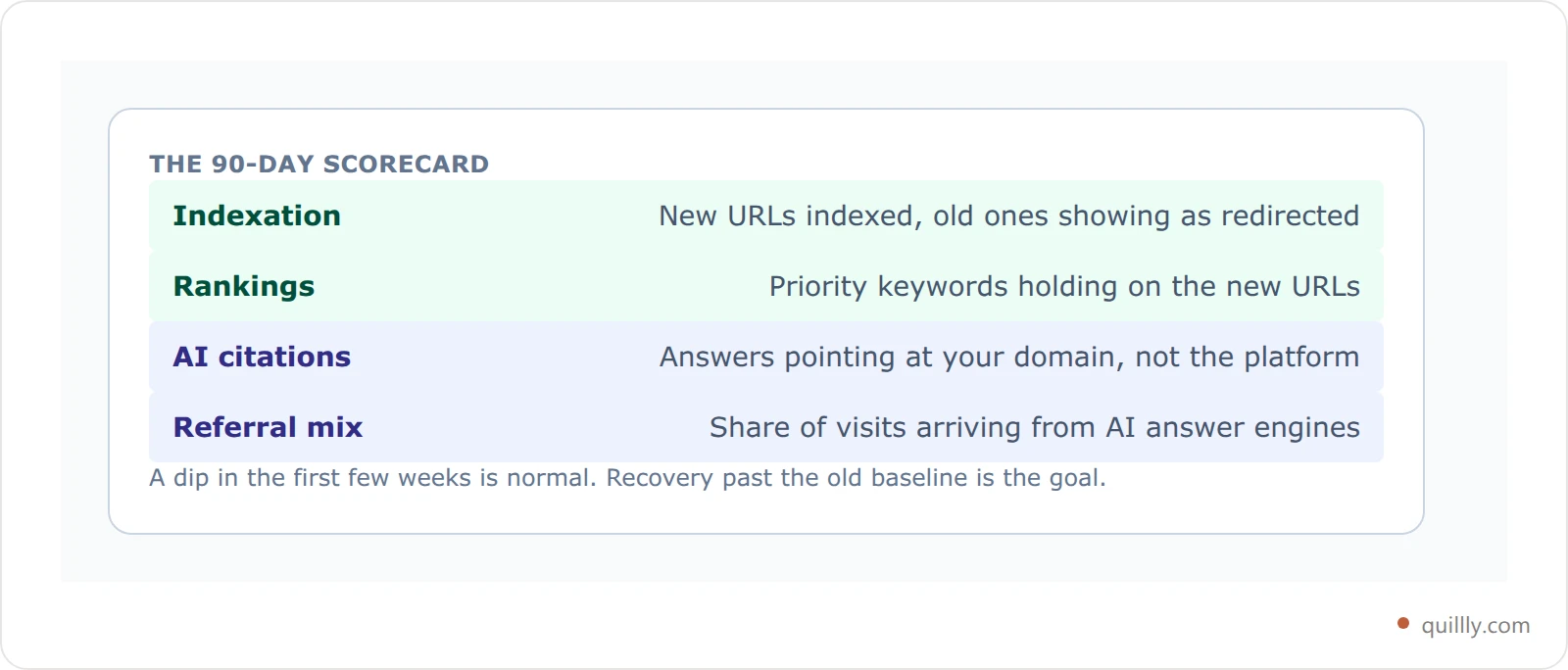
That last one matters more every quarter. A short dip in the first few weeks is normal as engines recrawl. What you want to see is recovery and then growth past the old baseline. If you'd rather not assemble that reporting by hand, Quillly tracks indexing, positions and AI-answer traffic per page on the domain you just moved to. Our guide to tracking AI search traffic covers how to separate AI referrals from the rest so you can prove the move paid off.
Frequently asked questions#
Will I lose SEO if I move my blog to a new domain?#
Not if you migrate cleanly. SEO loss happens when posts move without 301 redirects, sitemaps go unsubmitted, or everything redirects to the homepage. Done right, 301s pass the large majority of ranking signals to the new URLs. Expect a small dip during recrawl, then recovery within 8 to 12 weeks. The lasting upside is that authority now compounds on a domain you own.
Should my blog be on a subdomain or a subdirectory?#
A subdirectory (yourdomain.com/blog) wins for almost every blog. Google treats it as part of your main site, so each post strengthens your whole domain. Real migrations from subdomain to subdirectory have roughly doubled traffic (Salesforce) and lifted search visibility 116% (Monster.co.uk). Subdomains can behave like separate sites that must earn trust on their own. Choose a subdomain only for genuinely distinct properties, like a help center or app.
How do I move my blog from Medium to my own domain?#
Export your posts from Medium settings, then recreate each one at yourdomain.com/blog/your-slug. Set 301 redirects from the old Medium URLs to the new pages, update internal links, and submit a fresh sitemap in Google Search Console. Medium supports custom-domain mapping that helps preserve some link flow. Prioritize your posts with the most backlinks first, since those carry the most equity.
How long does a blog migration take to recover in search?#
Plan for 8 to 12 weeks for rankings to stabilize after a clean migration. AI citations on platforms like ChatGPT and Google AI Overviews often recover in roughly the same window, sometimes sooner than classic organic positions. The timeline depends on how fast engines recrawl, the quality of your 301 mapping, and how quickly external sites update their links. A short early dip is normal.
Is it worth using a custom domain on Substack?#
Yes, if you care about long-term SEO. On the default Substack URL, your backlinks and AI citations build Substack's authority, which sits near a domain authority of 78. Connect a custom domain and you start building your own instead. You trade a little borrowed authority now for an asset that compounds and that no platform can take away. For most creators planning to publish for years, that trade is clearly worth it.
Do I need WordPress to host a blog on my own domain?#
No. WordPress is one option, not a requirement. You can run a blog on a subdirectory of your domain through a modern CMS, a static site, or a publishing layer that posts directly to your domain. The non-negotiable parts are owning the domain, using a subdirectory, and controlling your sitemap and Search Console, not which software renders the pages.
What is a 301 redirect and why does it matter for migration?#
A 301 redirect is a permanent instruction that a page has moved to a new URL. It forwards visitors automatically and passes most of the old page's ranking signals to the new location. In a migration, 301s are what separate "we relocated our content" from "we deleted our site and started over." Map each old URL to its closest new match and keep the redirects live for at least a year.
Key Takeaways#
Owning your domain is the difference between renting traffic and building an asset. Three numbers make the case: subdirectory migrations have doubled organic traffic in real cases, the same content on a subdirectory earned 2 to 5x more ChatGPT citations than on a subdomain, and AI referral visitors convert at up to 16.8% versus 1.76% for Google organic. That value should land on a domain you keep.
Run the 4-R Migration in order — that sequence is all blog migration SEO really is. Rescue your content and map every URL. Rehome each post to a subdirectory and re-optimize as you go. Redirect old URLs one-to-one with 301s. Reindex by resubmitting your sitemap. Skip none of the four and your rankings come with you.
Want your AI to actually publish the post it just wrote, straight to your own domain? Connect Quillly to Claude, ChatGPT, or Cursor in 30 seconds.
Related: Once the blog is on your own domain, the next question is whether the server behind it is holding you back. Web hosting for SEO breaks down the four factors search engines actually measure — and how to test yours in ten minutes.
Related: Where the blog lives is one of seven structural choices that decide what a site can rank for — and it's cheapest to get right while the site is still a wireframe. See SEO optimization web design: 7 decisions that rank.