

WordPress just had its first market share decline in a decade. As of May 2026, it still powers 42.5% of all websites, but it's no longer the default everyone defaults to. A quiet wave of founders is asking the same thing: how do you add a blog without WordPress at all — on your own domain, in your existing stack, without the plugin treadmill?
This guide answers it. Four real options, the actual 2026 costs, the SEO trap most people fall into, and the AI-native path that didn't exist 18 months ago.
The 30-second answer#
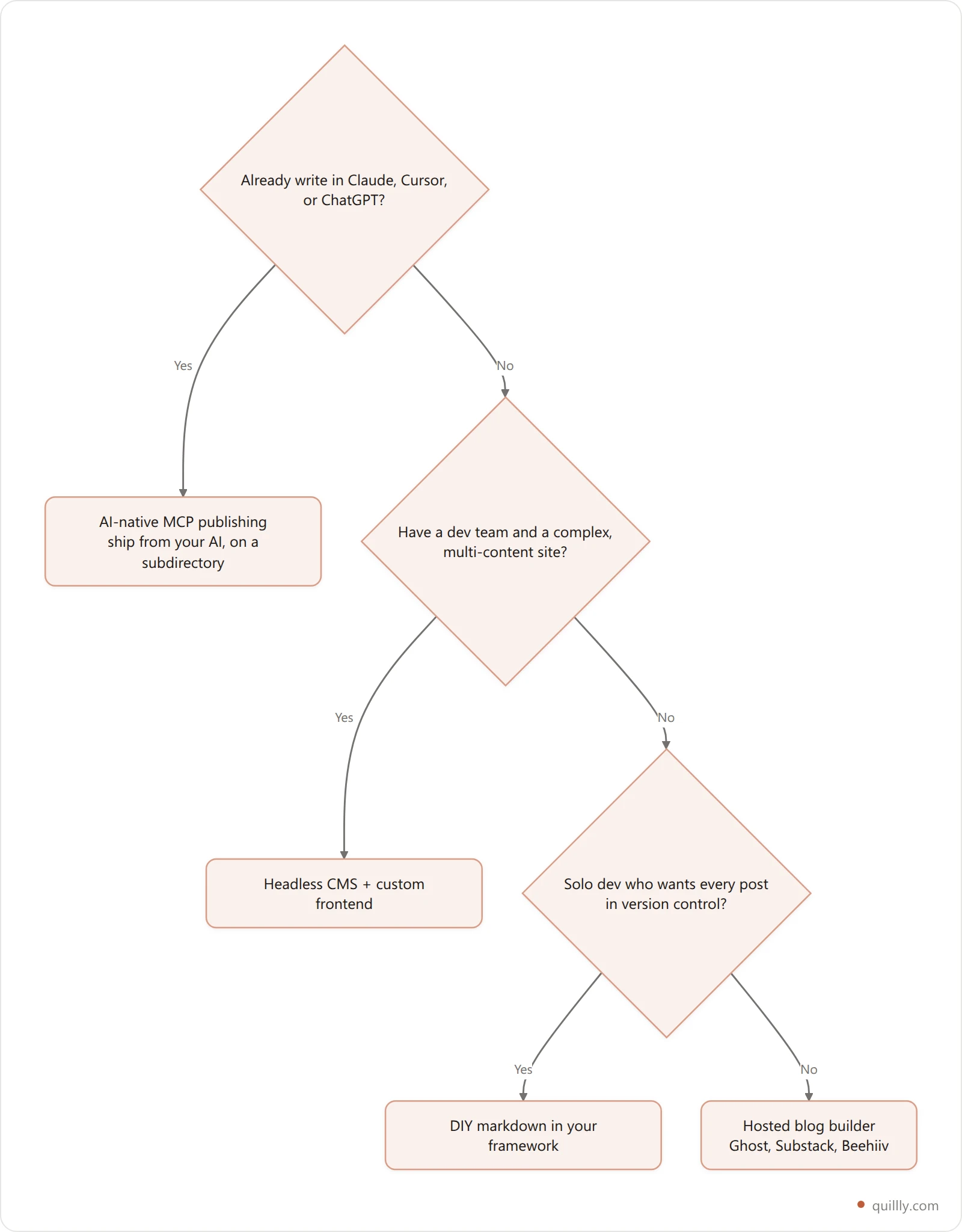
You don't need WordPress to run a blog in 2026. You have four real options: a hosted blog builder like Ghost or Substack, a headless CMS like Sanity or Contentful, a self-rolled markdown setup inside your existing framework, or an AI-native MCP publishing layer that lets Claude, ChatGPT, or Cursor write and ship posts directly to yourdomain.com/blog. The right pick depends on whether you want to write, automate, or both.
Why "blog without WordPress" became the question of 2026#
For 15 years, "add a blog" meant "install WordPress." That assumption finally cracked.
WordPress dropped to 42.5% of all websites in early 2026 — the first measurable decline since W3Techs started tracking in 2011. The HTTP Archive's Web Almanac calls it a shift "from expansion to stabilization." Translation: it's still huge, but builders are quietly leaving.
Three things broke at once.
Security became a tax. Patchstack's 2026 report logged 11,000+ new plugin vulnerabilities last year, and 91% of all WordPress CVEs live in plugins (Patchstack). More than half of disclosed vulnerabilities go unpatched at the time of disclosure. A premium plugin called Gravity Forms — installed on roughly a million sites — got hit with a supply-chain backdoor. The EssentialPlugin suite shipped a dormant backdoor that activated on 400,000 sites in April 2026.
Cost crept up. Honest math from Codeable: an entry-level managed WordPress stack runs $540–$2,160 per year once you add hosting ($30–$100/mo), premium plugins (Yoast, WP Rocket, Gravity Forms at $50–$200 each annually), and a basic maintenance plan (Codeable). Founders ballpark "WordPress is free" and discover the free part isn't the part that runs in production.
AI agents can't drive it. This is the new one. The Model Context Protocol (MCP) — the open standard Anthropic shipped in late 2024 to let AI tools call into apps — hit 97 million monthly SDK downloads by March 2026, up from roughly 100,000 at launch. 78% of enterprise AI teams report at least one MCP agent in production (Digital Applied). WordPress has no production MCP server. Your Claude or ChatGPT session can't open a draft, score it, or publish. The whole industry sprouted a new interface and the dominant CMS doesn't speak it.

The 4-Layer Blog Stack (most people only think about one layer)#
Before you pick a tool, separate the decision. Every blog setup answers four questions, and conflating them is why founders end up back on WordPress by default. Call it the 4-Layer Blog Stack:
Layer | What it does | The 2016 default | The 2026 options |
|---|---|---|---|
Authoring | Where you write | WordPress editor | Notion, Cursor, Claude, ChatGPT, MDX files |
SEO | Meta, schema, sitemap, internal links | Yoast plugin | Built-in, MCP scoring, or manual |
Publishing | Save, schedule, go live | WP admin → "Publish" | Git push, API call, MCP tool, button |
Hosting | Where rendered HTML lives | Host + MySQL | Static CDN, JAMstack, SaaS, headless |
WordPress fuses all four layers into one PHP monolith. That used to be convenient. In 2026 it's the constraint: you can't swap the author from a human to Claude without rewriting half the system. The 4-Layer Stack lets you swap each layer independently — write in Cursor, score with an MCP tool, publish via API, host on Vercel.
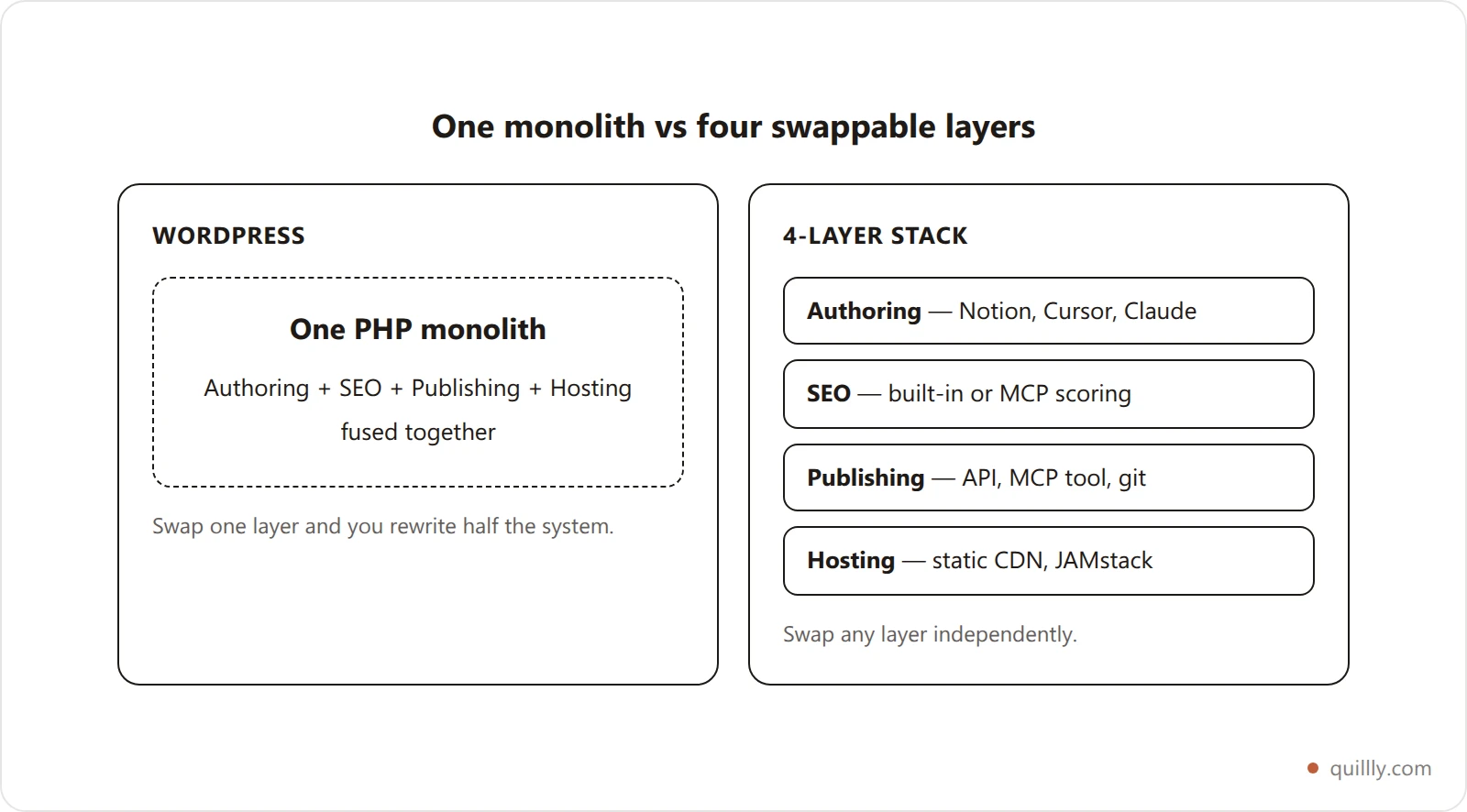
Use this lens when you compare the four options below. Each one trades off different layers.
The 4 real ways to add a blog without WordPress#
Quick verdict table first, then the per-option detail:
Approach | Setup time | First post live | Year-1 cost | AI-native? | Owns domain? |
|---|---|---|---|---|---|
Hosted blog builder (Ghost, Substack, Beehiiv) | 30 min | 1 hour | $108–$300 | Partial | Paid plan only |
Headless CMS + custom frontend (Sanity, Contentful, Storyblok) | 2–6 weeks | 2 days | $0–$600 | Via API | Yes |
DIY markdown in your framework (Next.js + MDX) | 4–40 hours | 1 day | $0–$240 | No | Yes |
AI-native MCP publishing (Quillly and similar) | 5 min | 5 min | $0–$108 | Native | Yes (subdirectory) |
Option 1: Hosted blog builder (Ghost, Substack, Beehiiv)#
You sign up, write, publish. Done in an afternoon. Ghost Pro starts at $9/month, Substack is free with a 10% revenue cut on paid subscriptions, Beehiiv has a free tier up to 2,500 subscribers.
The catch: most hosted builders push you to their subdomain on the free tier (yourblog.substack.com, yourblog.ghost.io). To get yourdomain.com/blog, you pay for the higher plan and configure DNS. Even then, several builders serve from a subdomain (blog.yourdomain.com) which costs you 15–47% of organic traffic versus a subdirectory (ZetaMatic).
Good fit if: you want fast and email-first, you don't care about deep SEO control, and most of your traffic comes from existing subscribers rather than search.
Option 2: Headless CMS + custom frontend (Sanity, Contentful, Storyblok)#
You manage content in a CMS dashboard, your frontend (Next.js, Astro, SvelteKit) pulls it via an API and renders it on your own domain. Headless adoption is roughly doubling year-over-year — headless platforms collectively went from 2.8% to 5.6% market share in 12 months (Storyblok).
The catch: someone has to build the frontend. Free tiers exist (Sanity is free up to 3 users, Contentful's free tier is generous), but the engineering setup is real. Plan 2–6 weeks if you're starting from scratch.
Good fit if: you have a dev team, a complex multi-content-type site, or you're building a marketplace where blogs are one content type among many.
Option 3: DIY markdown in your framework (Next.js + MDX, Astro, Hugo)#
You add a /blog route to your existing app, drop markdown files in /content/blog, and let your framework render them. A basic MDX blog on Next.js takes about an hour for a developer comfortable with the App Router (freeCodeCamp). A production-grade version with syntax highlighting, RSS, OG images, sitemap, and reading-time meta usually takes a week or two.
The catch: every new post is a git commit. Non-technical co-founders can't write directly. SEO scoring, internal linking, image hosting, and Google Search Console submission are all on you.
Good fit if: you're a solo dev who writes occasionally, you want every post in version control, and you don't mind doing your own SEO plumbing.
Option 4: AI-native MCP publishing layer#
This is the option that didn't exist 18 months ago. You connect an MCP server to whichever AI tool you already use — Claude, ChatGPT, Cursor, Windsurf, Gemini — and the AI gains tools like create_content, check_blog_seo, and publish_content. You write the prompt. The AI writes, scores, and ships the post to yourdomain.com/blog without you ever touching a CMS dashboard.
Quillly is one implementation: its MCP server exposes one tool set — create, score, patch, publish, and read search data — to any MCP-compatible AI. Posts land on your domain as a subdirectory. Sitemap and RSS are auto-generated. Google Search Console gets a fresh ping per publish.
The catch: you need to be comfortable in an AI chat (most indie founders already live there). The category is new, so there are fewer plugin integrations than WordPress's 60,000-strong ecosystem.
Good fit if: your authoring loop already runs in Claude or Cursor, you want zero dashboard maintenance, and you care about ranking in AI Overviews and ChatGPT citations alongside Google. For setup walkthroughs see how to publish blogs from Claude Desktop or the Cursor version.
The subdirectory vs subdomain trap (don't skip this)#
Whichever of the four options you pick, you'll hit one URL decision: should the blog live at yourdomain.com/blog (subdirectory) or blog.yourdomain.com (subdomain)?
The 2026 data is no longer ambiguous.
A 2026 audit of 13 client sites found subdirectory blogs were cited 2–5x more by ChatGPT and Gemini than subdomain blogs (SEO Engico).
The widely-cited ButterCMS case study shows a single migration delivered a 40% organic traffic lift after moving from subdomain to subdirectory (ButterCMS).
One reverse migration (subdirectory → subdomain) cost a SaaS company 47% of its organic traffic within months.

The reason is structural. Google treats subdomains as related but separate entities. AI citation engines treat them as outright different domains. Your subdomain blog doesn't inherit your main host's trust. Your subdirectory blog does.
Most hosted blog builders default to subdomains. Most AI-native publishing layers default to subdirectories. That single difference often outweighs every other feature comparison. For the full breakdown, see Subdirectory vs Subdomain SEO: the 2026 Verdict.
The contrarian take: WordPress's biggest 2026 problem isn't security#
Every WordPress retrospective in the last 12 months has focused on plugin CVEs, supply-chain attacks, or PHP performance. Those are real. They're also a distraction from the bigger structural issue.
WordPress is losing developer mindshare because the entire content interface moved. Founders aren't opening WP admin to draft posts anymore. They're in Claude. They're in Cursor. They're talking to an agent that holds the brief, drafts the section, fact-checks the stat, and is genuinely capable of publishing — if anything on the other end lets it.
"AI search is rewriting how people find information," writes Aleyda Solis, the SEO consultant whose AI Search Optimization roadmap has become the de facto reference for the category. Her checklist starts with infrastructure, not content — because the AI bots that feed LLMs have to be able to reach and parse your pages before optimization matters at all (Aleyda Solis).
Kevin Indig's 2026 publishing-velocity research backs the shift. "100-plus posts per quarter went from outlier to common" in H1 2026, and fact-check chains moved "from post-hoc cleanup to first-class pipeline stages" (Growth Memo). At that velocity, no one is opening a CMS dashboard for each post. The publishing layer has to be an API or an MCP tool — full stop.
WordPress can theoretically add MCP support. As of May 2026, no production plugin does. That's the gap a new generation of tools is filling.
Step-by-step: adding a blog to your existing site#
The exact steps depend on what you're already running. Here are the four most common starting points.
If you're on Next.js or Vercel#
You have two paths.
DIY markdown: Run npm install gray-matter next-mdx-remote rehype-pretty-code. Drop .mdx files in /content/blog. Add a [slug]/page.tsx route that reads the file system, parses frontmatter, and renders MDX. Add a sitemap route (/app/sitemap.ts) and an RSS route. Estimated time: 4–8 hours for a developer who knows the App Router.
MCP publishing on top of your existing app: Add an MCP-backed blog component that serves /blog/[slug] from a managed backend. Posts get drafted, scored, and published from Claude or Cursor and appear at yourdomain.com/blog without code deploys. Estimated time: 5 minutes after connecting the MCP server. The Claude Code content engine guide walks through the exact Next.js wiring.
If you're on Webflow, Framer, or Squarespace#
These platforms have native CMS collections. They work, but they're constrained — Webflow CMS plans start at $23/month, Framer's CMS is free but limits SEO control, Squarespace blogs publish in the same site shell.
If your builder supports a reverse proxy (or a "subdomain points to another host" trick), you can run a separate blog stack behind yourdomain.com/blog while keeping the marketing site on Webflow or Framer. That's how most indie SaaS founders solve the "no WordPress, no rebuild" problem without losing their existing landing-page editor.
If you're on a static landing page (Cloudflare Pages, Netlify)#
Same reverse-proxy trick. Your landing page stays static on Cloudflare Pages or Netlify. Your /blog/* path proxies to a blog backend (DIY markdown, headless CMS, or MCP publishing). Configure once, never touch again.
If you don't have a website yet#
Skip building a marketing site separately. A modern Next.js or Astro starter gives you both — pricing, docs, blog — in one repo. Then layer in whichever publishing option (DIY, headless, MCP) fits how you write.
The SEO essentials any 2026 blog setup must handle#
Picking the platform is half the job. The other half is making sure the platform handles the technical SEO that AI search and Google both require.
Requirement | Why it matters in 2026 | Hosted builder | Headless | DIY markdown | MCP publishing |
|---|---|---|---|---|---|
XML sitemap | Google + AI crawler discovery | Auto | Build it | Build it | Auto |
RSS feed | Subscribers + LLM ingestion | Auto | Build it | Build it | Auto |
Canonical tags | Avoids duplicate content | Auto | Partial | Build it | Auto |
Article schema (JSON-LD) | Rich results + AI Overviews | Partial | Build it | Build it | Auto |
FAQ schema | Featured snippets | Rarely | Build it | Build it | Auto |
OG + Twitter meta | Social shares | Auto | Partial | Build it | Auto |
Internal linking | Topical authority | Manual | Manual | Manual | Auto-suggested |
GSC sitemap submission | Faster indexing | Manual | Manual | Manual | Auto |
The hidden cost of DIY and headless setups is exactly this table. You can build all of it. You will spend 2–4 weeks doing it. The reason MCP-based publishing is winning indie hackers is that this table is the product, not a TODO list. For the full criteria walkthrough, see Blog SEO Score: how it's actually calculated and the 14-point SEO checker.

Cost comparison: what each option actually costs in 2026#
Total Cost of Ownership for a one-person SaaS blog publishing 4 posts/month over a 3-year horizon:
Stack | Setup | Year 1 | Year 2 (each) | 3-Year TCO |
|---|---|---|---|---|
WordPress (managed) | $0–$500 | $540–$2,160 | $540–$2,160 | $1,620–$6,980 |
Ghost Pro | $0 | $108 | $108 | $324 |
Substack | $0 | 10% rev cut | 10% rev cut | Variable |
Headless (Sanity Free + Vercel) | Dev time | $0–$240 | $0–$240 | $0–$5,720 |
Next.js + MDX DIY | Dev time | $0–$240 | $0–$240 | $0–$720 |
MCP publishing (Quillly Pro) | $0 | $96–$108 | $96–$108 | $288–$324 |
Two reads on this table. First, WordPress is the most expensive non-DIY option once you stop pretending the plugins are free. Second, MCP publishing is the cheapest managed stack that bundles sitemap, RSS, GSC submission, and schema — the four line items every other stack quietly bills back as engineering time. Be honest about the comparison, though: it opens with a 14-day trial that needs no card and then costs $9 per month, or $96 billed yearly. There is no permanent free tier, so the row to beat is Ghost Pro, not $0.

The "prompt to published" workflow (real example)#
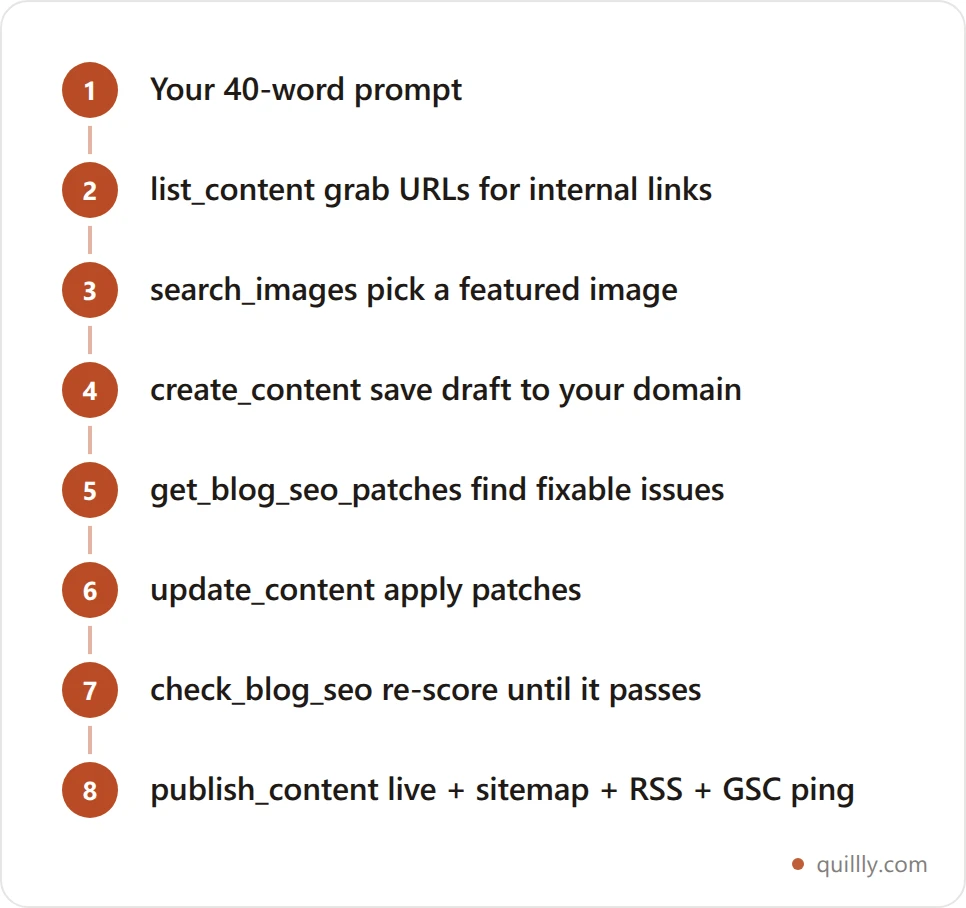
This is what changed. With an MCP-based blog backend connected to your AI tool, the entire flow happens in one conversation:
You: "Write a 1,500-word post on internal linking for SaaS blogs.
     Target keyword: 'blog internal linking strategy 2026'.
     Link naturally to our existing posts on topical authority."

Claude: [calls list_content to grab existing post URLs for internal linking]
        [calls search_images to pick a featured image]
        [calls create_content with the draft as a markdown body]
        [calls get_blog_seo_patches]
        "First-pass score 82/100. Two fixable issues: meta description
        is 148 chars (over the 155 sweet spot), and only one H2 contains
        the primary keyword. Patching now."
        [calls update_content with patches]
        [calls check_blog_seo — score 91]
        [calls publish_content]
        "Published to yourdomain.com/blog/blog-internal-linking-strategy-2026.
         Google was notified via the Indexing API. SEO score 91/100."
You wrote 40 words. You got a published post with a passing SEO score, schema markup, sitemap entry, RSS update, and a fresh Google Search Console indexing ping. That is the 2026 stack the BYO-AI movement runs on. For the full pattern across tools, see The Complete Guide to AI Blog Publishing in 2026.
Common pitfalls when leaving WordPress#
A few traps that catch every migration. None of them are hard if you plan for them. All of them are painful if you don't.
Don't break old URLs. Map every legacy
/2019/05/post-name/URL to its new path with a 301 redirect. Lose this and you lose every backlink you spent years earning.Rehost your images. WordPress media library URLs (
/wp-content/uploads/...) die the moment the install dies. Copy images to your new host before flipping DNS, not after.Export your schema. If you were running Yoast or Rank Math, your FAQ and Article schema lives in plugin tables. Re-add it on the new stack or you lose rich results in Google and citations in AI Overviews.
Don't change slugs unless you have to. Even a slug change inside the same domain costs ranking. Keep them identical when you migrate.
Verify the new sitemap in Search Console. Submit it the moment the new site goes live, then watch the indexing report for two weeks. If anything stalls, work through the Google indexing fix stack.
One more, less technical: don't migrate and redesign in the same week. If your traffic dips, you won't know whether it's the new platform, the new URLs, the new template, or all three.
The part nobody warns you about: a subdirectory shares your crawl budget#
Every guide on this page, including this one, tells you to put the blog at yourdomain.com/blog rather than blog.yourdomain.com. That advice is right, and it is incomplete. Here is the bill that comes with it, measured on our own domain on 9 August 2026.
quillly.com serves its blog as a subdirectory. It is a DR 12 domain. Across 125 published posts plus 155 tracked application URLs, Google has indexed 76 posts — 64%. Another 85 URLs sit in "Discovered – currently not indexed", which is Google saying it knows the URL exists and has not gotten around to fetching it.
The instructive part is which URLs are stuck. They are not all blog posts. The queue is dominated by programmatic pages — auto-generated reference and tool pages elsewhere on the domain — sitting in the same line as the blog. On one domain there is one crawl budget, and a subdirectory blog does not get a private allocation. It queues behind your marketing pages, your docs, your changelog, and every programmatic page you have ever shipped.
That is the real trade. A subdomain gets treated as a separate property and starts from zero authority, which is why it costs you 15–47% of organic traffic. A subdirectory inherits your domain's authority, which is why you should still choose it — but it also inherits your domain's queue.
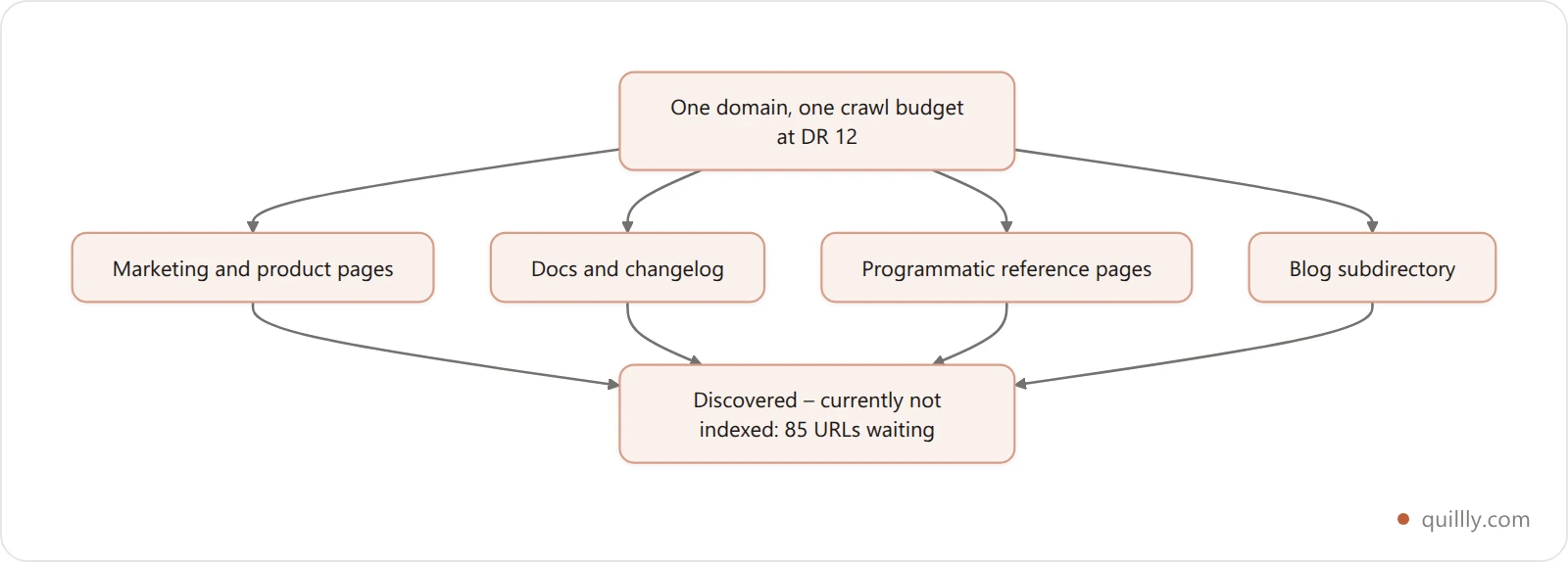
So plan for it. Pick the subdirectory, then treat crawl budget as a real constraint: ship fewer, denser posts rather than many thin ones, keep your programmatic page count proportionate to your authority, and link every new URL from a page that is already indexed. A blog you can publish to in one prompt is only an advantage if the pages you publish actually get fetched.
FAQ#
Can I add a blog to my website without using a CMS at all?#
Yes, if you're comfortable with markdown and a build step. Drop .md or .mdx files into your framework's content folder, configure a route to render them, add sitemap and RSS routes. Next.js, Astro, Hugo, and Eleventy all support this in under a day. The trade-off is that every new post requires a git commit, so non-technical contributors are locked out and scheduled publishing requires a CI workaround.
Is it bad for SEO to remove WordPress and switch platforms?#
Not if you migrate URLs and content correctly. 301-redirect every old post to its new path, keep slugs identical, preserve titles and meta descriptions, and re-add structured data. Most migrations recover within 4–8 weeks. The 47% traffic-loss case studies in the wild usually come from teams that simultaneously changed platform and moved from subdirectory to subdomain. Don't do both.
What's the cheapest way to add a blog to my SaaS?#
A Next.js + MDX setup you host yourself. It runs $0 per month if you're already paying for hosting on Vercel, Netlify, or Cloudflare — you pay for it in engineering time instead. The cheapest *managed* route is an MCP publishing layer at $9 per month after a 14-day no-card trial. Hosted builders like Ghost Pro start at $108 per year. WordPress is almost never the cheapest option once you add managed hosting, premium plugins, and the time cost of plugin updates.
Can ChatGPT or Claude actually publish a blog post directly to my domain?#
Yes, through MCP. As of 2026, Claude (native), ChatGPT (via the Apps SDK and Connectors), Cursor, Windsurf, and Google Gemini all support the Model Context Protocol. When you connect a publishing MCP server, the AI gains tools like create_content and publish_content that write posts straight to yourdomain.com/blog. No copy-paste, no dashboard. See the Claude Desktop publishing walkthrough for the full setup.
Does AI-written content still rank on Google in 2026?#
Yes, when it meets the Helpful Content System bar. Google's official position is that AI-generated content is not penalized as long as it demonstrates expertise, experience, authoritativeness, and trust (Google Search Central). What gets penalized is large-volume AI content with no human review or original insight. The hybrid pattern — AI drafts, human edits, real examples and original data added — is the model that ranks.
How long does it take to set up a blog without WordPress?#
Five minutes for a hosted builder or an MCP publishing layer. One hour for a basic Next.js + MDX blog. Two to six weeks for a headless CMS with a custom frontend. The "five minutes" numbers usually skip DNS propagation, which can add up to 24 hours regardless of the platform you pick.
Should my blog live at /blog or blog.mydomain.com?#
/blog (subdirectory), almost always. 2026 data shows subdirectory blogs earn 2–5x more AI citations and routinely outperform subdomain blogs by 15–47% on organic traffic. Subdomains made sense when blogs ran on separate WordPress installs in the early 2010s. They don't make sense now.
What about Webflow's or Framer's built-in CMS?#
They work for simple blogs. The limits show up when you need custom schema, advanced internal linking, or AI-driven publishing. Most founders on Webflow or Framer keep the marketing site there and point /blog/* to a separate stack via reverse proxy. That way the marketing pages keep Webflow's editor and the blog uses whichever publishing layer suits the team.
The short version#
WordPress made sense in 2012. In 2026, three things changed: plugins became a security tax, SaaS builders pushed blogs onto subdomains (which AI search penalizes), and an entirely new interface — MCP-driven AI agents — appeared and bypassed every CMS that didn't speak it.
Three takeaways worth keeping:
Separate authoring, SEO, publishing, and hosting before you pick a tool. The 4-Layer Blog Stack saves you from defaulting back to WordPress for the wrong reason.
Pick
**/blog**, not**blog.**— subdirectory blogs earn 2–5x more AI citations and up to 47% more organic traffic than the same content on a subdomain.The right answer depends on your authoring loop. If you're already in Claude, Cursor, or ChatGPT, the AI-native MCP layer is the only option that lets the agent finish the job. Everything else forces a context switch back to a dashboard.
Want your AI to actually publish the post it just wrote? Connect Quillly to Claude or Cursor in under a minute.