

Most "Wix vs WordPress" reviews score the two on templates and drag-and-drop. That's the wrong test if the site has to earn search traffic. The platform you pick decides who does the SEO work, what it costs a year from now, and how painful it is to leave.
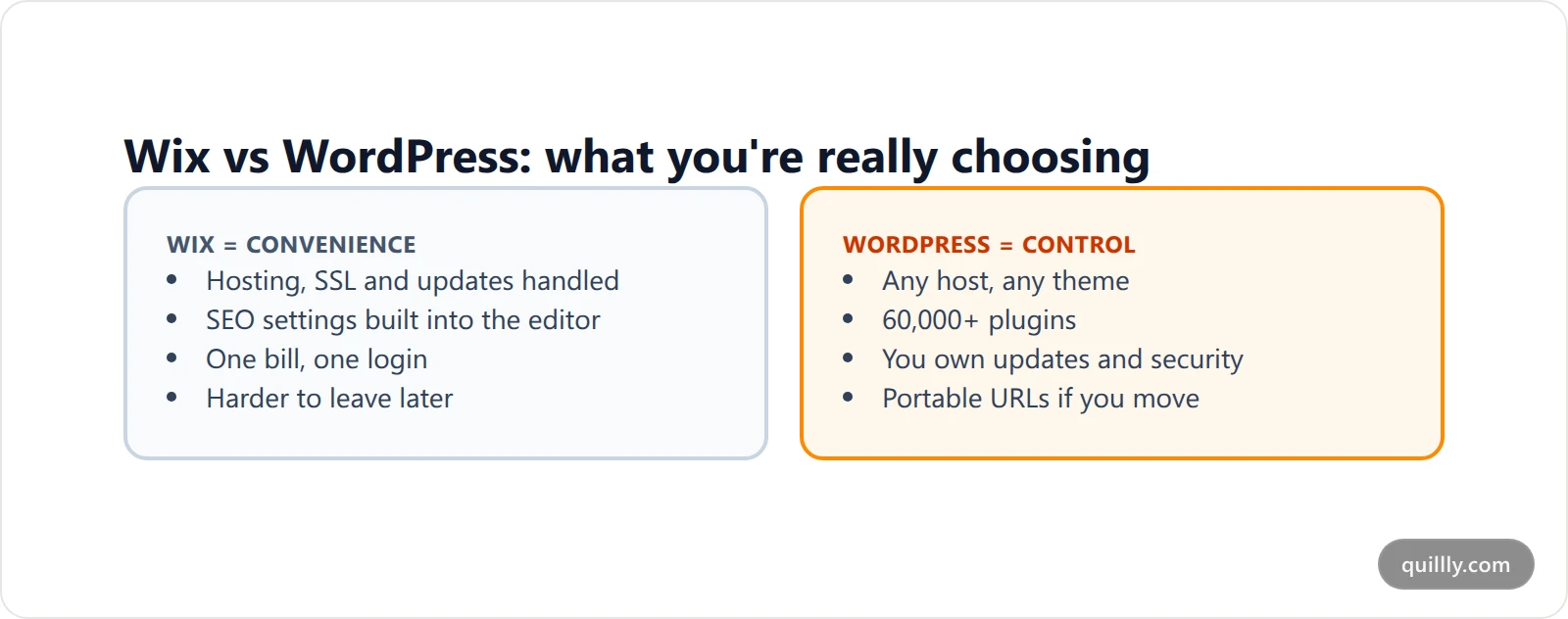
The short answer: pick Wix if you want one bill, one login and a site live this weekend, and your blog is a side channel. Pick WordPress if the blog is the growth plan: you'll want plugins, full theme control and the freedom to move hosts. Wix vs WordPress isn't a quality contest in 2026. Both can rank. It's a question of control versus convenience.
Wix vs WordPress at a Glance#
Here's the comparison table first, because that's what you came for. "WordPress" means self-hosted WordPress.org unless a row says WordPress.com.
Question | Wix | WordPress |
|---|---|---|
Starting price | Free plan on a wixsite.com URL; paid plans from about $17/mo billed yearly (US) | Software is free; you pay hosting. WordPress.com runs $4-$45/mo billed yearly |
Who hosts it | Wix, always | You choose any host (or WordPress.com) |
SEO basics | Built in: meta tags, canonicals, editable robots.txt, XML sitemap, 301s | Core covers some; most people add an SEO plugin |
Extensions | Wix App Market | 60,000+ plugins in the official directory |
Rendering | Server-side rendered by Wix | Whatever your theme and host output |
Leaving later | Rebuild the site elsewhere and 301 every URL | Export, move hosts, keep the same URLs |
Best for | Service businesses, portfolios, small shops | Content-led sites where the blog drives growth |
Is Wix or WordPress Better for SEO?#
For most sites, neither is better for SEO on its own. Wix handles the technical basics for you, including server-side rendering, sitemaps, robots.txt and redirects. WordPress matches that with a plugin and then lets you go further on schema, speed and templates. Your content and links decide rankings far more than the platform does.
Neither platform stops a page from ranking anymore. The old claim that "Wix is bad for SEO" dates from years when Wix sites leaned on client-side JavaScript. Today, per Wix's own SEO page, every Wix site is server-side rendered, ships an editable robots.txt, maintains its XML sitemap and adds structured data to blog posts automatically. You can set canonicals and bulk-import 301 redirects.
WordPress gets to the same place a different way. Core WordPress outputs a sitemap and clean permalinks, and a plugin like Yoast or Rank Math adds the title and schema controls. We broke down what each WordPress SEO plugin actually fixes if you want the detail.
So what separates them for SEO?
Ceiling, not floor. Wix gets a beginner to "technically fine" faster. WordPress lets an expert go further: custom schema per template, server-level caching, edge redirects, programmatic pages.
Speed is your host's job on WordPress. A bloated theme on cheap shared hosting will be slower than Wix. A lean theme on good hosting will be faster. Hosting matters less than people think, but it's on you.
Content quality decides the rest. Google's SEO starter guide doesn't mention a CMS once. It talks about helpful content, descriptive titles and crawlable links.
Wix or WordPress for Blogging?#
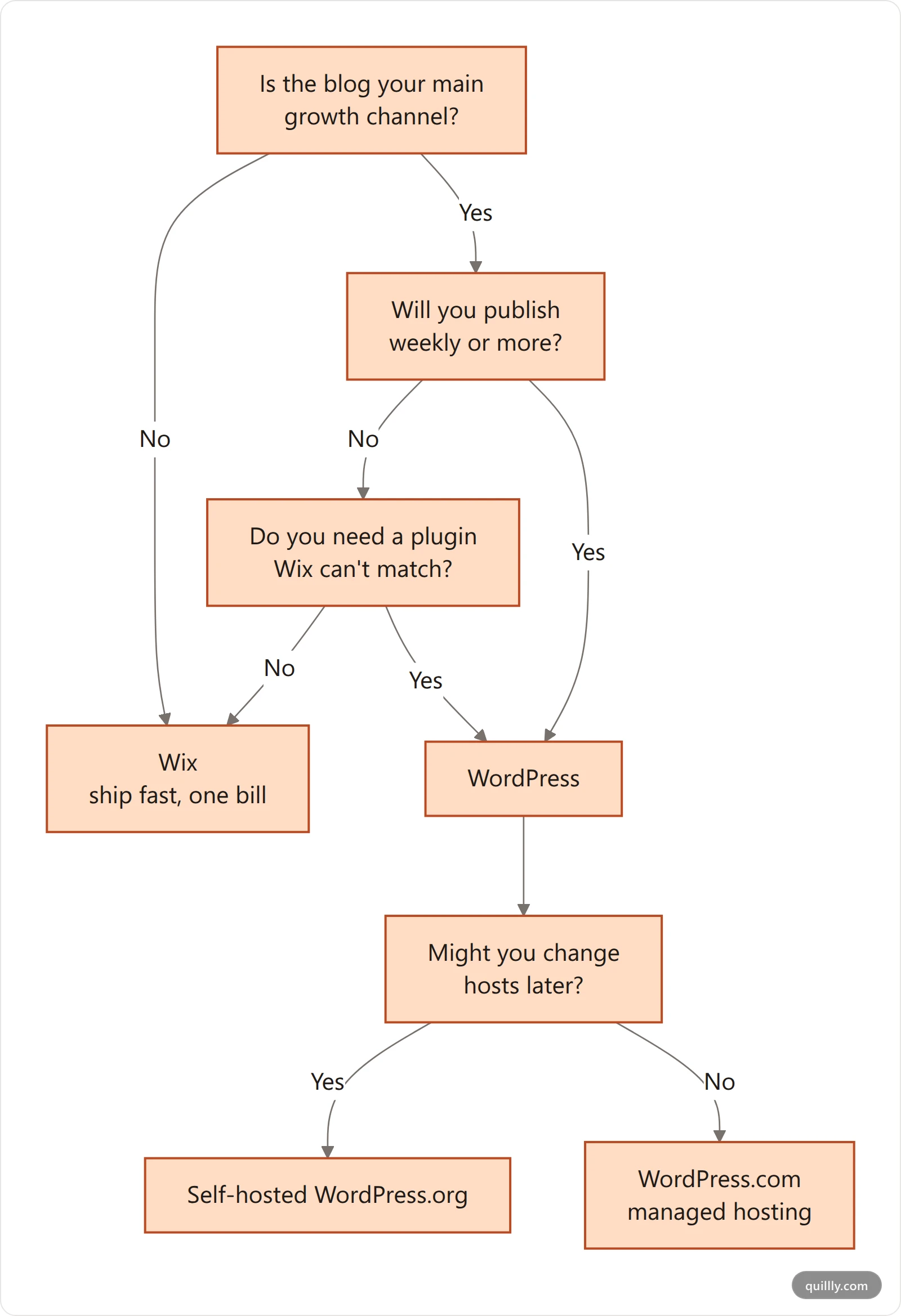
Wix is the easier blog to start and fine for a post or two a month. WordPress is the better blog to scale: once you publish weekly, its roles, revisions, plugins and integrations save hours. Choose Wix or WordPress for blogging by how often you'll publish, not by how the editor feels on day one.
This is where the Wix vs WordPress choice gets sharper. If you'll publish a post a month, the Wix Blog app is plenty: categories, tags, SEO fields per post, scheduled publishing, all inside the editor you already use.
If you plan to publish weekly or more, WordPress pulls ahead on three things:
Editorial workflow. Roles, revisions, custom fields and review states come built in or a plugin away.
Internal linking at scale. Once you pass 50 posts, you'll want tools that suggest links and flag broken ones. See our tests of internal linking tools.
Integrations. Almost every AI writing, SEO or analytics tool ships a WordPress integration first. Wix support is thinner.
What Does Each One Really Cost?#
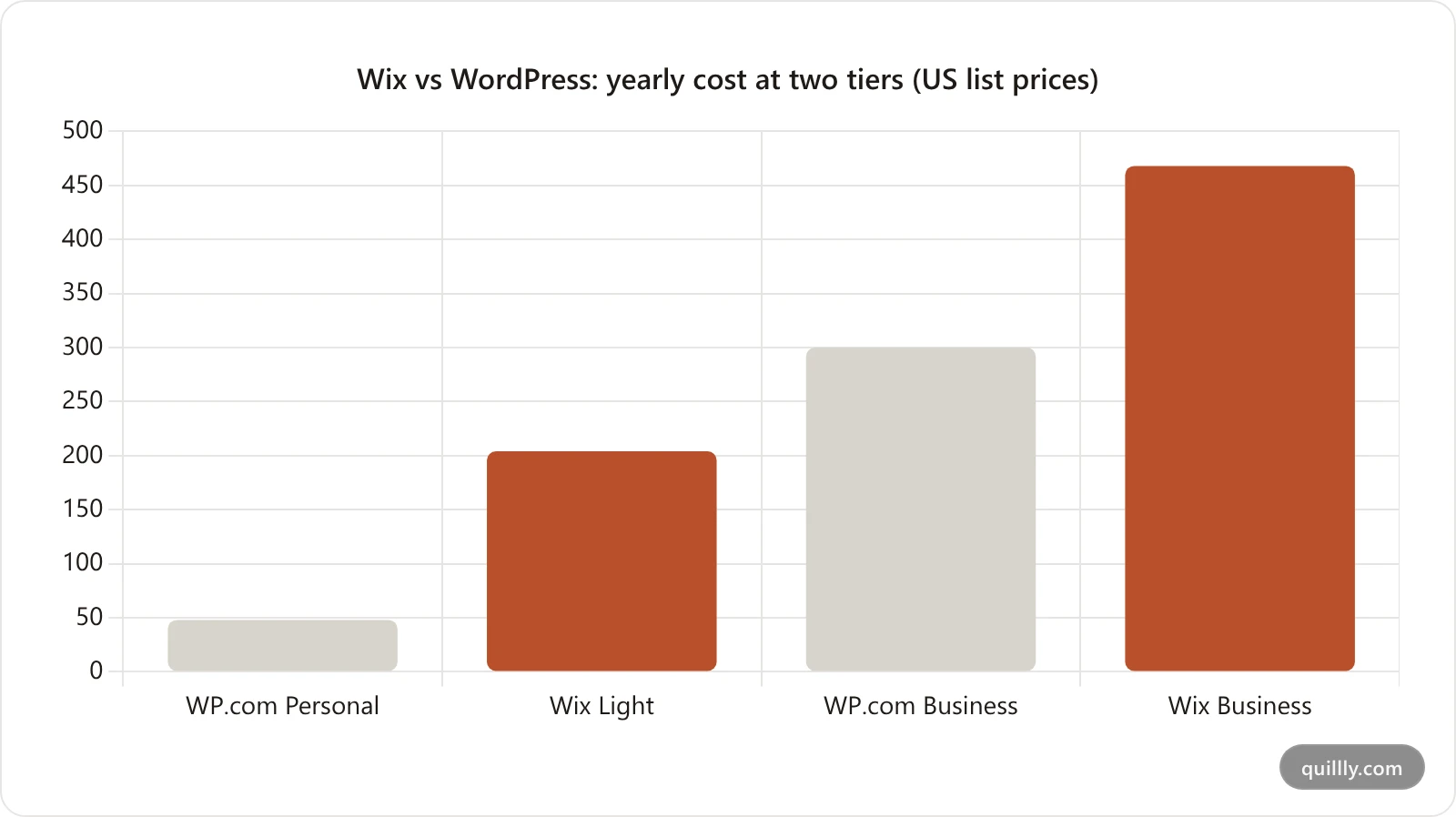
WordPress.com starts at $4 a month billed yearly and Wix at about $17 a month in the US, so WordPress is cheaper to enter. Self-hosted WordPress adds hosting and premium plugins. Wix bundles hosting and security, but leaving later costs you a full rebuild.
Sticker prices look close. Total cost doesn't.
Wix (US, billed yearly, checked September 2026): Light about $17/mo, Core about $29/mo, Business about $39/mo, Business Elite about $159/mo. Prices vary by region and include tax in some countries, so check Wix's plans page for yours. The free plan runs on a username.wixsite.com URL with Wix branding. Most yearly plans include a one-year domain voucher.
WordPress.com (billed yearly, per the live pricing page): Free, Personal $4/mo, Premium $8/mo, Business $25/mo, Commerce $45/mo. Plugin installs now start on the paid plans.
Self-hosted WordPress is free software. You pay for hosting (a few dollars a month for shared, $20-$50+ for managed), a domain, and any premium theme or plugins. Many sites end up paying for an SEO plugin, a backup tool and a security plugin.
The hidden cost on Wix is the exit. The hidden cost on WordPress is your time: updates, plugin conflicts and security are yours to manage unless you pay a managed host.
How Hard Is It to Switch Later?#
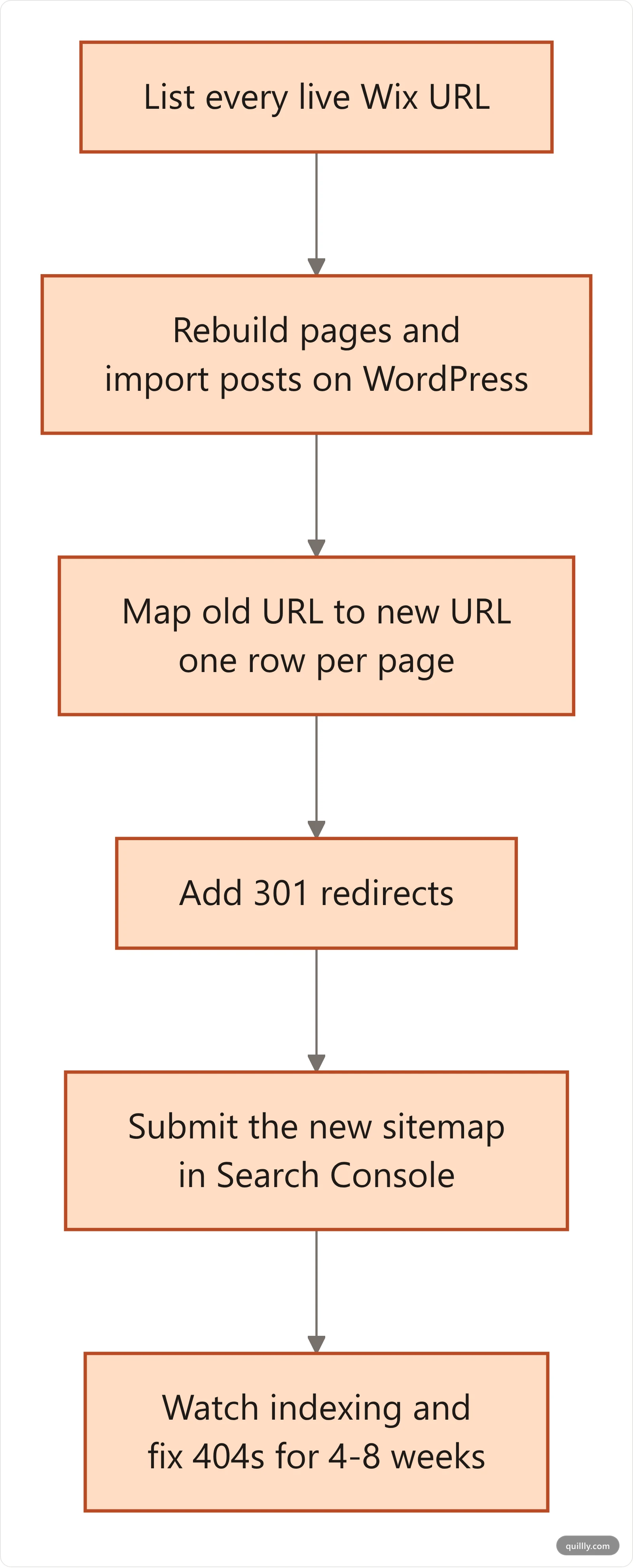
Leaving WordPress is easy: export the content, move hosts and keep every URL. Leaving Wix is hard: there's no portable site, so you rebuild the pages elsewhere and 301 redirect every old URL. That difference is the biggest long-term SEO risk in the whole comparison.
This is the row most WordPress vs Wix reviews skip, and it matters most for SEO.
WordPress content exports to a standard XML file, and your theme and database move with you. You can change hosts and keep every URL, which means you keep your rankings.
Wix doesn't hand you a portable site. Your design stays on Wix. Moving off means rebuilding pages on the new platform, then mapping every old URL to its new one with 301 redirects. Google's guide to site moves with URL changes explains why that mapping matters: skip it and the rankings you built don't follow you.
If there's a real chance you'll outgrow the platform, that alone can decide Wix or WordPress for you.
Already on WordPress? Let your AI publish into it
Quillly connects Claude, ChatGPT or Cursor to your WordPress site through an application password. Your AI drafts, scores each post against 14+ SEO criteria, and publishes straight into WordPress.
See how WordPress publishing worksWhere Wix Wins#
Give Wix its due. It's the better pick when:
You don't want to maintain anything. No plugin updates, no PHP versions, no backups to schedule.
Design speed matters more than depth. A service business can launch a good-looking site in a day.
You sell a little. Wix's store and booking tools are built in, not bolted on.
The blog supports the business rather than being the business. Ten solid posts on a clean Wix site can rank for local and niche terms.
Where WordPress Wins#
WordPress is the better pick when:
Content is the growth engine. Hundreds of posts, topic clusters, programmatic pages.
You need a specific tool. Membership, LMS, advanced schema, custom post types: there's a plugin in the official directory for almost anything.
You want an exit option. Portable content and URLs protect years of SEO work.
You automate publishing. WordPress's REST API with application passwords lets outside tools post into your site without a plugin.
For a wider field that includes Ghost, Webflow and hosted platforms, see our CMS SEO platform comparison and our guide to the best blogging platform by who owns the traffic.
Where AI Publishing Fits In#
The platform choice is only half of it. The other half is how posts get written, checked and shipped.
On WordPress, Quillly can publish into your existing site with an application password over the REST API. Your AI writes the post, Quillly scores it, and it lands in WordPress with the title, slug, body, excerpt and featured image.
Quillly doesn't publish into Wix. If you're on Wix and want the blog to carry the SEO load, the route is to serve the blog from Quillly on your own domain through a reverse proxy, or start on a Quillly subdomain and move later. Quillly Pro is $19/month for up to 5 websites with a 14-day trial. Connect your AI and try it.
Key Takeaways#
Wix vs WordPress is control versus convenience, not "good SEO versus bad SEO."
Wix covers SEO basics out of the box and is server-side rendered.
WordPress has the higher ceiling: plugins, any host, portable URLs.
Pick Wix when the blog is a side channel. Pick WordPress when it's the growth plan.
Price the exit, not just the plan: leaving Wix means a rebuild and a full redirect map.
If you've settled on WordPress or a proxied blog on your own domain, the setup guide walks through connecting your AI in a few minutes.
Frequently Asked Questions#
Is Wix vs WordPress a real SEO difference in 2026?#
Not for the basics. Both give you titles, meta descriptions, sitemaps, canonicals and 301s, and Wix sites are server-side rendered. The difference shows at the top end: WordPress lets you customize schema, caching and templates further, and it lets you move hosts without losing URLs.
Wix or WordPress for blogging: which is easier?#
Wix is easier to start. The Wix Blog app lives inside the same editor as your pages, with SEO fields per post. WordPress takes longer to set up but scales better once you publish weekly, thanks to roles, revisions and plugins for internal linking and SEO.
Is WordPress vs Wix cheaper over a year?#
WordPress.com Personal is about $48 a year billed yearly, while Wix Light runs about $204 a year in the US. Self-hosted WordPress can be cheaper still, but premium plugins, themes and managed hosting add up. Compare the full stack, not the entry plan.
Can I move my site from Wix to WordPress without losing rankings?#
Yes, if you map every old URL to its new one and add 301 redirects. Wix doesn't export a portable site, so you'll rebuild the pages. Submit the new sitemap in Search Console and watch for 404s for a few weeks after the move.
Can AI tools publish directly to Wix or WordPress?#
Many AI tools publish into WordPress through its REST API and application passwords, including Quillly. Wix integrations are less common. Quillly doesn't publish into Wix, but it can serve a blog on your own domain through a reverse proxy instead.


