


You wrote a sharp title in the Yoast snippet editor, checked the preview, hit update, then searched for the page a week later — and Google showed something else entirely. Usually your H1. Sometimes your site name bolted onto a fragment you never typed. The title you spent ten minutes on simply did not appear, and nothing in the WordPress dashboard tells you why.
That is not a bug, and it is not a Yoast failure. Search "seo title yoast" and most results explain where the field lives. Almost none explain the part that actually costs you clicks: the field is an input to Google, not an instruction.
The direct answer: the SEO title field in Yoast sets your page's HTML <title> element. Google treats that element as its single strongest signal for the title link in search results — but it is one of nine documented sources, and Google will swap in a different one whenever it judges your title inaccurate, boilerplate, or mismatched to the page.
Everything below is about winning that judgement: what the field writes, where Google's nine title sources come from, the seven documented reasons it overrides the one you wrote, and how to build titles that survive all seven at the scale of a whole site.
Table of Contents#
SEO Title Yoast: What the Field Actually Controls#
The Yoast SEO title field writes exactly one thing: the <title> element in your page's <head>. Nothing else. It does not touch what readers see on the page.
That single output does a lot of work:
It is the clickable headline in Google, Bing and other engines
It is the browser tab label
It is the default text when someone bookmarks the page
It is a fallback some social platforms use when
og:titleis missing
What it does not do is change your post heading, your URL, or your on-page design. Those are separate fields, and conflating them is the most common reason people think the plugin is broken.
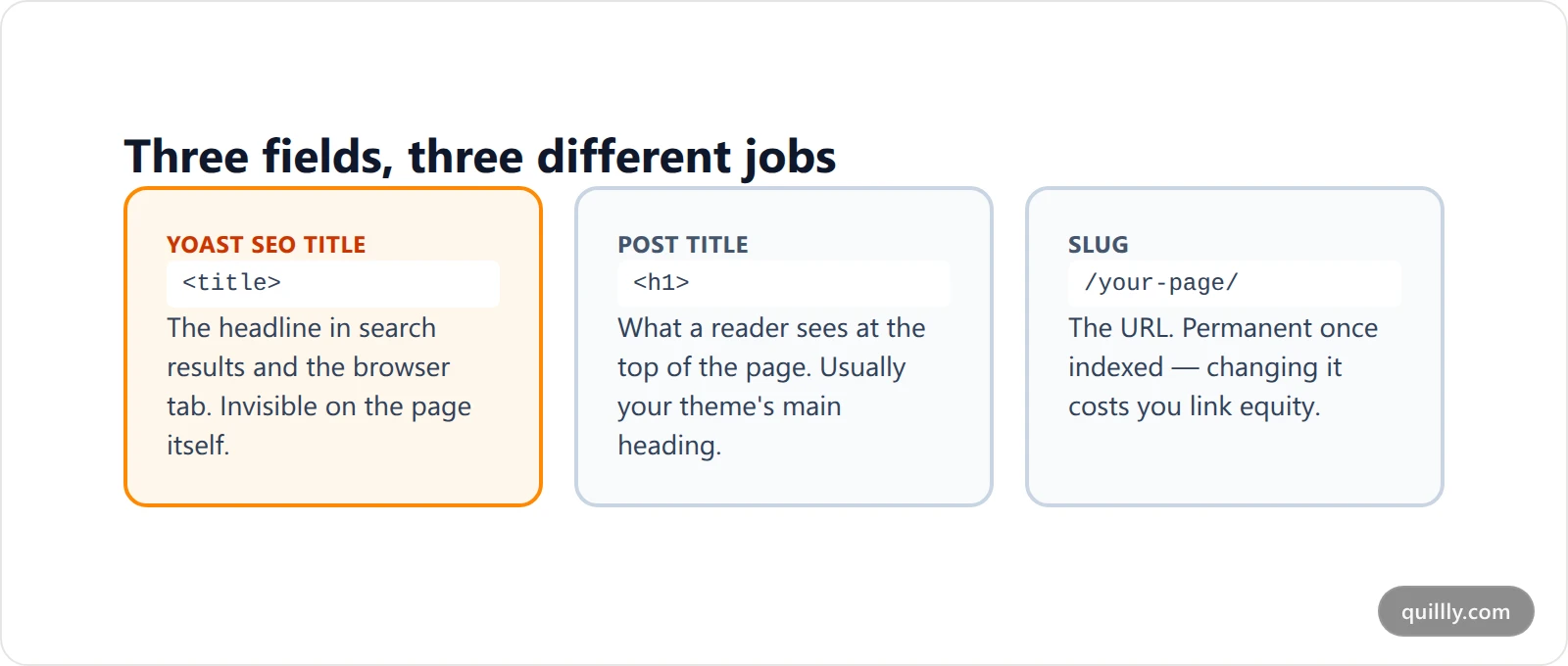
SEO title vs H1: two fields, two jobs#
Treating these as one field is the mistake that quietly caps your click-through rate. The SEO title vs H1 distinction matters because they serve different readers under different constraints.
Your H1 speaks to someone who has already arrived. It can be short, clever, and assume context. Your <title> speaks to someone scanning ten blue links who has no context at all — it has to carry the query, the promise and enough specificity to beat nine competitors, inside a width Google may truncate.
So they should usually differ. An H1 of "Our 2026 Pricing" is fine on the page. As a title link it is invisible. "Pricing — Plans From $19/Month | Acme" earns the click.
Where to Find and Edit the Yoast SEO Title#
Short answer: for one post, open the Yoast SEO box below the editor, click the Search appearance tab, and edit the SEO title in the snippet editor. For whole content types, go to Yoast SEO → Settings and set the default there. The homepage is a separate case with its own field.
For a single post or page, scroll below the editor to the Yoast SEO box, open the Search appearance tab, and click the SEO title line in the snippet editor. Yoast shows a preview and a length bar.
For whole content types, the setting lives in Yoast SEO → Settings, where each content type, taxonomy and archive carries its own default. The homepage is its own case — on a static front page, Yoast reads the title from that page's own SEO title field; on a blog-posts homepage, it uses the setting under Settings.
Yoast documents the homepage path in detail in its guide to editing the homepage SEO title, which is worth following exactly — it is the single most common place people edit the wrong field and conclude nothing happened.
If you are auditing more than a handful of pages at once, a crawl beats clicking through the dashboard. Our on-page SEO audit walkthrough covers pulling every title on a site into one list so duplicates and truncation show up immediately — or you can have the audit run on every draft automatically instead of remembering to crawl.
The SEO Title Template That Fills Itself#
Setting a title by hand on 400 posts is not a plan. Yoast solves this with snippet variables — placeholders it swaps for real values at render time.
Here is how the SEO title template works. A default like this:
Post title, separator, site title
...expands per post into "Your Post Headline - Acme". The common variables:
Variable | What it renders |
|---|---|
Title | The post or page title |
Sitename | Your site's name |
Separator | The separator character you picked in settings |
Primary category | The post's primary category |
Page | "Page 2 of 5" on paginated archives |
Excerpt | The post excerpt, trimmed |
You edit these under Yoast SEO → Settings → Content types, and Yoast's own snippet template documentation lists the full set.
Two rules make templates safe. First, keep the separator and site name at the end, not the front — the front of the title is the part that survives truncation, so spend it on the page's actual subject. Second, never let a template be your only title on a money page. Templates are a floor for the long tail, not a substitute for writing the twenty titles that carry your traffic.
Writing titles at volume is exactly where most workflows break down. If your posts are drafted by an AI assistant, Quillly scores every piece against 14+ on-page criteria — meta title length included — before it publishes to your own domain, so a title that would truncate gets caught at draft time rather than in a search result three weeks later.
Why Google Shows Something Else#
Short answer: Google uses your <title> element as its primary source, but documents nine possible sources and seven reasons to override yours — chiefly that the title looks boilerplate, inaccurate, half-empty, or mismatched to the page's language and headings. Every one of those reasons is a fixable property of your title.
This is the part Yoast cannot fix for you, because it happens after your HTML leaves the building.
Google is explicit that it uses nine sources to build a title link: the <title> element, the main visual title on the page, heading elements like <h1>, og:title meta tags, other large and prominent styled text, other text on the page, anchor text on the page, text in links pointing to the page, and WebSite structured data.
The <title> element is the primary source. But Google's title link documentation names the specific conditions under which it reaches for one of the others:
Half-empty titles — the title is missing text, so Google pulls from header elements or other prominent text
Obsolete content — the title was not updated to reflect the latest date, so Google uses the visible page title
Inaccuracy — Google determines the title "isn't accurately showing what a page is about"
Boilerplate repetition — the same title repeats across many pages with nothing to distinguish them
Unclear main title — more than one large, prominent heading, with no clear hierarchy
Language mismatch — the title's language or writing system does not match the page's primary text
Site name duplication — a repetitive domain-level site name gets dropped
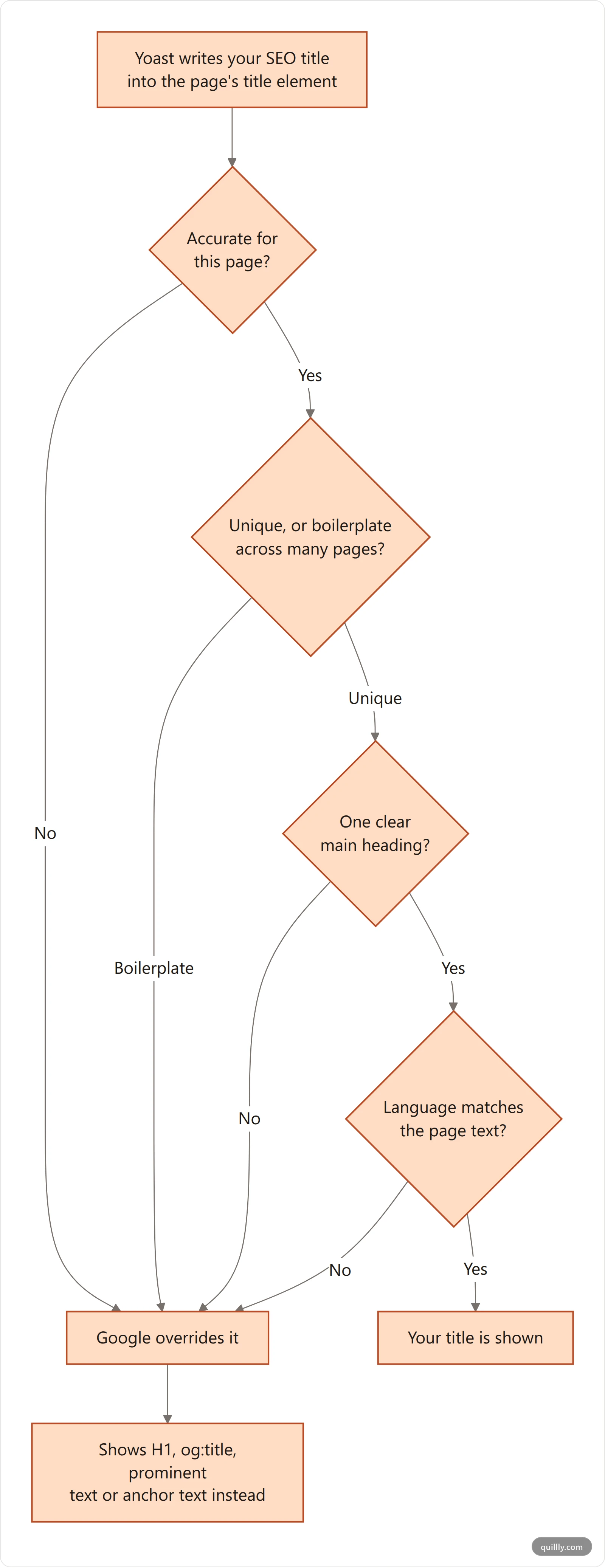
Read that list again as a checklist, because every single item is something you control. A rewrite is not bad luck. It is Google telling you your title failed one of seven tests.
How to Write a WordPress SEO Title That Survives the Rewrite#
Short answer: make every title unique, accurate to what is actually on the page, and backed by a single clear H1. Front-load the subject so truncation only costs you the site name, and never repeat the keyword for its own sake. That clears all seven override triggers.
Work the list above backwards.
Make it unique. If your template produces "Services | Acme" on nine pages, Google has nothing to distinguish them and will look elsewhere. Give every page a subject in its own title.
Make it accurate. The title must describe what is genuinely on the page. Titles that oversell — "Complete Guide" on a 400-word post — fail the accuracy test and get replaced by something duller and truer.
Keep one prominent heading. If your theme renders the post title and a large tagline at similar visual weight, Google may not know which is the main title. One clear H1 per page.
Front-load the subject. Google truncates title links "as needed, typically to fit the device width" — it is a pixel-width cut, not a character count, so a title of wide capitals truncates sooner than the same count in lowercase. Roughly 50-60 characters is a safe working target, but the real rule is simpler: put the thing the page is about in the first few words, and let the site name be what gets cut.
Do not stuff. Repeating your keyword three times reads as manipulation and lands squarely in the inaccuracy bucket.
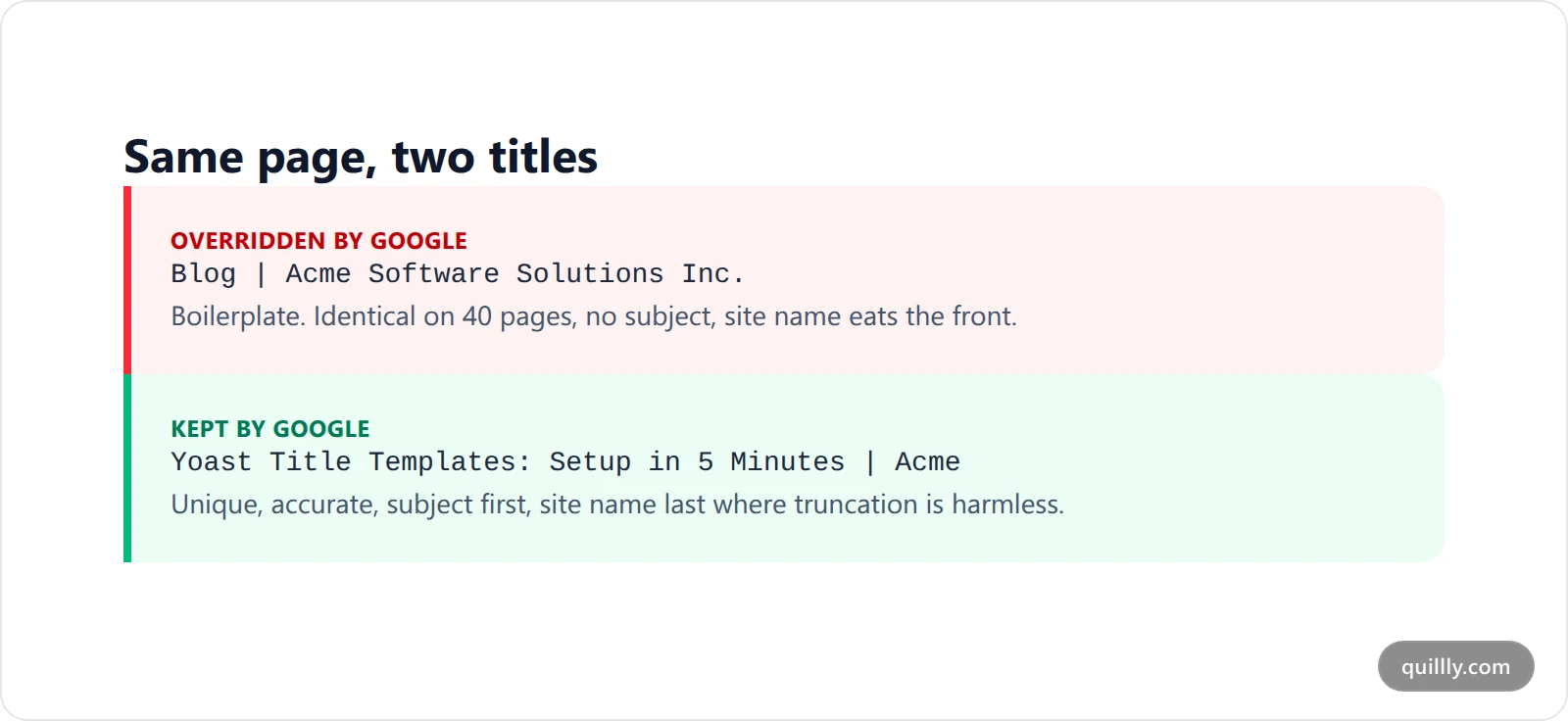
When the Field Is Ignored Entirely#
Short answer: if your title is missing from the page source entirely, Google never saw it and this is not a rewrite. The cause is almost always a second SEO plugin writing its own title tag, a theme that prints its own instead of supporting WordPress title management, or a stale page served from cache.
There is a second failure mode worth separating from a Google rewrite: your title never reaches Google at all. The tell is the page source — view it and search for <title>. If what you typed is not there, the problem is on your server, not in Google's judgement.
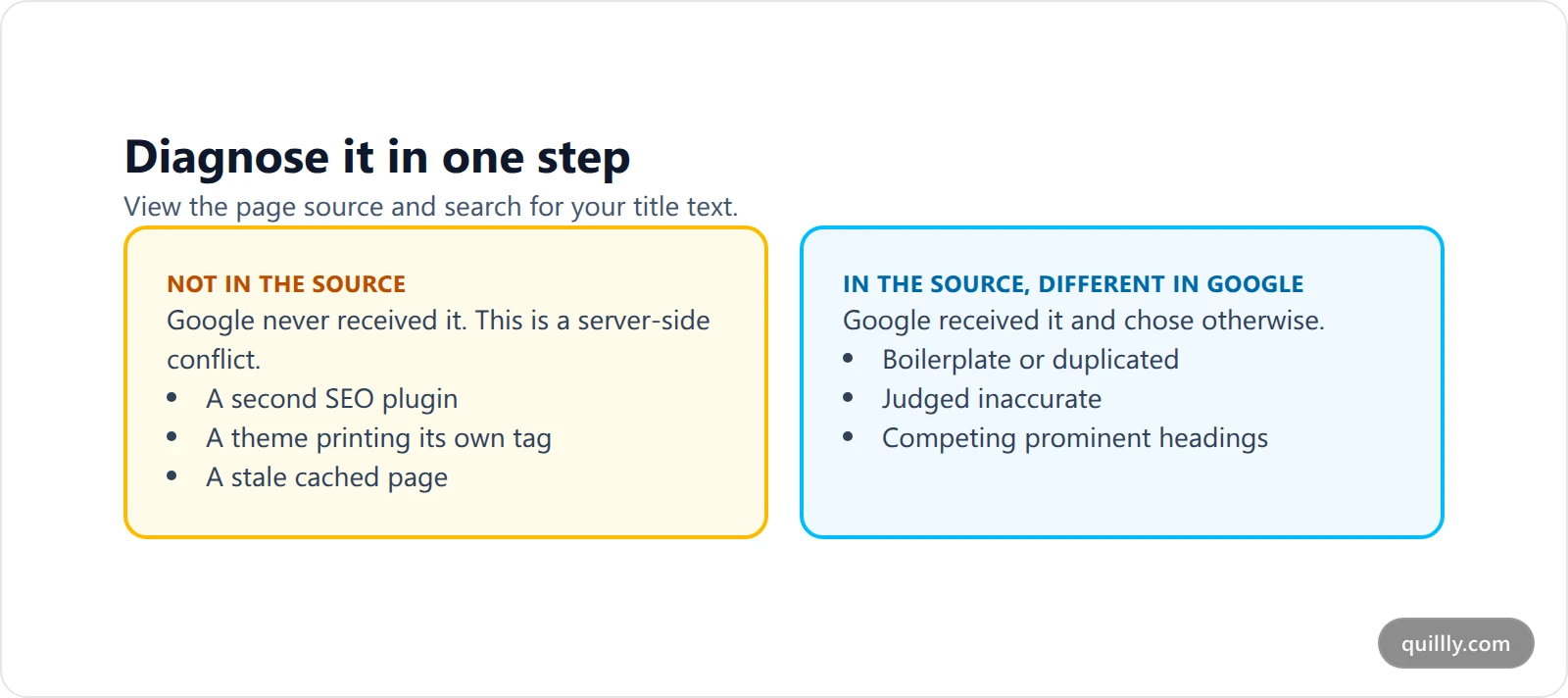
The usual causes:
A second SEO plugin is also writing a title tag. Two plugins, two titles, one wins. Run one SEO plugin.
The theme hardcodes its own title instead of letting WordPress manage it. Themes that do not declare
title-tagsupport, or that print their own tag, override the plugin.A caching layer is serving an old page. Purge the cache and re-check the source.
Yoast maintains a dedicated page for this exact symptom — my SEO title isn't showing as I have entered it — and it is the right first stop before you start editing anything else.
If you are weighing whether Yoast is even the right plugin for this job, we compared the field-level differences in what each WordPress SEO plugin actually fixes. And if the theme is fighting you at the template level, the same class of problem shows up in what WordPress actually serves in robots.txt.
SEO Title Yoast Settings Across a Whole Site#
Once you are past a few dozen pages, treat titles as a system rather than a field.
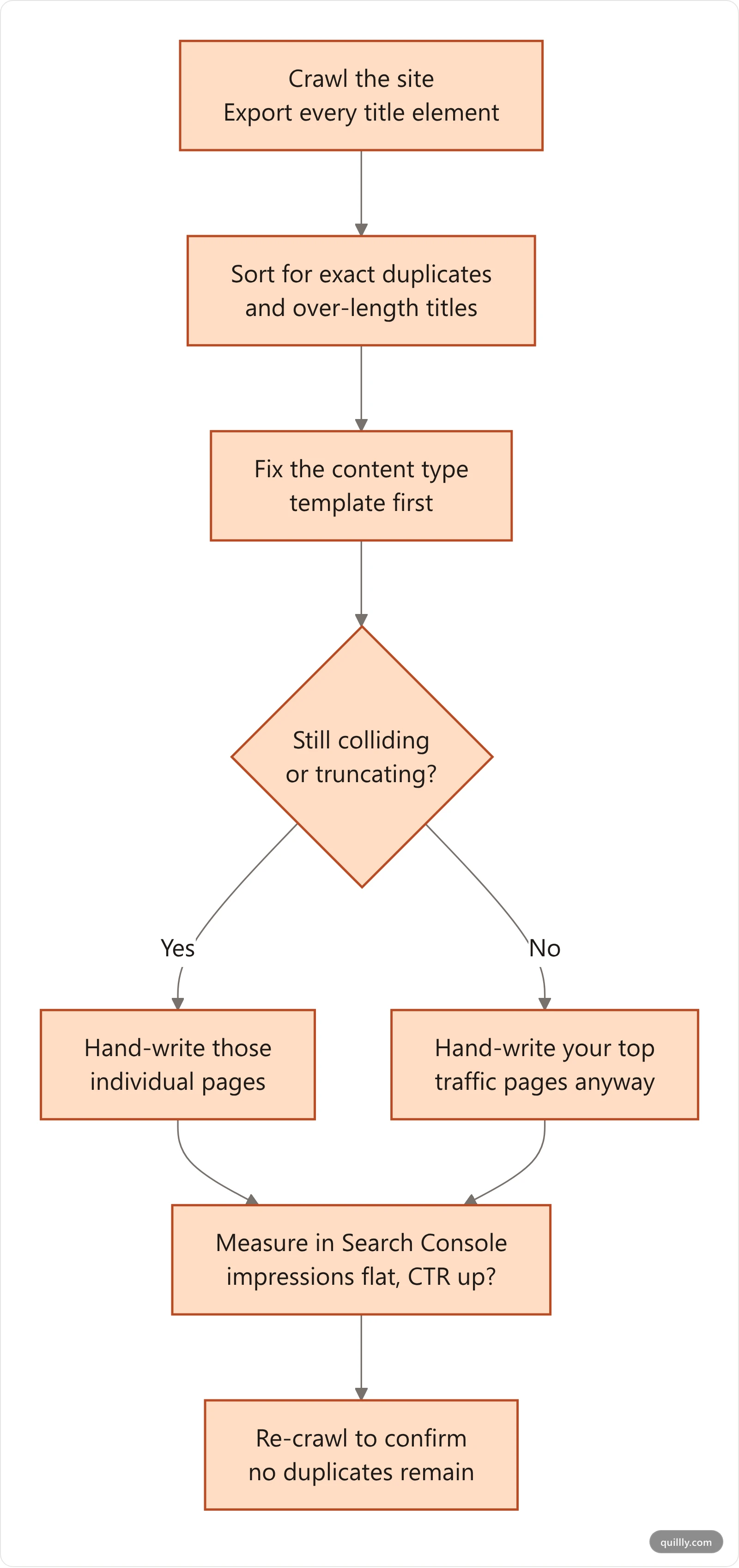
Start with an inventory: crawl the site and export every <title>. Sort by exact duplicates — those are your boilerplate failures, and they are the fastest wins available. Then sort by length to find the ones truncating.
Yoast Premium ships a bulk editor for titles and descriptions; the free plugin has a simpler bulk view under Yoast SEO → Tools → Bulk editor. Either way, fix the template first and the individual pages second. A good template lifts hundreds of pages in one edit; hand-writing titles before fixing the template means doing the work twice.
Then measure. A title change is a testable hypothesis: impressions should hold steady while click-through rate moves. Search Console's Performance report, filtered to the page and compared across the period before and after your edit, tells you whether the new title actually earned anything. Our blog SEO checklist puts this in sequence with the rest of the on-page work.
Stop finding title problems three weeks late
Quillly scores meta title length, heading structure and 14+ other on-page criteria on every draft — before it goes live on your own domain. Connect Claude, ChatGPT or Cursor and your AI gets real publishing tools.
See how it worksKey Takeaways#
The SEO title field in Yoast writes your
<title>element — nothing that readers see on the pageGoogle treats that element as its primary source but documents nine sources and seven reasons to override it
Every override reason is under your control: uniqueness, accuracy, one clear heading, matching language
Templates are the floor for the long tail; hand-write the titles on pages that carry real traffic
Front-load the subject, park the site name at the end, and let truncation eat the part that does not matter
If your title is missing from the page source, it is a plugin or theme conflict — not a Google decision
Frequently Asked Questions#
Does the SEO Title Yoast field change my page's H1?#
No. The field writes only the <title> element in the page head, which is what search engines and browser tabs display. Your H1 comes from the post title and your theme's template. They are independent, and on most pages they should say different things for different readers.
Why does my SEO Title Yoast entry not show in Google?#
Two different causes. Either the title never reached the page — check the page source for your text, and suspect a second SEO plugin or a theme conflict — or Google received it and chose to override it because the title looked boilerplate, inaccurate, or mismatched to the page content.
What is the ideal length for a WordPress SEO title?#
Google truncates by pixel width to fit the device, not by a character count, so no number is exact. Roughly 50-60 characters is a reliable working target. The more durable habit is front-loading: put the page's subject in the first few words so truncation only ever costs you the site name.
Can I use a seo title template on every post?#
Yes, and you should for archives, categories and long-tail posts where hand-writing is impractical. Set it under Yoast SEO → Settings → Content types. But override the template manually on your highest-traffic pages — a template cannot know which angle earns the click on a given query.
How do I fix duplicate titles across many pages?#
Crawl the site, export every title, and sort for exact duplicates. Fix the underlying template first, because one template edit corrects every page using it. Then hand-write the individual pages that still collide. Re-crawl afterwards to confirm the duplicates are gone.
Does changing an SEO title hurt existing rankings?#
Changing a title is low-risk compared with changing a URL, and Google re-evaluates it on the next crawl. Rankings can wobble briefly. Change one thing at a time and watch impressions versus click-through rate in Search Console so you can tell a bad title from normal volatility.
Titles are the cheapest ranking work available: no backlinks, no rewrites, no migration. You are editing one line and asking Google to trust it. The sites that win title links are simply the ones whose titles keep passing the seven tests above — and now you have the list. Start with your ten highest-impression pages and work down.


