

Photo by Alina Grubnyak on Unsplash
Most "best internal linking tool" roundups still quote Link Whisper at $77 a year. Link Whisper's own knowledge base, updated 24 April 2026, says $97. If a review can't get the headline number right, it probably didn't open the product either.
The short answer: the right internal linking tool depends on something almost no roundup asks — what your site runs on. Five of the eight tools below are WordPress plugins and simply do not exist for Ghost, Webflow, Framer, Astro or Next.js. Check your platform first, compare features second, and you'll cut the shortlist almost in half before you read a single feature table.
Every price on this page was pulled from the vendor's own site in August 2026 — not from another roundup. Here's what you'll get:
A verified price-and-platform table for all eight tools
The three pricing models in the category, and how each one fails
Which three options work outside WordPress
A five-minute decision tree at the end
Internal linking tools compared: price, platform, method#
Tool | Verified price (Aug 2026) | Platform | How it works |
|---|---|---|---|
Internal Link Juicer | Free (1 site); $69.99 / $149.99 / $189.99 paid tiers | WordPress only | Keyword-to-post rules, auto-inserted |
Quillly | $9/mo or $96/yr, up to 5 sites | Any (own domain) | Suggests links while the post is drafted |
Link Whisper | $97/yr (1 site) to $497/yr (50 sites), annual only | WordPress only | Scans library, one-click insertion |
LinkBoss | Free tier, 50 credits on signup; credits on insert | WordPress only | Credit-metered auto-insertion |
LinkStorm | $30/mo (1,000 URLs) to $200/mo (50,000 URLs) | Any (crawler) | Crawls site, recommends links |
Screaming Frog | £199/yr per user licence; free to 500 URLs | Any (desktop crawler) | Diagnoses orphans and depth; inserts nothing |
AIOSEO Link Assistant | Bundled in Pro, $399/yr list (10 sites) | WordPress only | Scans library, suggests and inserts |
Yoast SEO Premium | 1 site per subscription; +$5/seat/mo | WordPress only | Suggests links in the editor sidebar |
Two things jump out. The cheapest useful option is free, and the most expensive is nearly six times the price of the best-known one. And five of the eight are WordPress-only.

The three business models behind every internal linking tool#
Pricing pages look different but there are only three models in this category, and each one fails in a different way.
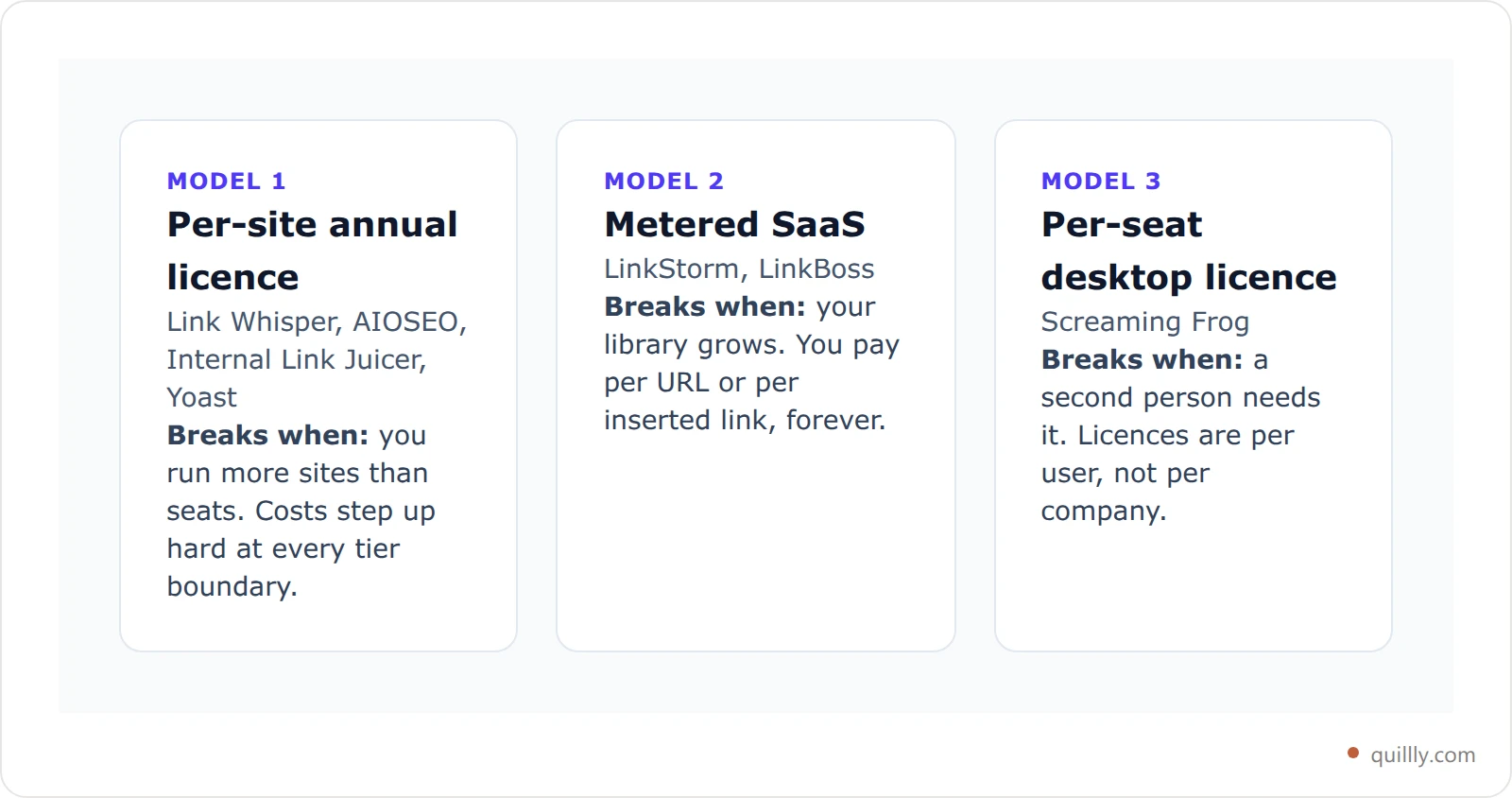
If you publish steadily, model 2 is the one to watch. A crawler that charges by URL gets more expensive precisely as your content starts working. If flat pricing matters more to you than crawl depth, Quillly is $9 a month for up to five sites.
WordPress plugins: Link Whisper, AIOSEO, Internal Link Juicer, Yoast#
Link Whisper is the category default, and deservedly so. It reads your library, proposes links for the post you're editing, and inserts them with one click. Its URL Changer — bulk find-and-replace across every link on the site — is the feature people actually stay for, and its orphan-content and broken-link reports are solid. Pricing is annual only: $97 for one site, $197 for three, $297 for ten, $497 for fifty. Every plan has the same features; you're paying purely for site count.
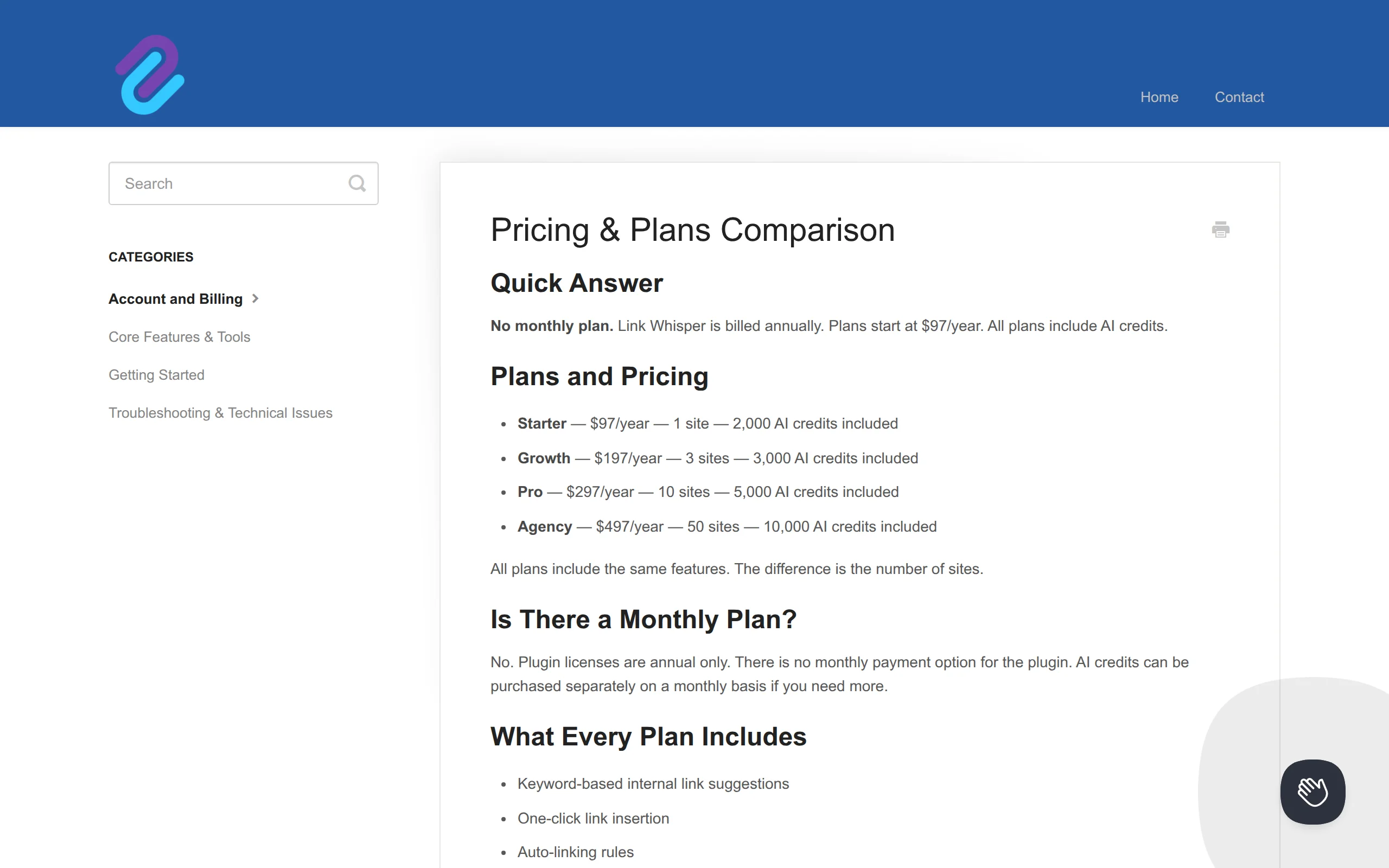
One detail worth knowing: when a Link Whisper licence lapses, the links it already inserted stay put. They're plain HTML in your posts. You lose new suggestions and updates, not your work.
AIOSEO's Link Assistant is capable, but it sits in the Pro tier — $399 a year list (shown as €399 from the EU), covering ten sites. That's fine if you already run AIOSEO Pro for everything else. Buying it purely for internal linking is the most expensive route on this page.
Internal Link Juicer is the value pick. There's a genuinely usable free version for one site, and paid licences at $69.99, $149.99 and $189.99. It works from keyword-to-target rules rather than per-post suggestions, so it's more set-and-forget and less editorial.
Yoast SEO Premium includes internal linking suggestions in the editor sidebar. It's a reasonable bonus if Yoast is already your SEO plugin, but one subscription covers one site, with extra seats at $5 per month. Nobody buys Yoast for the linking alone.
Crawler SaaS: LinkStorm and LinkBoss#
LinkStorm crawls your site and recommends links, and it prices by crawl size: $30/mo for 1,000 URLs, $60 for 5,000, $120 for 20,000, $200 for 50,000, with unlimited projects and websites on every tier. Reviewers consistently praise its recommendation accuracy, and it's one of the few options here that isn't WordPress-bound.
LinkBoss takes the opposite approach: most of it is free forever, and credits are consumed only when you actually insert a link. You get 50 credits at signup with no card. For a small site that adds a handful of links a month, that's hard to beat.
Both work the same way underneath — crawl, embed, compare, suggest. Which is the thing worth pausing on.
Screaming Frog: the diagnostic, not the fixer#
Screaming Frog is on this list because people put it here, but it doesn't insert links. It tells you which pages are orphaned, how deep each page sits, and where your link graph is thin — and then you go fix it yourself.
That's still valuable. Nothing else on this page maps crawl depth as well. It's £199 per year per user licence (with volume discounts from five licences), and free up to 500 URLs, which covers plenty of small blogs outright. Just don't buy it expecting automation. Pair it with our broken internal links audit stack and it earns its keep as a diagnostic.
The gap every tool on this list shares#
Here's what none of these roundups say out loud: every one of these tools is a retro-fitter. It looks at what you already published and tells you which links you should have added.
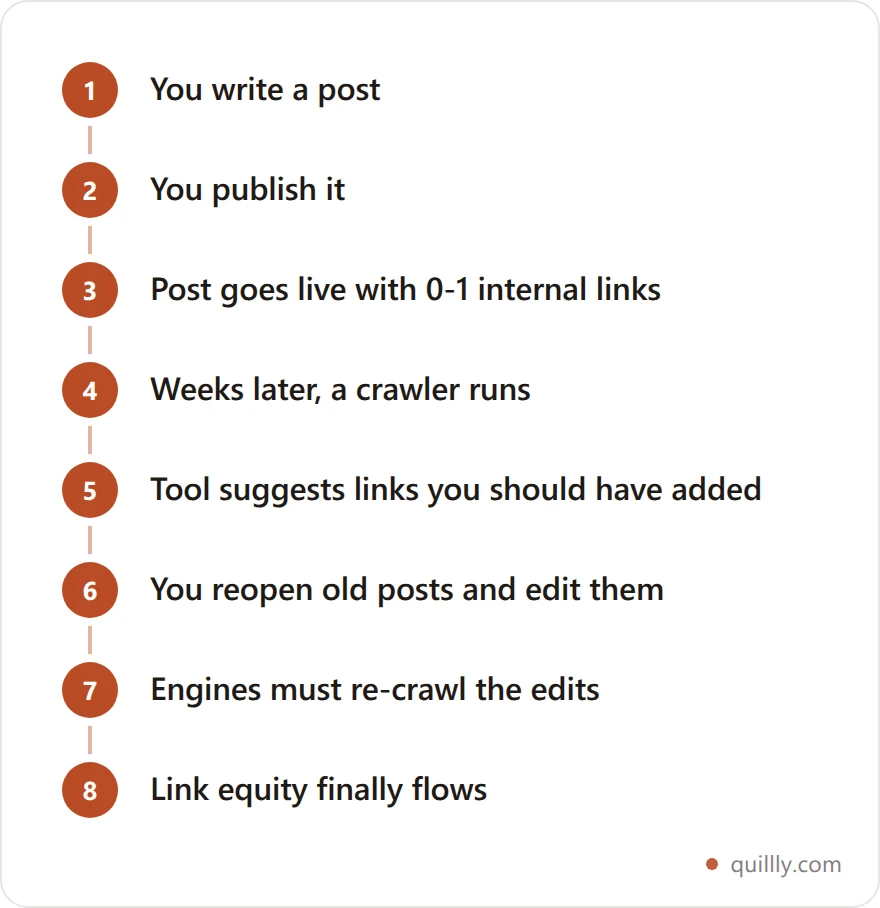
That loop works. It's also seven steps long, and the new post spends the entire time — the window when it most needs discovery — sitting with almost no internal links pointing at it. Internal links are how crawlers find pages at all; a post nothing links to is a post that waits. That's not a theory, it's the single most reliable fix for a page stuck at discovered but not indexed.
The link you actually want is the one added while the post is being written, because that's the moment someone knows what the post is about.
Linking at write time instead of after publish#
This is where Quillly sits differently, and it's worth being precise about how.
Quillly is an MCP server, so your AI assistant — Claude, ChatGPT, Cursor — gets real publishing tools rather than a chat window. One of them is suggest_internal_links, which reads a draft against everything already published on the site and returns anchor text plus the exact live URL for each target, across blog posts and docs pages alike. Your assistant applies the ones that fit before the post ever goes live. The same session then runs check_blog_seo and publish_content.
The practical difference: the post ships already wired into the library, and existing posts get inbound links pointing at it in the same session. No crawl, no second editing pass, no waiting for a re-crawl.
It's not a better crawler than Screaming Frog — it isn't a crawler. And if your site is on WordPress and staying there, Link Whisper's one-click insertion inside the WordPress editor is a shorter path than changing how you publish. Quillly makes sense when you're already writing with an AI assistant and publishing to your own domain.
Start a free 14-day trial — no card required and connect your assistant in a few minutes.
How to pick an internal linking tool in five minutes#
Pick on platform, then site count. On WordPress with one site, Internal Link Juicer's free tier or Link Whisper at $97 covers it. Off WordPress, choose Screaming Frog to diagnose, LinkStorm to automate, or Quillly if you already draft with an AI assistant.
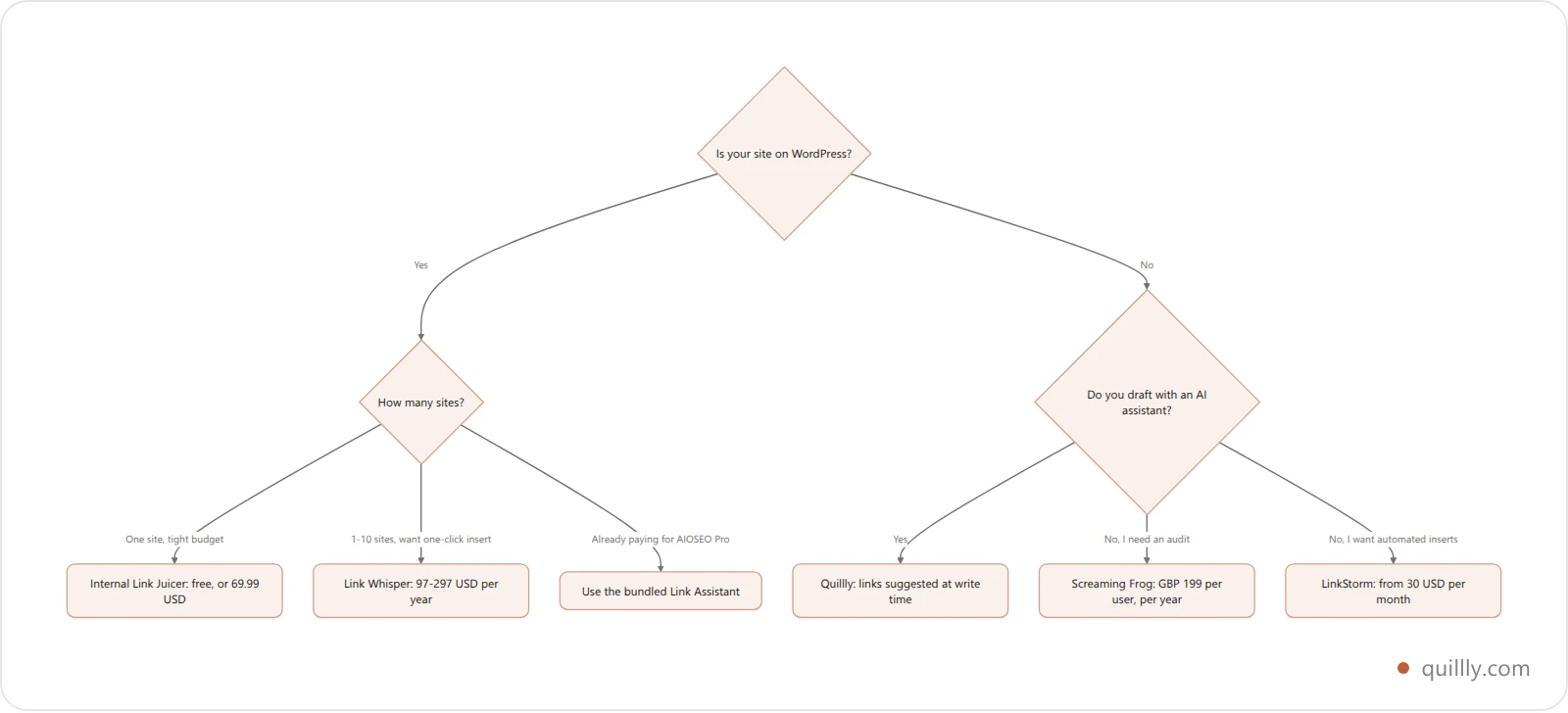
Whatever you pick, the tool is the smaller half of the job. A tool proposes links; a structure decides which links are worth having. Map your clusters first — our topical authority cluster map walks through it — then let the tool fill in the wiring. And if you want the strategy rather than the software, the AI internal linking playbook covers anchor text, link depth and how many links a post should carry.
One more thing worth doing before you buy anything: run a quick on-page SEO audit and count how many of your posts have fewer than three inbound internal links. If that number is small, you may not need a tool at all.
Key takeaways#
Platform decides first. Five of the eight options here are WordPress-only. On Ghost, Webflow, Framer, Astro or Next.js, your real choices are LinkStorm, Screaming Frog or Quillly.
Free is genuinely viable. Internal Link Juicer covers one site at $0, LinkBoss keeps most features free forever, and Screaming Frog is free to 500 URLs.
Check the price yourself. Roundups still quote Link Whisper at $77; the vendor's own docs say $97.
Metered pricing scales against you. URL-based and credit-based internal link building software costs more precisely as your library grows.
Timing beats features. Everything here except one option works after publish. Links added while the draft is written start working immediately.
Publish posts that ship already linked
Connect your own domain, point Claude or ChatGPT at it, and let your assistant suggest internal links before the post goes live — not weeks after.
Try Quillly free for 14 daysFrequently Asked Questions#
What is an internal linking tool?#
An internal linking tool finds places on your site where one page should link to another, and in most cases inserts the link for you. Some run as WordPress plugins inside your editor; others crawl your live site from outside. A few only diagnose problems like orphan pages and leave the fixing to you.
Do I need an internal linking tool for a small blog?#
Probably not under about 30 posts. At that size you can hold the whole library in your head and link by hand as you write. Tools earn their price when you can no longer remember what you published six months ago — which is usually somewhere between 50 and 100 posts.
Which internal linking tool works without WordPress?#
Three of the eight here. LinkStorm crawls any site, Screaming Frog crawls any site as a desktop app, and Quillly works on any domain by suggesting links at draft time. Link Whisper, AIOSEO, Internal Link Juicer and Yoast are all WordPress plugins.
Is there a free internal linking tool?#
Yes, two real ones. Internal Link Juicer has a free version for a single site, and LinkBoss keeps most features free forever with 50 insert credits at signup. Screaming Frog is also free up to 500 URLs, though it reports problems rather than fixing them.
Does automatic internal linking hurt SEO?#
Automation itself is fine — the risk is volume and relevance. Rule-based tools that inject the same anchor text sitewide can bury a page in near-identical links, which reads as manipulation. Review what any tool proposes before it inserts, and keep links where a reader would genuinely follow them.
What happens to my internal links if I stop paying?#
With plugins that insert real HTML, such as Link Whisper, the links already in your posts stay there permanently — they're ordinary markup. You lose new suggestions, reports and updates. Tools that render links dynamically at page load are the ones to check carefully before you cancel.


