
You published a post three days ago. You search Google for the exact title. Nothing. You paste site:yourdomain.com/your-slug into the search bar. Still nothing. The panic move is to Google "how to get indexed on Google fast," land on a 2021 guide, and start pinging your sitemap and wiring up the Indexing API — two things that do nothing for a blog post in 2026.
Here's the uncomfortable part: most indexing advice still floating around is broken. Google deprecated the sitemap ping endpoint, the Indexing API was never meant for blogs, and the "submit your URL to 200 engines" tools are theater. Getting indexed fast in 2026 is a different game, and the rules changed quietly.
The short answer: to get indexed on Google fast in 2026, publish content that clears Google's quality bar, keep one fresh sitemap with accurate lastmod dates registered in Search Console, push new URLs through IndexNow for the Bing network, link each post from an already-indexed page, and request indexing for priority URLs in the URL Inspection tool. Skip sitemap pings and the Indexing API — they don't apply to blogs.
Why your blog isn't indexed: the 60-second diagnosis#
Start by naming the exact state, because "not indexed" hides three very different problems. Open Google Search Console, run your URL through the URL Inspection tool, and read the status. It will say one of: Discovered – currently not indexed, Crawled – currently not indexed, or that the URL is simply unknown to Google.
Each points somewhere different. "Discovered" means Google knows the URL exists but hasn't crawled it — a crawl-budget or priority signal. "Crawled – currently not indexed" is the scary one: Google fetched the page, looked at it, and decided it wasn't worth an index slot — a quality signal. "URL is unknown" means Google never found it at all — a discovery problem you fix with sitemaps and internal links.
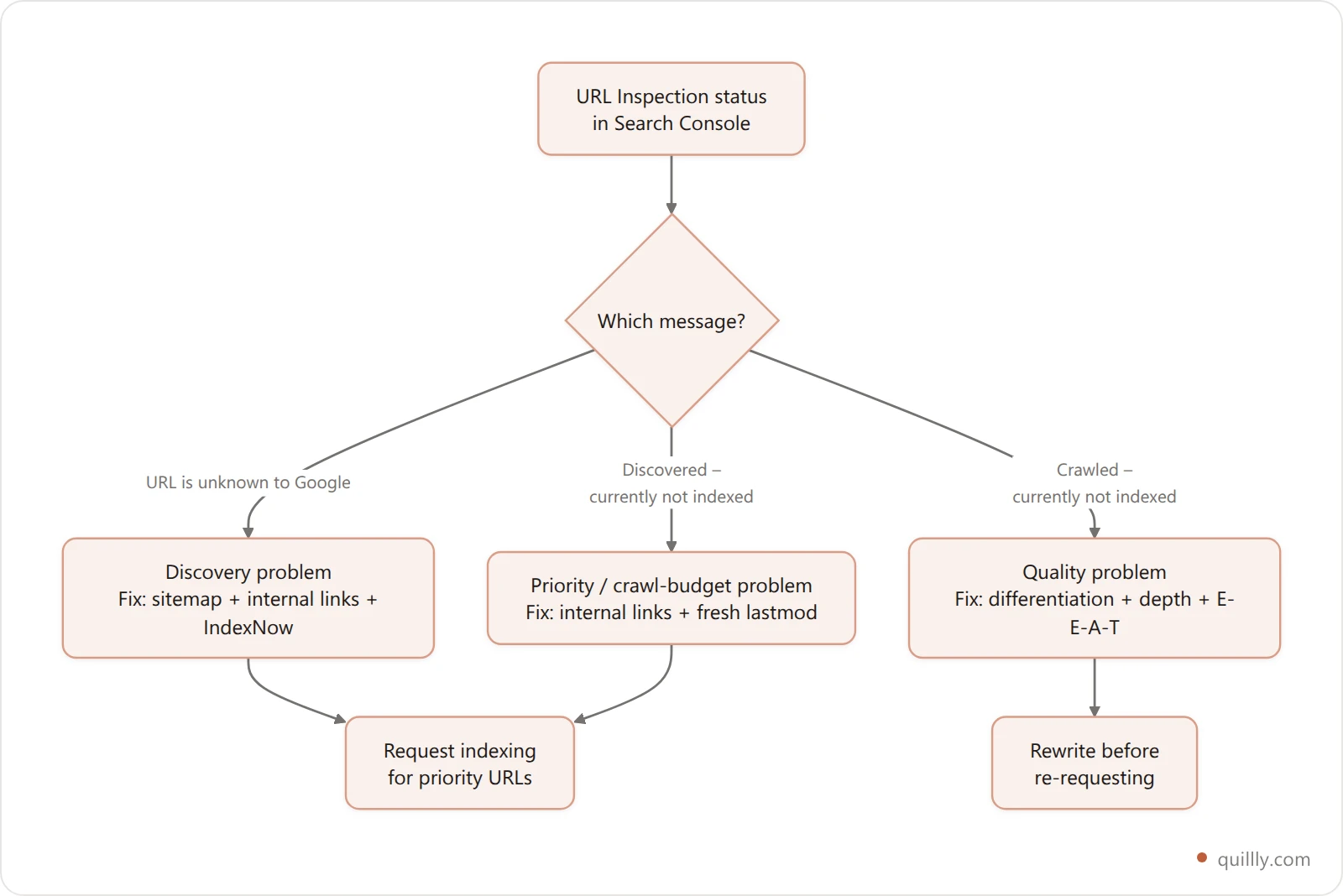
Diagnose first. If you throw indexing tactics at a "Crawled – currently not indexed" page, you're pushing on a door marked pull. For a deeper teardown of each status, see our fix stack for when Google won't index your blog.
The 3 indexing tactics that died (and people still use)#
Stop doing these three things today — they range from useless to actively wasteful. This is where most "get indexed fast" guides are dangerously out of date, and following them burns time you could spend on what works.
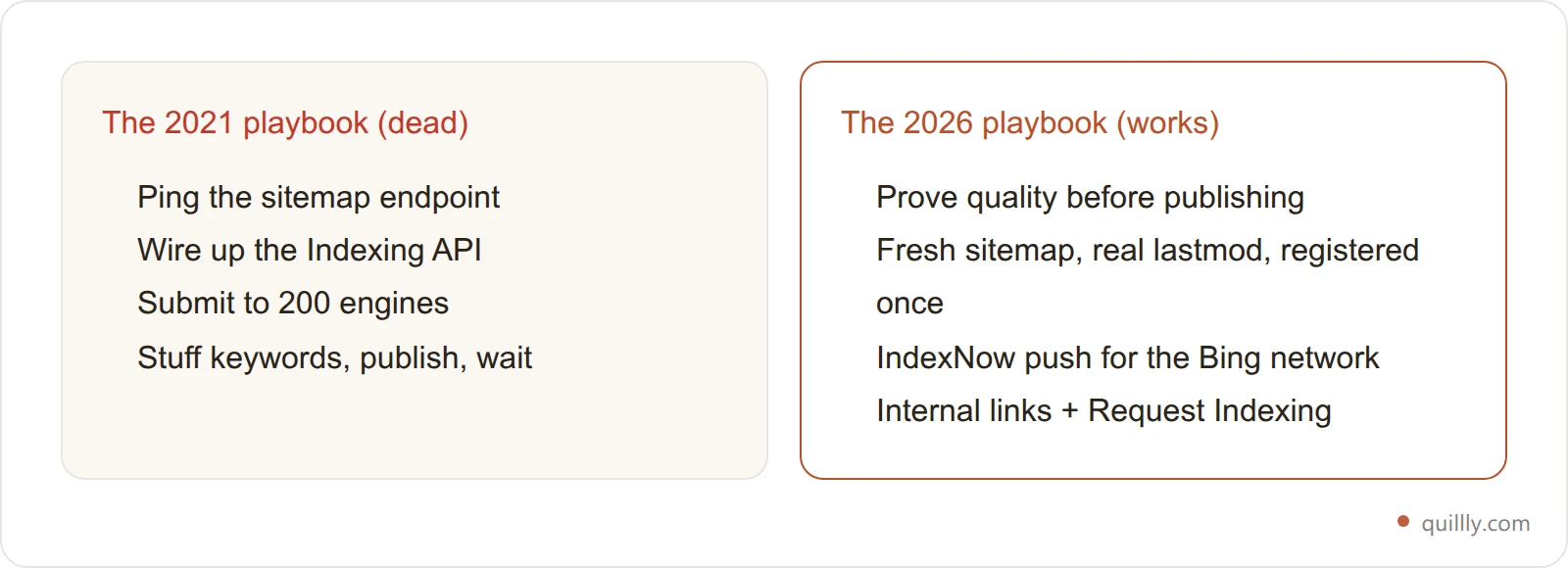
1. Pinging your sitemap. Google announced in June 2023 that the sitemaps ping endpoint was going away, and it now returns a 404. Google's own reasoning: unauthenticated sitemap submissions "weren't very useful" and were "often abused for spam." Any tool or plugin still hitting google.com/ping?sitemap= is calling a dead endpoint.
2. Using the Google Indexing API for blog posts. The Indexing API officially supports only two things: pages with JobPosting structured data and BroadcastEvent embedded in a VideoObject. Not blogs. Not landing pages. Not product pages. Using it out of scope can be ignored, throttled, or counted against you — and it shares one small per-project quota.
3. "Submit to 200 search engines" tools. These fire your URL at directories and defunct engines that send zero traffic and zero authority. It's motion, not progress.
Dead / wrong tactic | Status in 2026 | What to do instead |
|---|---|---|
Sitemap ping ( | Endpoint removed, returns 404 | Register sitemap once in GSC, keep |
Indexing API for blog URLs | Out of scope (JobPosting / BroadcastEvent only) | IndexNow for the fast lane |
"Submit to 200 engines" | Spam directories, no value | Internal links + IndexNow + quality |
Waiting and hoping | Slowest possible path | Request indexing for priority URLs |
Auditing every post for dead tactics by hand gets old fast. Let your AI publish and notify the right engines automatically.
The Push-Pull-Prove model for fast indexing#
Fast indexing in 2026 has three jobs, and every real tactic falls into one of them. I call it the Push-Pull-Prove model, and once you see indexing this way, the whole workflow gets obvious.
Push is instant notification: you tell engines a URL exists the moment it goes live (IndexNow). Pull is invitation: you make it easy and appealing for Google's crawler to come get the page on its own (fresh sitemap, internal links, crawlability). Prove is the part everyone skips: you demonstrate the page deserves an index slot (quality, differentiation, E-E-A-T). Push and Pull get you crawled. Only Prove gets you indexed.
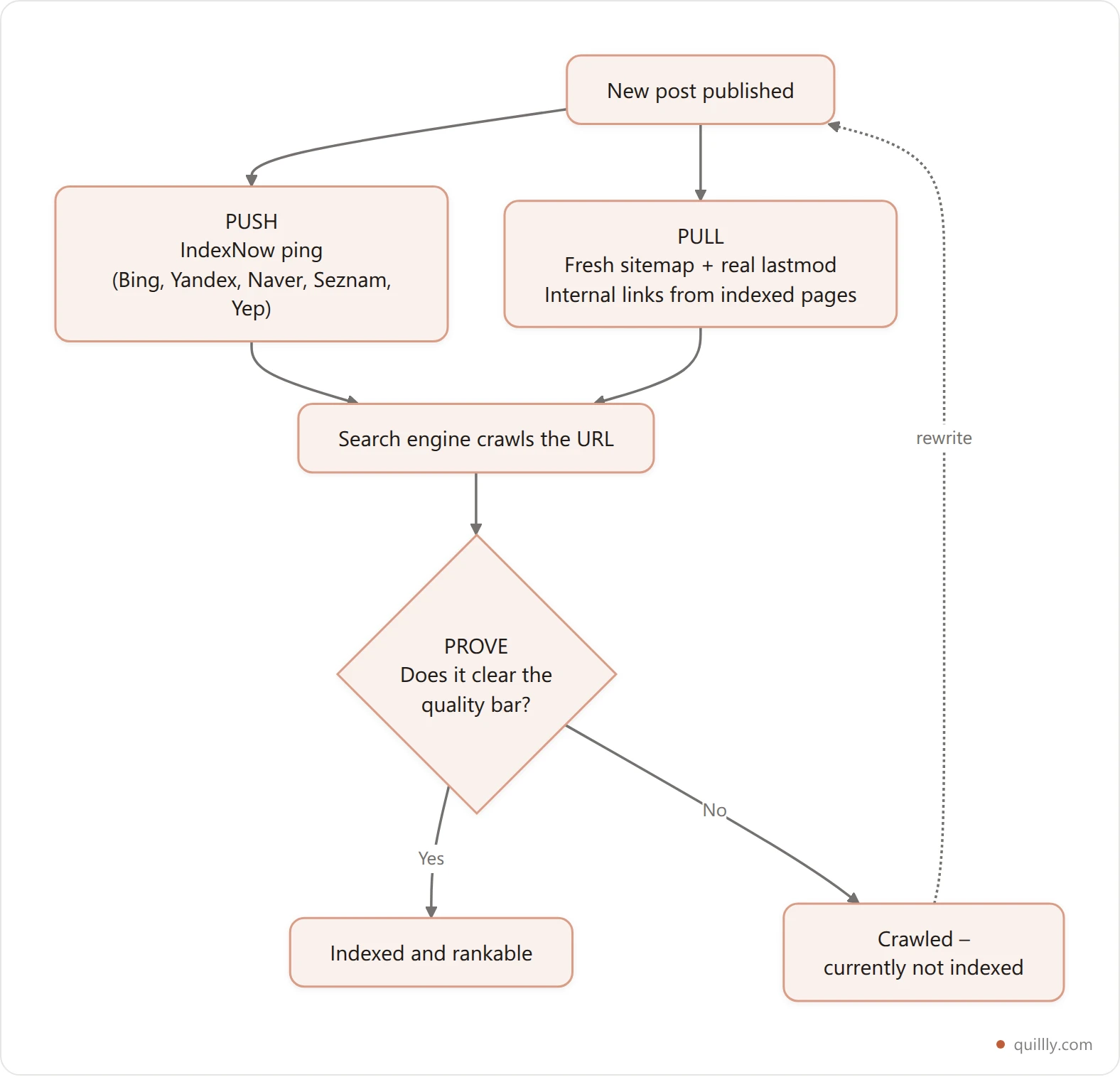
The mistake almost everyone makes is spending 100% of their effort on Push and Pull while ignoring Prove — then wondering why a crawled page still won't index.
Push: IndexNow is the real instant lane#
IndexNow is the one instant-notification protocol that actually works in 2026, so wire it up for every publish. It's an open push protocol, launched in 2021 by Microsoft and Yandex, that lets you notify participating engines the second content changes — no waiting for a crawl to stumble onto it.
One IndexNow POST reaches Bing, Yandex, Naver, Seznam, and Yep at once, and DuckDuckGo, Yahoo, and Ecosia inherit Bing's index. That's most of the non-Google search world covered in a single call. Be honest about the catch: Google does not officially participate in IndexNow. It ran a pilot in late 2024 but has not committed. So IndexNow is your fast lane for everything except Google — which is exactly why you still need the Pull and Prove layers below.
For AI search, this matters more than it looks. ChatGPT search and Copilot lean on Bing's index, so IndexNow is a direct line into AI answer engines. Our deep dive on IndexNow for Bing and ChatGPT indexing walks through the key-file setup end to end.

Pull: a fresh sitemap and internal links do the quiet work#
Since Google won't take a push, you win it over by making your site trivial to crawl — this is the Pull layer, and it's where Google indexing is actually earned. Two levers matter most.
First, one clean XML sitemap with honest **lastmod** dates, registered once in Search Console. Google explicitly uses lastmod as a scheduling signal for URLs it already knows — but only if you're accurate. Stamp every URL with today's date and Google learns to ignore your lastmod entirely. The sitemap should contain only indexable, canonical URLs: no noindex, no redirects, no duplicates.
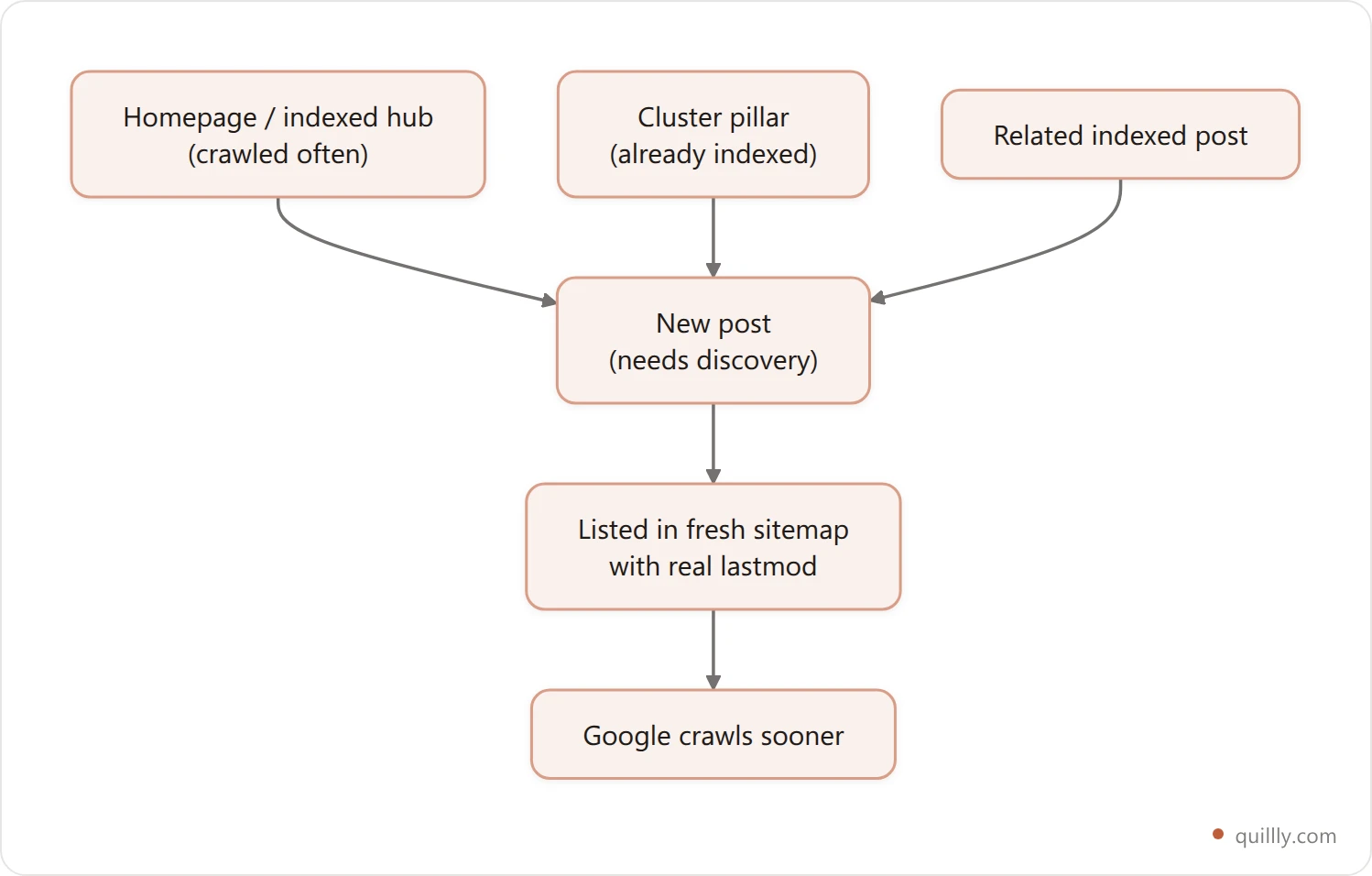
Second, internal links from already-indexed pages. A link from your homepage or a frequently-crawled hub passes crawl equity to the new URL far faster than an orphaned post ever gets discovered. Add two or three contextual internal links the moment you publish. If doing that by hand across a growing library has become the bottleneck, our internal linking tool comparison covers the eight main options and what each one actually costs. If you're building topical clusters, our guide to striking distance keywords shows how to wire new posts into pages that already rank.
Prove: why AI-written blogs get stuck at "crawled, not indexed"#
If your page is crawled but not indexed, no amount of pinging will fix it — you have a quality problem, and this is the layer that decides everything. Google's John Mueller has been blunt about it: "Most of the time when we still crawl something, it doesn't necessarily mean that we will automatically index it." Crawling is Google looking; indexing is Google deciding the page earns space.
This hits AI-published blogs hardest. Mueller has named undifferentiated AI-generated content as a live trigger for the doubts that make Google crawl less and index less. The fix isn't "stop using AI" — it's stop shipping the same generic draft everyone else's AI produces. Add first-hand specifics, real data, a named framework, a point of view. Prove the page exists for a reader, not a keyword.
This is the whole reason a scoring layer sits between "AI wrote it" and "published." A tool like Quillly's check_blog_seo grades depth, structure, and originality signals before the post goes live, so you catch a thin draft while it's still fixable — not three weeks later in a Coverage report.
The 48-hour checklist to get indexed on Google#
Run this checklist on every new post and most will index within 48 hours on an established site. It's the Push-Pull-Prove model turned into an order of operations you can copy.
Prove first. Before publishing, confirm the post says something the top 5 results don't. Thin or derivative? Rewrite — indexing won't save it.
Set a real canonical and make sure the page isn't accidentally
noindex.Add 2–3 internal links from already-indexed pages (homepage, pillar, related post).
Publish, then confirm the URL is in your XML sitemap with an accurate
lastmod.Fire IndexNow to hit the Bing network and AI engines instantly.
Open URL Inspection in GSC, click Request Indexing for this one priority URL.
Wait 48 hours, re-inspect. Indexed? Done. "Crawled – not indexed"? Back to step 1.
Seven manual steps per post adds up fast. Let Quillly run the whole checklist on autopilot.
How to confirm a post actually got indexed#
Don't trust "it feels indexed" — verify it three ways. First, the **site:** operator: search site:yourdomain.com/your-slug. A result means indexed; nothing means keep waiting. It's a rough check, not gospel — Google sometimes lags here.
Second, URL Inspection in Search Console is the source of truth. "URL is on Google" means indexed. Anything else tells you exactly which of the three states you're in, so you know whether to push, pull, or prove.
Third, the Pages (Coverage) report shows patterns across your whole site. If dozens of URLs sit in "Crawled – currently not indexed," that's not bad luck — it's Google signaling a site-wide quality doubt, and it's your cue to raise the bar, not to ping harder. Watching indexing alongside rankings over time is easier with a no-code rank tracker than with manual site: checks.
Let your AI handle the whole indexing stack#
Here's the shortcut: the entire Push-Pull-Prove stack is mechanical, so automate it. Every step above — a fresh per-type sitemap with real lastmod, an IndexNow ping on publish, canonical and noindex hygiene, internal-link suggestions, and a pre-publish quality score — is a rule a machine can run better than a human doing it by hand at midnight.
That's the layer Quillly sits in. Your AI writes the post in Claude or ChatGPT; publish_content ships it to your own domain and fires the sitemap refresh and IndexNow ping automatically across Google, Bing, Yahoo, Yandex, Naver, Seznam, and Yep — the same routine every time you want to get indexed on Google fast. You never touch a ping endpoint or a dead API. If you're publishing straight from an assistant, our guide to getting cited in Google AI Mode pairs well with this one — indexing gets you in, AEO gets you quoted.
See how prompt-to-published indexing works.
Frequently Asked Questions#
How long does Google take to index a new blog post?#
On an established, healthy site, a quality post with internal links and an IndexNow push often indexes within 24–48 hours. New or low-authority sites can take days to weeks. The single biggest variable isn't a technical trick — it's whether Google trusts your site overall and whether the specific page clears its quality bar.
Does pinging my sitemap still get me indexed faster?#
No. Google removed the sitemap ping endpoint after announcing the change in June 2023, and requests to it now return a 404. The value of a sitemap comes from registering it once in Search Console and keeping lastmod dates accurate, which Google uses to schedule crawls — not from repeatedly pinging it.
Can I use the Google Indexing API for blog posts?#
Not properly. The Indexing API officially supports only pages with JobPosting structured data or BroadcastEvent in a VideoObject. Using it for blogs, product pages, or landing pages is out of scope; Google may ignore the request or throttle it, and it draws on a small shared quota. Use IndexNow and internal links instead.
What does "Crawled – currently not indexed" mean?#
It means Google fetched your page, evaluated it, and chose not to index it — a quality judgment, not a technical error. Common causes are thin or duplicate content, undifferentiated AI text, or a site-wide quality doubt. The fix is to make the page genuinely more useful than what already ranks, then request indexing again.
Does IndexNow get me indexed on Google?#
Not directly. Google does not officially participate in IndexNow as of 2026, though it ran a pilot in late 2024. IndexNow instantly notifies Bing, Yandex, Naver, Seznam, and Yep — which also feeds AI engines like ChatGPT search and Copilot through Bing. For Google, rely on a fresh sitemap, internal links, quality, and the URL Inspection tool.
Why are my AI-written posts not getting indexed?#
Usually because they read like everyone else's AI output. Google's John Mueller has named undifferentiated AI-generated content as a trigger for the quality doubts that make Google crawl and index less. AI drafting is fine — publishing the generic first draft is the problem. Add original data, first-hand detail, and a clear point of view before you hit publish.
How many times should I request indexing for one URL?#
Once per meaningful change. Clicking "Request Indexing" repeatedly on an unchanged URL does nothing and can look spammy. Request it once after publishing. If it lands in "Crawled – currently not indexed," improve the page first, then request again — the rewrite, not the re-request, is what changes the outcome.
The bottom line on getting indexed fast#
Three takeaways to act on today. First, stop using dead tactics: the sitemap ping endpoint returns a 404, and the Indexing API covers only JobPosting and BroadcastEvent — neither touches your blog. Second, run the Push-Pull-Prove model: IndexNow pushes to the Bing network, a fresh sitemap plus internal links pulls Google's crawler, and quality proves the page deserves the slot. Third, respect the quality gate — most "crawled, not indexed" pages fail because they're undifferentiated, and no ping fixes that.
Get those right and a healthy site indexes new posts in 24–48 hours instead of never. The work is mechanical, repetitive, and easy to skip at midnight — which is exactly why it's worth automating.