

Almost every hosting company sells an "SEO-optimized" plan. Almost none of them will tell you which part of SEO their servers actually touch — and one corner of the industry still sells a product Google stopped caring about more than a decade ago.
Here's the short version. Web hosting for SEO comes down to four measurable things: how fast your server responds, whether it stays up, whether it serves valid HTTPS, and — weakly — where it physically sits. Everything else on a hosting sales page is marketing. A slow host can suppress how much Google crawls you. A fast host does not buy you rankings.
That distinction is the whole article. Hosting is a floor, not a lever. You can fall through the floor, and if you do it costs you real indexed pages — but no amount of extra RAM lifts you above it.
What web hosting for SEO actually changes#
The short answer: web hosting for SEO changes four things — server response time, uptime, HTTPS validity and server location. The first two affect how much Google crawls you. The third is table stakes. The fourth is a weak geotargeting hint. Nothing else on a hosting plan is a search signal.
People search this a dozen ways — seo and web hosting, web host for seo, seo and hosting, even hosting seo web — and they all resolve to the same question: does the server I pay for change what Google does with my site?
It does, through exactly four channels. Here they are with what Google has actually published about each, rather than what a hosting affiliate page claims.
Factor | What it affects | How much it matters | Google's own position |
|---|---|---|---|
Server response time (TTFB) | Crawl rate, page experience | High — the one that bites | Faster responses let Google "read more content from your site" |
Uptime and 5xx errors | Crawl rate, deindexing risk | High if it's chronic | 5xx and 429 responses make Google "crawl less" |
HTTPS / valid TLS | Trust, browser warnings | Table stakes | Part of the documented page experience signals |
Server location / IP | Geotargeting hint | Low | "Not a definitive signal" |
Notice what is not on that list: disk type, "unlimited bandwidth", control panel brand, dedicated IP addresses, or the word "SEO" in the plan name. None of those are signals. They are differentiators a host invented because the four real ones are hard to compete on honestly.
How a slow server turns into fewer indexed pages#
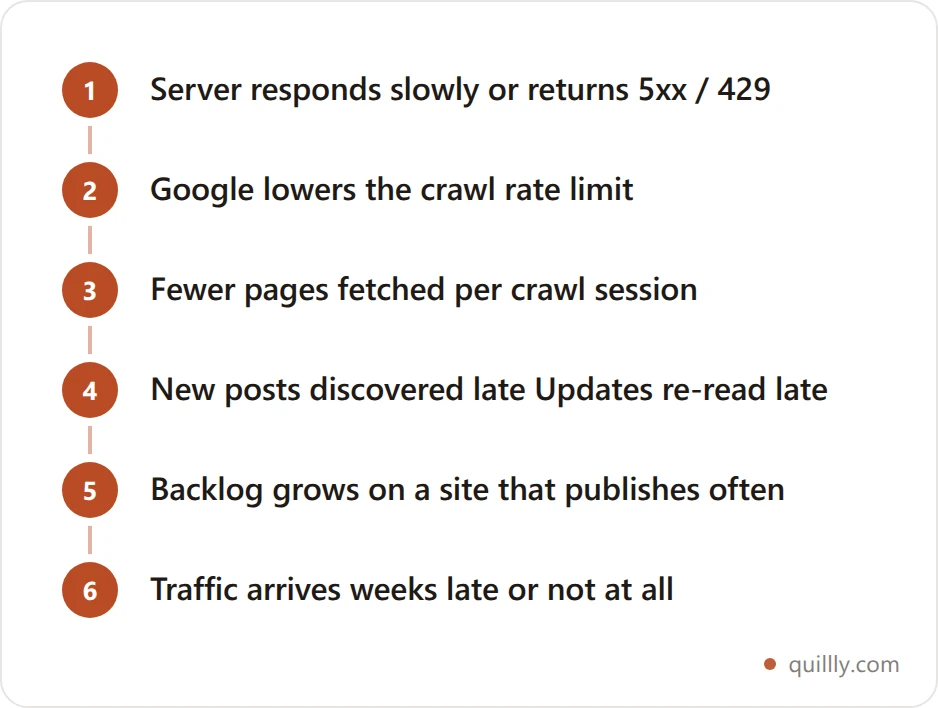
The short answer: Google raises and lowers how much it crawls based on how your server responds. Slow replies, 5xx errors or 429 rate-limiting signals push the crawl rate down, so new posts get discovered later and updates get re-read later. Speed doesn't add rankings; it removes a delay.
This is the mechanism worth understanding, because it's the only way hosting quietly costs you traffic.
Google documents a crawl rate limit that moves in both directions. When your site "responds consistently and its response times (including latency and Time-to-First-Byte) remain stable or improve, the limit goes up." When the site slows down "or responds with server errors (5xx HTTP status codes) or rate-limiting signals (such as HTTP 429), the limit goes down and Google crawls less."
Less crawling means new posts get picked up later and updated posts get re-read later. On a small blog that's an annoyance. On a site publishing daily it compounds into a backlog.
Now the important caveat, straight from the same Google guide: crawl budget is "intended primarily" for large sites — 1 million+ pages changing weekly, or 10,000+ pages changing daily. Google is explicit that if your site "doesn't have a large number of pages that change rapidly... you don't need to read this guide."
So if you run a 60-post blog, a merely average host is not throttling your indexing. Something else is. That's worth ruling out before you migrate anything — our 284-page test of "Crawled – currently not indexed" walks through what actually causes that status, and hosting was rarely the culprit.
Three hosting myths that cost real money#
The gap between the four real factors and the sales pitch is where money gets wasted.
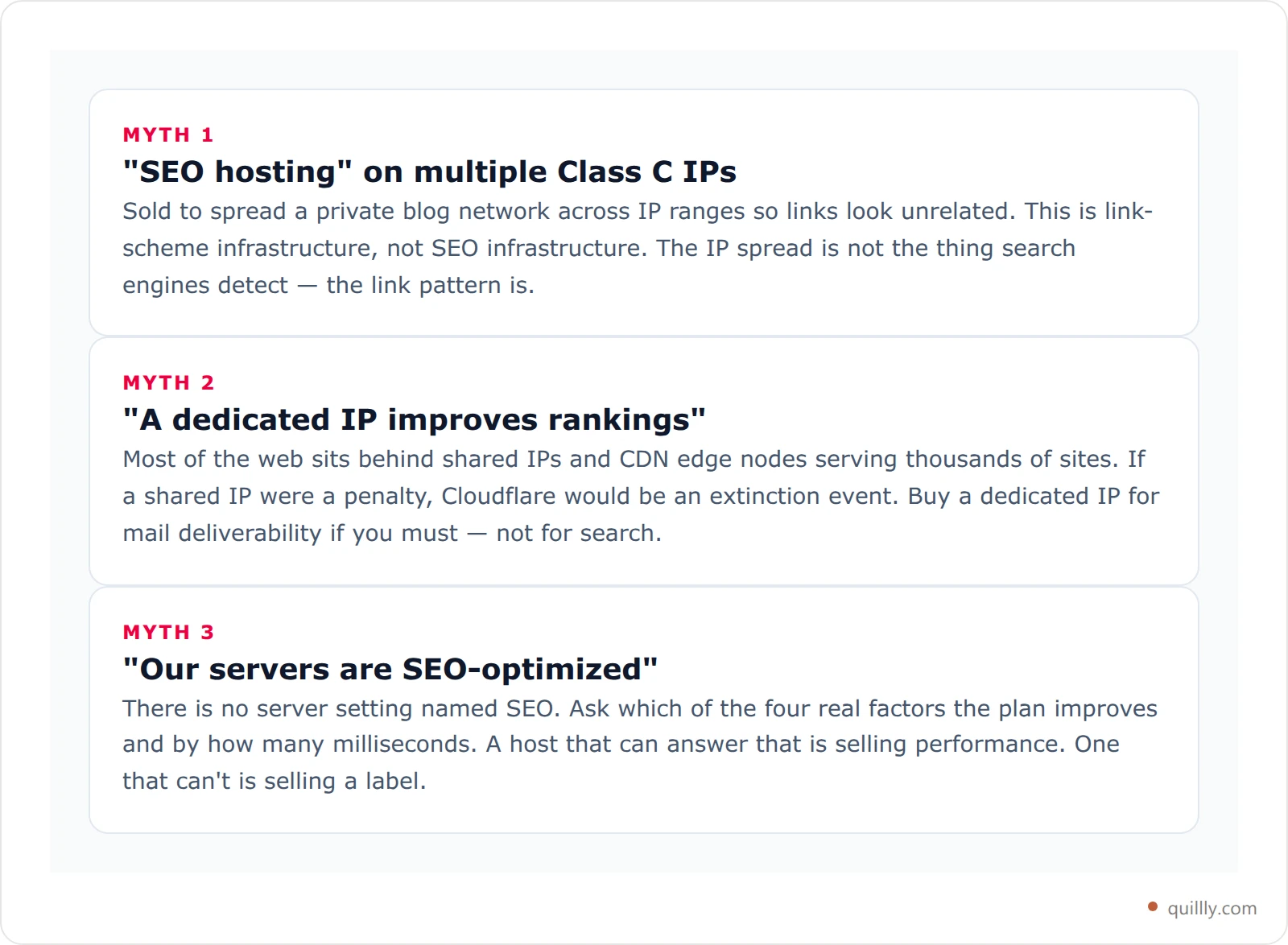
The Class C IP pitch deserves special mention because it is still visibly for sale on the first page of results for this very query. It's aimed at people building private blog networks. If that's not you, you're buying a workaround for a problem you don't have.
Stop paying for hosting you don't need
Quillly serves your blog under your own domain through a one-line reverse proxy — so your posts inherit whatever infrastructure your main site already runs on. No second host, no second bill.
Start a 14-day free trialServer location: a real signal, a weak one#
Server location is the one myth-adjacent factor that is actually real — just far smaller than it's sold as.
Google's multi-regional guidance lists it plainly: "Server location (through the IP address of the server). The server location is often physically near your users and can be a signal about your site's intended audience." Then it immediately qualifies it: "Some websites use distributed content delivery networks (CDNs) or are hosted in a country with better webserver infrastructure, so it is not a definitive signal."
Google's own ranked order puts country-code domains first as "a strong signal," then hreflang, then server location, then everything else. The practical read: if you serve one country and you're choosing between two otherwise identical hosts, pick the nearer region for the latency win. If you need real geotargeting, do it with hreflang and ccTLDs — the explicit methods Google asks you to use — and stop thinking about datacenters.
Shared, VPS, managed, or static: what each tier actually fixes#
Tiers are easier to reason about when you ask what failure mode each one removes, rather than what it costs.
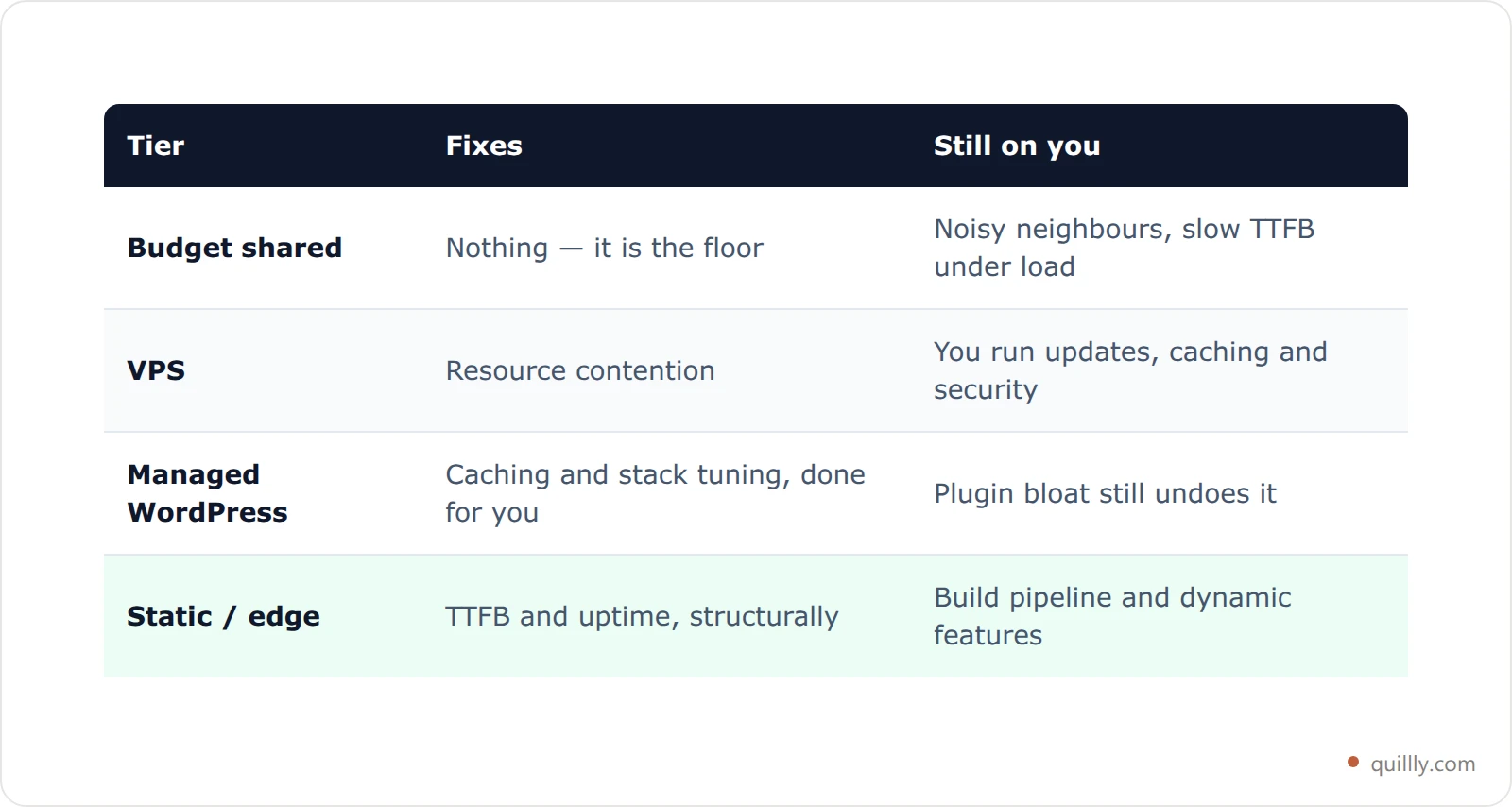
The honest summary: moving from genuinely bad shared hosting to almost anything else is a real improvement. Every upgrade after that has sharply diminishing returns for search specifically. A $200/month plan and a $20/month plan look identical to Googlebot if both answer in 300ms.
And if your pages are slow because of what the platform does before it serves them, no hosting tier saves you. That's a CMS problem, and we sorted the platforms by how they actually behave in our CMS SEO comparison.
How to test your web host for SEO in ten minutes#
The short answer: measure time-to-first-byte from two or three regions, compare a static file against a full page to separate server from application, check Search Console for 5xx patterns, and confirm HTTPS is clean. If TTFB is stable and errors are near zero, your host is fine.
Before you migrate anything, measure. Most "my host is slow" hunches don't survive contact with a stopwatch.
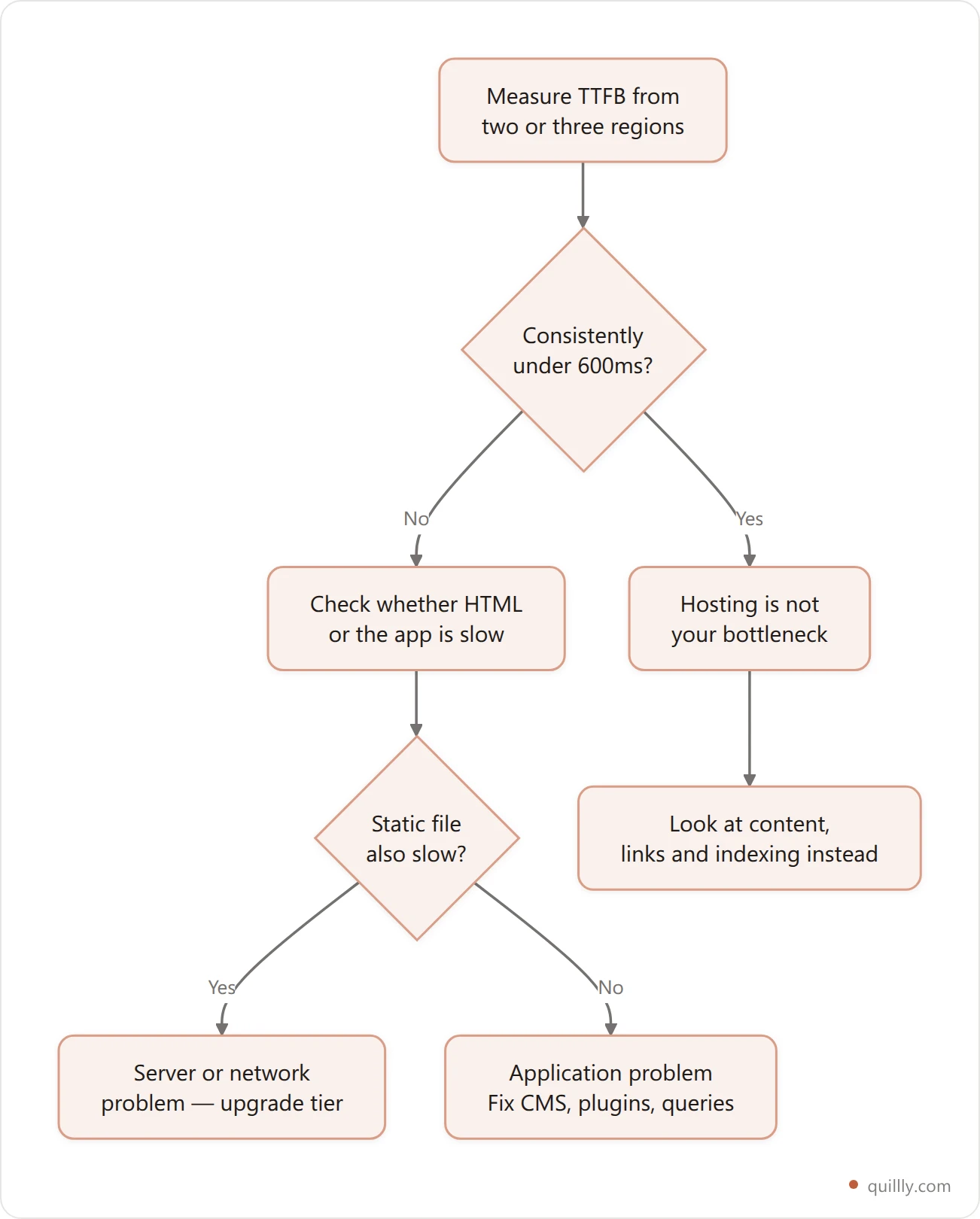
Concretely:
Time the first byte.
curl -o /dev/null -s -w "%{time_starttransfer}\n" https://yoursite.com/gives you TTFB from wherever you run it. Run it a few times, from more than one location. Google's own TTFB guidance is the reference for what good looks like.Separate the server from the app. Time a plain static asset alongside a full page. If the static file is fast and the page is slow, your host is fine and your software isn't.
Check your error rate, not just your speed. Search Console's crawl stats report shows 5xx responses over time. An occasional blip is normal; a pattern is the thing Google reacts to. Google's HTTP status code reference covers how each response is treated.
Read your access logs — carefully. A surprising share of "traffic" hammering a small server is fake crawlers spoofing Googlebot. Before you upsize to handle the load, confirm who's actually knocking; verifying a crawler takes about a minute.
Confirm HTTPS is clean. Not just present — no mixed content, no expired chain, no redirect chain three hops long.
If TTFB is stable and errors are near zero, hosting is done as an SEO topic for you. Genuinely. Go spend the effort somewhere it compounds, like the items in our blog SEO checklist.
When web hosting for SEO is the wrong thing to fix#
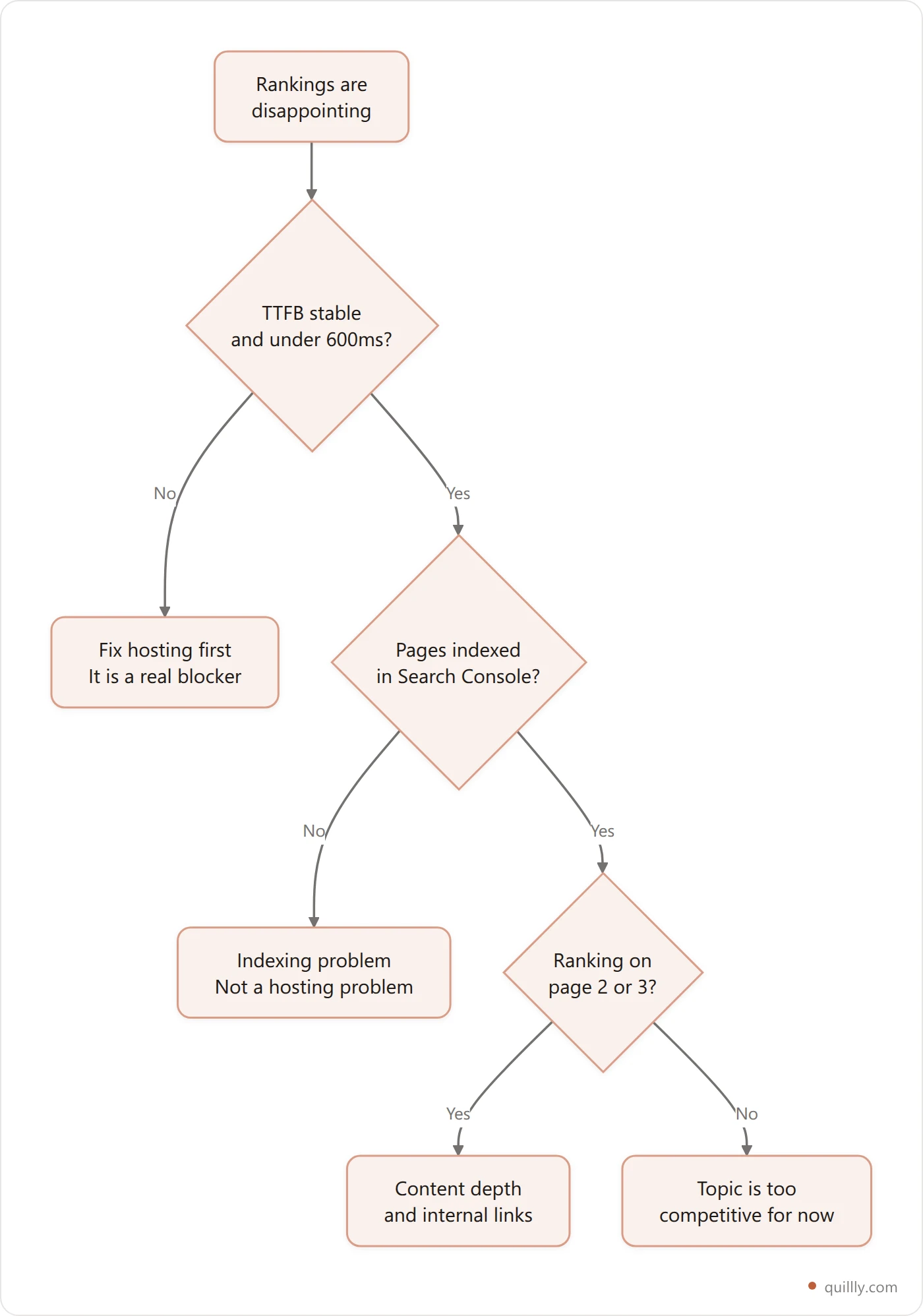
The short answer: once your server is stable and quick, hosting stops being an SEO lever. Infrastructure can stop you being crawled, but it can't make a page worth ranking. If positions disappoint and your TTFB is healthy, the cause is the content, the query or the links pointing at it.
Here's the uncomfortable part for anyone who arrived hoping to buy a fix.
Hosting is infrastructure, and infrastructure has a ceiling: it can stop you from being crawled, but it cannot make you worth ranking. If your pages aren't earning positions, the cause is almost always the page, the query it targets, or the links pointing at it — not the machine serving it.
There's also a structural option people miss. You don't have to host your blog on the same box as your app. Serving your posts through a reverse proxy means your blog inherits whatever infrastructure your main site already runs on, and the SEO equity stays on your domain because the URLs stay on your domain. That's how Quillly works: one rewrite rule pointing /blog at Quillly, with copy-paste guides for Vercel, Cloudflare, Nginx, Apache, Next.js and Netlify. A verify step publishes a test post, fetches it back through your proxy, and names the exact line that's wrong if the check fails.
The result is a blog with no second host, no plugin stack to keep patched, and no separate hosting bill — on a $19/month plan that also handles SEO scoring and submits new posts to eight search engines.
Frequently Asked Questions#
Does web hosting directly affect Google rankings?#
Only indirectly. Hosting influences server response time, uptime and HTTPS validity, which feed into crawl rate and page experience. There is no ranking signal called "hosting quality." A faster server removes a possible obstacle; it does not add positive ranking value on its own.
Is shared hosting bad for SEO?#
Not inherently. Shared hosting becomes an SEO problem only when it produces slow responses or frequent 5xx errors under real traffic. Millions of well-ranking sites sit on shared IPs. Measure your TTFB and error rate before assuming the plan type is the issue.
Do I need a dedicated IP address for SEO?#
No. Shared IPs are the norm across CDNs and most hosting, and search engines account for that. A dedicated IP can help with email deliverability or certain compliance requirements, but it is not a search ranking factor and should not drive your hosting decision.
Does server location matter for SEO?#
A little. Google lists server location as one geotargeting signal but calls it "not a definitive signal," noting that CDNs make it unreliable. Nearby servers help latency, which is worth having. For genuine country targeting, use hreflang or a country-code domain instead.
What TTFB should I aim for?#
Under roughly 600ms is a reasonable working target for most sites, and consistency matters as much as the number. A server that answers in 400ms every time is better for crawling than one averaging 300ms with regular spikes into seconds.
Will moving to a faster host recover lost traffic?#
Usually not, unless the traffic loss lined up with measurable server problems. Check Search Console for a matching rise in 5xx responses or crawl-rate decline first. If neither moved, the drop came from content, competition or an algorithm update, and migrating hosts will change nothing.
Key Takeaways#
Web hosting for SEO is a floor you need to stay above, not a lever you can pull. Get server response time, uptime and HTTPS right, treat server location as a tiebreaker, and ignore every product sold with "SEO" in the plan name. Then measure — because most hosting hunches are wrong, and the ten minutes it takes to check is cheaper than a migration you didn't need.
If it turns out your host is fine, that's the good outcome. It means the next win is in your content, and that's a problem you can actually write your way out of.


