

Your bandwidth bill climbs. Your access log fills with hits labelled Googlebot. And Search Console shows the same page count it showed last month. Heavy crawling plus zero indexing movement is the classic signature of something wearing Googlebot's name and nothing else.
A fake Googlebot is any client that sends Googlebot's user-agent string without coming from Google. That string is just a text header, so anyone can copy it in one line of code. The only reliable check is a DNS round trip: reverse-resolve the visiting IP, confirm the hostname ends in googlebot.com or google.com, then forward-resolve that hostname back to the same IP.
This guide walks through that check, the faster IP-list shortcut, how to read your logs for impostors, and what to do with the ones you catch.
What a Fake Googlebot Actually Is#
Every HTTP request carries a User-Agent header that the client writes about itself. Nothing validates it. A scraper can copy the Googlebot user agent string with a single line in its request config, and your server has no way to disagree based on the header alone.
Google says this plainly in its own documentation: you verify a crawler by checking where the request came from, never by trusting what it calls itself. Google's verification guide treats the user agent as a label, not evidence.
Impostors usually fall into three buckets:
Content scrapers copying your posts to republish elsewhere, using Googlebot's name because most sites wave it through.
SEO and monitoring tools crawling competitor sites, some of which spoof Googlebot to see what you serve search engines.
Vulnerability scanners probing for admin paths and stale plugins, hiding inside traffic you're unlikely to block.
There's a fourth case that isn't malicious at all: Google runs many different crawlers, and some legitimate ones — like tools that fetch a page on a user's behalf — don't come from Googlebot's IP ranges. Knowing which is which is the whole job.
Why Fake Googlebot Traffic Costs You Real Money#
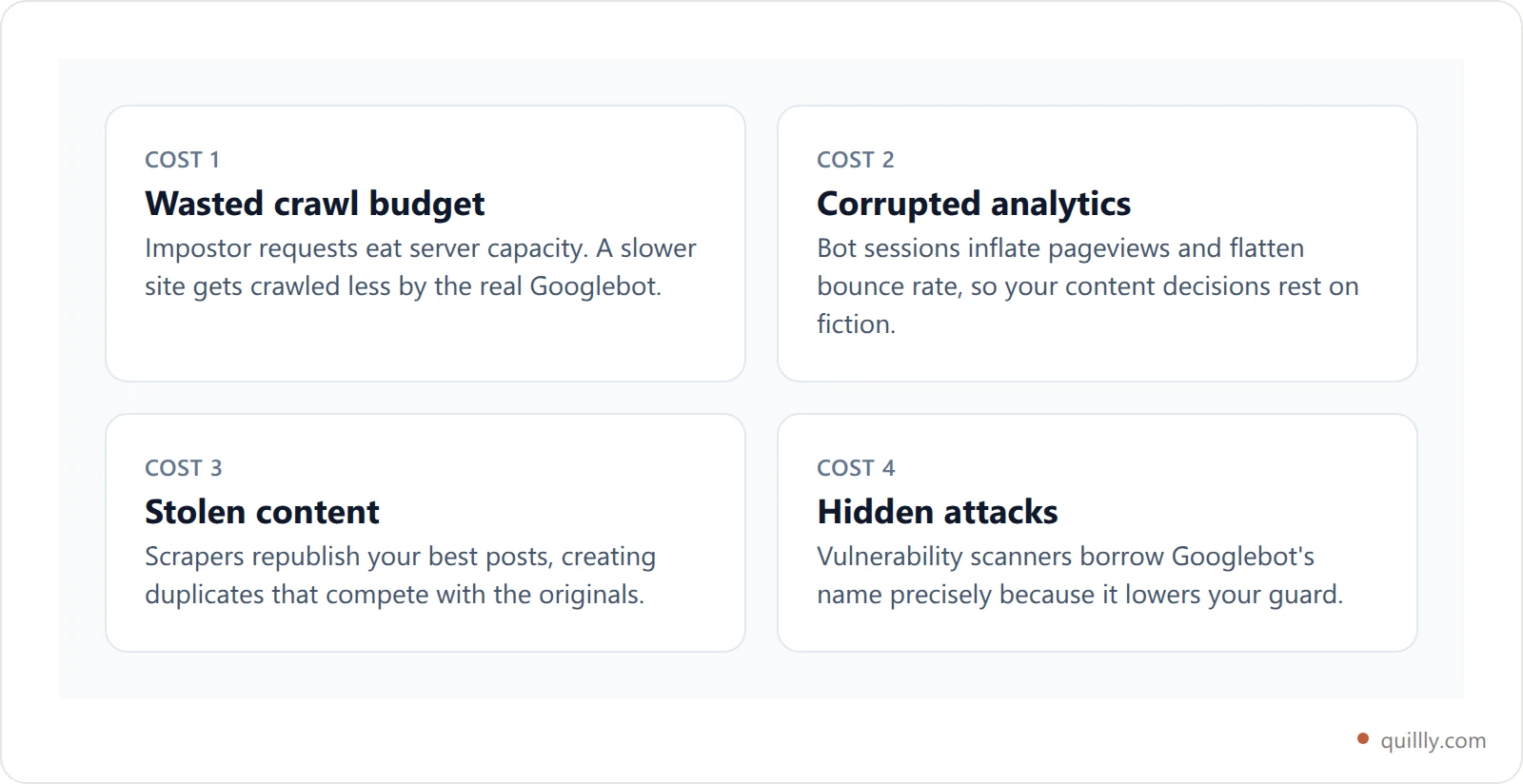
It's tempting to shrug this off as background noise. Four reasons not to:
It burns crawl budget you paid for. Every impostor request consumes server resources that real crawlers might have used. On a large site, crawl budget is a genuine constraint, and a slow server makes Google crawl less.
It corrupts your analytics. If bot traffic lands in your reporting, your sessions, bounce rate and top-pages list all drift away from what humans actually did.
It feeds content theft. Scraped copies of your posts compete with your originals, which matters most on the pages you've invested the most in.
It hides real attacks. A scanner labelled Googlebot gets less scrutiny in a log review than the same scanner labelled python-requests.
The Only Reliable Way to Verify Googlebot#
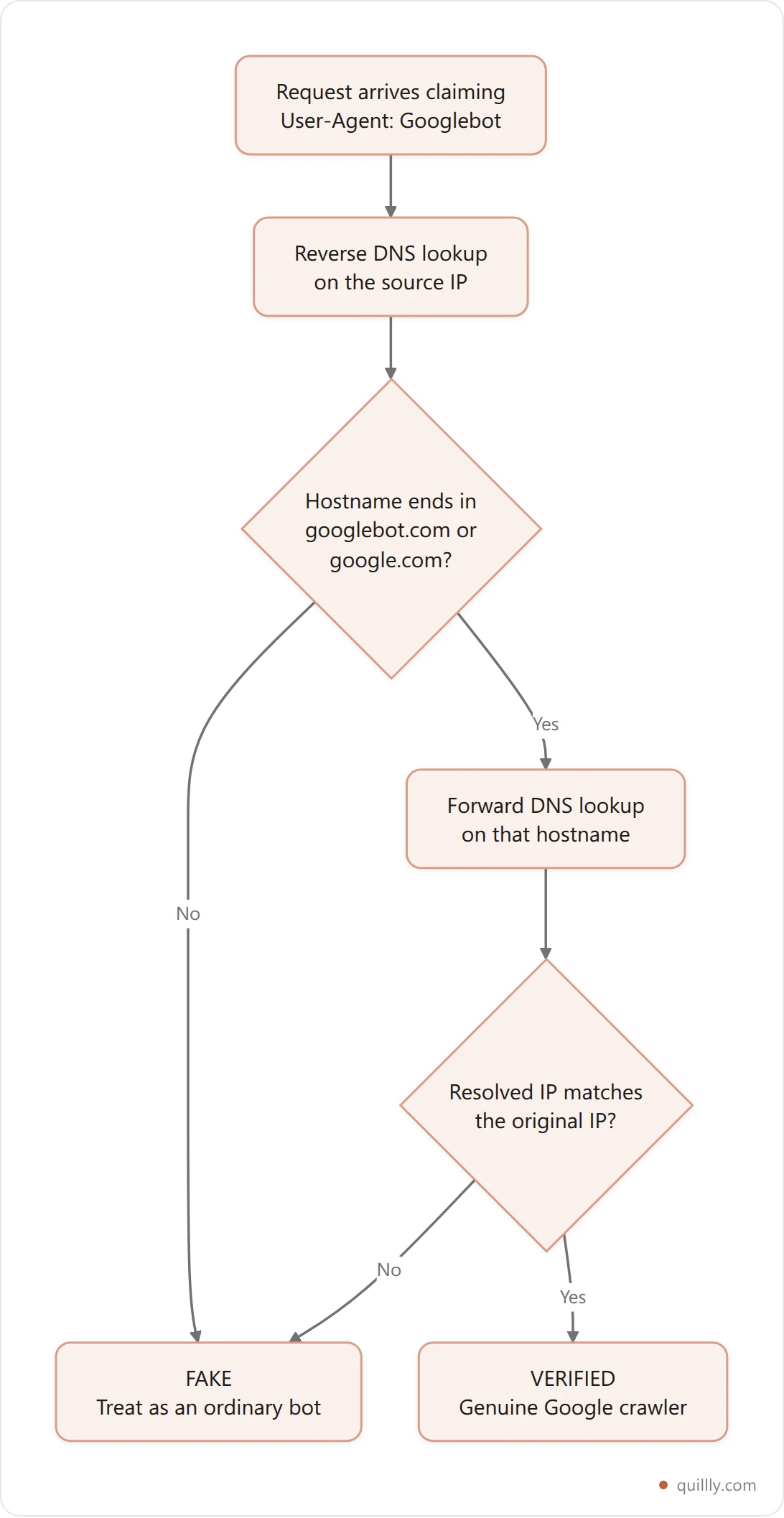
The check Google endorses is a two-step DNS round trip, and both steps matter.
Step one — reverse DNS. Take the IP address from your log and ask what hostname it resolves to. A real Googlebot IP resolves to a hostname ending in googlebot.com or google.com.
Step two — forward DNS. Take that hostname and resolve it back to an IP. It must match the IP you started with.
Step two is the part people skip, and it's the part that closes the hole. Reverse DNS records are controlled by whoever owns the IP block, so an attacker can point their own reverse record at a convincing-looking hostname. What they can't do is make Google's DNS return their IP for that hostname. The forward lookup is what makes the pair trustworthy.
Verify Googlebot From the Command Line#
You can run both steps by hand in about ten seconds. Start with the reverse lookup on an IP pulled from your log:
host 66.249.66.1
1.66.249.66.in-addr.arpa domain name pointer crawl-66-249-66-1.googlebot.com.
Then forward-resolve the hostname it gave you:
host crawl-66-249-66-1.googlebot.com
crawl-66-249-66-1.googlebot.com has address 66.249.66.1
If the address that comes back is the IP you started with, the crawler is genuine. If either step fails — no hostname, a hostname on some other domain, or a mismatched address — you're looking at a fake Googlebot.
A failing check looks like this:
host 203.0.113.45
45.113.0.203.in-addr.arpa domain name pointer scanner.example-host.net.

-> hostname is not googlebot.com or google.com, so this one is fake
On a busy site you don't want to do this per request. Cache the verdict per IP for a few hours: Googlebot's addresses are stable enough that repeating a DNS round trip on every hit just adds latency to your own responses.
Cleaning up who gets to crawl you is only half the picture. The other half is seeing which pages the engines actually kept, page by page, instead of inferring it from crawl volume.
The Faster Method: Google's Published IP Ranges#
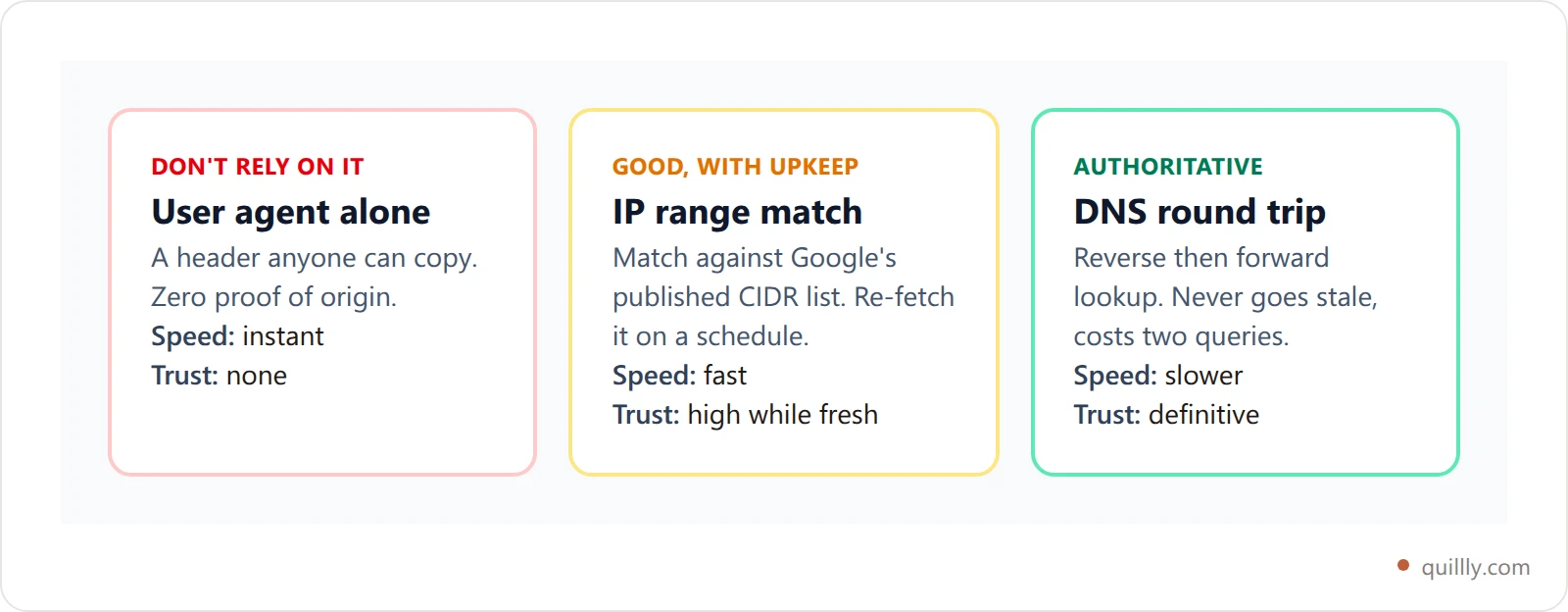
Google publishes its crawler IP ranges as a JSON file you can fetch and match against directly — googlebot.json lists the CIDR blocks Googlebot crawls from. Matching an IP against that list avoids the DNS round trip entirely.
The trade-off is freshness. The file changes over time, so you need to re-fetch it on a schedule rather than hardcoding the ranges into your firewall and forgetting about them. The DNS check never goes stale; the IP list is faster but needs maintenance.
If your site sits behind a CDN, check whether the work is already done for you. Cloudflare, for one, maintains a verified bots list and does this validation at the edge before traffic reaches your origin.
How to Spot a Fake Googlebot in Your Logs#
Before you verify anything, a log skim usually tells you where to look. Real Googlebot and its impostors behave differently.
Genuine Googlebot requests robots.txt early and honours what it finds. It spreads requests out to avoid hammering your server. It follows links through your site structure. It comes from a narrow set of IP ranges that reverse-resolve cleanly.
Impostors tend to ignore robots.txt completely, fire requests in dense bursts, hit URL patterns no link points at — /wp-admin/, /.env, /backup.zip — and arrive from consumer ISPs, cheap hosting or residential proxy pools.
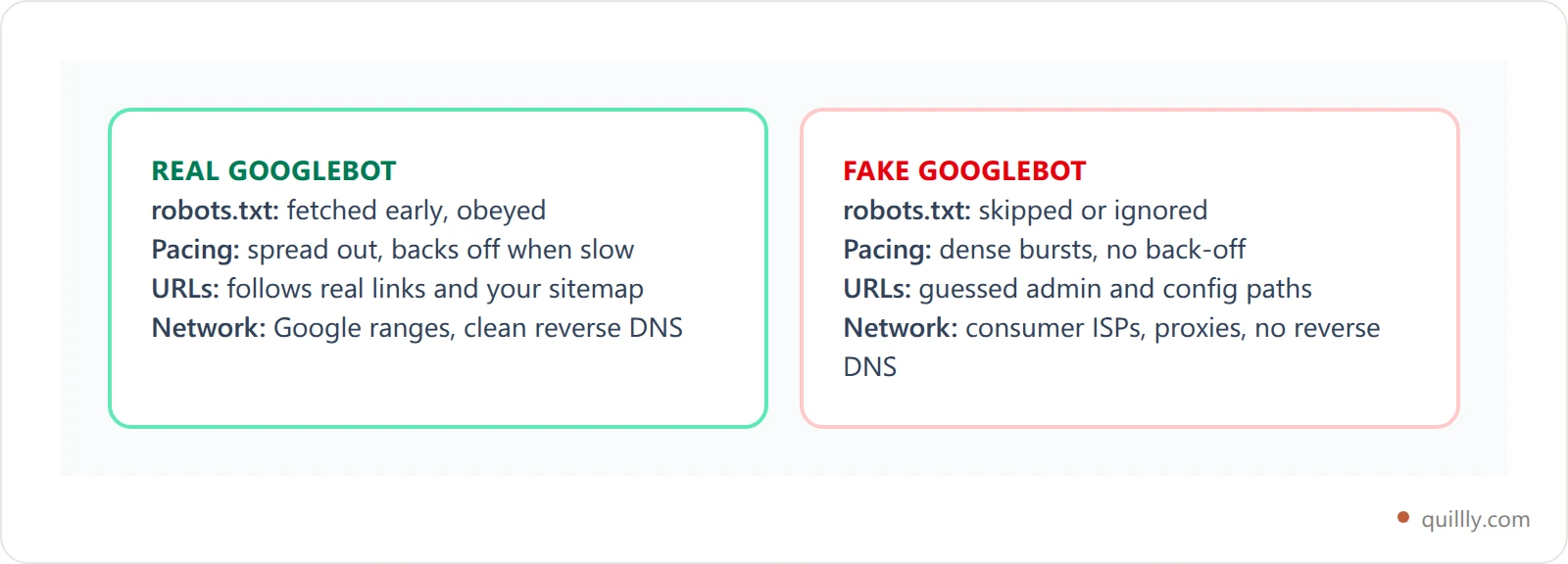
None of these signals proves anything on its own — treat them as a shortlist, then run the DNS check on the addresses that look wrong. If you want the broader picture of which crawlers are worth allowing at all, our guide on whether to block AI crawlers works through the same trade-off for the newer bots.
What to Do When You Catch One#
Resist the urge to block everything at once. A rule written in anger is how people accidentally block the real Googlebot and watch their rankings fall.
Work through it in order: verify first, then decide based on what the client is actually doing. Plenty of unverified bots are harmless.
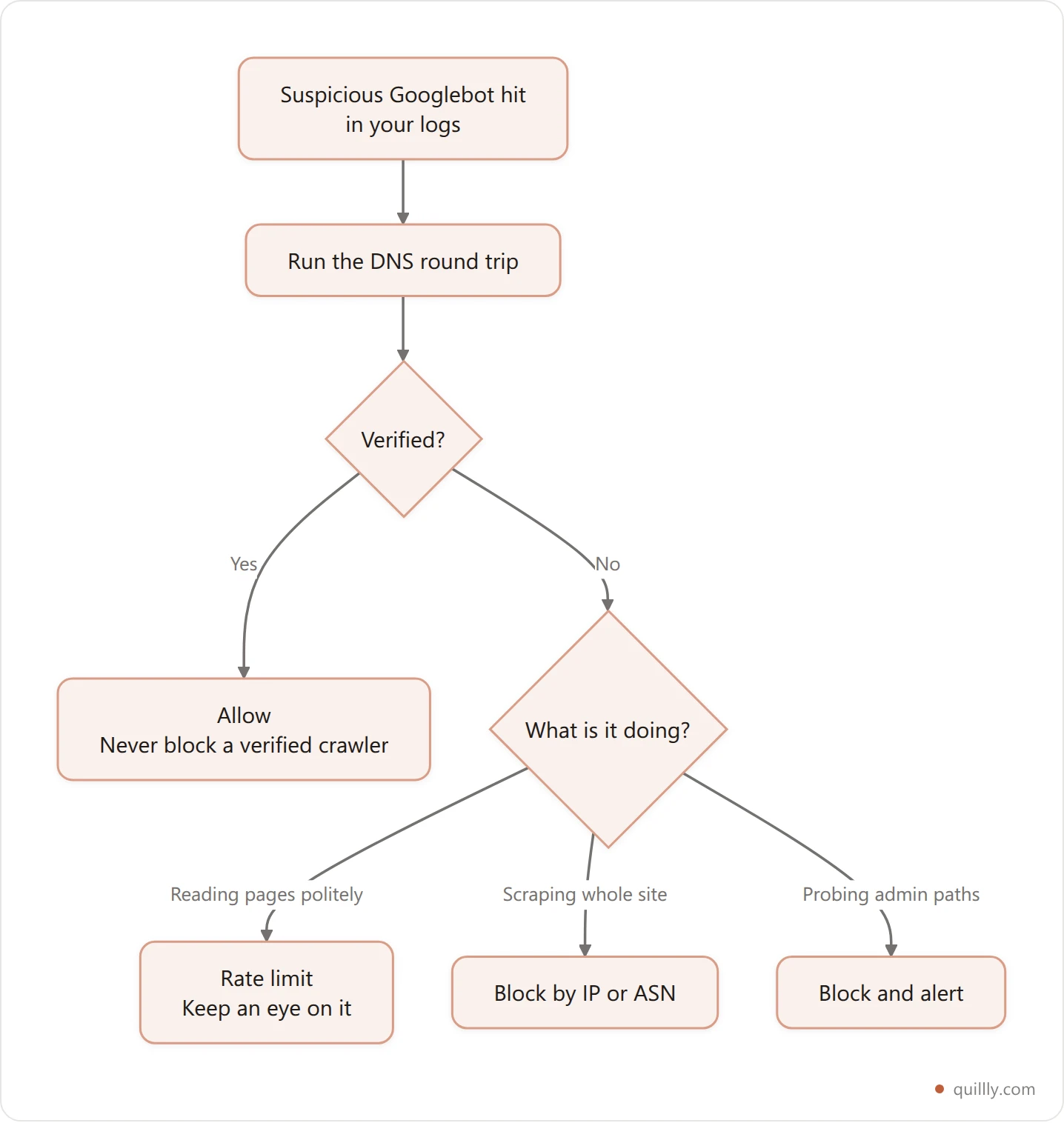
Three rules worth keeping:
Never serve different content based on the user agent alone. Deciding what to show from an unverified header is how sites end up cloaking by accident, and cloaking is a policy violation with real consequences.
Block by network, not by name. Blocking the string
Googlebotblocks the real one too. Block the IP or the ASN behind the bad traffic.Log your blocks. If indexing changes after you tighten a rule, you'll want to see exactly what you shut out.
Know what actually got indexed, not just what got crawled
Your server log tells you who visited. Quillly tells you which pages the search engines actually kept — indexing coverage, keyword positions and traffic for every post, in one dashboard.
Start a 14-day free trialHow to View a Page as Googlebot, Safely#
Once you've sorted the impostors out, the opposite question comes up: how do you see your own page the way Google sees it?
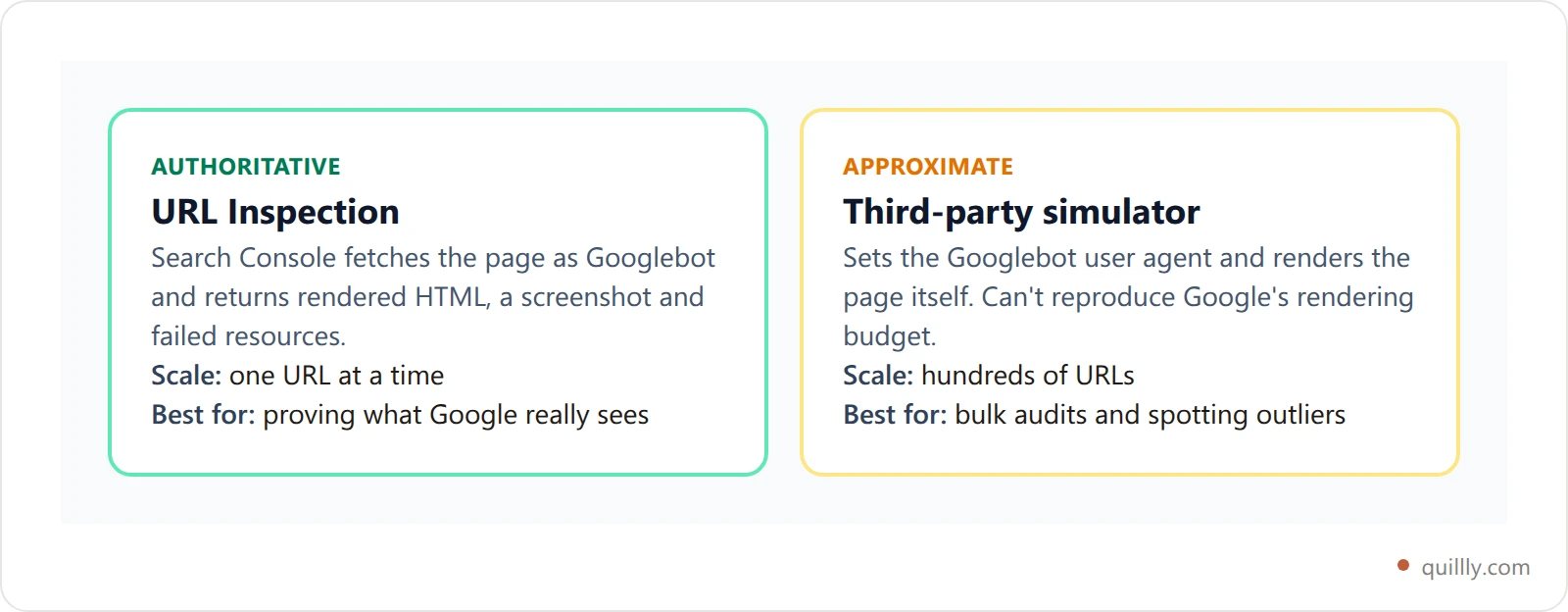
If you've ever searched "view page as googlebot", the tools that come back fall into two camps. The honest answer is to start with Google's own tooling rather than a third-party googlebot simulator. The URL Inspection tool in Search Console fetches your page as Googlebot and shows you the rendered HTML, the screenshot and any resources that failed to load. It's authoritative because it is Googlebot.
Third-party crawlers that let you view a page as Googlebot are useful for bulk work — auditing hundreds of URLs at once — but they're approximations. They can't reproduce Google's rendering budget or its exact resource handling.
Whichever tool you use, remember that spoofing the Googlebot user agent against other people's sites is the same behaviour this guide is about catching. Set your crawler's user agent to something honest that identifies you.
If a page checks out in URL Inspection but still doesn't rank, the problem has moved from crawling to content and authority. That's where an on-page SEO audit and a look at how fast pages get indexed do more than any log analysis will.
Crawler Verification Fits Into a Bigger Picture#
Verifying Googlebot answers one narrow question: was that request really Google? It doesn't tell you whether Google kept the page, and those are genuinely different things. A page can be crawled repeatedly and still never make it into the index.
We see that gap on this very site: Google and Bing hold noticeably different subsets of the same library, even though both crawl it from the same sitemap. Crawl volume told us nothing useful about either.
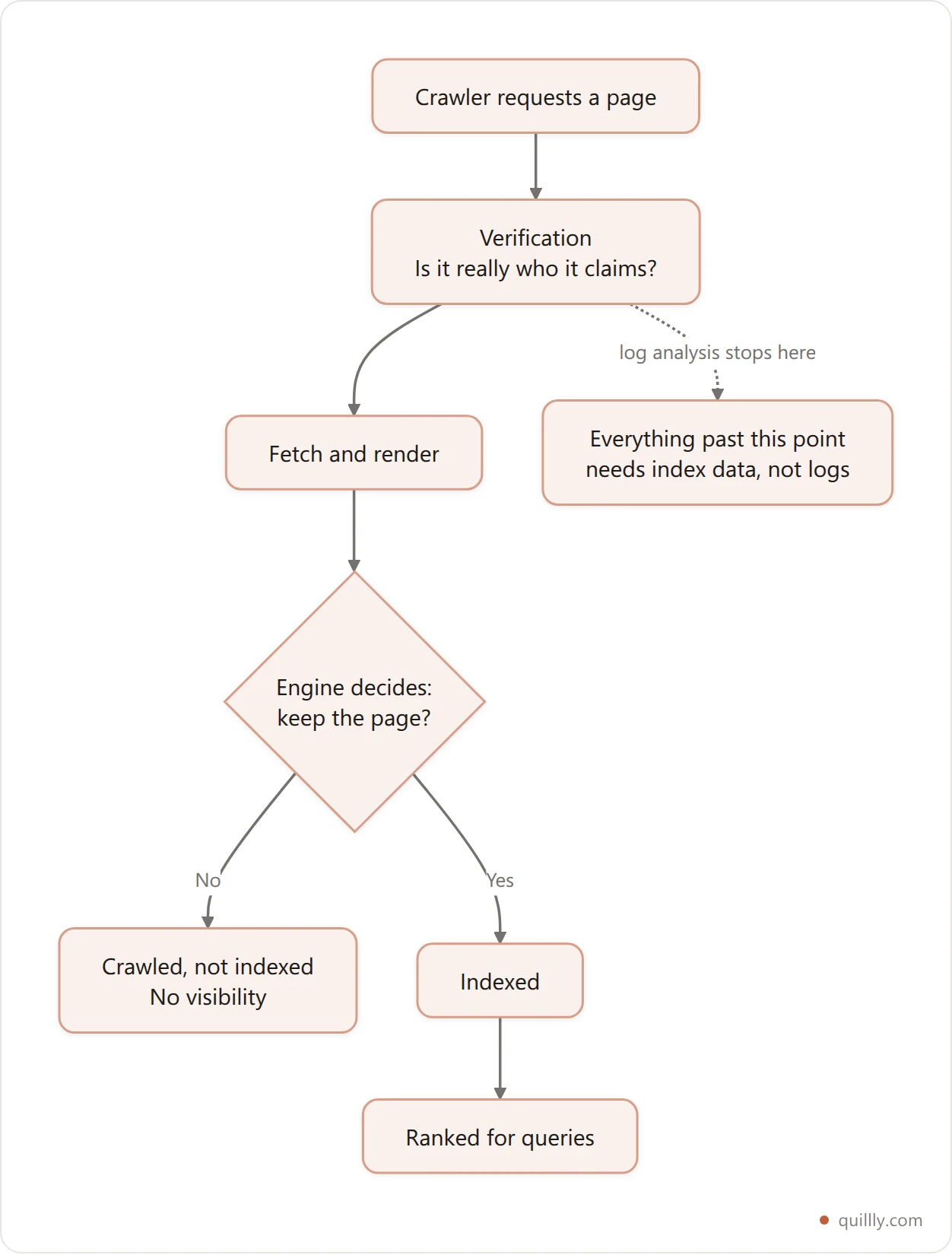
That gap is worth watching directly. Quillly submits every new and updated page to eight search engines — Google through your Search Console sitemap and RSS feed, and Bing, Yahoo, Yandex, Naver, Seznam, Yep and Amazon through the IndexNow network — then reports back on coverage. Google, Bing and Yandex are the three that confirm indexed status, so those are the numbers you can actually hold anyone to.
It also matters that Google isn't the only crawler deciding your visibility any more. Ranking beyond Google means a handful of engines and AI assistants are each making their own fetch-and-keep decision, and each has its own bot to verify. Tracking that across engines by hand gets old fast — our piece on tracking every page you own covers how to keep the whole sitemap in view rather than the ten URLs you happen to remember.
Start with the DNS check. It costs two lookups, it takes a minute to script, and it turns an unanswerable question about your logs into a yes or no. Then watch the indexing side just as closely — that's where the traffic actually comes from.
Key Takeaways#
The
User-Agentheader is a claim, not evidence. Anyone can send Googlebot's string in one line of code.Verify with a DNS round trip: reverse-resolve the IP to a
googlebot.comorgoogle.comhostname, then forward-resolve that hostname back to the same IP. Both directions, every time.Google's published IP list is the faster alternative, but re-fetch it on a schedule or it goes stale and starts blocking real crawlers.
Block by IP or ASN, never by user-agent string. Blocking the name
Googlebotblocks the real one too.Never vary what you serve based on an unverified user agent. That is how sites end up cloaking by accident.
Use Search Console's URL Inspection tool to see a page as Googlebot, and treat third-party simulators as approximations.
Frequently Asked Questions#
Can a fake Googlebot hurt my rankings directly?#
Not directly — Google doesn't penalise you for who crawls your site. The damage is indirect: scraped duplicates of your content compete with your originals, and a server slowed down by impostor traffic gets crawled less by the real Googlebot, which can delay how quickly new pages are found.
Is the IP address enough to verify Googlebot on its own?#
Matching against Google's published IP ranges is solid, provided you re-fetch the list on a schedule. The ranges change. If you hardcode them once and never update, you'll eventually block legitimate Google crawlers — which is a worse outcome than letting a few scrapers through.
Why does the forward DNS lookup matter if reverse DNS already passed?#
Because whoever controls an IP block controls its reverse DNS record, so a reverse lookup can be made to say almost anything. The forward lookup asks Google's own DNS which IP that hostname belongs to. Only a genuine Google address survives both directions, which is why the pair is trustworthy and either half alone isn't.
Should I block every crawler that fails verification?#
No. Plenty of unverified bots are legitimate — uptime monitors, feed readers, link checkers and AI assistants that fetch pages for users. Rate limit the polite ones and reserve outright blocks for clients that ignore robots.txt, scrape at volume, or probe for admin paths.
What's the safest way to view a page as Googlebot?#
Search Console's URL Inspection tool, because it genuinely fetches the page as Googlebot and shows you the rendered result. Third-party simulators are fine for auditing many URLs quickly, but treat their output as an approximation of Google's rendering rather than a faithful copy of it.
How often should I check my logs for impostors?#
Monthly is plenty for most sites. Check sooner if you see an unexplained bandwidth spike, a jump in crawl activity that doesn't show up as new indexed pages, or your content appearing on someone else's domain.
Stop guessing at what the engines did with your pages. See your indexing coverage across all eight engines — 14-day free trial, no card required, then $19/month for unlimited content on up to 5 websites.


