

A redesign everyone in the room loves can cut a site's search traffic in half on launch day. The visuals almost never cause that. The decisions underneath them do — a new URL pattern, a navigation that quietly dropped forty links, a hero that pushed the H1 below the fold on phones.
Search "seo optimization web design" and you'll mostly find advice about fonts and white space. The choices that actually decide whether the finished site can rank get made much earlier, in the wireframe, and they're nearly invisible by the time anyone argues about colour.
The short answer: SEO optimization web design is the practice of settling the structural choices — architecture, URLs, templates, navigation, rendering, content slots and redirects — while the site is still a wireframe. Each one costs an hour to change in the design file, weeks to change after launch, and becomes permanent once search engines have crawled it.
This piece walks the seven decisions in the order a real project makes them, with the SEO consequence of each and what to do instead.
What's on this page
What SEO Optimization Web Design Actually Means#
There are two kinds of choices in any website project, and only one of them is what SEO optimization web design is about.
Decoration is type scale, palette, illustration style, motion. It affects whether people trust you and stay. It has almost no direct effect on whether a page can be found.
Structure is how many clicks deep a page sits, what its URL looks like, which template renders its title, what the nav links to, whether the markup exists before JavaScript runs, and where the blog lives. Every one of those is a design-time decision made by a designer or a developer, usually without an SEO in the room, and every one of them caps what the finished site can do in search.
The uncomfortable part: structure is decided first and changed last. Nielsen Norman Group has been cataloguing the same web design mistakes for two decades, and most of them are structural, not visual.
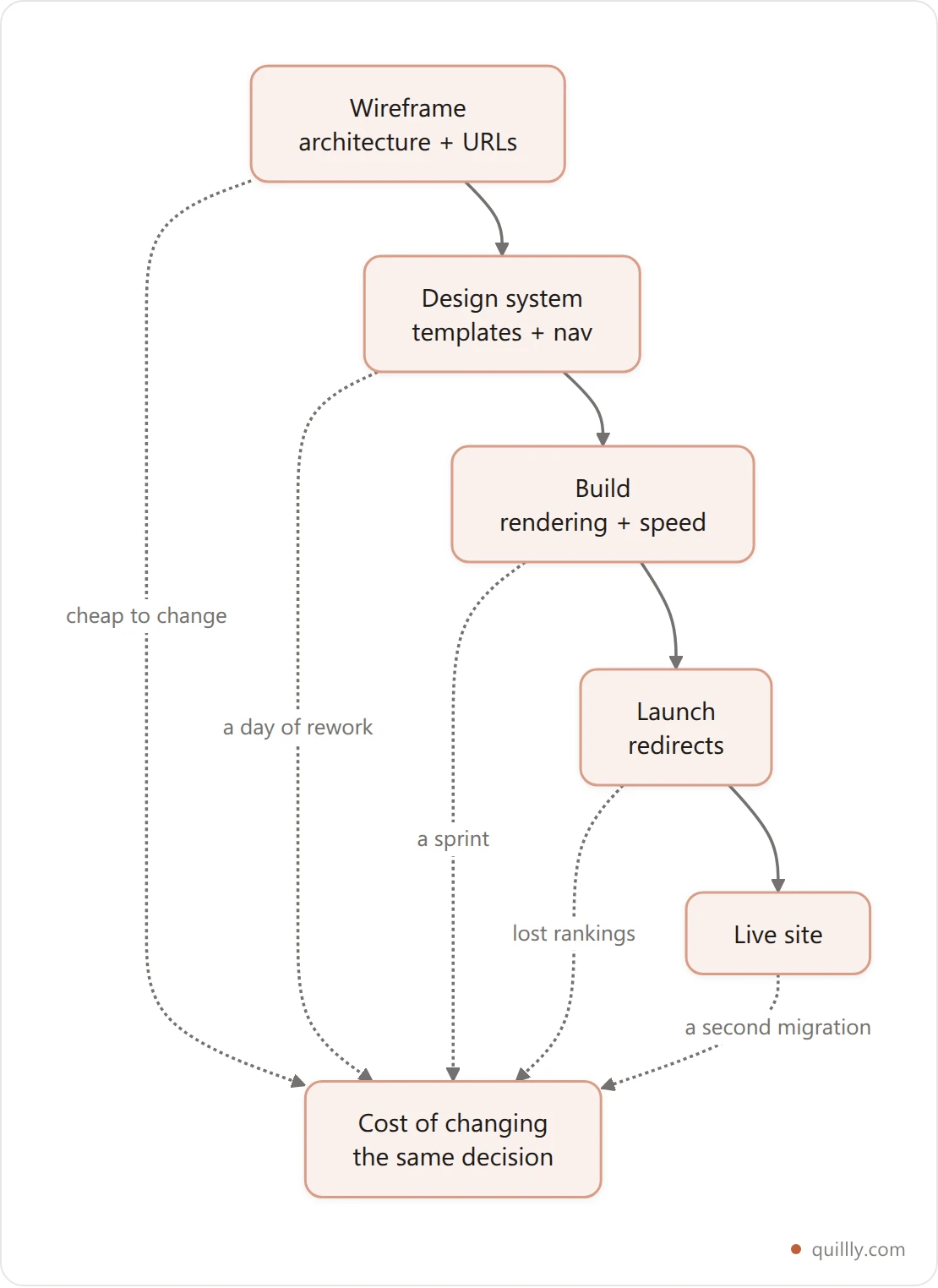
The rest of this article is those decisions, in that order.
Decision 1: How Deep Your Deepest Page Sits#
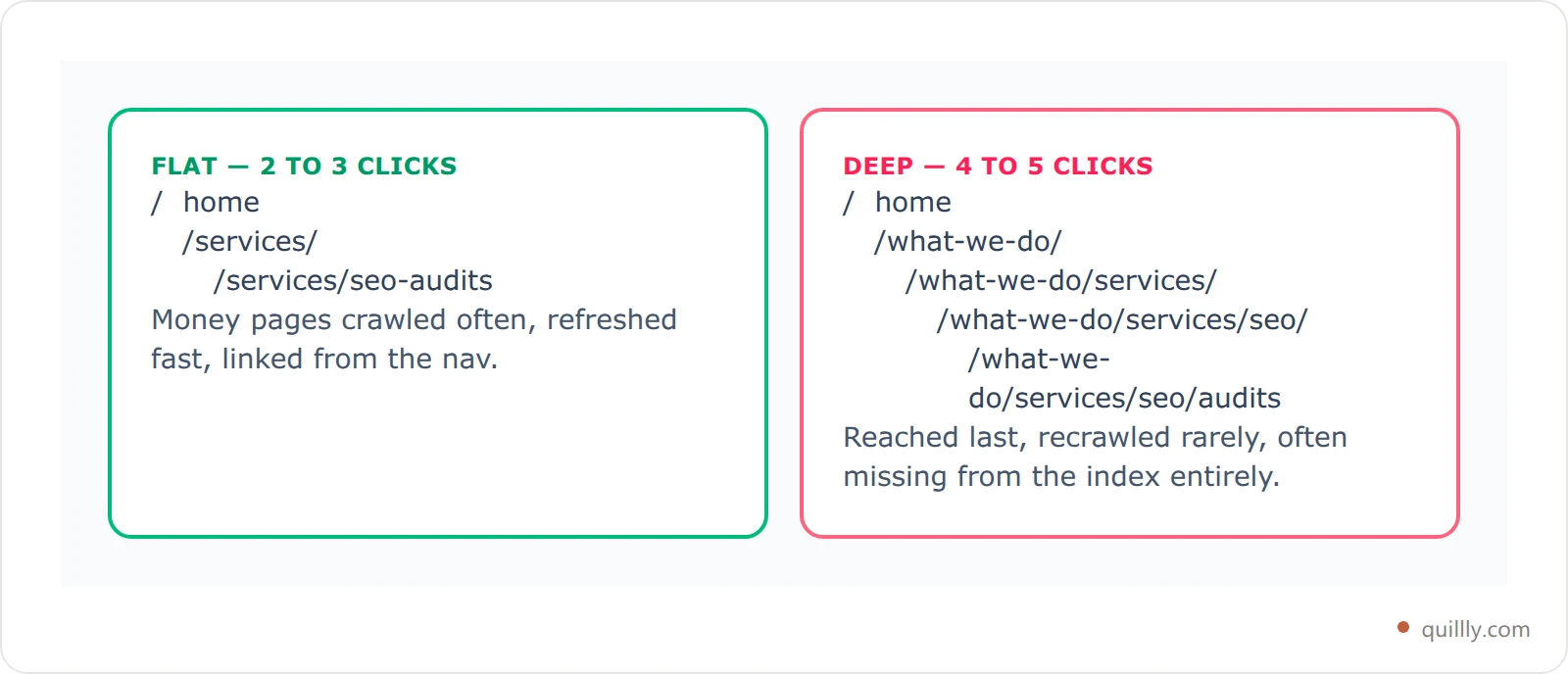
Crawl depth is the number of clicks from the homepage to a page. It is set by the sitemap a designer draws in week one, and it predicts which pages get crawled often and which get forgotten.
A brand website built as Home → About → Services → Service detail → Case study buries its case studies four clicks down. Those are the pages with the commercial intent. They're also the ones a crawler reaches last and refreshes least.
What to do at wireframe stage:
Keep money pages within three clicks of the homepage. Two is better.
Give every category a real hub page with real text, not a filter view.
If a section needs more than three levels, the taxonomy is wrong, not the design.
Draw the click-depth map before anyone opens a design tool. Site analysis in SEO has exactly one job at this stage: tell you which existing pages already earn traffic so the new structure doesn't strand them.
Decision 2: URLs You Will Never Have to Change#
A URL is the one part of a design that has to survive every future redesign. It is also the part most often invented at 4pm on a Friday by whoever is wiring up the CMS.
Google's own SEO starter guide is blunt about it: use words people would search for, keep them readable, and avoid IDs. The design-time version of that rule is stricter — pick a pattern that does not encode anything that can change.
Pattern | Why it breaks |
|---|---|
| Dates age the page; the URL lies within a year |
| Recategorise once and every link 404s |
| No words, no meaning, no keyword signal |
| Survives a rebrand, a CMS swap and three redesigns |
Three rules worth writing into the design spec:
No dates, no IDs, no category in the path. Categories are navigation, not identity.
Lowercase, hyphenated, three to five words. Long enough to be readable, short enough to paste.
Decide the blog path once —
/blogor/blogs, not both, and never a mix.
Decision 3: Templates That Carry Titles, H1s and Schema#
Designers build templates. Search engines read pages. The gap between the two is where most on-page SEO quietly disappears.
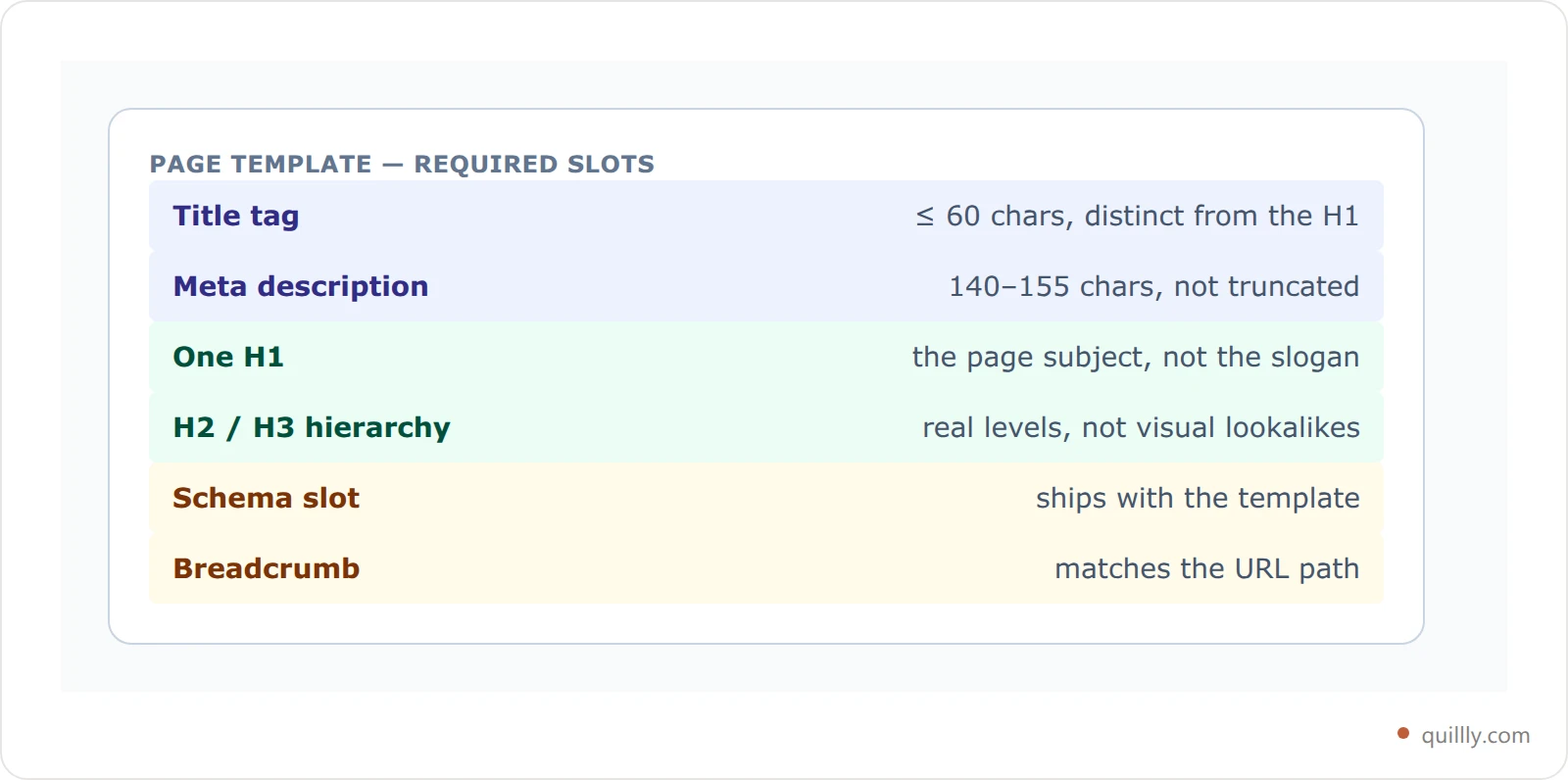
If the template doesn't have a slot for it, nobody will add it later. Every page template needs, by design:
One H1, visible, holding the page's actual subject — not a logo, not a tagline.
A title tag distinct from the H1, with room for 60 characters.
A meta description slot of 140–155 characters that the CMS doesn't truncate at 120.
A heading hierarchy the designer honours — H2s that are really H2s, not H4s that happen to look right.
A schema slot so structured data ships with the template rather than being bolted on per page.
A visible breadcrumb that matches the URL path.
The failure mode is specific and common: a beautiful hero where the biggest text is the company slogan, marked up as the H1, on all 40 pages. Forty pages, one H1, zero differentiation. Our on-page SEO audit guide walks through finding these after the fact — but the fix is a template slot, not an audit.
Once the templates are right, the work becomes producing pages that fill them properly. That's the point where connecting your AI assistant to the site stops being a novelty: the structure is settled, so every new page inherits it.
Decision 4: Navigation Is Your Internal Link Graph#
Your navigation is not a menu. It's the strongest set of internal links on the site, and it tells search engines what you consider important.
Design decisions that damage it:
A mega-menu rendered only on hover in JavaScript. If the links don't exist in the HTML, they may not be followed.
An icon-only or "hamburger everywhere" nav that ships three links instead of thirty.
A footer stripped for visual calm. The footer is where deep pages get their only site-wide link.
A redesign that cuts the nav from 30 items to 8 without replacing those links anywhere else. This is the single most common cause of the post-redesign traffic drop.
A useful rule for the design review: every important page must be reachable from at least one static, crawlable <a href> that exists in the HTML source. Before launch, check that no internal link points at a page you deleted — broken internal links multiply fastest during a redesign, when half the sitemap changes at once.
Your structure is set. Now it has to produce pages.
Quillly connects Claude, ChatGPT or Cursor straight to your site through MCP — your AI drafts, scores each piece against 14+ SEO criteria, and publishes to your own domain. Blog, docs, changelog and news from one pipeline.
See how it worksDecision 5: What Renders Before Anyone Scrolls#
Two design choices decide this one: how the page is built, and how heavy the top of it is.
Rendering. A single-page app that paints content only after JavaScript executes is a bet that every crawler will run your JavaScript. Google documents how it processes JavaScript in a separate rendering queue — and other engines are less patient. Server-render anything you want indexed. If the framework is already chosen, at least pre-render the marketing and content routes — we covered what a single-page site can realistically rank for if that decision is already made.
Weight. The hero carousel, the custom webfonts, the full-bleed video: each is a design decision with a measurable cost. Google's Core Web Vitals thresholds are public numbers, and a design can blow through them before a single line of content is written.

Cumulative Layout Shift isn't a time at all — it's a score, and the bar is 0.1. It is also the most design-caused metric on the list: images without dimensions, fonts that swap late, banners injected above content.
Because phones and desktops render the same design very differently, treat mobile keyword ranking as a separate number from desktop. A layout that's fine on a 27-inch monitor and 4 seconds slow on a mid-range phone will show you exactly that split. We've written up the blog-specific version of these fixes if the slow pages are your articles.
Decision 6: Where the Blog Lives on the Domain#
This one gets decided in a hallway conversation and is then almost impossible to undo.
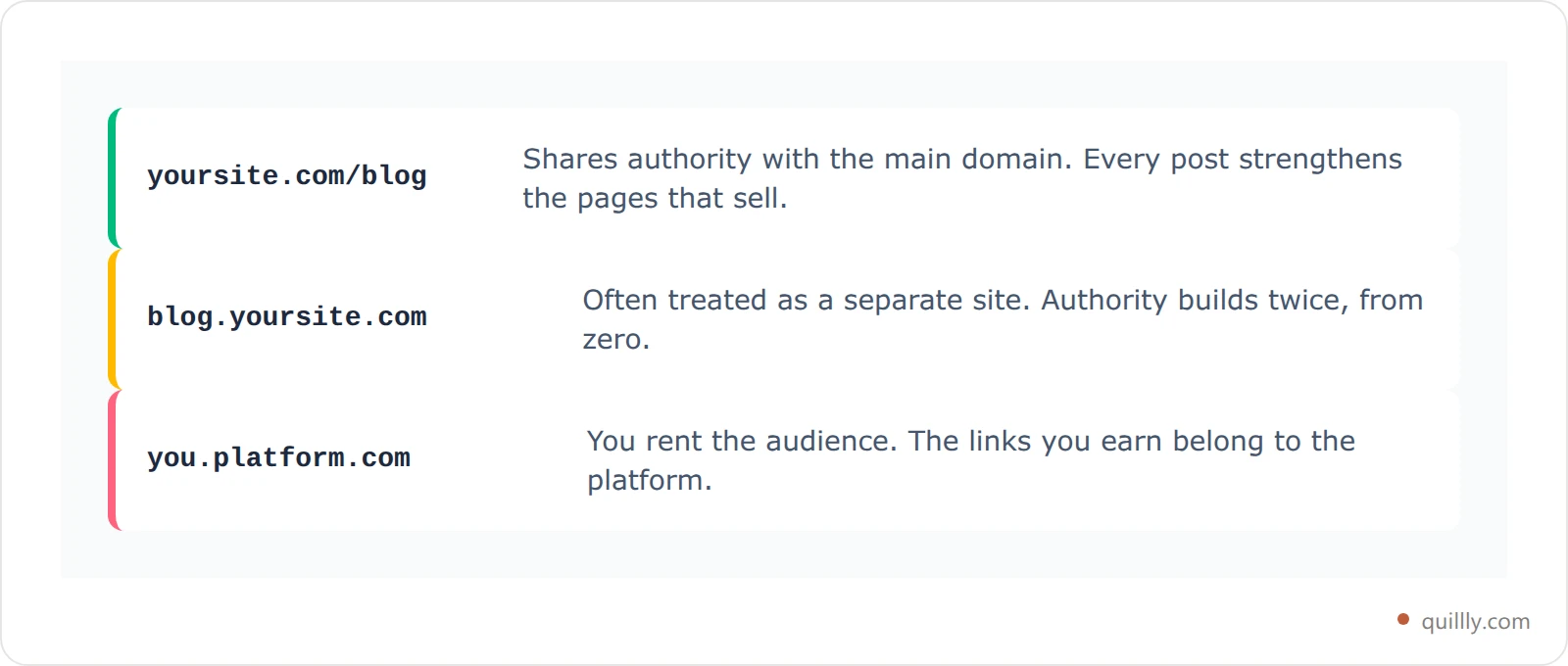
The three options, and what each one costs:
yoursite.com/blog(subdirectory). Authority is shared with the main domain. Best default for almost everyone.blog.yoursite.com(subdomain). Easier to host, frequently treated as a separate property. You start its authority from scratch.yourblog.platformname.com(someone else's domain). Every link you earn builds their domain, not yours.
If you're starting the blog from scratch, the cheapest version of this decision is to publish it on your own domain from day one. If the blog is going on a different stack from the marketing site — a common and sensible engineering choice — you can still keep it on the main domain with a reverse proxy at a subdirectory. And if the blog is already on the wrong host, moving it to your own domain is worth doing before the redesign rather than after, so you only run one migration.
Decision 7: The Redirect Map You Write Before Launch#
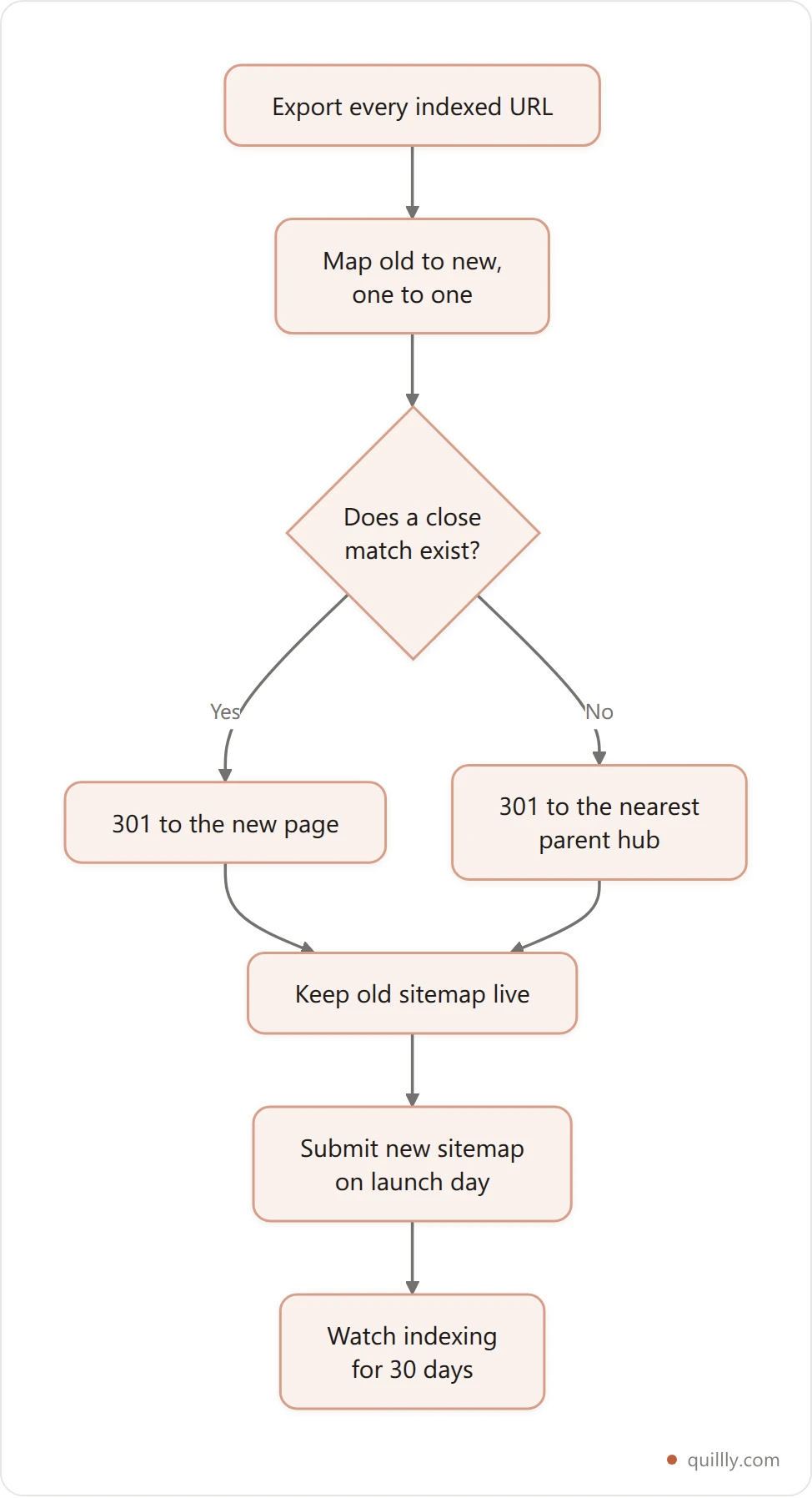
Every redesign that changes URLs needs a one-to-one map from old to new, written during design, not discovered during launch week.
Google's site move documentation is the reference, and the practical version is short:
Export every indexed URL before the build starts — from your sitemap, your analytics and Search Console.
Map each one to its closest new page. Not the homepage. A blanket redirect to
/is treated as a soft 404.Use 301s, not 302s. Temporary redirects don't pass what you want passed.
Keep the old sitemap live for a few weeks so crawlers find the redirects.
Re-submit the new sitemap on launch day, then watch indexing for a month. Coverage drops before rankings do, so it's your earliest warning.
The SEO Optimization Web Design Checklist for Launch Day#
Run this before the site goes live, not after the first traffic report.
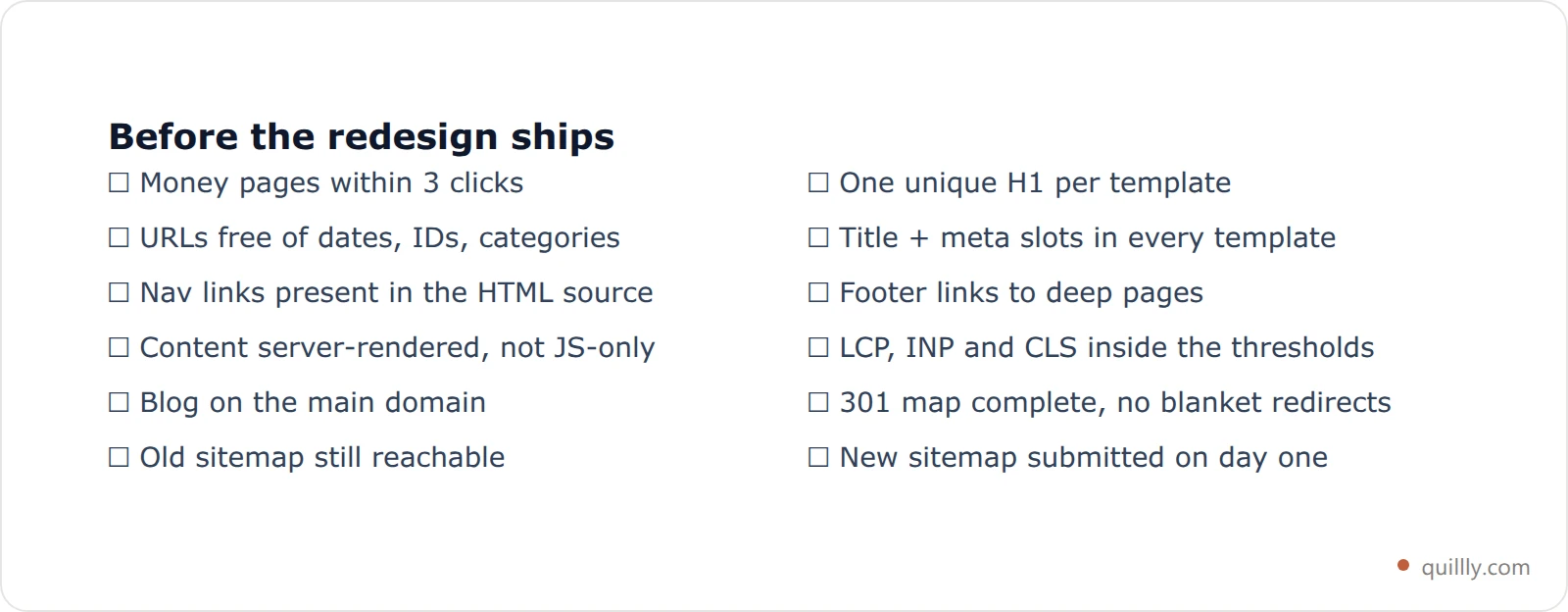
The last line does more work than it looks. A sitemap that reaches Google alone reaches one engine; Quillly submits yours to eight — Google via sitemap and RSS, then Bing, Yahoo, Yandex, Naver, Seznam, Yep and Amazon through IndexNow — which matters most in the weeks after a launch when every engine is re-learning your site. If you want the reasoning, we made the case for ranking beyond Google separately.
Frequently Asked Questions#
Is SEO optimization web design different for a redesign?#
Yes, and it's higher stakes. A new site has nothing to lose; a redesign has existing rankings that a URL change can erase. On a redesign, the redirect map and the current indexed-URL export come first, before wireframes, because they constrain the architecture you're allowed to draw.
What is site analysis in SEO, and when should it happen?#
Site analysis in SEO means auditing what you already have — indexed pages, the queries they earn, internal links and technical errors. On a redesign it belongs at the very start, before design begins, so the new structure preserves the pages that already work instead of quietly stranding them.
Should designers be responsible for SEO?#
No, but they should be given the constraints. A designer handed "money pages within three clicks, one H1 per template, LCP under 2.5 seconds, nav links in the HTML" will meet them without ever opening an SEO tool. The failure is almost never the designer — it's that nobody wrote the constraints down.
Does a fast site rank higher than a slow one?#
Not directly, and not by much. Page experience is a real but small factor compared with relevance and links. Speed matters because slow pages lose the visitors you already earned, and because a design heavy enough to fail Core Web Vitals usually also delays rendering for crawlers.
How do I check mobile keyword ranking separately?#
Search Console splits performance by device, so filter to mobile and compare positions with desktop for the same queries. A consistent mobile gap across many queries points at rendering or layout, not at content — which makes it a design problem, not a writing one.
Can a site rank without a blog?#
A small one can, on brand and product queries. But the site's page count stops growing on launch day, and so does the set of queries it can answer. That's why the blog path is a launch-day decision: retrofitting one into a finished information architecture is the expensive version.
Key Takeaways#
SEO optimization web design is structural, not decorative. Architecture, URLs, templates, navigation, rendering and redirects decide what the finished site can rank for.
Depth and URLs are the two decisions you can't cheaply undo. Money pages within three clicks; URLs with no dates, IDs or categories in the path.
If the template has no slot for it, it will never be added. One H1, a distinct title, a real meta description and a schema slot belong in the design system.
Navigation is your internal link graph. Cutting the nav in a redesign is the most common cause of the traffic drop that follows.
The redirect map is written before the build, not during launch week. One-to-one 301s, no blanket redirect to the homepage.
Get these seven right and the site launches with nothing holding it back. What decides the next twelve months is whether it keeps publishing — start a 14-day trial and let your AI handle it, or read how we score every post before it ships.


