
Your AI writes a sharp post. You publish it. Weeks later it's stuck on page three, and you blame the writing. The writing is probably fine. The page is slow.
More than half the web quietly fails Google's speed bar. As of May 2026, only 55.9% of tracked sites pass all three Core Web Vitals, per Chrome User Experience Report data. That's the metric most indie blogs never check, because their content tool stops at "published" and never looks at how the page actually loads. Core Web Vitals for blogs are the difference between a post that ranks and one that technically exists.
Here's the part nobody tells you: your page speed was mostly decided before you wrote a word. It's set by your template, your theme, and the pile of scripts loading around your text — which means it was really decided at design time, along with the seven web design decisions that cap what a site can rank for. This guide gives you the 2026 thresholds, the real reason your blog is slow, and a fix that takes minutes instead of a weekend.
What Core Web Vitals for Blogs Measure in 2026#
Core Web Vitals for blogs are three field metrics Google uses to score page experience: Largest Contentful Paint (loading), Interaction to Next Paint (responsiveness), and Cumulative Layout Shift (visual stability). A page passes when 75% of real visits hit "good" on all three. That 75th-percentile rule matters: one slow segment of your traffic can sink an otherwise healthy page.
INP replaced First Input Delay in March 2024, and it's the metric most sites trip on. It measures the full delay from a tap or click to the next visual update, so heavy JavaScript hurts here more than anywhere else.
Here are the 2026 Core Web Vitals thresholds, straight from Google's web.dev guidance:
Metric | What it measures | Good | Needs work | Poor |
|---|---|---|---|---|
LCP (Largest Contentful Paint) | Loading — when the main content appears | ≤ 2.5s | 2.5–4.0s | > 4.0s |
INP (Interaction to Next Paint) | Responsiveness — tap-to-response delay | ≤ 200ms | 200–500ms | > 500ms |
CLS (Cumulative Layout Shift) | Stability — how much the layout jumps | ≤ 0.1 | 0.1–0.25 | > 0.25 |
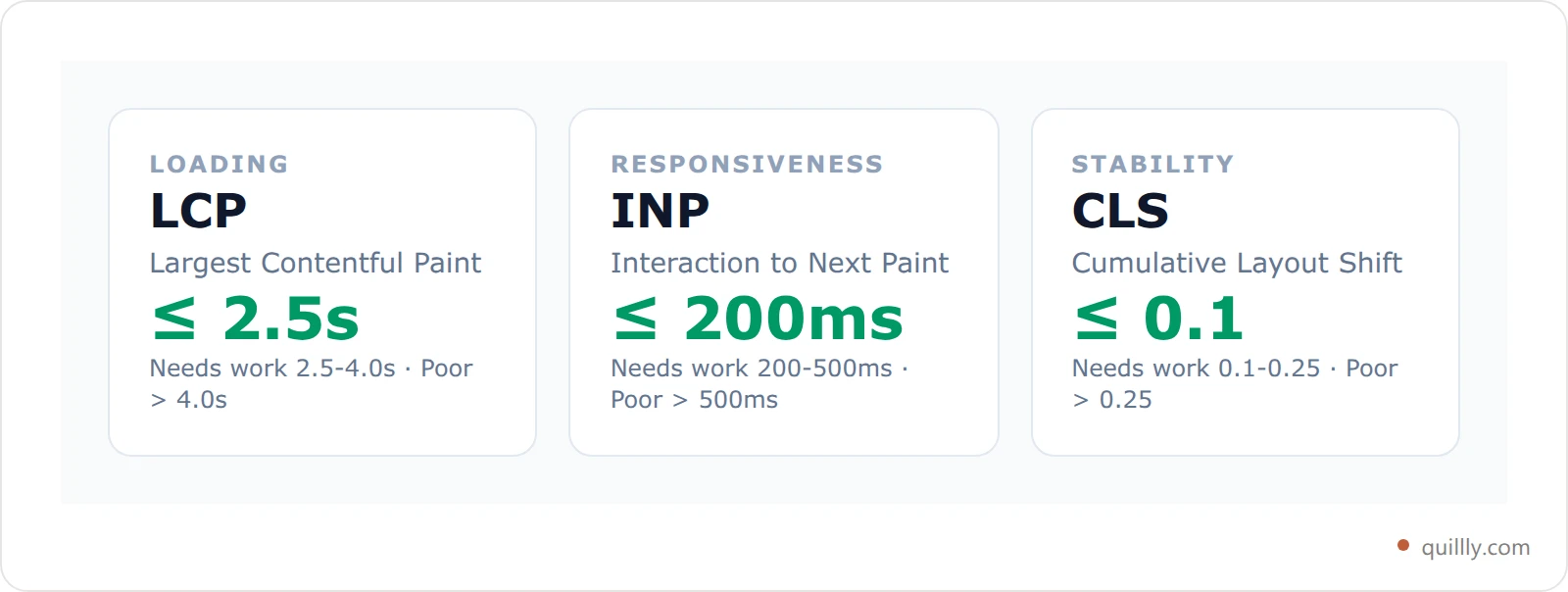
Miss any one at the 75th percentile and the whole page is marked "needs improvement." Speed is pass/fail, not a curve.
The Template Tax: Why Your Blog Speed Isn't a Content Problem#
Here's the contrarian truth: optimizing your blog content for speed is mostly wasted effort. Page speed is dominated by the template, not the words inside it. The theme, the web fonts, the analytics scripts, the cookie banner, the three marketing tags your last growth experiment left behind. Those load on every post, so every post scores within noise of every other post on the same site.
Call it the Template Tax: a fixed speed cost your template charges on every page you publish, before your content gets a vote. Blog page speed, in other words, is a property of your template far more than a property of your posts. Compress an image here, trim a paragraph there, and you're paying down a rounding error while the tax keeps billing.
This is why professional speed audits check the homepage and treat it as representative. When performance is set by shared template code, one measurement tells you the number for the whole site. It also explains the CrUX gap: individual metrics look decent (68.6% good LCP, 81.3% good CLS, 86.6% good INP in May 2026) but only 55.9% of sites pass all three. One heavy piece of template code drags an otherwise fine site under the line.

Each metric looks survivable on its own. The compound test is what most sites fail.
Stop paying the Template Tax on every post
Quillly serves your posts as static, CDN-delivered pages on your own domain, so page experience is set by the serving layer instead of a theme you inherited.
Start a 14-day free trialThe fix isn't editing posts. It's changing what serves them.
Do Core Web Vitals Even Matter for Rankings?#
Yes, but not the way panicky blog posts claim. Core Web Vitals are a real ranking signal inside Google's page experience system, and they are a tiebreaker between pages of similar relevance. They do not outrank actually answering the query.
Google's John Mueller put it plainly: "It is a ranking factor, and it's more than a tie-breaker, but it also doesn't replace relevance." (Search Engine Journal). Google's own page experience documentation adds that a page with subpar experience can still rank if it has great, relevant content.
So why bother? Two reasons that dwarf the ranking nudge:
Conversions. Google and Deloitte's Milliseconds Make Millions study found a 0.1-second load improvement lifted retail conversions by 8.4% and average order value by 9.2%. Speed is a revenue lever, not a vanity score.
Bounce. Google research shows that as load time goes from 1 to 3 seconds, the probability of a bounce rises 32%. From 1 to 6 seconds, it's up 106%. Your ranking doesn't matter if visitors leave before the text paints.
Ranking is the tiebreaker. Keeping the reader is the whole game.
Page Speed and AI Search: The Angle Older Guides Miss#
Most Core Web Vitals articles were written for blue-link Google and never updated for AI search. That's the gap in 2026. A slow blog doesn't just rank lower. It gets crawled less and cited less by the engines feeding ChatGPT, Copilot, and Google's AI answers.
Two mechanics are at play. First, crawl budget: slow servers and heavy pages mean bots fetch fewer of your URLs per visit, so new posts sit undiscovered longer. Bing has said lastmod freshness and fast responses drive its AI-powered recrawl. Second, retrieval: ChatGPT Search leans on Bing's index, and 87% of SearchGPT citations match Bing's top organic results, per a Seer Interactive study of 500+ citations. If Bing can't crawl and hold a fresh, fast copy of your page, ChatGPT can't cite it.
Speed is now upstream of AI visibility. A page that renders instantly for a headless crawler like OAI-SearchBot is a page that gets read, parsed, and quoted. One that stalls on render-blocking scripts is a page the bot gives up on. If you're chasing citations, treat page experience as part of your AI crawler optimization work, not a separate chore.
If your pages are built as a client-side app, the rendering question comes before the speed question — our guide to SEO for single page website setups covers the render test that tells you which problem you have.
The 5-Minute Blog Speed Audit#
You don't need a performance engineer. Core Web Vitals for blogs come down to three numbers and a short checklist. Run this before you touch a single line of your posts.
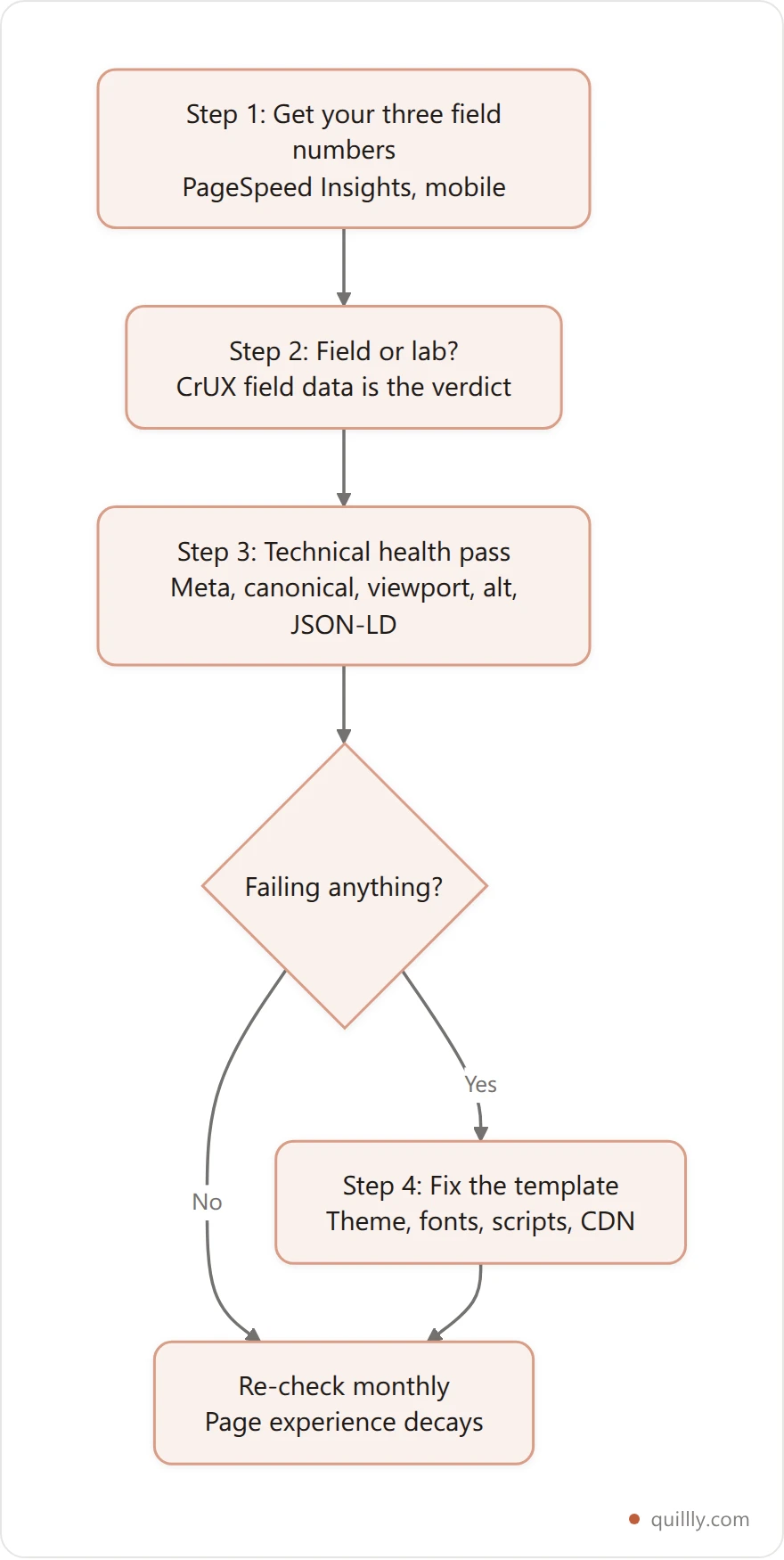
Step 1 — Get your three field numbers. Drop your homepage URL into PageSpeed Insights. It runs Google's own Lighthouse pass and returns your mobile performance score plus LCP, INP proxy (total blocking time), and CLS. Use mobile, because that's what Google indexes and scores.
Step 2 — Check field vs lab. If PageSpeed shows "real user" (CrUX) data at the top, that's what Google actually ranks on. Lab data is a diagnostic. Field data is the verdict.
Step 3 — Run the technical-health pass. Speed is half of page experience. The other half is the boring stuff that quietly breaks: missing meta descriptions, no canonical, absent viewport tag, images without alt, broken JSON-LD, mixed content, wrong HTTP status. If you publish through Quillly, the get_page_issues MCP tool audits every tracked page for exactly these and returns them worst-first:
// Your AI agent calls this — no dashboard required
{
  "tool": "get_page_issues",
  "website_id": "your-site-id",
  "severity": "error"
}
// → per page: issue, severity, why it matters, and the exact fix
// Add "fresh": true with a "path" to re-audit live after you deploy.
Step 4 — Fix the template, not the posts. Whatever the numbers say, the lever is your theme and scripts (next section). This is the step that actually helps you fix slow blog load times, because it changes what every post inherits at once.
Copy this checklist. Re-run it monthly. Page experience decays as you bolt on tags.
Fixing Core Web Vitals for Blogs: What Actually Makes Them Slow#
Each Core Web Vital fails for predictable reasons. Here's the cause-and-fix for a typical content blog, in the order that moves the number most.
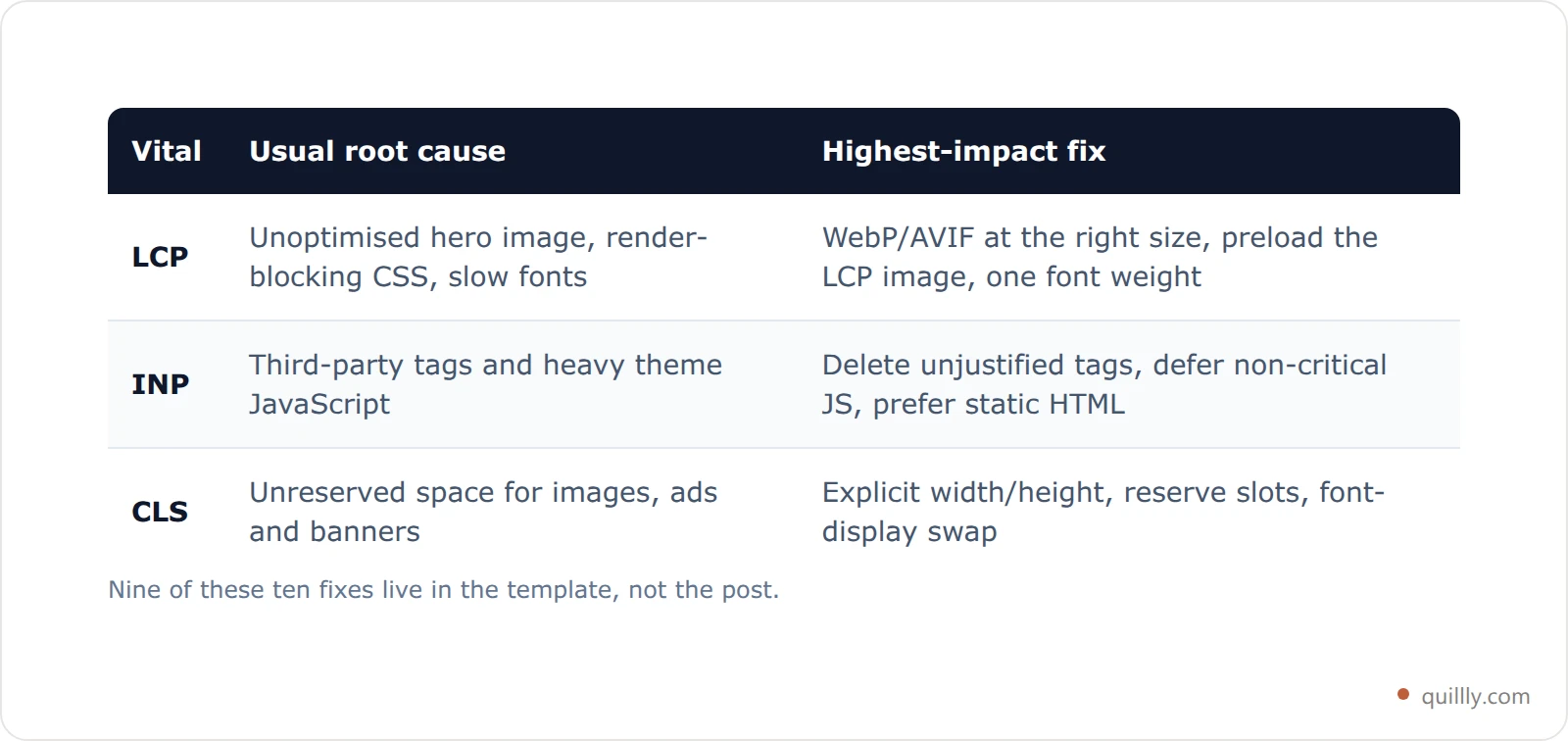
LCP is slow (loading). Your largest element is usually the hero image or the first heading, and it's blocked by render-blocking CSS, slow fonts, or an unoptimized image.
Serve images in modern formats (WebP/AVIF) at the right size, not a 4000px original scaled down in the browser.
Preload the LCP image and your primary web font. Better: cut custom fonts to one weight.
Put your content on a CDN so the first byte arrives fast worldwide.
INP is slow (responsiveness). This is almost always JavaScript. Third-party tags, chat widgets, and heavy theme bundles block the main thread.
Audit third-party scripts and delete what you can't justify. Each tag is a tax.
Defer non-critical JS so the browser paints text first.
Prefer static HTML over client-side frameworks for a reading experience. A blog post does not need a single-page app.
CLS is bad (stability). Content jumps because dimensions aren't reserved.
Set explicit
widthandheighton every image and embed.Reserve space for ads, cookie banners, and lazy-loaded blocks.
Load fonts with
font-display: optionalorswapto stop text reflow.
Notice the pattern. Nine of these ten fixes are template and infrastructure changes. Exactly one touches your content (image sizing). That's the Template Tax in action, and it's why "write shorter posts to load faster" is bad advice.
Before and After: A Bloated Theme vs Served Static Pages#
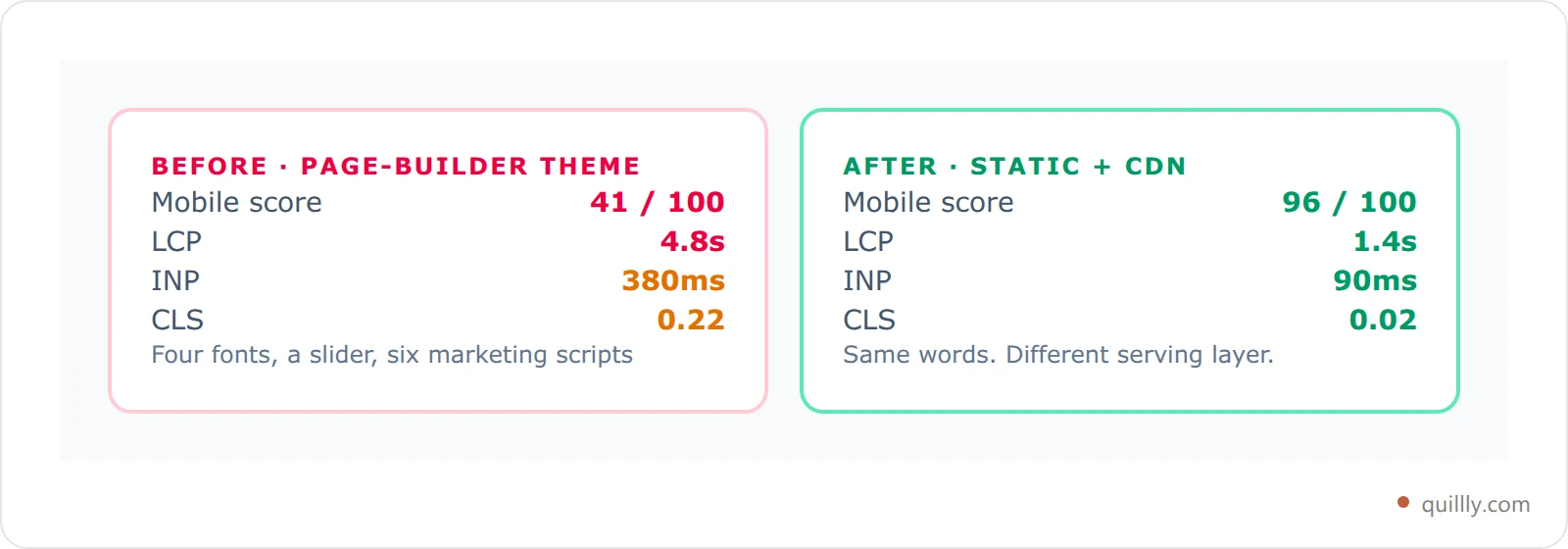
Here's a composite of the most common indie-blog situation, built from typical PageSpeed results. Treat it as illustrative, not a promise. Your mileage depends on your stack.
Before — WordPress blog on a "fast" marketing theme:
Metric | Result | Verdict |
|---|---|---|
Mobile performance score | 41 / 100 | Poor |
LCP | 4.8s | Poor |
INP | 380ms | Needs work |
CLS | 0.22 | Needs work |
The cause wasn't the writing. It was a page-builder theme, four fonts, a slider, and six marketing scripts. Every post inherited all of it.
After — same content served as static, CDN-delivered pages:
Metric | Result | Verdict |
|---|---|---|
Mobile performance score | 96 / 100 | Good |
LCP | 1.4s | Good |
INP | 90ms | Good |
CLS | 0.02 | Good |
Nothing about the words changed. The template did. The blog went from failing all three vitals to passing all three, which is the exact jump that separates the 44% of sites below the line from the 55.9% above it. When speed lives in the serving layer, you fix it once for every post, forever.
Where Publishing on Your Own Domain Fits#
Most AI content tools hand you a draft and wish you luck. You paste it into WordPress, inherit that theme's Template Tax, and wonder why a well-written post loads in five seconds. The generator never controlled the serving layer, so it could never control your speed.
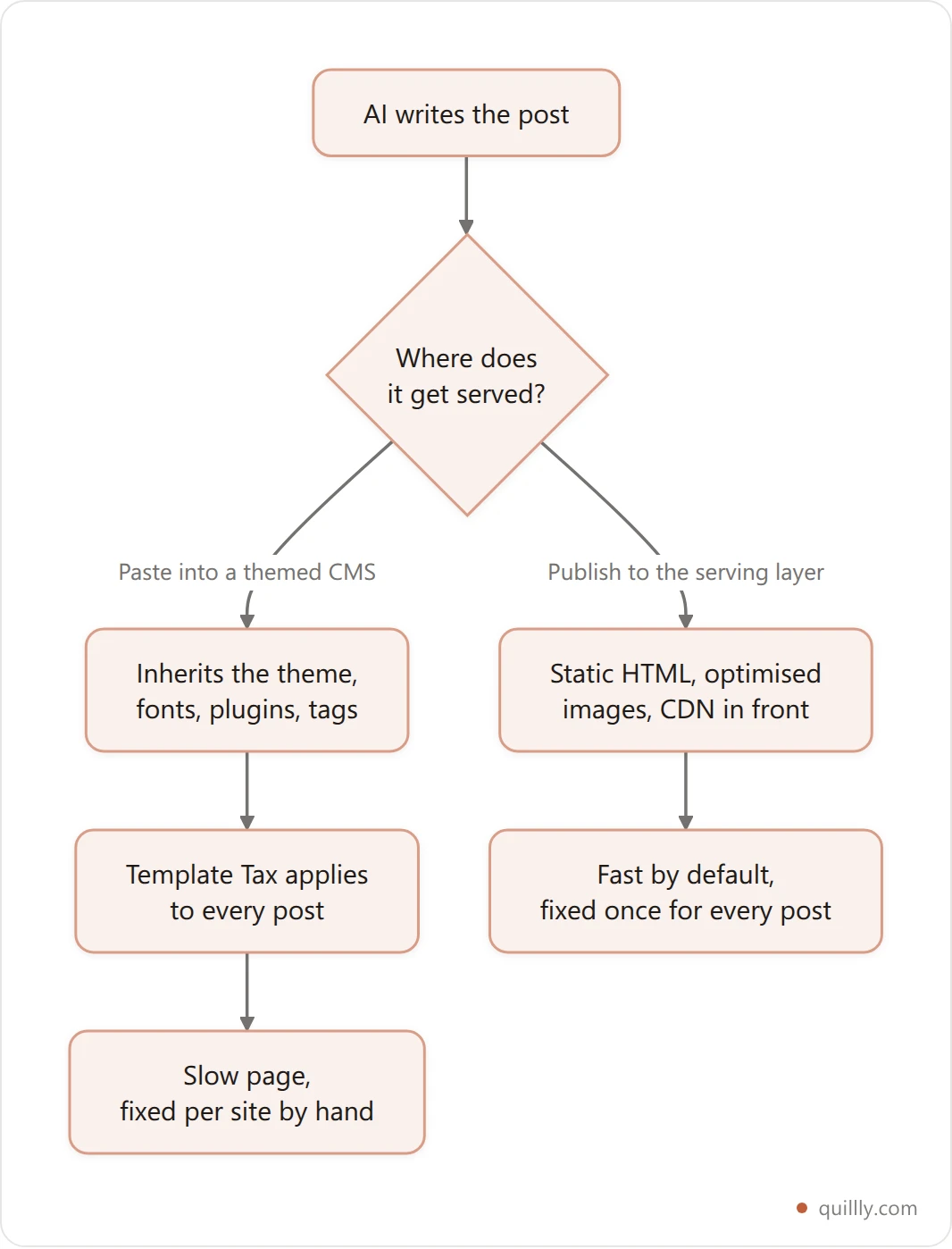
That's the wedge for publishing straight to your own domain. When the platform serves the page, page experience is baked in: static HTML, images optimized on the way out, a CDN in front, no plugin sprawl. Your AI writes the post, and the serving layer is fast by default rather than fast if you spend a weekend on it. See what publishing to your own domain involves.
This is also why adding a blog without WordPress keeps getting more attractive for builders. You skip the entire class of theme-and-plugin performance problems. Pair that with a subdirectory setup instead of a subdomain so the speed and authority land on your main domain, and page experience stops being a project. It becomes a property of where you publish.
How to Monitor Core Web Vitals Without Becoming an Engineer#
Fixing once isn't enough. Page experience decays every time you add a tag, embed, or widget. Monitoring keeps the Template Tax from creeping back up. You need two views and a cadence.
Field data (the verdict). Google's Search Console has a Core Web Vitals report driven by real Chrome users. This is the data that ranks you. It groups URLs into "good," "needs improvement," and "poor," and it lags real user behavior by about 28 days. If a URL group turns red here, it's costing you.
Lab data (the diagnosis). PageSpeed Insights and Lighthouse simulate a load in a controlled environment. Numbers won't match the field exactly, and they shouldn't. Lab tells you why a page is slow. Field tells you whether Google agrees it's a problem.
The cadence. Check field data monthly and after any theme, plugin, or script change. Three quick myths to retire while you're there:
"A 100 Lighthouse score means you pass." No. Lab 100 with poor field CrUX still fails. Real users decide.
"Desktop is what matters." Google indexes and scores mobile first. Audit mobile.
"Speed is a one-time project." It's a maintenance habit. One new chat widget can undo a quarter of work.
Roll page-experience checks into the same routine as your broken-link and technical audits so nothing slips between reviews. The teams that stay above the line aren't faster once. They're faster on a schedule.
Page Experience Beyond Speed#
Core Web Vitals get the headlines, but Google's page experience system checks more than three numbers. A fast page that fails the rest still leaks rankings. These are the signals that sit next to speed, and they're the ones a content tool usually forgets.
Mobile-friendliness. Google indexes mobile-first. A layout that overflows or needs pinch-zoom on a phone is a page-experience failure no LCP score can rescue.
HTTPS. Non-secure pages and mixed content (an HTTPS page pulling an HTTP image or script) get flagged and can block the padlock entirely.
No intrusive interstitials. Full-screen popups that cover the content on load are an explicit demotion signal, not just an annoyance.
Clean technical head. A missing viewport tag, absent canonical, no meta description, images without
alt, or broken JSON-LD each chip away at how machines read the page.
The trouble is these break silently. Nothing errors when a canonical goes missing or an OG tag drops off. You find out weeks later when a page slips. That's the case for automated, per-page auditing: the get_page_issues MCP tool live-checks each tracked page for meta tags, canonical, viewport, robots noindex, Open Graph and Twitter cards, heading structure, image alt text, JSON-LD, mixed content, and HTTP status, then returns them worst-first with the exact fix. Structured data is part of this too. If you want the deeper version, see the guide to blog schema markup for AI search.
Speed gets you to the line. The rest of page experience keeps you there. Treat page experience SEO as a single checklist covering both halves, or the half you ignore is the half that quietly fails.
Frequently Asked Questions#
What are good Core Web Vitals scores for a blog in 2026?#
A blog passes when 75% of real mobile visits hit "good" on all three metrics: LCP under 2.5 seconds, INP under 200 milliseconds, and CLS under 0.1. Miss any one at the 75th percentile and Google marks the whole page "needs improvement." As of May 2026, only 55.9% of sites clear all three, so passing already puts you ahead of nearly half the web.
Do Core Web Vitals affect SEO rankings?#
Yes, but as a tiebreaker, not a primary factor. Google's John Mueller called them "more than a tie-breaker" while stressing they don't replace relevance. A great answer to the query still beats a fast page with weak content. The bigger wins are conversions and bounce rate: a 0.1-second speed gain lifted retail conversions 8.4% in Google and Deloitte's research.
Why is my AI-written blog slow if the content is good?#
Because page speed is set by your template, not your text. Themes, web fonts, analytics tags, and page-builder bloat load on every post regardless of what you wrote. This is the Template Tax. Trimming words barely moves the number. Changing how the page is served does.
What is INP and how is it different from FID?#
Interaction to Next Paint replaced First Input Delay as a Core Web Vital in March 2024. FID only measured the delay before the browser started processing your first interaction. INP measures the full time from any interaction to the next visual update, across the whole visit. It's stricter, and it's the metric most sites fail because of heavy JavaScript.
Does page speed affect whether ChatGPT cites my blog?#
Indirectly, yes. ChatGPT Search retrieves from Bing's index, and 87% of its citations match Bing's top organic results. Slow pages get crawled less and are harder for headless bots to render, so they're less likely to be indexed fresh and cited. Fast, static pages are easier for AI crawlers to fetch and quote.
How do I check my blog's Core Web Vitals for free?#
Use PageSpeed Insights (pagespeed.web.dev) for a single URL and Google Search Console's Core Web Vitals report for site-wide field data. PageSpeed runs Lighthouse and shows both lab and real-user numbers. Search Console shows the field data Google actually ranks on, grouped by URL, updated on a roughly 28-day rolling window.
Can I fix Core Web Vitals without touching my content?#
Almost entirely, yes. Nine of the ten highest-impact fixes are template and infrastructure changes: modern image formats, fewer fonts, deferred JavaScript, a CDN, reserved layout space. Only image sizing touches your posts. If your platform serves static, CDN-delivered pages by default, most of these are handled before you publish.
Key Takeaways#
Three takeaways to act on today. First, your blog's Core Web Vitals are decided by your template, not your writing, so stop editing posts and start auditing your serving layer. Second, the 2026 bar is pass-or-fail at the 75th percentile: LCP under 2.5s, INP under 200ms, CLS under 0.1, and only 55.9% of sites clear it. Third, speed is now upstream of AI visibility. Fast pages get crawled, indexed, and cited. Slow ones get skipped.
Run the 5-minute audit, fix the template once, and monitor monthly. That's the whole playbook. The blogs that win in 2026 aren't the ones with the most words. They're the ones that load before the reader, and the crawler, gives up.
Want your AI to publish posts that are fast by default, on a domain you own? Connect Quillly to Claude, ChatGPT, or Cursor in 30 seconds.
Go Deeper#
Framer blog SEO: how to rank a Framer blog in 2026 — where Core Web Vitals get decided for you by the platform.
Publish to Webflow from AI without copy-paste — keeping a fast site fast while publishing at speed.
Markdown for AI crawlers: the .md twin playbook — the lightest possible payload for a machine reader.
Fake Googlebot: how to verify a crawler — when the crawl budget you just optimised is being spent by something that isn't Google at all.
Related reading#
Wondering whether a platform change would fix the speed problem instead? CMS SEO: which platform actually ranks compares eight content platforms on the seven technical levers a CMS genuinely controls — page speed among them — and uses our own indexing data across 144 pages to show why the same content was held at 91% by one engine and 20% by another. Speed is a template and hosting problem far more often than it is a vendor problem.
Related: Core Web Vitals measure what your pages do after the server answers. For what the server itself contributes — and the three hosting myths that cost money without moving a single metric — see web hosting for SEO.