
AI Content Repurposing: Why Competitors Publish 5x More Content Than You#
Small businesses pour hours into crafting a single blog post, hit publish, and move on — while competitors are simultaneously distributing that same effort across LinkedIn, email, Instagram, YouTube Shorts, and paid ads. The gap isn't talent or budget. It's workflow.
Most SMBs treat content creation as a one-and-done activity, leaving enormous efficiency gains on the table. A structured approach to content automation tools transforms that single long-form asset into a full multi-channel content engine — without hiring a content team or doubling your workload. In this guide, you'll learn the step-by-step AI repurposing workflow, the right tool stack for small budgets, how to measure real ROI, and how to keep every output sounding unmistakably like your brand.
Why AI Content Repurposing Is the Highest-ROI Activity for Small Businesses in 2026#
If you're looking for the single highest-leverage move in your small business content strategy, AI content repurposing is it. According to the Content Marketing Institute's 2026 B2C Content Marketing Report, organizations that repurpose content consistently report stronger ROI than those creating net-new assets for every channel. According to HubSpot's 2026 State of Marketing report, brands that repurpose content across three or more channels generate significantly more leads than those publishing to a single channel — and AI has made multi-channel repurposing accessible for teams of any size.
Repurposing one long-form asset into multiple formats improves content efficiency by 2x–5x, meaning the research, expertise, and narrative you invest in a single blog post can generate five times the reach and engagement when distributed intelligently. At the same time, AI reduces first-draft production time by 30%–60%, collapsing what used to be a half-day task into a focused 30-minute sprint.
The compounding logic is straightforward:
One round of research powers a blog post, an email newsletter, three social posts, a short-video script, and an ad headline set
One editorial review covers all derivative assets when they share a common source
One publishing session can populate an entire week of scheduled content
The cost case is equally compelling. Variable content costs — freelancer fees, agency retainers, per-piece writing costs — drop 15%–35% when automated content creation replaces external drafting for routine formats. For SMBs spending anywhere from $5,000 to $50,000 annually on AI marketing, that reduction translates directly to margin or reinvestment capacity.
The contrast with the old way is stark. Manual repurposing required a writer to reopen the source document, reframe the argument for a new audience, reformat for a new platform, and repeat — often 60–90 minutes per derivative asset. Content automation tools that already save small businesses 30+ hours monthly compress that entire process into a few well-crafted prompts. The efficiency isn't incremental; it's structural.
The Step-by-Step AI Repurposing Workflow for Small Teams#
You don't need a dedicated content team to run this workflow. You need a process, a prompt library, and about two hours the first time you set it up. Teams that use structured briefs and prompt libraries cut production time by 20%–45% compared to ad-hoc AI usage — so the upfront investment pays back quickly.
Here's the workflow any SMB can follow:
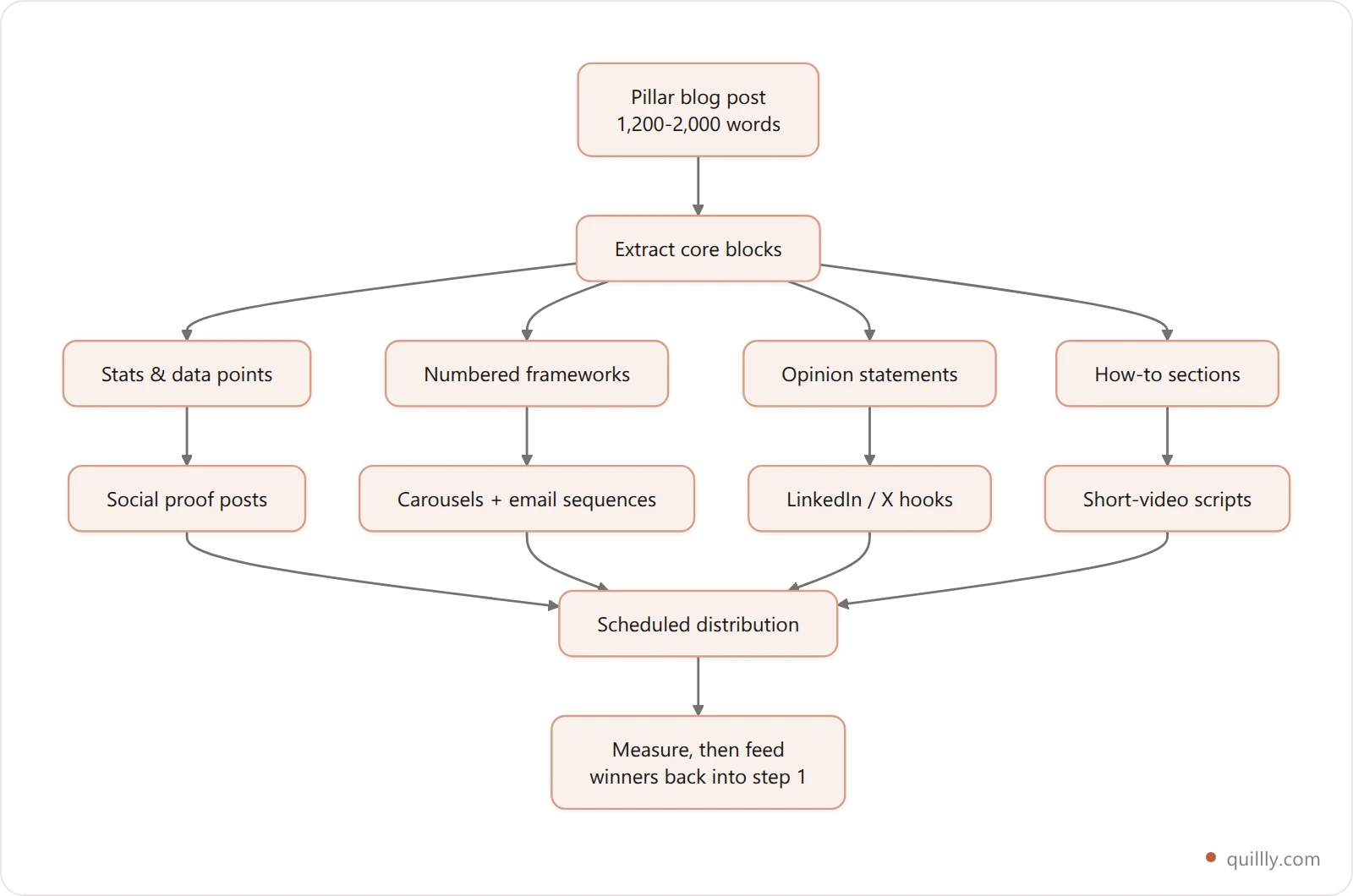
Step 1: Create Your Pillar Asset First#
Start with a comprehensive long-form blog post — ideally 1,200–2,000 words — that covers a topic your audience genuinely searches for. This is your content hub. Everything else derives from it. Platforms built for ai content generation like Quillly let you generate this pillar post in minutes with built-in SEO optimization, so you're not starting from a blank page.
Step 2: Extract the Core Content Blocks#
Before prompting for derivatives, identify the reusable building blocks inside your pillar post:
Key statistics or data points (ideal for social proof posts)
Numbered frameworks or step-by-step sections (ideal for carousels or email sequences)
Strong opinion statements or counterintuitive claims (ideal for LinkedIn hooks or Twitter/X threads)
How-to sections (ideal for short-video scripts and step-by-step carousels)
Step 3: Build a Prompt Library for Each Channel#
A prompt library is simply a saved set of instructions you reuse every time. Create one prompt template for each output format:
Email newsletter: "Summarize this blog post as a 200-word email with a single CTA. Match the tone of [brand voice description]."
LinkedIn post: "Write a 150-word LinkedIn post opening with a surprising stat from this content. End with a question."
Instagram caption: "Create a 3-sentence caption with two relevant hashtags. Keep it conversational."
Short-video script: "Write a 60-second script based on the [Step X] section. Use a hook, three points, and a CTA."
Ad headline set: "Generate five ad headlines under 10 words each that highlight the main benefit."
Step 4: Automate Distribution Scheduling#
Once your derivatives are generated and lightly edited, load them into a scheduling tool (Buffer, Later, or your email platform) and set your publishing cadence. The goal is content marketing automation at the distribution layer — you create once, and the scheduler handles the rest across the week.
Step 5: Archive and Iterate#
Save every prompt that produced a strong output. Over time, your prompt library becomes a proprietary asset that new team members or contractors can use immediately, maintaining consistency without lengthy onboarding.
Building Your SMB AI Tool Stack for Repurposing#
The right tool stack doesn't require enterprise budgets. Most SMBs running effective automated content creation workflows spend between $20 and $80 per user per month on SaaS tools — well within reach for businesses allocating $5,000–$50,000 annually to AI marketing.
Here's a practical, budget-conscious stack:
Layer | Purpose | Budget Range |
|---|---|---|
Content Generation | Pillar blog creation, SEO optimization | 29–99 dollars/month |
AI Transformation | Reformatting content for each channel | 20–50 dollars/month |
Scheduling & Distribution | Automated multi-channel publishing | 15–45 dollars/month |
Analytics | Tracking performance across channels | Free–30 dollars/month |
For content generation, Quillly handles the pillar post creation with built-in SEO optimization and direct publishing — eliminating the need for a separate SEO tool at the drafting stage.
For AI transformation, a general-purpose AI writing assistant works well when paired with your prompt library. The key is consistency: always feed it the same brand voice instructions alongside the source content.
For distribution, tools like Buffer or Hootsuite connect to most social channels and email platforms, enabling true one-click multi-channel publishing once your content is queued.
The payback window for this stack is typically 30–90 days when AI replaces even a few freelancer hours per month. If you're currently spending 500 dollars/month on per-piece content production, a 150 dollar/month tool stack that produces the same volume in-house delivers ROI in the first billing cycle. For a deeper look at the returns possible with this approach, explore our analysis of marketing automation ROI for small businesses.

Measuring the ROI of Your AI Repurposing Workflow#
The teams that keep AI spend flat while increasing impact by 10%–25% share one habit: they measure outcomes, not activity. Publishing volume is a vanity metric. What matters is whether your repurposed content is driving traffic, engagement, and conversions.
Build this simple measurement framework on day one:
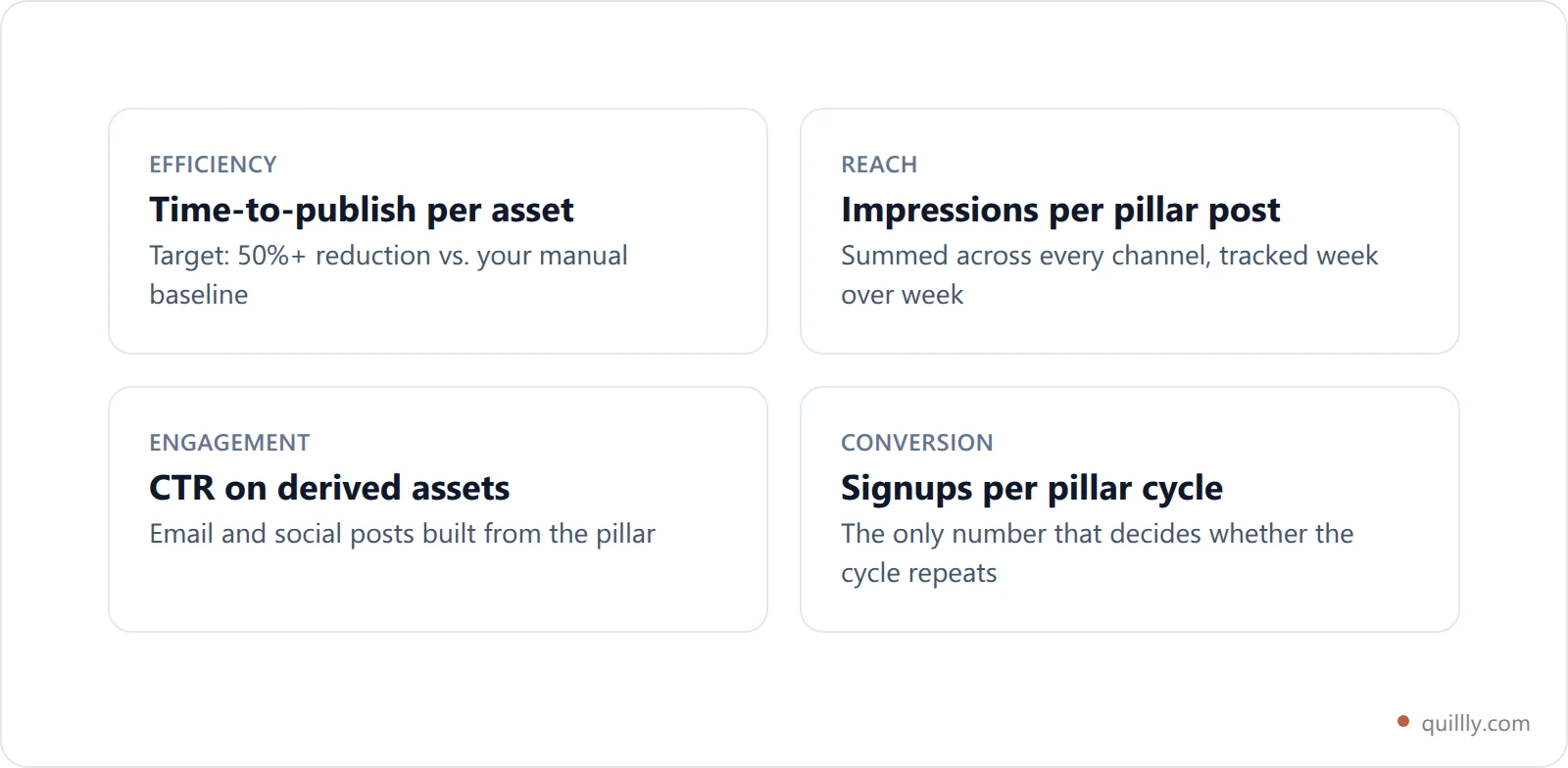
Efficiency metric: Time-to-publish per asset (before vs. after AI workflow). Target: 50%+ reduction.
Reach metric: Total impressions across all channels per pillar post. Track week-over-week growth.
Engagement metric: Click-through rate on emails and social posts derived from repurposed content.
Conversion metric: Leads or sales attributed to content touches (use UTM parameters on every distributed link).
Cost metric: Cost per published asset (total tool spend ÷ assets published monthly).
Review these metrics monthly, not daily. The goal is to identify which channel derivatives perform best for your audience and double down on those formats. If LinkedIn posts from your blog consistently outperform Instagram captions, shift your prompt library investment accordingly.
Pairing repurposing data with first-party audience signals makes this even more powerful — our guide on turning first-party data into AI-powered content assets walks through exactly how to do that.
Governance and Brand Voice: Keeping Repurposed Content On-Brand#
Here's the risk that makes many SMB owners hesitate before scaling AI content: AI drift. Without guardrails, 20%–40% of AI drafts require significant rewriting to match brand tone, terminology, and messaging priorities. At scale, that rewriting cost erases much of the efficiency gain.
The fix is a lightweight governance layer — not a 50-page brand bible, but three practical documents:
A brand voice card (2–3 sentences describing your tone, what you always say, and what you never say)
A terminology list (preferred product names, industry terms, phrases to avoid)
A review checklist (5 questions every piece must pass before publishing)
Embed the brand voice card directly into every AI prompt. This single habit eliminates most drift before it happens. Assign one person — even part-time — to run the review checklist before scheduling.
As Forrester analyst Dr. Maya Patel has noted, AI is most valuable when it automates repetitive tasks, freeing marketers to focus on strategy. Governance enables exactly that freedom: when your AI outputs are reliably on-brand, you stop firefighting corrections and start spending time on creative direction and audience strategy.
For teams using automated content planning, integrating brand voice rules at the planning stage — before generation begins — creates the most consistent results.
Frequently Asked Questions#
What is AI content repurposing?#
AI content repurposing is the practice of turning one long-form asset into many channel-specific pieces using AI prompts. You write a pillar blog post once, extract its reusable blocks, then generate emails, carousels, threads, and video scripts from those blocks instead of starting each from scratch.
How many pieces can you get from one blog post?#
Most small teams get between two and five usable derivatives per pillar post. The ceiling is set by how many distinct blocks the original contains, not by the AI. A post with strong statistics, a numbered framework, and a clear opinion yields more than a thin listicle.
Does repurposed content hurt your SEO?#
Not when the derivatives live on different channels. Duplicate-content risk applies to near-identical pages on the same indexed domain. An email or a LinkedIn carousel built from your blog post is distribution, not duplication, and it usually drives more traffic back to the original.
How long before repurposing pays for itself?#
The typical payback window is 30 to 90 days once AI replaces even a few freelancer hours a month. If you spend $500 a month on per-piece production, a $150 tool stack producing the same volume in-house clears its cost in the first billing cycle.
What should you repurpose first?#
Start with your best-performing existing post, not a new one. It already has proven demand, so the derivatives inherit a topic your audience responds to. Pull its top three blocks, build one prompt template per channel, and publish the set within a week.
Start Multiplying Your Content Output Today#
The opportunity is concrete: one long-form asset, multiplied 2x–5x across channels, produced 30%–60% faster, at 15%–35% lower cost than traditional content production. The workflow is repeatable — create with AI, transform with prompts, distribute via automation, measure outcomes, govern with lightweight guardrails.
The compounding advantage is real. SMBs that build this workflow now generate five pieces of channel-optimized content for every one their competitors produce manually. That gap widens every week.
The place to start is your next pillar blog post. Start a free 14-day Quillly trial to generate a fully SEO-optimized blog post in minutes — then apply the repurposing workflow from this guide to distribute it across email, social, and paid channels before the week is out.
And if you want to explore the broader landscape of AI content strategy for small businesses, Content Automation Tools: How Small Businesses Save 30+ Hours Monthly is your logical next read — it covers the resource constraints this workflow is specifically designed to solve.