

You published the post. The pageview counter ticked up. You felt good. Then nothing happened. No signups, no rankings, no return visitors. Here's the uncomfortable reason: a pageview tells you someone arrived, not that they stayed, read, or cared.
Chartbeat studied 2 billion visits across the web and found that 55% of people spend fewer than 15 seconds actively on a page. Most of your "traffic" bounces before your second paragraph loads.
Blog engagement metrics are the signals that measure what readers actually do once they land: how long they stay engaged, how far they scroll, whether they finish, and whether they come back. They separate content that works from content that merely gets clicked.
This matters more now than it did a year ago. Google's December 2025 core update reportedly leaned harder on user-satisfaction signals, and 2025 antitrust disclosures confirmed Google watches clicks, scrolls, and dwell time. So engagement is no longer a soft "nice to know." It feeds the loop that decides whether you rank at all. This guide gives you the five metrics that matter, the benchmarks to hit, and how to track them without a cookie banner.
What counts as a blog engagement metric?#
A blog engagement metric is any measurement of how actively a reader interacts with a post after landing, rather than whether they landed at all. Examples include engaged time, scroll depth, read-completion rate, and return visits. Engagement metrics measure quality of attention. Traffic metrics measure quantity of arrivals.
That distinction is the whole game. Traffic answers "how many showed up?" Engagement answers "did it work?" You can double your traffic and halve your impact if the new visitors leave in three seconds.
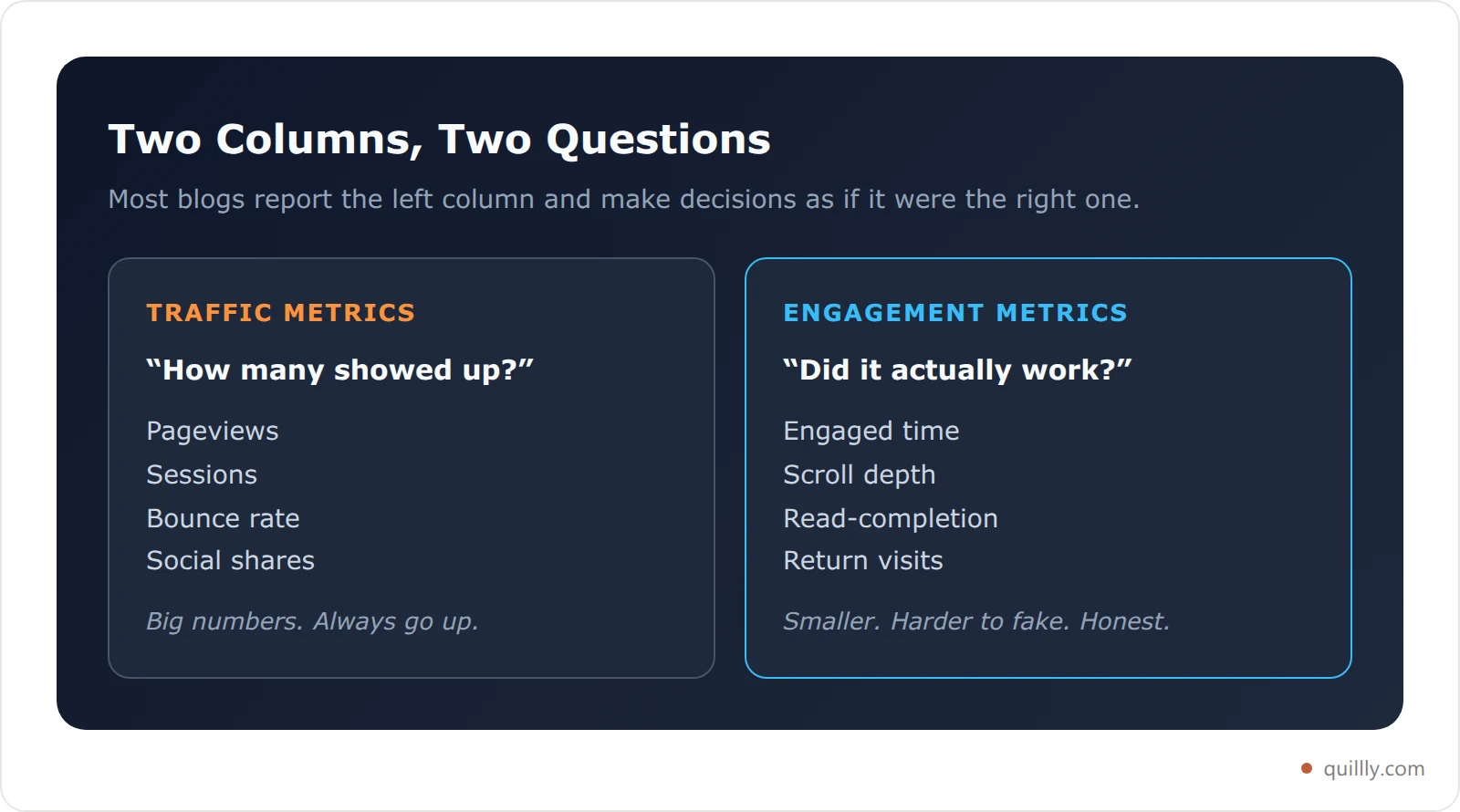
Most blogs track the wrong column. They obsess over pageviews and sessions because those numbers are big and always go up. The metrics that predict whether your blog earns rankings, links, and signups live in the other column, and they are usually smaller, harder to inflate, and far more honest.
Why pageviews and bounce rate are lying to you#
Pageviews and bounce rate are the two most-watched blog metrics, and both mislead you. A pageview fires the instant the page loads. It says nothing about whether a human read a word. You can have 5,000 pageviews on a post with an average engaged time of nine seconds, which means you have a popular page that nobody reads.
Bounce rate is worse. In Universal Analytics, "bounce" meant a single-page session. Google deprecated that definition. GA4 replaced bounce rate with engagement rate, defined as the share of sessions that last longer than 10 seconds, fire a key event, or include two or more pageviews. The old bounce rate you may still be quoting is a metric Google itself walked away from.
Here's the contrarian part: a high "bounce" on a blog post is often fine. Someone searches a question, lands on your post, gets the answer in 40 seconds, and leaves satisfied. That is a win for answer-engine optimization and a loss in your bounce column. Tony Haile, Chartbeat's CEO, put it bluntly: his team found "effectively no correlation" between how much a piece of content is shared and how much attention readers actually give it. The vanity metrics and the real ones do not move together.
Vanity metric | What it implies | What it hides |
|---|---|---|
Pageviews | "People are reading" | Most left in seconds |
Sessions | "Traffic is growing" | Could be all bots or bounces |
Bounce rate | "Engagement" | Deprecated in GA4; punishes good answers |
Social shares | "Content resonates" | No link to actual attention |

The READS framework: 5 blog engagement metrics that matter#
Most "top 20 KPIs" lists dump traffic, leads, and engagement into one bucket and leave you to guess which ones prove your content works. The READS framework fixes that. It is five engagement metrics, in the order a reader experiences them, that together tell you whether a post earned its spot.
READS stands for Reach, Engaged time, Attention, Depth, and Stickiness. Each one measures a different stage of the reader journey, from "did they arrive" to "did they come back." Track these five and you can diagnose any post in under a minute.
Letter | Metric | The question it answers | Good benchmark |
|---|---|---|---|
R | Reach | Did real people arrive? | Sessions trending up, low bot share |
E | Engaged time | Did they actually stay? | 60+ active seconds |
A | Attention | How far did they scroll? | 60–80% scroll depth |
D | Depth | Did they finish? | 25%+ read-completion |
S | Stickiness | Did they come back? | 20%+ return visitors |
Read on for how to measure each one and what counts as good.
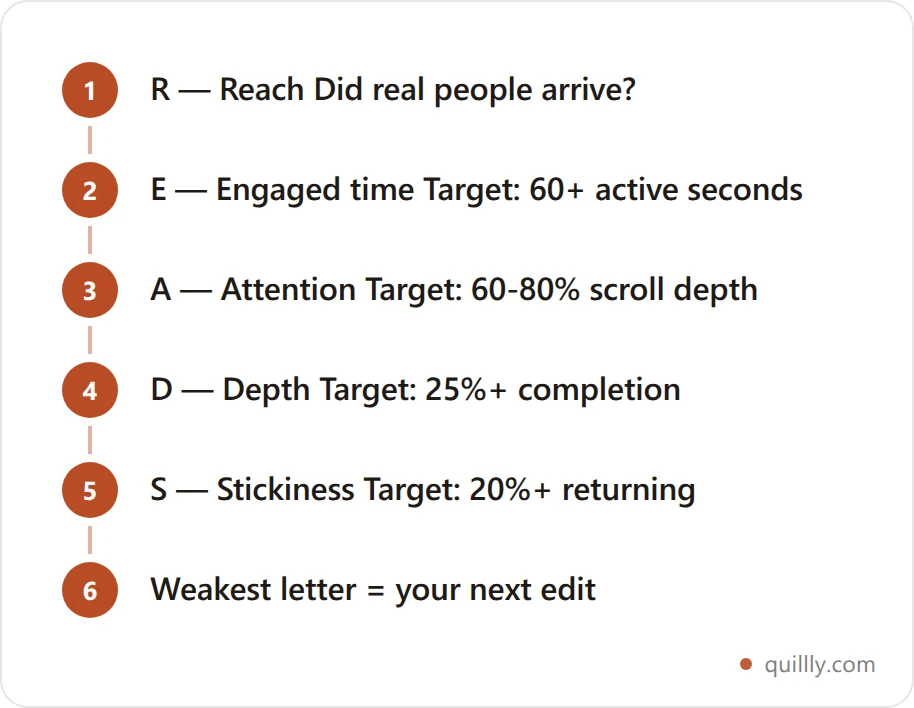
Diagnose in order. A post failing at Reach needs distribution; a post failing at Depth needs restructuring. Fixing the wrong stage is the most common wasted edit in content work.
R — Reach: count sessions, not pageviews#
Reach is the denominator for everything else, but measure it with sessions and unique visitors, not raw pageviews. A session groups one visitor's activity into a single visit. Pageviews double-count anyone who refreshes or navigates, which quietly inflates your sense of scale.
Start here because every other READS metric is a rate built on top of reach. A 30% read-completion rate means nothing until you know whether it is 30% of 50 people or 50,000.
The trap is celebrating reach in isolation. More sessions only help if the readers behind them stay and convert. Watch reach alongside engaged time. If sessions climb while engaged time falls, you are buying or attracting the wrong audience. If both rise together, your distribution and your content are in sync. When you are also tracking where that reach comes from, separate human search and referral traffic from AI assistants. Our guide on how to track AI search traffic walks through tagging ChatGPT, Perplexity, and Google AI Overviews as their own source.
E — Engaged time: the only "time" metric worth trusting#
Engaged time is the number of seconds a reader is actively present on your page, with the tab focused and some sign of life like scrolling or mouse movement. It is the single most honest engagement metric you can track, and it is very different from time on page.
Time on page counts every second the tab is open, including the four minutes someone left your article sitting behind a recipe they were cooking. Engaged time pauses the clock when the tab loses focus or the reader goes idle. One number is theater. The other is truth.
Time on page | Engaged time | |
|---|---|---|
Counts background tabs | Yes | No |
Counts idle readers | Yes | No |
Inflated by | Open tabs, walk-aways | Almost nothing |
Trustworthy | No | Yes |
Aim for 60+ active seconds on a standard post and proportionally more on long-form. GA4's engagement rate uses a default 10-second engaged-session threshold, configurable up to 60 seconds, which tells you Google treats roughly the first minute as the line between a glance and a read. Engaged time is also a strong leading indicator of content decay: when a post's engaged time slides for two months straight, rankings usually follow.
A — Attention: scroll depth and where readers drop off#
Scroll depth measures how far down a post a reader travels, usually reported as the percentage of the article they reached. It shows you exactly where attention dies. If 70% of readers never pass the halfway mark, your middle is too slow or your intro overpromised.
For blog content, a 60–80% average scroll depth signals strong engagement. Below 50% means most readers leave before your key points. Contentsquare's 2026 benchmark found scroll rates slipped 2% year over year, with desktop readers reaching 50.5% of pages versus 45.2% on mobile, so grade mobile on a curve.
Scroll depth is most useful as a heatmap of drop-off, not a single average. Track the milestones: what share of readers hit 25%, 50%, 75%, and 100%. A steep cliff between two milestones is a precise editing instruction. Chartbeat's classic finding still holds: of the people who do scroll, fewer than a third read past the first third of the article. Front-load your value accordingly.
D — Depth: did they actually finish?#
Read-completion rate is the share of readers who reach the end of a post and spend enough time to plausibly have read it. A good tracker combines two signals: scrolling to roughly 90% of the article and staying for at least the minimum time a human needs to read that many words. Hit both and it counts as a read. Hit only the scroll and it is a skimmer racing to the comments.
This is the metric that catches "popular but empty" posts. A listicle can earn huge reach and a 4% completion rate because everyone grabs the first tip and leaves. A dense how-to can earn modest reach and a 35% completion rate because the people who arrive actually need it. The second post is the one that ranks and converts.
Treat 25% or higher as healthy for a substantial post. If completion is in the single digits, the problem is usually length, structure, or a mismatch between your title and your body. A post that promises a quick answer and delivers a 3,000-word essay loses people fast, which is why how long a blog post should be is a question about the query rather than about a word-count target.
S — Stickiness: return visits and loyalty#
Stickiness measures whether readers come back. The headline metric is your share of returning visitors, but the richer version tracks how many days pass between visits and how many posts a returning reader touches. A blog that only ever gets first-time visitors is renting attention, not building an audience.
Return visits matter for rankings too. Chartbeat found that readers who view two pages are 2.75x more likely to return than those who view only one, which is why internal links and a tight related-posts section pay off twice: more pages per session now, more loyalty later.
Aim for 20% or more returning visitors on an established blog. Pair stickiness with your publishing cadence. If you post consistently and stickiness still flatlines, your topics are not building on each other. Strong internal linking and a clear cluster structure fix that, which is also why how often you publish matters less than whether each new post gives returning readers a reason to stay.
Do blog engagement metrics affect rankings?#
Yes, indirectly but powerfully. Google has never confirmed "dwell time" as a direct ranking factor, and spokespeople routinely deny it. But the 2025 DOJ antitrust disclosures revealed that Google's systems use clicks, scrolls, Chrome visit data, and pogo-sticking as ranking feedback. The signals are real even if the official label is not.
Two recent data points sharpen this. Google's December 2025 core update reportedly weighted user-satisfaction signals, including pogo-sticking, dwell time, and return visits, more heavily than prior updates. And a Moz study of 1,500 URLs found that pages with higher average dwell time held their positions longer after algorithm updates. Engagement does not just correlate with rankings. It buys you stability when the algorithm shifts.
Kevin Indig, who writes the Growth Memo newsletter, argues that click-through rate "is no longer the north star metric" and that first-party engagement data is now central to understanding what content works. Pogo-sticking, a reader bouncing back to the search results to click a competitor, is the clearest negative signal you can send Google. Every engagement metric in the READS framework is, at heart, a way to measure and reduce it. If your blog still isn't ranking despite solid on-page SEO, weak engagement is often the missing layer.
How to track engagement without cookie banners#
Here is the problem nobody mentions when they tell you to "just use Google Analytics." Cookie-consent banners are quietly destroying the data you need. When visitors get a genuine "Reject All" option, 50–60% decline, and across strict-consent regions 30–60% of real visitors vanish from your reports entirely. In September 2025, France's CNIL fined Google 325 million euros over coercive cookie consent, so the screws are tightening, not loosening.
That means your engagement metrics are often computed on a self-selected, consent-giving minority. ```image:chart alt="Chart showing blog analytics data loss caused by cookie consent banners versus cookieless tracking" { "type": "bar", "data": { "labels": ["Visitors who reject consent", "Data lost in strict regions (low)", "Data lost in strict regions (high)", "Data lost with cookieless tracking"], "datasets": [{ "label": "Share of visitors missing from reports (%)", "data": [55, 30, 60, 0], "backgroundColor": ["#fb923c", "#fb923c", "#f97316", "#0ea5e9"] }] }, "options": { "plugins": { "legend": { "display": false }, "title": { "display": true, "text": "How Consent Banners Erase Your Engagement Data" } }, "scales": { "y": { "beginAtZero": true, "max": 100, "title": { "display": true, "text": "Percent of real visitors missing" } } } } }
The fix is **first-party, cookieless analytics**: tracking that runs on your own domain, uses an anonymous fingerprint instead of cookies, and needs no banner because it stores nothing personal.

This is where the tooling matters. [Quillly](https://quillly.com){cta=signup} ships a built-in, cookieless engagement tracker on every blog it publishes to your domain. It captures the full READS stack out of the box: scroll-depth milestones, true engaged time with idle detection, read-completion, return visits, plus code-block copies and text highlights. Because the blog lives on your domain and the tracker is first-party, there is no consent gate skimming off your data.

Your AI can read it back without you opening a dashboard. In Claude, Cursor, or ChatGPT, the `get_website_analytics` tool pulls views, engaged time, and top pages, while `get_gsc_performance` adds search position. A prompt like this turns raw events into a decision:
Using Quillly, pull the last 28 days of analytics for my site. List the 5 posts with the highest engaged time and the 5 with the lowest read-completion rate. For each weak post, suggest whether to refresh, restructure, or merge it.
Pair that on-page data with search-side data from your [Google Search Console MCP workflow](https://quillly.com/blogs/google-search-console-ai-mcp-workflow-2026) and you can see both halves of the loop: what brings readers in, and what makes them stay.

## The READS scorecard: a copyable benchmark checklist

Save this. It turns the framework into a five-line audit you can run on any post in under a minute. Copy a post's numbers into the right column and compare against the benchmark.
READS SCORECARD — [post title]
R — Reach .............. sessions: ____ (trend: up / flat / down) E — Engaged time ....... ____ sec (target: 60+ sec) A — Attention .......... ____% scroll (target: 60–80%) D — Depth .............. ____% read (target: 25%+ completion) S — Stickiness ......... ____% return (target: 20%+ returning)
VERDICT:
4–5 green -> scale it: build a cluster around this topic
2–3 green -> fix it: weakest letter tells you what to edit
0–1 green -> rewrite or merge: the post isn't earning its slot
The verdict line is the point. A post strong on reach but weak on depth needs a tighter structure, not more promotion. A post strong on depth but weak on reach is a hidden gem that needs distribution and internal links. The weakest letter in READS is always your next edit. This is the same diagnostic logic behind a full [blog SEO score](https://quillly.com/blogs/blog-seo-score), applied to the reader side of the equation instead of the crawler side.

## What good engagement looks like by blog type

One set of benchmarks for every blog is the reason most audits end in a shrug. A 40-second engaged time is alarming on a technical tutorial and completely normal on a news post. Grade each post against the pattern its format actually produces.

| Blog type | Typical engaged time | Scroll depth | Completion | What to watch |
| --- | --- | --- | --- | --- |
| Technical tutorial / how-to | 3–6 min | 70–85% | 30–45% | Drop-off at the first code block |
| Long-form guide or pillar | 2–4 min | 60–75% | 20–30% | Whether readers reach the middle |
| Listicle / roundup | 45–90 sec | 50–65% | 5–15% | Low completion is normal, not broken |
| News or announcement | 30–60 sec | 40–60% | 10–20% | Return visits matter more than depth |
| Comparison / alternatives | 90 sec–3 min | 65–80% | 20–35% | Did they reach the pricing table? |
{ "type": "bar", "data": { "labels": ["Technical tutorial", "Long-form guide", "Comparison post", "Listicle", "News post"], "datasets": [ { "label": "Typical scroll depth (%)", "data": [78, 68, 72, 58, 50], "backgroundColor": "#0ea5e9" }, { "label": "Typical read-completion (%)", "data": [38, 25, 28, 10, 15], "backgroundColor": "#38bdf8" } ] }, "options": { "plugins": { "legend": { "display": true }, "title": { "display": true, "text": "Blog Engagement Benchmarks by Content Type" } }, "scales": { "y": { "beginAtZero": true, "max": 100, "title": { "display": true, "text": "Percent" } } } } }
[See the full engagement stack on a post you publish.](https://quillly.com){cta=demo}

The practical rule: compare a post to its own format and to its own history, never to your site average. A listicle at 10% completion is healthy. A tutorial at 10% completion is a structural problem. And when a single post's numbers slide month over month against its own baseline, that is the decay signal worth acting on, regardless of format.

Industry matters less than format, with one exception: audiences researching an expensive decision read further than audiences browsing. B2B software, finance, and health readers routinely beat these ranges, while lifestyle and travel readers sit below them and lean harder on return visits. If you write [comparison and alternatives pages](https://quillly.com/blogs/surfer-seo-alternatives), watch whether readers reach the pricing table specifically — that scroll milestone predicts conversions better than the post average does.

## Frequently asked questions

### What are the most important blog engagement metrics?

The five that matter most are engaged time, scroll depth, read-completion rate, return-visitor rate, and sessions. Engaged time and read-completion are the truest signals of whether content works, because they are hard to fake and closely tied to reader satisfaction. Traffic counts like pageviews tell you reach, but the engagement metrics above tell you whether that reach was worth anything.

### Is bounce rate still a useful blog metric in 2026?

Mostly no. Google deprecated the old single-page bounce rate and replaced it in GA4 with engagement rate, the share of sessions that last over 10 seconds, fire a key event, or include two-plus pageviews. On blog posts, a high bounce often just means a reader got their answer and left happy. Track engagement rate and engaged time instead, which measure satisfaction rather than punishing it.

### What is a good average engaged time for a blog post?

Aim for 60 or more active seconds on a standard post, and proportionally more for long-form guides. Engaged time only counts seconds when the tab is focused and the reader is active, so it runs lower and more honest than time on page. GA4's default engaged-session threshold is 10 seconds, configurable up to 60, which signals that roughly the first minute separates a glance from a genuine read.

### How is engaged time different from time on page?

Time on page counts every second the browser tab is open, including time spent in other tabs or away from the screen. Engaged time pauses the moment the tab loses focus or the reader goes idle, then resumes when they return. The result is a number that reflects real attention. A post can show four minutes of time on page and only 40 seconds of engaged time, and the 40 seconds is the truth.

### Do engagement metrics actually affect Google rankings?

Indirectly, yes. Google denies a direct "dwell time" factor, but 2025 antitrust disclosures showed its systems use clicks, scrolls, and pogo-sticking as feedback. The December 2025 core update reportedly weighted user-satisfaction signals more heavily, and a Moz study of 1,500 URLs found higher-dwell pages held rankings longer after updates. Strong engagement will not rank bad content, but weak engagement quietly caps good content.

### How do I track blog engagement without cookies or a consent banner?

Use first-party, cookieless analytics that run on your own domain and identify visitors with an anonymous fingerprint instead of cookies. Because nothing personal is stored, no consent banner is required, so you avoid the 30–60% data loss that gated tracking causes. Quillly's built-in tracker does this automatically on every published post, capturing scroll depth, engaged time, read-completion, and return visits with no setup.

### Why are my pageviews high but conversions low?

High pageviews with low conversions usually means weak engagement, not weak traffic. Readers are arriving but not staying long enough to act. Check engaged time and read-completion first. If both are low, the post attracts the wrong audience or loses people before the offer. A post with modest reach but high completion will almost always out-convert a popular page nobody finishes.

### How often should I review blog engagement metrics?

Review them at two cadences. Check new posts roughly two weeks after publishing, once they have enough sessions to be meaningful, to catch structural problems early. Then run a full READS audit across your library once a quarter to spot decaying posts and hidden gems. Engagement trends move slowly, so daily checking adds noise without insight.

## The bottom line on blog engagement metrics

Stop grading your blog on the metrics that always go up. Three takeaways to act on today. First, pageviews and the old bounce rate lie, because 55% of visitors leave within 15 seconds and Google retired bounce rate in GA4 in favor of engagement rate. Second, the READS framework, Reach, Engaged time, Attention, Depth, and Stickiness, gives you five honest signals and clear benchmarks: 60+ engaged seconds, 60–80% scroll depth, 25%+ completion, and 20%+ return visitors. Third, engagement is now a ranking input, with the December 2025 core update leaning on dwell and pogo-sticking, so the work pays off twice.

Run the READS scorecard on your three most important posts this week. The weakest letter is your next edit.
heading: Measure what you publish, without a consent banner body: Every post Quillly publishes to your domain ships with first-party, cookieless tracking — engaged time, scroll depth, read-completion, and return visits, readable straight from your AI. 14-day trial, no card. button: Start the free trial | https://quillly.com variant: card
Want your AI to actually measure the posts it writes, without a cookie banner eating your data? [Connect Quillly to Claude, Cursor, or ChatGPT in 30 seconds.](https://quillly.com){cta=signup}