
Publish blogs from Claude Code without ever leaving your terminal#
You already write in Claude Code. You debug in Claude Code. So why does publishing a blog still mean opening a browser, pasting into a CMS, and re-fixing every heading the paste mangled?
To publish blogs from Claude Code, you connect an MCP (Model Context Protocol) server that exposes publishing tools to the CLI, then ask Claude to draft, SEO-score, and push the post straight to your own domain. No copy-paste, no WordPress tab, no formatting loss. One prompt in the terminal ships a live, indexed article.
That last mile is the whole problem. Model Context Protocol crossed 97 million monthly SDK downloads by March 2026, a 970x jump from roughly 100,000 in November 2024, and Claude Code was one of the biggest reasons (Digital Applied). The terminal became an agent that can act on the outside world. This guide shows you the exact setup, the tool sequence, and whether posts shipped this way actually rank. Everything here is verified against current Claude Code docs and a live MCP server as of July 2026.
Why publish from Claude Code at all?#
Here's the counterintuitive part. The terminal is a better publishing surface than a polished CMS, not a worse one.
Think about the manual flow. You draft in an AI tool. You copy the output. You paste it into WordPress, where the paste breaks your code blocks and strips your heading levels. You re-upload images. You write a meta description. You hand-set internal links. You hit publish. Then you open Google Search Console and submit the URL. That is nine steps, and the tool Wordable estimates it costs 30 to 60 minutes of formatting and optimization time per article (Wordable).
Claude Code deletes the round trip. The draft never leaves the environment that created it, so nothing gets mangled in transit. The agent that wrote the post is the same agent that scores it, fixes it, links it, and ships it.
There's a quality angle too. A raw AI draft pasted into a CMS gets published at whatever quality it landed at. A draft pushed through an MCP server can be gated: score it first, refuse to publish below a threshold, patch it, then ship. The terminal enforces the discipline the copy-paste flow skips.
This isn't a fringe setup anymore. Anthropic's ecosystem data counts more than 10,000 active public MCP servers, and by July 2026 an estimated 78% of enterprise AI teams had MCP-backed agents in production (MCP adoption report). Connecting a publishing server to your terminal is now a standard move, not a hack.
Claude Code vs Claude Desktop: what's actually different#
People conflate these because they share the "Claude" name and the same underlying model. For publishing, they are not the same tool, and the setup differs.
Claude Code (CLI) | Claude Desktop / claude.ai | |
|---|---|---|
Where it runs | Your terminal | Desktop app or browser |
MCP setup |
| Settings → Connectors → Add custom connector |
Auth for a remote server | URL query key or | OAuth sign-in flow |
Config is version-controllable | Yes ( | No |
Best for | Developers, technical content, automation | Non-technical writing, quick one-offs |
The practical takeaway: if you live in the terminal, use Claude Code and the CLI setup below. The same Quillly connection works across Claude Code, Claude Desktop, and the web app on one key, so you can set it up once and publish from whichever you have open. If you split time between the terminal and an editor, the publish-from-VS-Code workflow covers that route too.
Connect the Quillly MCP server to Claude Code#
Quillly is defined as an MCP server that gives your AI a set of tools to create, SEO-score, and publish blogs directly to your websites. Your AI writes. Quillly handles the publishing, scoring, sitemap, and indexing. You bring Claude Code; Quillly brings the last mile.
Before you connect, make sure you have three things:
Claude Code installed and working in your terminal
A Quillly account with your domain verified (free to start)
A connection key from the dashboard, which looks like
qly_...
Setup is one command. Grab your key from the Quillly dashboard (Settings → Connections), then run:
claude mcp add --transport http quillly \
  https://quillly.com/api/mcp \
  --header "Authorization: Bearer qly_your_key_here"
That registers a remote streamable-HTTP server named quillly. The --transport http flag tells Claude Code this is a remote server, not a local stdio process. The --header flag passes your key as a bearer token.
Prefer to keep the config in your repo so a teammate who clones it gets the same setup? Drop this into a .mcp.json file at your project root:
{
  "mcpServers": {
    "quillly": {
      "type": "http",
      "url": "https://quillly.com/api/mcp",
      "headers": {
        "Authorization": "Bearer qly_your_key_here"
      }
    }
  }
}
The "type": "http" field is required. Claude Code accepts "http" as the alias for the spec's streamable-http transport. A url with no type is a config error.
Pick the right scope#
Claude Code has three MCP scopes. Choosing well is the difference between "just me" and "the whole team."
Scope | Flag | Stored in | Who gets it |
|---|---|---|---|
Local |
|
| Only you, this project |
Project |
|
| Everyone who clones the repo |
User |
|
| Only you, every project |
For a personal blog, --scope user means Quillly is available in every terminal session you open. For an agency repo where the whole team publishes, --scope project commits the config to .mcp.json so it travels with the code.
Confirm the connection#
Verify the server is live:
claude mcp listYou'll see quillly with a ✓ Connected status. Inside a session, type /mcp to open the interactive panel and see every tool the server exposes. Then prove it end to end with the one prompt Quillly uses for its own connection test:
List my Quillly websites
If Claude comes back with your sites, the pipe is open. The moment your AI makes that first call, the key is marked active on the server side, so you know the connection is real and not faked.
The Five-Call Publish Loop#
Every published post moves through the same five tool calls. Name it once and you can reason about the whole pipeline. This is the Five-Call Publish Loop, and it's the mental model to keep in your head every time you ship from the terminal.
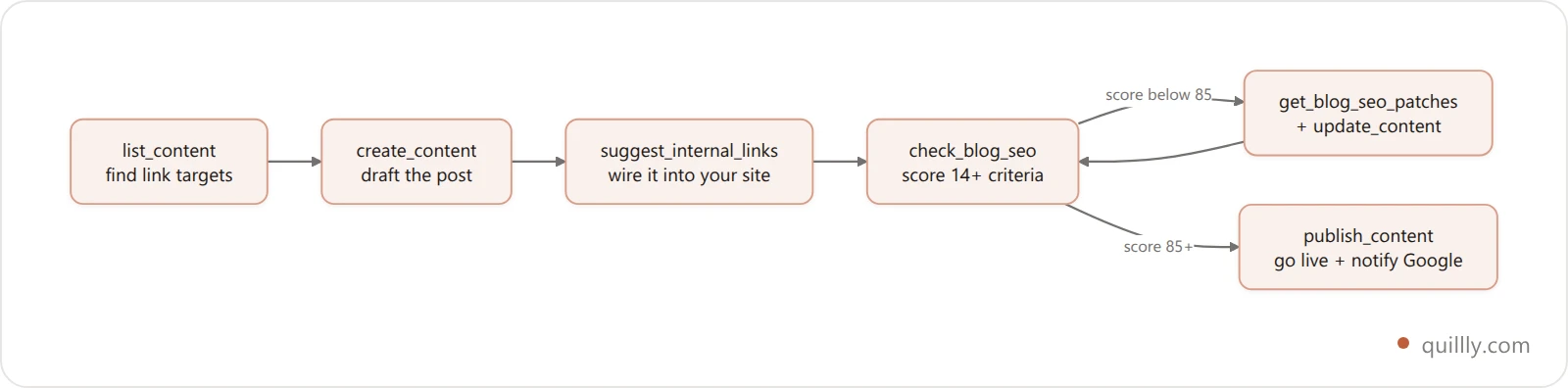
Here's what each call does and why it's in the loop:
Stage | Tool | What it does |
|---|---|---|
1. Map |
| Pulls your existing posts so links point at real URLs |
2. Draft |
| Saves the markdown post as a draft, returns an SEO score |
3. Link |
| Finds relevant internal links and their anchor text |
4. Score |
| Grades the post on 14+ SEO criteria, 0 to 100 |
5. Fix + ship |
| Applies fixes, then publishes to your domain |
The loop between stages 4 and 5 is the important bit. check_blog_seo returns a score. If it's below your bar, get_blog_seo_patches hands back the exact edits, update_content applies them, and you re-score. You only call publish_content once the post clears. That's the gate a copy-paste flow doesn't have. Want the full breakdown of what those criteria measure? The 14-point blog SEO checker walks through each one.
Publish your first post: a real walkthrough#
Enough theory. Here's what shipping a post actually looks like in the terminal. You type one instruction:
Write a 1,400-word post on "RAG vs fine-tuning for support bots." Score it for SEO, add internal links to my related posts, and publish it to my blog once it's above 85.
Claude Code runs the loop as a visible sequence of tool calls you can review:
● list_content        → found 12 related posts
● create_content      → draft saved, SEO 79/100
● suggest_internal_links → 3 anchors proposed
● check_blog_seo      → 79/100 (meta description too long, thin intro)
● get_blog_seo_patches → 4 fixes returned
● update_content      → patches applied
● check_blog_seo      → 91/100 ✓
● publish_content     → live at yourdomain.com/blogs/rag-vs-fine-tuning
Compare the two paths side by side. This is the before-and-after that makes the setup worth ten minutes:
Step | Manual copy-paste | Claude Code + MCP |
|---|---|---|
Move draft to CMS | Copy, paste, fix formatting | Skipped. Never leaves the terminal |
Images | Download, re-upload | Handled in the tool call |
Meta + internal links | Hand-written | Generated and scored |
SEO check | You eyeball it | 14+ criteria, gated at 85 |
Submit to Google | Manual GSC step | Automatic on publish |
Total time | 30 to 60 minutes | Roughly 2 minutes of your attention |

Save the instruction above as a reusable prompt. Swap the topic and the word count, and you have a one-line publish command you can fire any day. That's your copyable asset: a single prompt that runs the entire Five-Call Publish Loop.
Turn your repo into blog posts#
This is the trick only Claude Code can pull off, because Claude Code lives inside your repository. Claude Desktop and ChatGPT can't read your git history. Claude Code can.
That changes what "write a post" means. Your commits, your CHANGELOG, and your merged PRs are already a record of what you built. Point Claude Code at them and the source material writes itself:
Read the CHANGELOG since the last release and publish a "What's new in v2.0" post to my blog, linking to the relevant docs pages.
Claude Code reads the file, drafts the announcement, runs suggest_internal_links to wire it to your docs, scores it, and ships it. A launch post that used to be a Friday-afternoon chore becomes one line. The same works for engineering write-ups: point it at a PR thread and ask for a "how we cut build times 40%" post, and it turns the discussion into a narrative that builds your domain's authority.
Because Quillly also publishes docs and changelog entries, not just blog posts, the whole developer-content surface ships from the same terminal. Your code, your release notes, and your blog all live one prompt away from published.
Does AI content published this way actually rank?#
Fair question, and the honest answer has nuance. Publishing from AI is not the same as publishing unedited AI slop. The distinction is everything.
The data on unedited AI is sobering. Semrush analyzed 42,000 blog pages across 20,000 keywords and found human-written content holds the number one position 80.5% of the time versus 10% for AI-only content (Semrush). A separate study by Rankability scored 487 top search results and found 83% read as human-written (Rankability).
Google's own position is not "AI is banned." As Google Search Central puts it: "Appropriate use of AI or automation is not against our guidelines." The line they draw is intent: "Using automation, including AI, to generate content with the primary purpose of manipulating ranking in search results violates spam policies."
The March 2026 core update sharpened this by raising the weight of a signal called Information Gain, which measures how much genuinely new value your page adds beyond what already ranks. Pure AI drafts are weak here because models synthesize what exists; they rarely add a novel observation.
So where does the terminal help? It makes the human-in-the-loop step frictionless. You review each tool call, refine the draft in the conversation, and only publish when the SEO gate clears. As Ana Camarena, Head of Organic Content Strategy at Semrush, put it: "AI helps us move faster, and speed does matter. But not enough to justify lowering quality standards." The loop is built to keep speed without dropping the bar.
It works in practice. One documented Claude Code plus MCP publishing workflow took a brand-new domain (DR 0) from 0 to over 6,000 impressions in 30 days (GitHub case study). New domain, no backlinks, terminal-only publishing.

Automate it: scheduled and multi-post runs#
Once the loop runs from a single prompt, you can scale it. Quillly itself is not an automation platform, and that's a feature, not a limit. Automation lives in Claude Code, where you already have cron, scripts, and scheduled tasks.
A weekly content run is just a saved prompt fired on a schedule. Point Claude Code at your content calendar, your changelog, or a list of target keywords, and let it draft and publish a batch. Because every post still passes through check_blog_seo before publish_content, batch scale doesn't mean dropping quality.
For genuinely large jobs, the pattern is the same loop, repeated. Publishing dozens of pages from one conversation is how programmatic SEO with MCP works: one instruction, many posts, each scored and linked. And if you're managing several sites, the tools take a website_id, so one Claude Code session can publish to all of them.
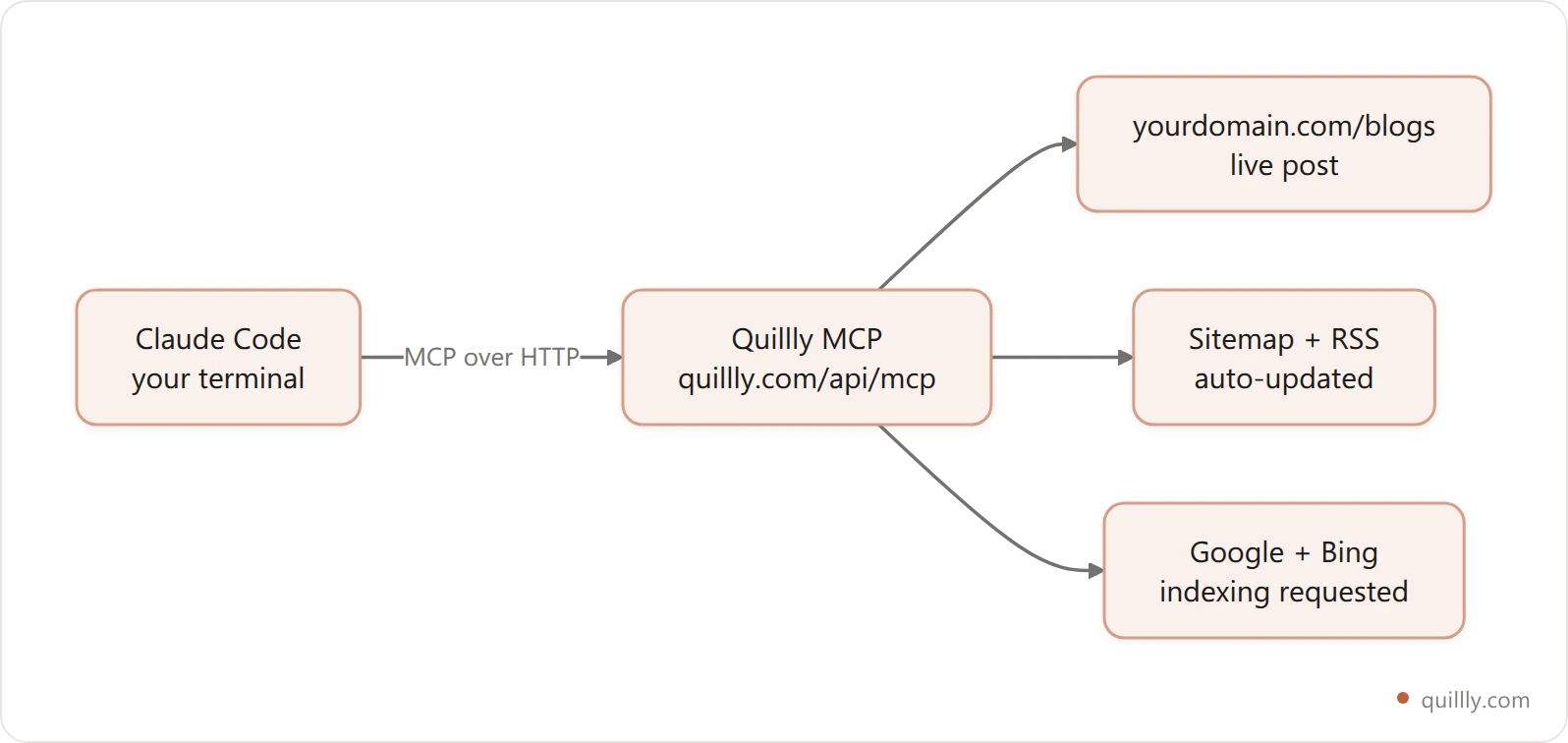
You control the schedule and the prompts. The MCP server just makes "publish" a callable action. If you're weighing this against a traditional stack, the case for MCP replacing the headless CMS goes deeper on the architecture.
Troubleshooting: when the server won't connect#
Most setup issues are one of three things. Here's the fast triage.
**claude mcp list** shows a failure. Re-check the transport flag. A remote server needs --transport http. Without it, Claude Code assumes a local stdio command and fails to spawn it.
Tools don't appear in **/mcp**. Your key is probably wrong or missing. Confirm the Authorization: Bearer qly_... header matches the key in your Quillly dashboard, and that you copied the whole thing including the qly_ prefix.
Config committed but a teammate can't connect. Project scope shares the server definition, not your secret. Each teammate still needs their own key. Keep keys out of the committed .mcp.json by using their own local override, or an environment variable, so you never push a secret to git.
If the connection is live but a specific publish fails, the tool response tells you why (a meta description over the limit, an unverified domain). Read the error, fix the one thing, and re-run. When you're moving an existing site over, the guide on moving your blog to your own domain covers the domain verification step.
Frequently asked questions#
Can Claude Code publish a blog to my own domain?#
Yes. With an MCP server like Quillly connected, Claude Code can create, SEO-score, and publish posts directly to yourdomain.com/blogs. The post is a real, indexable page on your domain, not a subdomain or a rented canvas. You run one prompt in the terminal and the article goes live, with the sitemap updated and search engines notified.
Do I need to know how to code to use Claude Code for blogging?#
You need to be comfortable in a terminal, but you don't write code to publish. Setup is one claude mcp add command. After that, you instruct Claude in plain English ("write and publish a post on X"), and it runs the tool calls. The technical bar is installing Claude Code and pasting one command, not programming. If you do write code for a living, the developer workflow goes further into CI hooks and scripted publishing.
How is this different from an AI writer like Jasper?#
An AI writer generates text. It stops at the draft. Quillly is not a writer at all. It's the publishing, SEO-scoring, and indexing layer. Claude Code brings the writing; the MCP server handles everything after the draft: scoring on 14+ criteria, internal links, meta tags, publishing to your domain, and pinging Google. You bring your own AI instead of paying for another one. The same split is why tools that only draft leave so much work on your desk — we counted the steps between draft and indexed URL in Writesonic alternatives.
Is it safe to let an AI publish to my site automatically?#
It's as safe as the gate you set. Every post passes through check_blog_seo before publish_content, so you can refuse to publish anything below a score threshold. You review each tool call in the terminal before it runs. And you can publish as drafts first, then promote them manually. The agent proposes; you keep the veto.
Will AI-published content get my site penalized by Google?#
Not because it's AI. Google's guidelines allow AI-assisted content and penalize content made to manipulate rankings. The risk is publishing thin, unedited drafts at scale. The terminal loop mitigates this by forcing an SEO gate and keeping you in the review path. Add genuine information gain, meaning your own data, examples, and takes, and AI-assisted posts rank fine.
Does the same connection work in Cursor and Claude Desktop?#
Yes. The Quillly endpoint is the same across every MCP client. Add it as a connector in Claude Desktop or claude.ai, as an MCP server in Claude Code, or in ~/.cursor/mcp.json for Cursor. Your blogs, sites, and key are shared across all of them, so you set up once and publish from whichever tool you have open.
What does it cost to publish from Claude Code?#
Quillly has a free way to connect a site and publish your first post, and a Pro plan at $9 per month (or $96 per year) that adds up to 5 websites, unlimited blogs, custom CSS, scheduled publishing, and full analytics. Claude Code itself is a separate Anthropic product. Quillly never sees your Anthropic credentials.
The bottom line#
Publishing from Claude Code turns your terminal into a full content pipeline. Three things to remember. First, setup is one claude mcp add --transport http command, and the same key works across Claude Code, Cursor, and Claude Desktop. Second, the Five-Call Publish Loop (list, create, link, score, publish) gates every post at your SEO bar, which is why terminal publishing beats copy-paste on both speed (about 2 minutes versus 30 to 60) and quality. Third, AI-assisted content ranks when a human stays in the loop; the data shows human-in-the-loop wins position one 80.5% of the time, and the terminal makes that loop frictionless.
Want your AI to actually publish the post it just wrote? Connect Quillly to Claude Code in 30 seconds.