---
title: Framer Blog SEO: Rank Your Framer Blog in 2026
description: Framer's technical SEO is solid, but its CMS caps your blog. Here's how to add a fast, schema-rich blog that ranks in 2026 and publish to it from AI.
keywords: framer blog seo, framer seo, framer cms limitations, add a blog to framer, framer subdirectory blog
published: 2026-07-23
updated: 2026-07-23
url: https://quillly.com/blogs/framer-blog-seo
word_count: 2706
---
## Related Pages
- [019e6c0d-a638-705f-8770-a2cf30893af3](https://quillly.com/blogs019e6c0d-a638-705f-8770-a2cf30893af3)
- [019f58f3-0f8c-7473-8302-d1b1d2ca479f](https://quillly.com/blogs019f58f3-0f8c-7473-8302-d1b1d2ca479f)
- [019f256c-579f-74c7-bf1e-8d9faec4e13d](https://quillly.com/blogs019f256c-579f-74c7-bf1e-8d9faec4e13d)
- [019ed829-886c-75c3-8428-f58428510b9b](https://quillly.com/blogs019ed829-886c-75c3-8428-f58428510b9b)
- [019f633e-fc49-7138-85dd-1c03023aee06](https://quillly.com/blogs019f633e-fc49-7138-85dd-1c03023aee06)
- [019e7b82-4c29-779f-a2dd-d2fabdc9bcf4](https://quillly.com/blogs019e7b82-4c29-779f-a2dd-d2fabdc9bcf4)
- [019ec396-f66f-7378-a88b-1d45b4fcc591](https://quillly.com/blogs019ec396-f66f-7378-a88b-1d45b4fcc591)

*Photo by [vadim kaipov](https://unsplash.com/@vadimkaipov?utm_source=quillly&utm_medium=referral) on [Unsplash](https://unsplash.com?utm_source=quillly&utm_medium=referral)*
You built a beautiful site in Framer. The landing page converts, the animations feel expensive, and then you added a blog... and it just sits there. No rankings, no AI citations, no traffic. So you start googling "is Framer bad for SEO" and get a wall of contradictory takes.
Here's the thing most of those posts get wrong: Framer blog SEO isn't held back by crawling or rendering anymore. Framer's technical foundation is genuinely good in 2026. What holds your blog back is the *content operations* layer around it — the stuff that turns a page into a page that ranks and gets cited.
**Framer blog SEO is strong on the technical basics — server-side rendering, auto-generated sitemaps, and editable meta tags — but weak on content operations: no schema automation, no categories or author pages, hard CMS item caps, and no way to publish straight from your AI. You rank a Framer blog by fixing the ops layer, not by leaving the platform.**
This guide shows you exactly where Framer's blog wins, where it quietly loses rankings, and the setup that fixes both without ripping out your design.
## Is Framer good for SEO in 2026?
Yes — for the right job. Framer is excellent for marketing sites, landing pages, and portfolios. Its pages pre-render real HTML on the server, so Googlebot and AI crawlers see your headings, copy, and metadata in the first response instead of waiting on JavaScript. That alone puts Framer ahead of most no-code builders people still assume are "bad for SEO."
The nuance: Framer is strong on *technical* SEO and weak on *content-scale* SEO. Google's own guidance is that it rewards "high-quality content, however it's produced" and judges the who, how, and why behind a page — not the tool you built it in ([Google Search Central](https://developers.google.com/search/blog/2025/05/succeeding-in-ai-search)). Framer can produce that quality. It just doesn't give you the operational machinery to do it across dozens or hundreds of posts. That's the real Framer blog SEO story, and it's why so many Framer sites rank for their brand but never for the informational queries that grow traffic.
## What Framer does well for SEO
Give Framer credit where it's due. If you only publish a handful of posts, its native blog is fine. The technical fundamentals are solid out of the box:
- **Server-side rendering.** Every page ships complete HTML, so crawlers and answer engines read your content immediately — no hydration gamble.
- **Automatic sitemap and robots.txt.** Framer generates and updates these for you, so new posts get discovered.
- **Editable meta tags.** Each page and CMS item has meta title and description fields, and you can map them to CMS fields so every post gets unique metadata.
- **Image optimization.** Framer serves responsive, compressed images with lazy loading by default.
- **Clean URLs and HTTPS.** Structure is sane and secure without configuration.
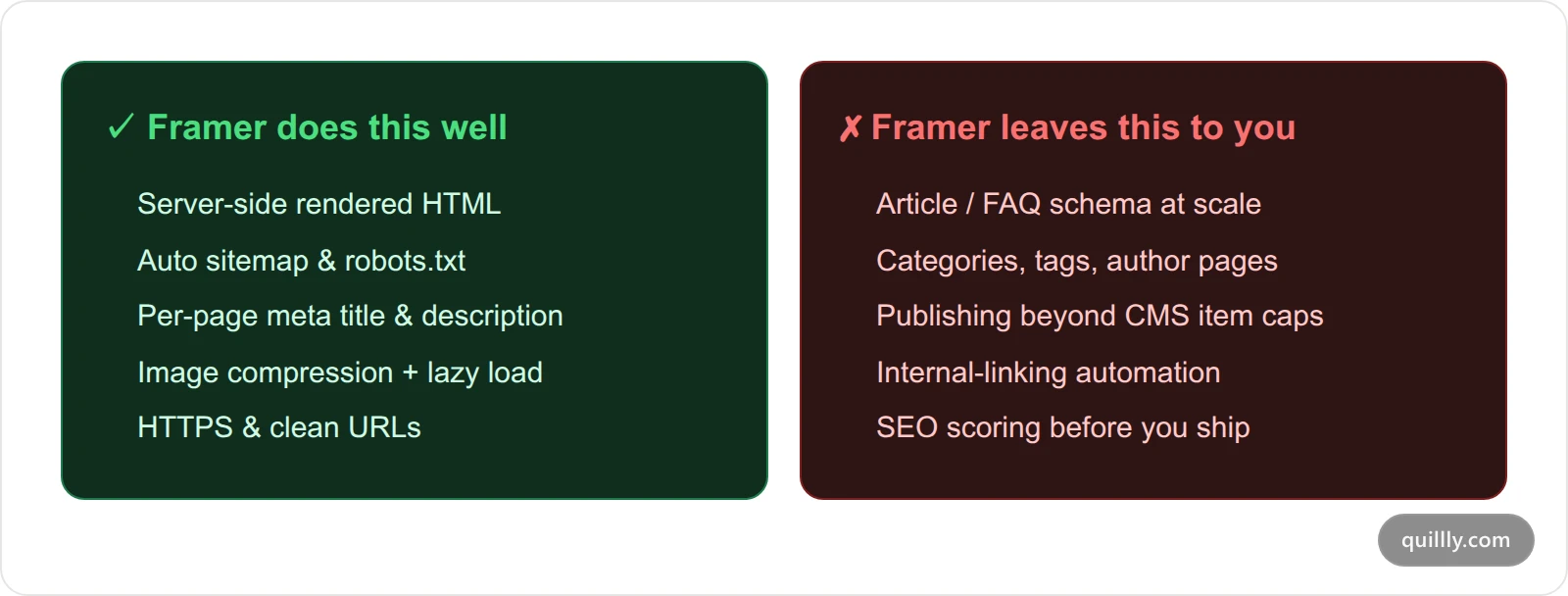
*Framer nails technical SEO; the content-operations layer is where a growing Framer blog loses rankings.*
## Where Framer blogs actually lose rankings
The problems show up the moment you get serious about content. These are the five gaps that quietly cap a Framer blog's organic ceiling:
1. **No schema automation.** Framer has no native, per-item structured data. Adding Article, FAQ, or HowTo JSON-LD means hand-rolling code overrides — one at a time. Miss it and you forfeit rich results and a chunk of AI-citation eligibility.
2. **No real blog taxonomy.** The CMS has no built-in categories, tags, or author pages. That's a problem for both [topical authority](/topical-authority-cluster-map) and E-E-A-T signals, which want visible authorship and clustered topics.
3. **Hard CMS caps.** Framer meters your content by plan (more on the exact numbers below). A blog is the one thing on your site designed to grow forever, and Framer's CMS is designed with ceilings.
4. **No internal-linking engine.** Every internal link is manual. On a real content library, that's hours of upkeep — and stale links are a slow leak of ranking equity.
5. **No pre-publish quality signal.** Framer won't tell you a post is thin, missing a meta description, or under-linked. You ship blind and find out from Search Console weeks later.
None of these are "Framer is broken." They're "Framer is a design tool, not a content platform." A quick way to catch several of them on any page is a structured [on-page SEO audit that flags the issues actually killing your rankings](/on-page-seo-audit).
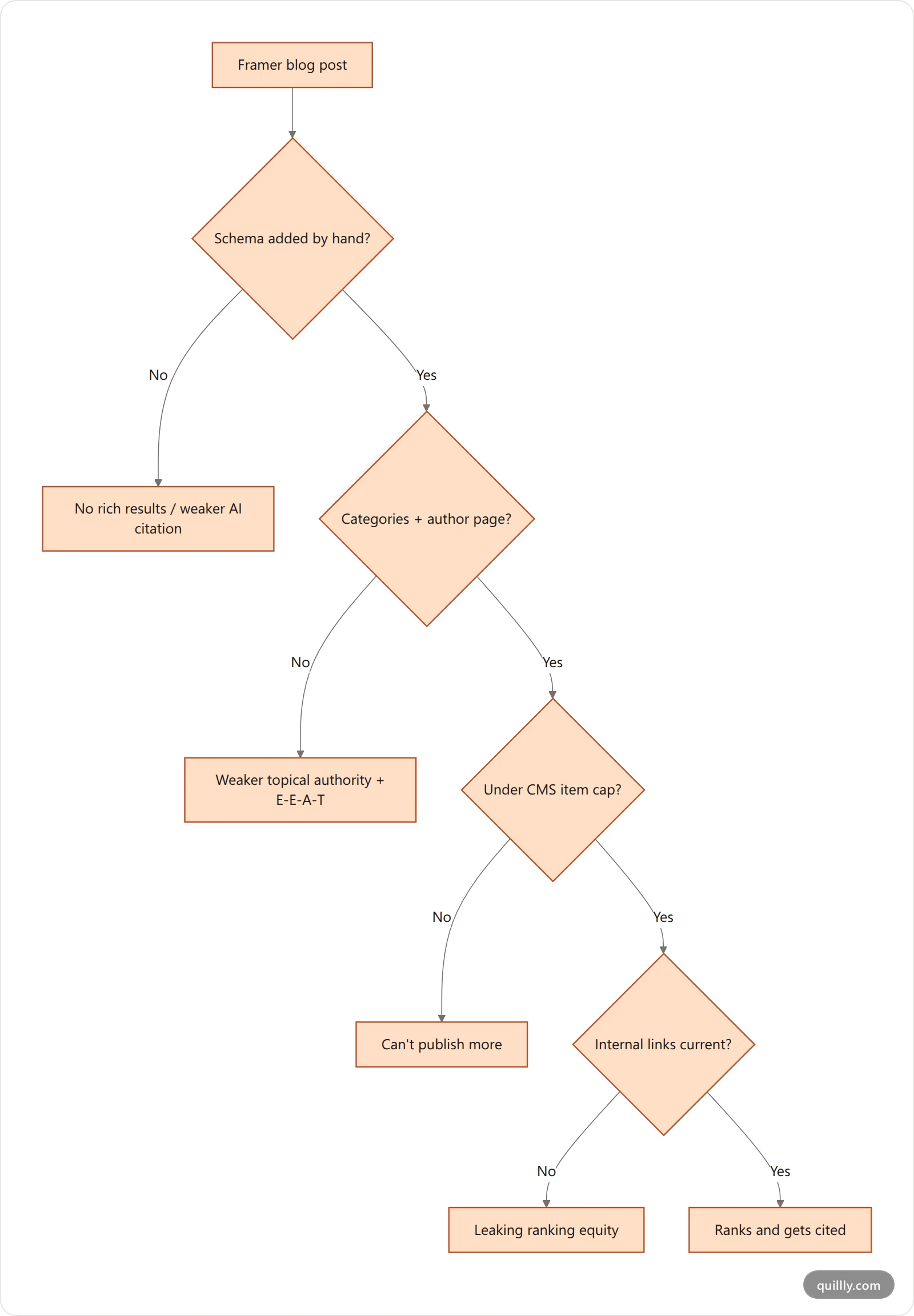
*Each unmet content-ops requirement is a place a Framer blog silently loses ground.*
## Framer CMS limits that cap your blog
This is the gap founders hit first, and the numbers are concrete. Framer's CMS is metered per plan:
| Framer plan | CMS collections | CMS items | Notes |
| --- | --- | --- | --- |
| Basic | Limited | Low cap | Fine for a landing page, not a blog |
| Pro (~$30/mo annual) | 10 | 2,500 | The plan most blogs live on |
| Scale (~$100/mo annual) | 20 | 10,000 | Add-ons: +$20 per 10,000 items |
Source: [Framer pricing breakdowns, 2026](https://brixtemplates.com/blog/framer-pricing-plans). 2,500 items sounds like plenty until you remember a CMS "item" is every blog post, every author record, every category entry, and every reusable content block. A programmatic or fast-moving blog eats that allowance, and the fix is either a pricier tier or a different home for your content.
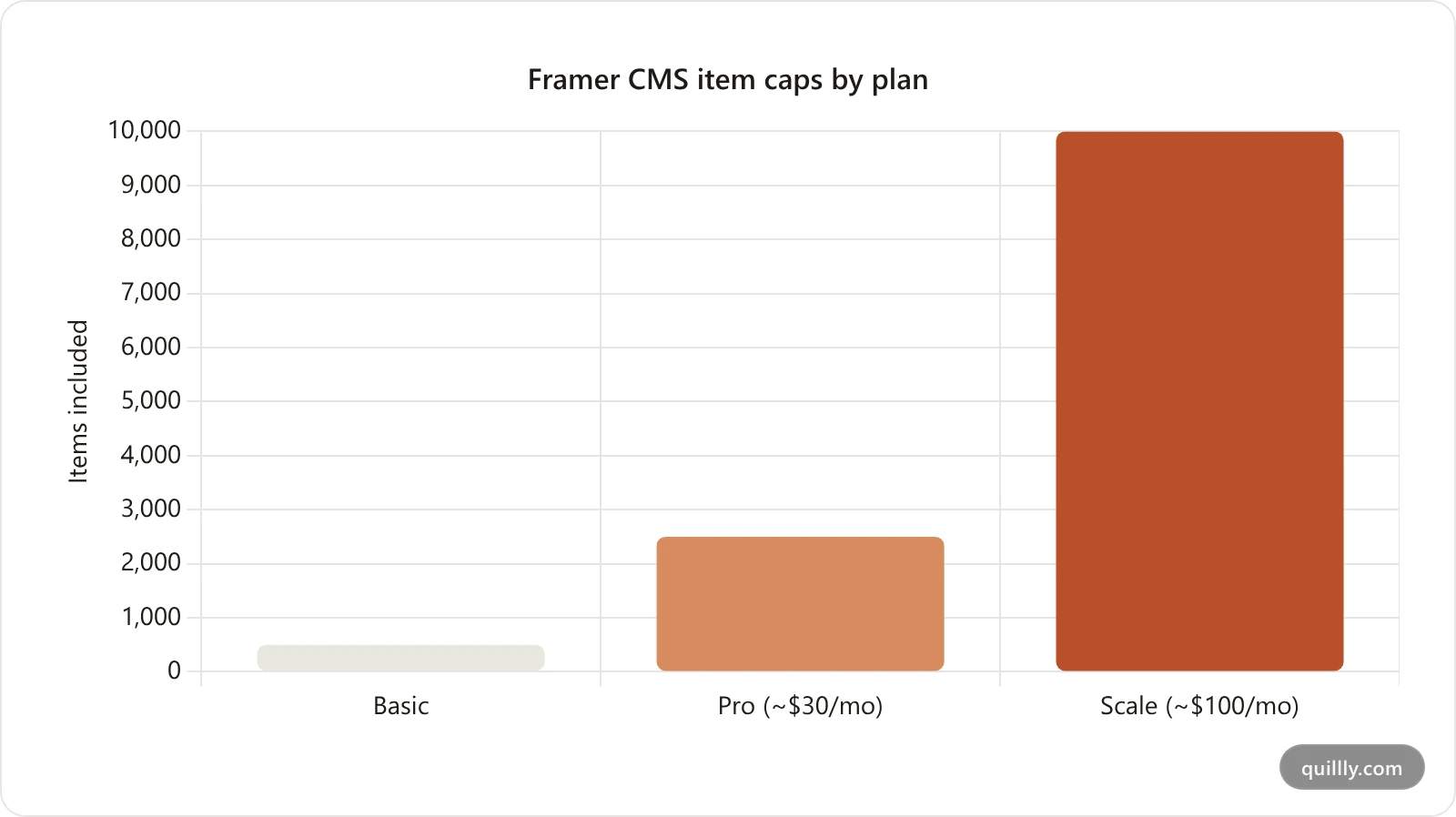
*A blog is built to grow forever; Framer's CMS is metered by tier. (Basic figure approximate.)*
There's a second cost hiding here: performance. Framer sites lean on animation, and animated elements without reserved dimensions cause layout shift. Reviews regularly find Framer pages scoring 0.15–0.3 on Cumulative Layout Shift ([we-optimizz, 2026](https://www.we-optimizz.com/post/is-framer-good-for-seo)), while Google's "good" threshold is 0.1 or under ([web.dev](https://web.dev/articles/cls)). On a content page, that's a Core Web Vitals ding you pay on every post. If speed is your bottleneck, our guide to [fixing a slow blog and passing Core Web Vitals](/core-web-vitals-for-blogs) walks through the specifics.
## Native Framer blog vs a subdirectory blog
So what do you actually do? You have two honest options, and the right one depends on how much you plan to publish.
Keep the **native Framer blog** if you'll publish occasionally, you're fine adding schema by hand, and you'll stay well under the CMS cap. It keeps everything in one tool.
Move to a **subdirectory blog** — a dedicated blog engine served at `yourdomain.com/blogs` while Framer keeps the root — if content is a real growth channel. You get schema, taxonomy, unlimited posts, scoring, and automated internal links, all on the same domain so every bit of authority compounds to your root. This is the same architecture a lot of teams already use to bolt a real blog onto a design-first site.
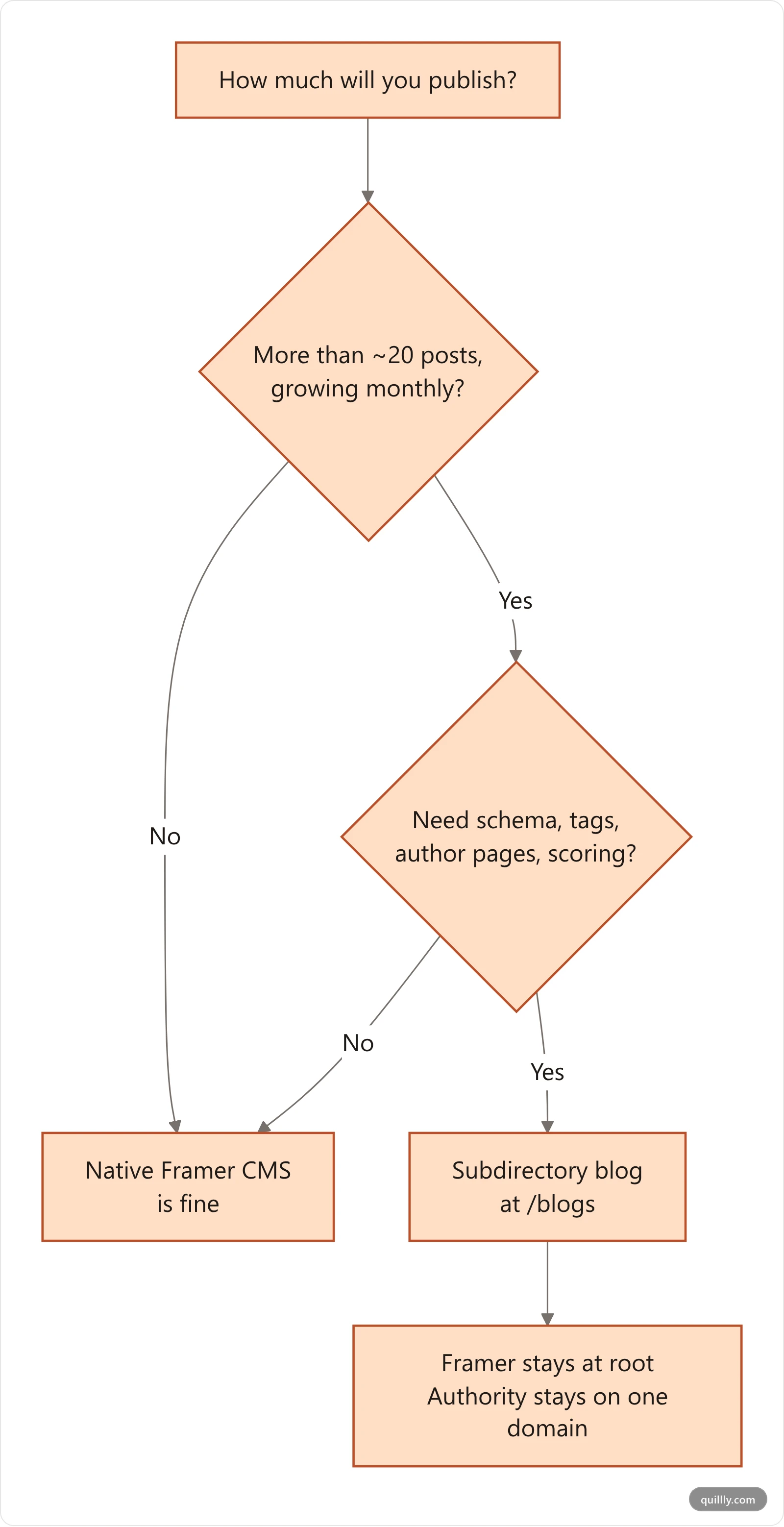
*If content is a growth channel, the subdirectory route removes every Framer content-ops ceiling at once.*
Why a subdirectory and not a subdomain like `blog.yourdomain.com`? Because a subdirectory inherits your root domain's authority instead of starting a fresh reputation. It's the setup we walk through end to end in [the reverse-proxy blog subdirectory guide](/reverse-proxy-blog-subdirectory) — and it's the single highest-leverage move for a Framer blog that needs to scale.
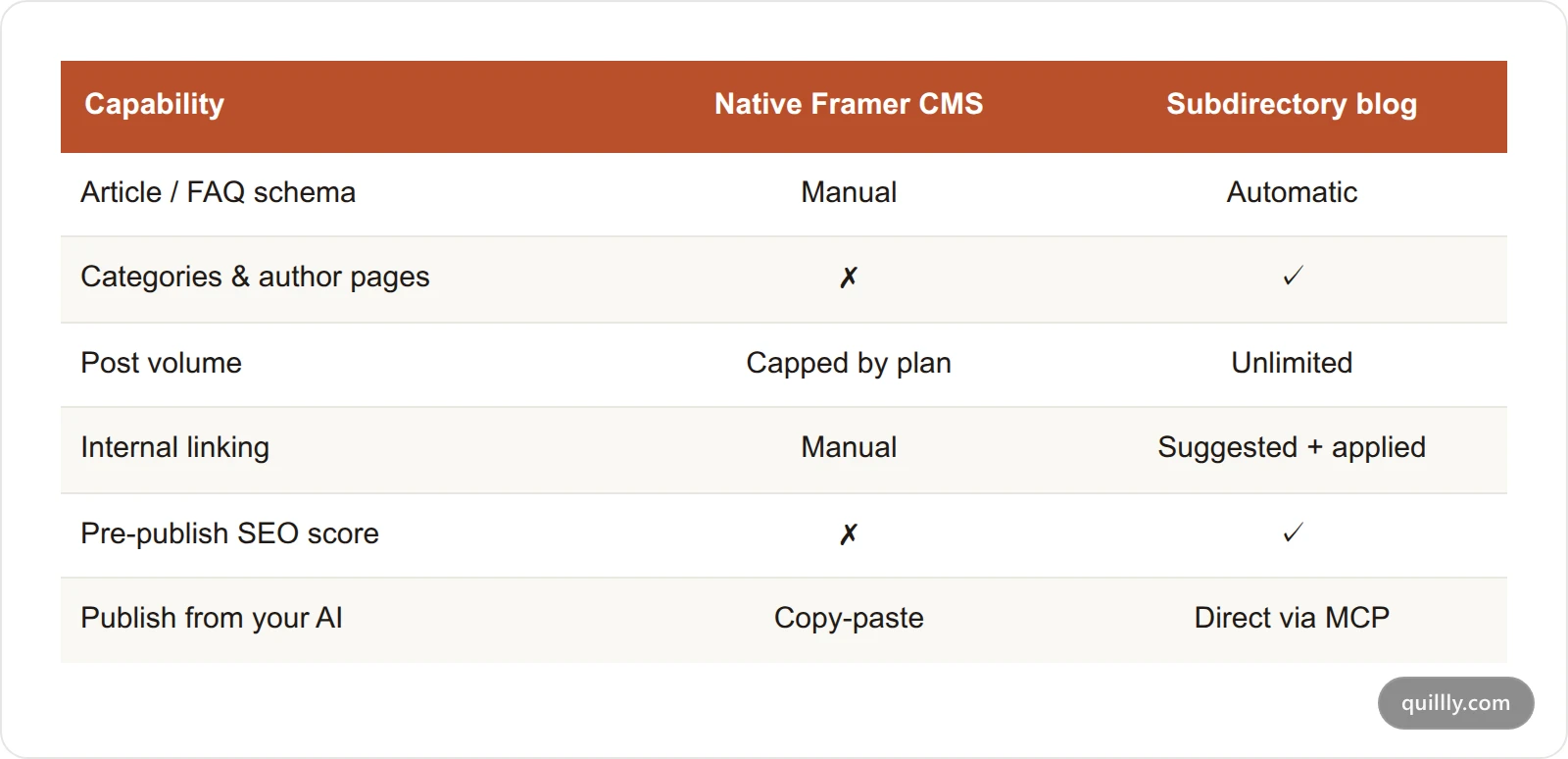
*Native Framer keeps things in one place; a subdirectory blog trades that for a real content-operations engine on the same domain.*
## How to add a rank-ready blog to your Framer site
The subdirectory setup is less work than it sounds. At a high level:
1. **Keep Framer at the root.** Your marketing site, pricing, and landing pages stay exactly where they are.
2. **Point **`**/blogs**`** at a blog engine.** A reverse proxy (via your CDN or host — Cloudflare, Vercel, and Netlify all handle this) routes `yourdomain.com/blogs/*` to a dedicated blog service while everything else hits Framer.
3. **Match your brand.** Serve the blog with your fonts, colors, and nav so readers never feel the seam.
4. **Ship sitemap, RSS, and **`**llms.txt**`**.** The blog engine generates these so search engines and AI crawlers keep up with new posts automatically.
The result: one domain, two systems, zero authority split. Google sees a single site; readers see a seamless experience; you get a blog with no item caps and full schema control. If you happen to be on Webflow instead of Framer, the same logic applies — here's the [Webflow-from-AI version of this workflow](/publish-to-webflow-from-ai).
Want a blog that ranks living at your Framer domain without touching the CMS? [See how the subdirectory setup works.](https://quillly.com){cta=learn}
## Publish to your Framer blog from AI, no copy-paste
Here's the part that changes the daily workflow. Once your blog lives at `/blogs` on a platform with an MCP server, your AI can write *and* publish — you never touch a CMS editor.
The Ahrefs study of 600,000 pages settled the question of [whether AI content ranks](/does-google-penalize-ai-content): 86.5% of top-ranking pages already contain AI-assisted content, and the correlation between AI usage and ranking position was 0.011 — statistically zero ([Search Engine Journal](https://www.searchenginejournal.com/ahrefs-study-finds-no-evidence-google-penalizes-ai-content/550656/)). Google doesn't care who typed it. It cares whether it's good. As Google's John Mueller put it, "focus on your visitors and provide them with unique, satisfying content."
So the winning move isn't "write with AI or not" — it's "write with AI, then run it through a quality gate before it goes live." With an MCP-connected blog, that whole loop happens inside Claude or ChatGPT:
```bash
# Draft, score, and publish — all from your AI, no CMS login
create_content # save the draft to /blogs on your domain
check_blog_seo # score it against a 14-point audit
get_blog_seo_patches # get the exact fixes to hit 85+
update_content # apply the patches in one pass
publish_content # go live + ping sitemap, RSS, and IndexNow
```
That `check_blog_seo` step is the guardrail Framer's native CMS doesn't have. It's what keeps AI-assisted volume on the right side of Google's 2026 scaled-content-abuse line, where sites publishing 50–100 edited AI posts saw traffic gains while unedited content farms lost 40–90% ([Search Engine Journal](https://www.searchenginejournal.com/ahrefs-study-finds-no-evidence-google-penalizes-ai-content/550656/)). Quality control, not authorship, is the difference. It's also the same MCP workflow teams use to [publish to WordPress from AI without copy-paste](/publish-to-wordpress-from-ai) — Framer just keeps the front of house.
## The Framer Blog SEO checklist
Copy this and run every post against it, whether you stay on the native CMS or move to a subdirectory:
- [ ] **Unique meta title (≤60 chars)** with the primary keyword up front
- [ ] **Meta description 140–155 chars**, mapped from a CMS field if native
- [ ] **Article or FAQ schema** present (hand-added on Framer, automatic on a blog engine)
- [ ] **One H1, descriptive H2s** that answer real questions
- [ ] **3+ internal links** to related posts with descriptive anchors
- [ ] **Reserved image dimensions** so CLS stays under 0.1
- [ ] **A visual every 300–500 words** (diagram, chart, or photo) with alt text
- [ ] **Author attribution** visible for E-E-A-T
- [ ] **Post added to sitemap + pinged** to search engines on publish
> **Stop copy-pasting into a CMS that caps your blog**
> Keep Framer for design. Add a blog at yourdomain.com/blogs that your AI writes, scores, and publishes for you — schema, internal links, and unlimited posts included.
> → [Connect your AI in 30 seconds](https://quillly.com)
## Frequently Asked Questions
### Is Framer good for SEO in 2026?
Yes, for technical SEO. Framer pre-renders HTML on the server, auto-generates sitemaps and robots.txt, and gives every page editable meta tags, so crawlers and AI engines read your content cleanly. Its weakness is content-scale SEO — schema, taxonomy, and CMS caps — which matters once your blog grows past a handful of posts.
### Why isn't my Framer blog ranking?
Usually it's content operations, not the platform. Common culprits: missing Article or FAQ schema, no categories or author pages for topical authority, thin internal linking, and layout shift from animations hurting Core Web Vitals. Framer renders fine for crawlers; the gaps are in the SEO machinery around each post.
### What are Framer's CMS limits for a blog?
Framer meters CMS content by plan. The Pro plan includes about 10 collections and 2,500 items; Scale raises that to 20 collections and 10,000 items with paid add-ons. Since every post, author, and category counts as an item, a fast-growing blog can hit the ceiling and force an upgrade.
### Should I put my Framer blog on a subdomain or subdirectory?
Use a subdirectory (`yourdomain.com/blogs`), not a subdomain (`blog.yourdomain.com`). A subdirectory inherits your root domain's authority, so every post you publish strengthens the whole site. A subdomain effectively starts a separate reputation Google has to trust from scratch.
### Can I keep Framer and still have a blog that ranks?
Yes. Keep Framer for your marketing site at the root and serve a dedicated blog engine at `/blogs` via a reverse proxy. Google sees one domain, readers see one brand, and your blog gets schema, unlimited posts, and internal-linking automation Framer's CMS doesn't offer.
### Does Google penalize AI-written content on a Framer blog?
No. Google rewards quality however content is produced. An Ahrefs study of 600,000 pages found the correlation between AI usage and ranking was 0.011 — essentially zero. The risk is publishing unedited content at scale. Run every AI draft through an SEO score and editorial check before it goes live.
### How do I add schema to a Framer blog post?
On the native CMS, you add JSON-LD by hand through a custom code override per page or CMS item, which doesn't scale well. A dedicated blog engine generates Article, FAQ, and HowTo schema automatically for every post, which is why schema is a leading reason teams move blogs to a subdirectory.
## The bottom line on Framer blog SEO
Three things to take away. First, Framer's technical SEO is genuinely good in 2026 — server-side rendering and auto sitemaps mean crawling was never your problem. Second, the ceiling is content operations: no schema automation, no taxonomy, a 2,500-item CMS cap on Pro, and manual internal links. Third, you don't have to leave Framer to fix it — serve a real blog at `yourdomain.com/blogs` and keep every bit of domain authority in one place.
The founders winning organic traffic from Framer sites aren't fighting the platform. They're pairing Framer's design with a blog engine that scores and publishes for them. Want your AI to actually publish the post it just wrote? [Connect Quillly to Claude or ChatGPT in 30 seconds.](https://quillly.com){cta=signup}